1. สินค้าหมดview
The Brinno BCC200-BLE is a specialized time-lapse camera system designed for indoor construction and remodeling projects. It features a High Dynamic Range (HDR) camera for optimal image quality in varying light conditions and is controlled wirelessly via a Bluetooth remote controller with a 2.8-inch touch panel. This system allows for flexible scheduling and easy management of your time-lapse recordings.

Image 1.1: The Brinno BCC200-BLE Time Lapse Camera (left) and its dedicated Bluetooth Remote Controller (right).

ภาพที่ 1.2: จบแล้วview of the camera's key features, including HDR imaging, 2.8" touch panel, ready-to-view time-lapse video, flexible schedule setup, IPX4 weather resistance, and multilingual user interface.
2. เนื้อหาบรรจุภัณฑ์
ตรวจสอบว่ารายการทั้งหมดที่ระบุไว้ด้านล่างนี้รวมอยู่ในแพ็คเกจของคุณ:
- Brinno Time Lapse Camera (TLC200PRO-BLE)
- Bluetooth Remote Controller (ARC1000)
- Hand Rope and Hook (for controller)
- การ์ด SD
- AA Batteries (for camera)
- สายไมโคร USB
3. การตั้งค่าเริ่มต้น
3.1. การติดตั้งแบตเตอรี่
- Open the battery compartment on the Brinno Time Lapse Camera.
- ใส่แบตเตอรี่ AA ที่ให้มา โดยตรวจสอบให้แน่ใจว่าขั้วถูกต้อง (+/-)
- ปิดช่องใส่แบตเตอรี่ให้แน่น
3.2. การใส่การ์ด SD
- ค้นหาช่องเสียบการ์ด SD บนกล้อง
- Insert the provided SD card into the slot until it clicks into place. Ensure the card is oriented correctly.
- ในการถอด ให้ดันการ์ดเข้าไปเบาๆ จนกระทั่งการ์ดเด้งออกมา
3.3. เปิดเครื่อง
Press and hold the power button on the camera until the indicator light illuminates. Similarly, power on the Bluetooth Remote Controller.
3.4. Connecting the Remote Controller
The camera and controller are designed to pair automatically via Bluetooth 4.0 when both devices are powered on and within range (up to 33 feet). The controller's screen will display the camera's status once connected.
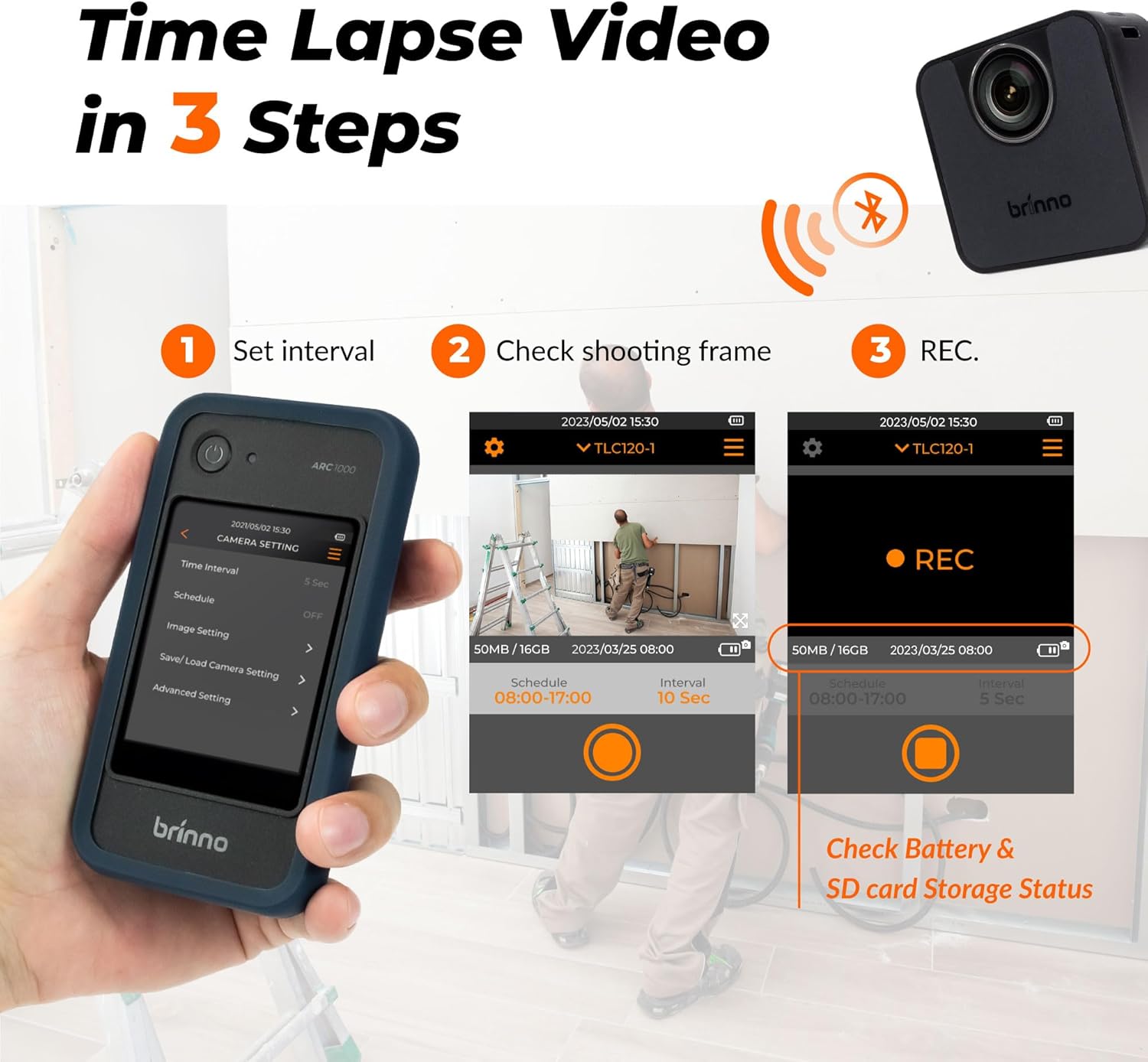
Image 3.1: The three-step process for time-lapse video creation: 1. Set interval on the controller, 2. Check shooting frame via live preview, 3. Initiate recording (REC). The controller also displays battery and SD card storage status.
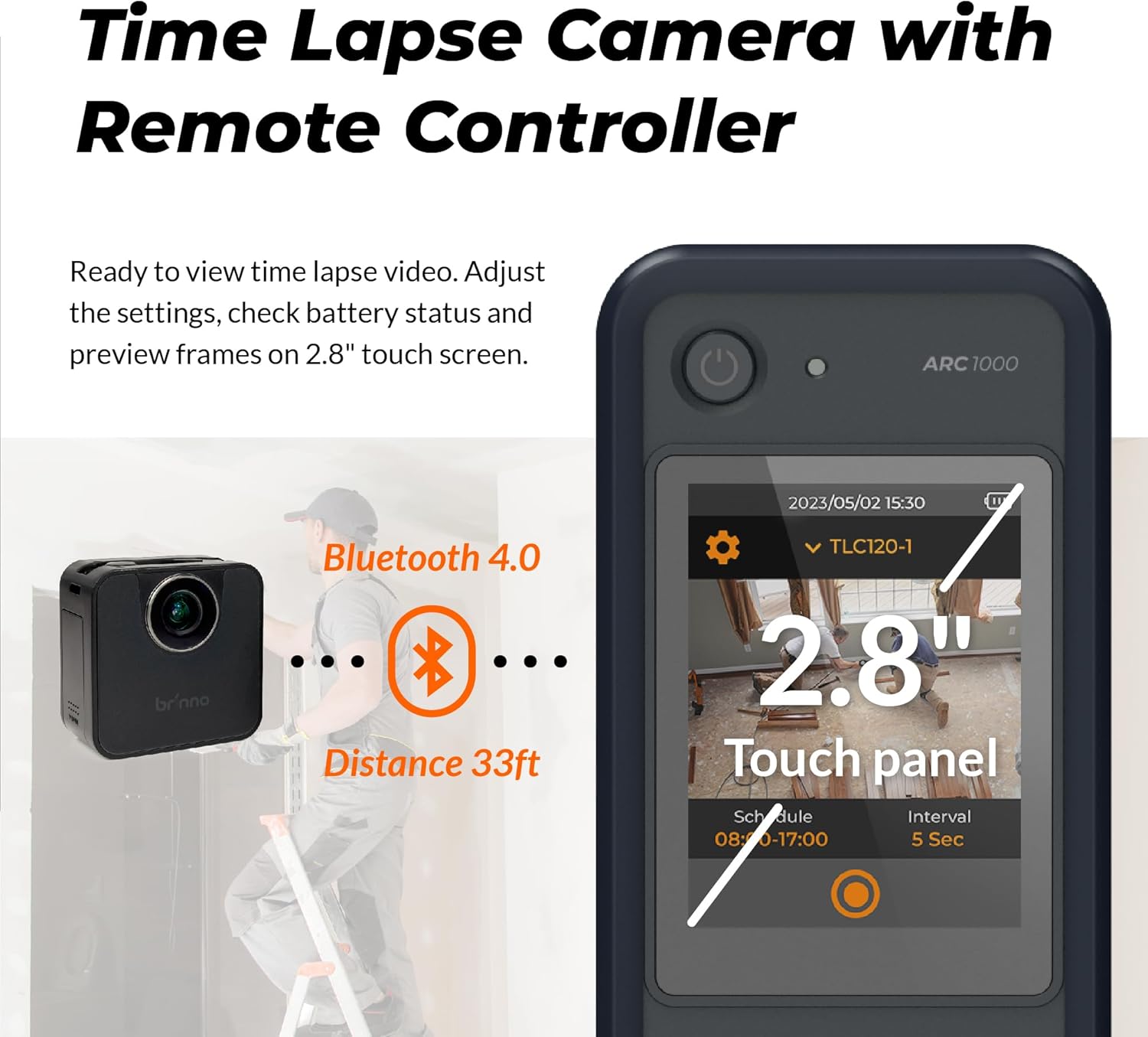
Image 3.2: Illustration of the Bluetooth 4.0 connection between the camera and controller, indicating a maximum effective distance of 33 feet.
4. คู่มือการใช้งาน
4.1. การบันทึกขั้นพื้นฐาน
Once the camera and controller are connected, use the 2.8-inch touch panel on the controller to navigate the menu and initiate recording. The controller provides a live preview of the camera's field of view, allowing for precise framing.

Image 4.1: A user managing the Brinno camera with the BLE Remote Controller, highlighting the intuitive 2.8-inch touch panel for adjusting settings and previewing frames.
4.2. Setting Time-Lapse Intervals
From the controller's menu, select the desired time interval between captured frames. Options typically range from seconds to hours, depending on the total duration of your project and desired playback speed.
4.3. HDR Imaging
The camera features High Dynamic Range (HDR) technology, which enhances image quality in challenging lighting conditions, such as low light or high contrast environments. This ensures clear and detailed footage throughout the recording period.

Image 4.2: A sequence of images captured over time, demonstrating the camera's ability to maintain premium image quality in low light conditions using HDR technology, capturing the full dynamic range of scenes.

Image 4.3: A visual representation of the camera's imaging technologies at work in a construction environment, emphasizing its capability to handle low light and high contrast scenarios for visually striking time-lapse videos.
4.4. Flexible Schedule Setup
Program the camera to record only during specific hours or days using the flexible scheduling feature. This conserves battery life and storage space by capturing footage only when relevant.
4.5. Multilingual Interface
The user interface of the remote controller supports 8 languages: English, German, Italian, Spanish, French, Japanese, Traditional Chinese, and Simplified Chinese. You can select your preferred language from the settings menu.

Image 4.4: The Brinno controller screen showing the language selection menu, illustrating the availability of 8 different languages for the user interface.
4.6. Viewing Recorded Footage
ถึง view the recorded time-lapse videos, remove the SD card from the camera and insert it into a computer or compatible device. The videos are saved in MP4 format for easy playback.
5. การบำรุงรักษา
5.1. Cleaning the Camera and Controller
- Use a soft, dry cloth to wipe the exterior of the camera and controller.
- สำหรับสิ่งสกปรกฝังแน่น ให้เช็ดออกเล็กน้อยampชุบผ้าด้วยน้ำ หลีกเลี่ยงการใช้สารเคมีรุนแรงหรือวัสดุที่มีฤทธิ์กัดกร่อน
- Keep the lens clean using a lens cleaning cloth or brush.
5.2. การดูแลแบตเตอรี่
- Replace batteries when the low battery indicator appears on the controller.
- If storing the camera for an extended period, remove the batteries to prevent leakage.
5.3. การจัดเก็บ
Store the camera and controller in a cool, dry place away from direct sunlight and extreme temperatures. Use the original packaging or a protective case for storage and transport.
6. การแก้ไขปัญหาทั่วไป
- กล้องไม่เปิด: Ensure batteries are correctly inserted and fully charged. Try new batteries.
- Controller not connecting to camera: Ensure both devices are powered on and within the 33ft Bluetooth range. Restart both devices.
- คุณภาพของภาพไม่ดี: Check the lens for smudges or dirt. Ensure adequate lighting in the recording area. Verify HDR settings are appropriate for the environment.
- เกิดข้อผิดพลาดกับการ์ด SD: Ensure the SD card is properly inserted. Try formatting the SD card via the controller's settings (this will erase all data). If the issue persists, try a different compatible SD card.
- Video playback issues on computer: Ensure your computer has the necessary codecs to play MP4 files. Try a different media player.
7. ข้อมูลจำเพาะทางเทคนิค
| คุณสมบัติ | ข้อมูลจำเพาะ |
|---|---|
| หมายเลขรุ่น | BCC200BLE |
| ยี่ห้อ | บรินโน |
| น้ำหนักสินค้า | 1.52 ปอนด์ |
| ขนาดสินค้า | 11 x 7 x 3 นิ้ว |
| แบตเตอรี่ | ต้องใช้แบตเตอรี่ AA 3 ก้อน (รวมอยู่ด้วย) |
| สี | สีดำ |
| คุณสมบัติพิเศษ | Time Lapse, High Dynamic Range (HDR) |
| เทคโนโลยีโฟโต้เซนเซอร์ | อื่น |
| ความละเอียดในการจับภาพวิดีโอ | 720p |
| ความยาวโฟกัสสูงสุด | 35 มิลลิเมตร |
| รูรับแสงสูงสุด | 2 ฟ. |
| ประเภทหน่วยความจำแฟลช | SD |
| รูปแบบการจับภาพวิดีโอ | เอ็มพี 4 |
| Screen Size (Controller) | 2.8 นิ้ว |
| เทคโนโลยีการเชื่อมต่อ | บลูทูธ |

Image 7.1: A comparison table highlighting the differences between the BCC200-BLE and the older BCC200 model, detailing aspects like LCD screen size, frame preview method, camera status display, wireless connectivity, multilingual options, and power source.
8. ข้อมูลการรับประกันและการสนับสนุน
For detailed warranty information, please refer to the warranty card included with your product or visit the official Brinno website. If you encounter any issues not covered in this manual or require technical assistance, please contact Brinno customer support through their official channels.
No official product videos with 'Seller' as creator type were found in the provided data to embed in this manual.

Image 8.1: The Brinno camera shown with various compatible accessories, demonstrating its expandable versatility for different recording needs, such as outdoor housing, rechargeable power banks, and solar panels.


