การแนะนำ
The Miops Smart Digital Camera Trigger is an advanced device designed to expand the capabilities of your DSLR or mirrorless camera. It offers various triggering modes, including lightning, sound, laser, and timelapse, allowing photographers to capture unique moments with precision. This manual provides detailed instructions for setup, operation, and maintenance to ensure optimal performance of your Miops device.
ข้อมูลด้านความปลอดภัย
- อย่าให้เครื่องโดนน้ำหรือความชื้นมากเกินไป
- หลีกเลี่ยงอุณหภูมิที่สูงหรือต่ำเกินไป
- อย่าพยายามถอดประกอบหรือซ่อมแซมอุปกรณ์ด้วยตนเอง โปรดติดต่อช่างผู้ชำนาญการ
- เก็บให้พ้นจากมือเด็ก
- ใช้เฉพาะสายชาร์จและแหล่งจ่ายไฟที่ระบุไว้เท่านั้น
เนื้อหาแพ็คเกจ
ตรวจสอบว่ามีรายการทั้งหมดอยู่ในแพ็คเกจ:
- Miops Smart Digital Camera Trigger device
- สายชาร์จ USB
- Camera connection cable (specific to your camera model, may be sold separately)
- คู่มือเริ่มต้นอย่างรวดเร็ว

รูปที่ 1: Miops Smart Digital Camera Trigger product box, showing the device and key features.
สินค้าเกินview
The Miops Smart Trigger features a compact design with an LCD screen and intuitive controls. It connects wirelessly to your smartphone via Bluetooth for advanced control and mode selection.

รูปที่ 2: The Miops Smart Digital Camera Trigger device shown alongside a DSLR camera, illustrating its compact size and purpose.
การตั้งค่า
1. การชาร์จอุปกรณ์
Before first use, fully charge your Miops device using the provided USB cable. Connect the cable to the device's charging port and a standard USB power adapter (not included) or a computer USB port. The charging indicator will show the charging status.
2. Connecting to Your Camera
Connect the Miops device to your camera's remote port using the appropriate camera connection cable. Ensure the cable is securely plugged into both the Miops unit and your camera.
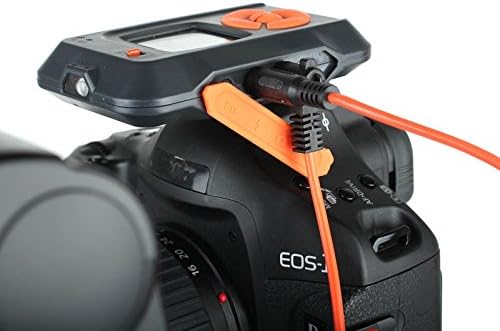
รูปที่ 3: The Miops device connected to a camera's remote port using a dedicated cable, ready for operation.
3. การติดตั้งและการจับคู่แอป
- Download the Miops app from your smartphone's app store (iOS or Android).
- Turn on the Miops device.
- เปิดใช้งานบลูทูธบนสมาร์ทโฟนของคุณ
- Open the Miops app and follow the on-screen instructions to pair with your device. The app will search for available Miops devices.
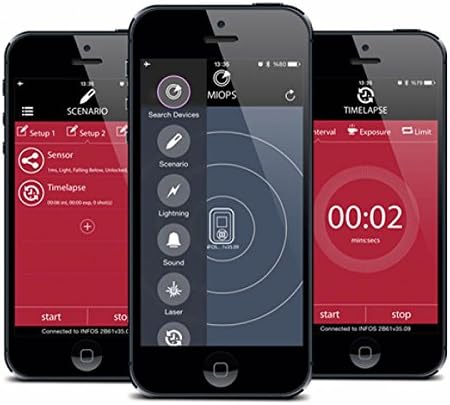
รูปที่ 4: Screenshots of the Miops smartphone application interface, demonstrating its intuitive design for controlling the trigger.
โหมดการทำงาน
The Miops Smart Trigger offers various modes for different photographic scenarios, controllable via the mobile app.
โหมดสายฟ้า
This mode is designed to capture lightning strikes. The device detects sudden changes in light and triggers the camera instantly. Adjust sensitivity settings in the app for optimal performance.

รูปที่ 5: อดีตample photograph captured using the Miops Smart Trigger's lightning mode, showing multiple lightning bolts over a city.
โหมดเสียง
The sound mode triggers the camera when a sound above a set threshold is detected. Ideal for capturing breaking objects, balloons popping, or other sound-activated events.
โหมดเลเซอร์
Utilizes a laser beam to detect movement. When the laser beam is broken, the camera is triggered. Useful for wildlife photography or capturing fast-moving subjects.
Timelapse Mode
Allows you to set intervals and exposure times for creating stunning timelapse sequences. Configure the number of shots, interval, and exposure duration directly from the app.

รูปที่ 6: The Miops device mounted on a camera, demonstrating its use in capturing high-speed events, such as shattering glass.

รูปที่ 7: A high-speed photograph illustrating the Miops trigger's capability to capture precise moments, such as an egg breaking upon impact.
การซ่อมบำรุง
- การทำความสะอาด: ใช้ผ้านุ่มและแห้งเช็ดทำความสะอาดอุปกรณ์ ห้ามใช้น้ำยาทำความสะอาดหรือตัวทำละลาย
- พื้นที่จัดเก็บ: เก็บอุปกรณ์ไว้ในที่แห้งและเย็น หลีกเลี่ยงแสงแดดโดยตรงและอุณหภูมิที่สูงหรือต่ำเกินไป
- แบตเตอรี่: For long-term storage, ensure the battery is partially charged (around 50%) to preserve its lifespan.
การแก้ไขปัญหา
| ปัญหา | สาเหตุที่เป็นไปได้ | สารละลาย |
|---|---|---|
| อุปกรณ์ไม่เปิด | แบตเตอรี่อ่อน | ชาร์จอุปกรณ์ให้เต็ม |
| ไม่สามารถจับคู่กับสมาร์ทโฟนได้ | Bluetooth is off; device not in pairing mode; interference. | Ensure Bluetooth is on; restart both devices; try pairing in a different location. |
| กล้องไม่ทำงาน | Incorrect cable connection; camera settings; trigger sensitivity. | Check cable connection; ensure camera is in remote trigger mode; adjust sensitivity in the app. |
ข้อมูลจำเพาะ
| คุณสมบัติ | รายละเอียด |
|---|---|
| ยี่ห้อ | Miops |
| ชื่อรุ่น | Miops |
| เทคโนโลยีการเชื่อมต่อ | บลูทูธ |
| อุปกรณ์ที่รองรับ | กล้อง |
| คุณสมบัติพิเศษ | Digital display, Rechargeable |
| ช่วงสูงสุด | 10 เมตร |
| ประเภทแบตเตอรี่ | ต้องใช้แบตเตอรี่ลิเธียมไอออน 1 ก้อน |
การรับประกันและการสนับสนุน
For warranty information and technical support, please refer to the official Miops webหรือติดต่อฝ่ายบริการลูกค้า เก็บหลักฐานการซื้อไว้เพื่อใช้ในการเคลมประกัน
ผู้ผลิต: Miops
