1. บทนำ
This manual provides essential instructions for the proper installation, use, and maintenance of your Brother PC201 Thermal Transfer Fax Print Cartridge. Adhering to these guidelines will ensure optimal performance and longevity of the product within compatible Brother Intellifax machines.
2. สินค้าหมดview
The Brother PC201 is a thermal transfer print cartridge designed specifically for Brother plain paper fax machines. It delivers black ink for clear and reliable document printing.

Figure 2.1: Brother PC201 Fax Print Cartridge and Retail Packaging.
This image displays the Brother PC201 thermal transfer print cartridge alongside its retail packaging. The packaging indicates compatibility with various Brother Intellifax models and highlights the PC-201 model number. The cartridge itself is shown with the thermal transfer film visible.
3. ความเข้ากันได้
The Brother PC201 Fax Print Cartridge is compatible with the following Brother Intellifax and MFC models:
- แฟกซ์ -1010
- แฟกซ์ -1020
- แฟกซ์ -1030e
- แฟกซ์ -1170
- แฟกซ์ -1270
- FAX-1570MC
- เอ็มเอฟซี-1770
- เอ็มเอฟซี-1780
- MFC-1970MC
Always verify your fax machine's model number before purchasing and installing a replacement cartridge.
4. การตั้งค่าและการติดตั้ง
Follow these steps to correctly install the Brother PC201 Fax Print Cartridge into your compatible Brother Intellifax machine.
- หมดแรง: Ensure your fax machine is turned off and unplugged from the power outlet before beginning the installation process.
- เปิดฝาครอบ: Open the front cover or access panel of your Brother Intellifax machine to expose the cartridge compartment. Refer to your fax machine's specific user manual for exact instructions on opening the cover.
- ถอดตลับหมึกเก่าออก (ถ้ามี): If replacing an existing cartridge, carefully remove the used PC201 cartridge by lifting it out. Dispose of the old cartridge responsibly according to local regulations.
- แกะกล่องตลับหมึกใหม่: Remove the new Brother PC201 cartridge from its retail packaging. Avoid touching the thermal transfer film directly.
- ใส่ตลับหมึกใหม่: Align the new PC201 cartridge with the guides inside the fax machine's compartment. Gently push the cartridge down until it clicks securely into place. Ensure it is seated firmly.
- ปิดฝาครอบ: Close the front cover or access panel of your fax machine.
- เปิดเครื่อง: Plug the fax machine back into the power outlet and turn it on. The machine may perform a brief initialization cycle.
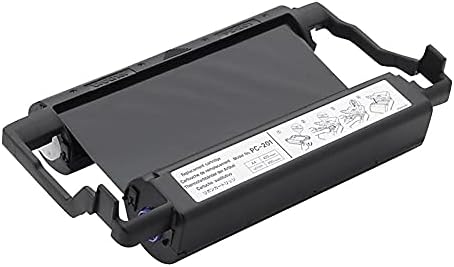
Figure 4.1: Brother PC201 Cartridge with Installation Diagrams.
ภาพนี้ให้ภาพที่ใกล้ชิดยิ่งขึ้น view of the Brother PC201 cartridge, highlighting small diagrams printed on its label. These diagrams typically illustrate the correct orientation and steps for inserting the cartridge into the fax machine, such as aligning and pressing down until it locks.
5. คู่มือการใช้งาน
Once the PC201 cartridge is installed, your Brother Intellifax machine is ready for operation. The cartridge functions automatically during fax transmission and copying. No specific user interaction with the cartridge itself is required during normal operation.
- แฟกซ์: Load documents into your fax machine's document feeder and initiate a fax transmission as per your machine's user manual.
- คัดลอก: Place documents on the scanner glass or in the document feeder and select the copy function on your machine.
The cartridge has a page yield of approximately 450 pages. Replace the cartridge when print quality deteriorates or when your fax machine indicates a low or empty cartridge status.
6. การบำรุงรักษา
Proper maintenance ensures consistent performance of your PC201 cartridge and fax machine.
- พื้นที่จัดเก็บ: Store unused cartridges in their original sealed packaging in a cool, dry place, away from direct sunlight and extreme temperatures.
- การจัดการ: Avoid touching the thermal transfer film or any electrical contacts on the cartridge to prevent damage or print quality issues.
- การทำความสะอาด: Do not attempt to clean the cartridge itself. If print quality issues arise, consult your fax machine's manual for instructions on cleaning the print head or other internal components.
- การกำจัด: Dispose of used cartridges responsibly. Many retailers and manufacturers offer recycling programs for printer consumables.
7 การแก้ไขปัญหา
If you encounter issues after installing the PC201 cartridge, consider the following common solutions:
- Poor Print Quality (Faint/Streaky Prints):
- Ensure the cartridge is installed correctly and seated firmly.
- Check if the cartridge is nearing its end of life. Replace if necessary.
- Refer to your fax machine's manual for instructions on cleaning the print head or thermal elements.
- "Cartridge Error" or "No Cartridge" Message:
- Remove and re-install the cartridge, ensuring it clicks into place.
- Verify that you are using the correct PC201 cartridge for your specific Brother Intellifax model.
- Inspect the cartridge for any visible damage.
- กระดาษติด:
- While not directly related to the cartridge, ensure the paper is loaded correctly and that there are no obstructions in the paper path.
- Refer to your fax machine's manual for paper jam clearing procedures.
If problems persist, consult your Brother Intellifax machine's comprehensive user manual or contact Brother customer support.
8. ข้อมูลจำเพาะ
| คุณสมบัติ | รายละเอียด |
|---|---|
| ประเภทสินค้า | Thermal Transfer Print Cartridge |
| หมายเลขรุ่น | พีซี201 |
| สี | สีดำ |
| ผลผลิตหน้า | ประมาณ 450 หน้า |
| ประเภทอุปกรณ์ | Fax Machines (Brother Intellifax series) |
| ขนาดสินค้า | 12.5 x 7.7 x 3.3 นิ้ว (31.75 x 19.56 x 8.38 ซม.) |
| น้ำหนักสินค้า | 2.71 ปอนด์ (1.23 กก.) |
9. การรับประกันและการสนับสนุน
For specific warranty information regarding your Brother PC201 Fax Print Cartridge, please refer to the documentation included with your purchase or visit the official Brother website. Brother provides customer support for their products.
ฝ่ายบริการลูกค้าของ Brother: For technical assistance, troubleshooting, or warranty claims, please contact Brother customer support directly. Contact details can typically be found on the Brother official website or in your fax machine's user manual.


