การแนะนำ
Thank you for choosing the Casio Collection SGW-450H watch. This timepiece combines analog and digital displays with advanced sensor technology, including an altimeter, barometer, and thermometer, making it ideal for outdoor activities and daily wear. To ensure proper operation and longevity, please read this manual carefully before using your watch.
This manual provides detailed instructions on setting up your watch, understanding its various modes and functions, performing routine maintenance, and troubleshooting common issues.
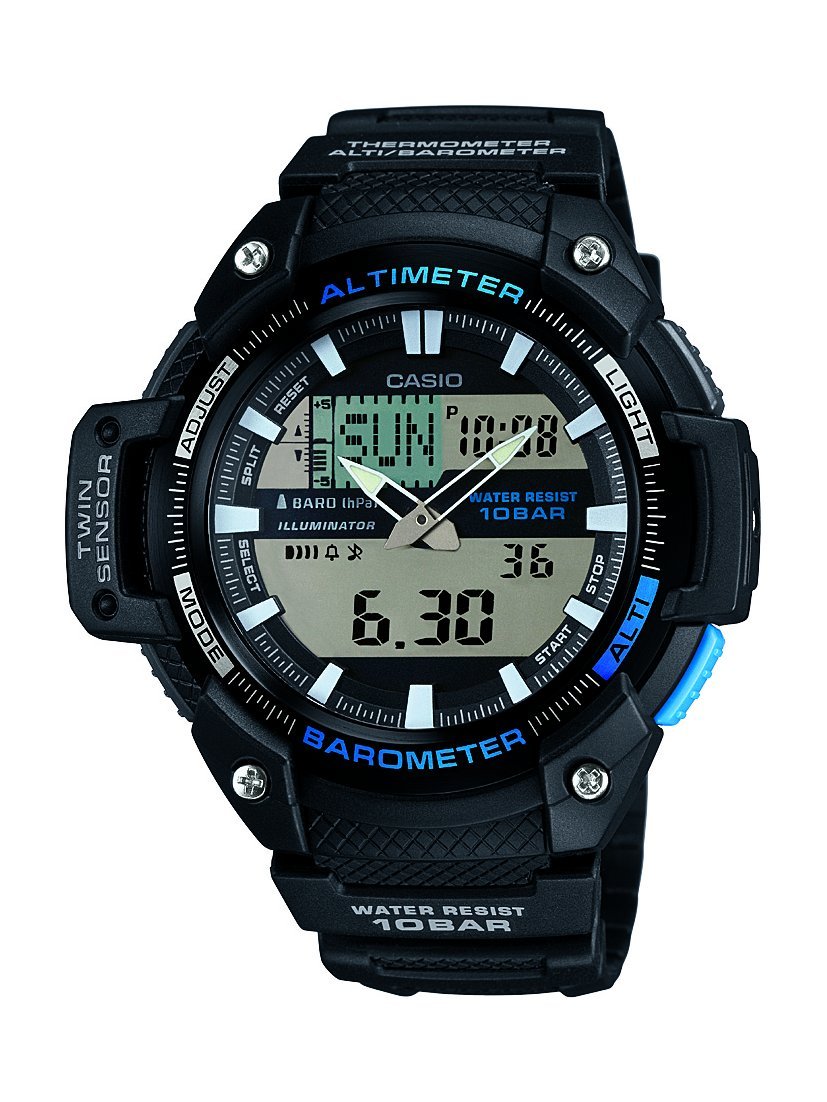
ด้านหน้า view of the Casio Collection SGW-450H watch, highlighting its dual display and sensor indicators.
การตั้งค่า
1. การตั้งเวลาเริ่มต้น
Upon first use or after a battery change, you will need to set both the analog and digital times. Refer to the watch's specific button layout for 'ADJUST' and 'MODE' buttons.
- เวลาดิจิทัล: In Timekeeping Mode, press and hold the 'ADJUST' button until the city code starts flashing. Use the 'MODE' and 'SEARCH' buttons to navigate and adjust settings like city code, DST (Daylight Saving Time), 12/24-hour format, hour, minute, year, month, and day. Press 'ADJUST' again to exit.
- เวลาแบบอนาล็อก: If the analog hands do not match the digital time, enter the Hand Setting Mode (usually by holding 'ADJUST' in Timekeeping Mode and then pressing 'MODE' multiple times until 'H.SET' appears). Use the 'SEARCH' button to advance the analog hands. Press 'ADJUST' to synchronize.
2. การสอบเทียบเซ็นเซอร์
The altimeter, barometer, and thermometer require calibration for accurate readings. Perform calibration in a stable environment or against known values.
- เครื่องวัดระยะสูง: In Altimeter Mode, press and hold 'ADJUST' until the current altitude value flashes. Use 'SEARCH' to adjust the altitude to a known reference point.
- บารอมิเตอร์: In Barometer Mode, press and hold 'ADJUST' until the current barometric pressure value flashes. Adjust to a known local pressure reading.
- เครื่องวัดอุณหภูมิ: The thermometer is integrated. For accurate temperature readings, remove the watch from your wrist for at least 20-30 minutes to avoid body heat interference.
3. Battery Installation/Reset
If the watch hands are stuck or not moving, a battery reset may be required. This involves temporarily removing and reinserting the battery.
- Carefully remove the four screws from the back cover of the watch.
- Gently lift out the battery.
- Replace the battery back into its position.
- Re-attach the back cover and screws, ensuring a secure fit to maintain water resistance.
- Set the analog hands as per the manual's instructions (Step 1. above).
การใช้งานนาฬิกา
The SGW-450H features multiple modes accessible via the 'MODE' button. Press 'MODE' to cycle through the following functions:
- โหมดบอกเวลาปกติ: แสดงเวลาปัจจุบัน วัน และวันที่
- โหมดอัลติมิเตอร์: Measures and displays current altitude. The watch can store altitude data for tracking.
- โหมดบารอมิเตอร์: Displays barometric pressure and a pressure tendency graph, which can indicate upcoming weather changes.
- โหมดเทอร์โมมิเตอร์: แสดงอุณหภูมิปัจจุบัน
- โหมดนาฬิกาจับเวลา: วัดเวลาที่ใช้ทั้งหมด เวลาแบ่งช่วง และเวลาเข้าเส้นชัยสองครั้ง
- โหมดปลุก: ตั้งปลุกทุกวัน
- โหมดเวลาโลก: แสดงเวลาปัจจุบันในเมืองต่างๆ ทั่วโลก
การใช้แสง
Press the 'LIGHT' button (usually located on the upper right side) to illuminate the digital display for visibility in low-light conditions.
ความต้านทานต่อน้ำ
This watch is water-resistant up to 100 meters (10 BAR). It is suitable for swimming and snorkeling but not for scuba diving. Do not operate buttons while the watch is wet or submerged to prevent water ingress.
การซ่อมบำรุง
การทำความสะอาด
Regularly clean your watch with a soft, dry cloth. For resin bands and cases, a mild soap solution and a soft brush can be used, followed by thorough rinsing with fresh water and drying. Avoid harsh chemicals or abrasive cleaners.
การเปลี่ยนแบตเตอรี่
The watch is powered by a battery. When the display becomes dim or functions become erratic, it may be time for a battery replacement. It is recommended to have the battery replaced by a qualified watch technician to ensure proper sealing and maintain water resistance.
พื้นที่จัดเก็บ
When not in use for extended periods, store the watch in a cool, dry place away from direct sunlight and extreme temperatures. Avoid exposing the watch to strong magnetic fields.
การแก้ไขปัญหา
- Digital Display Difficult to Read: In some lighting conditions, the negative LCD display may be less visible. Adjust the viewing angle or use the built-in light.
- การอ่านค่าเซ็นเซอร์ที่ไม่แม่นยำ: Ensure sensors are calibrated regularly, especially the altimeter and barometer, against known reference points. Temperature readings are affected by body heat; remove the watch for 20-30 minutes for accurate ambient temperature.
- Analog Hands Not Moving or Incorrect: Perform the battery reset procedure as described in the Setup section (remove and reinsert battery), then manually set the analog hands.
- Watch Not Functioning: Check if the battery needs replacement. If issues persist after battery replacement and reset, contact Casio customer support.
ข้อมูลจำเพาะ
| คุณสมบัติ | ข้อมูลจำเพาะ |
|---|---|
| ยี่ห้อ | คาสิโอ |
| หมายเลขรุ่น | SGW-450H-1AER |
| หมายเลขรุ่นสินค้า | SGW-450H-1AER |
| ประเภทจอภาพ | อะนาล็อกเป็นดิจิตอล |
| ประเภทการเคลื่อนไหวของนาฬิกา | ควอตซ์ |
| แหล่งพลังงาน | ใช้พลังงานจากแบตเตอรี่ |
| ความลึกของการต้านทานน้ำ | 100 เมตร (10 บาร์) |
| ประเภทกีฬา | วิ่ง |
| ประเภทตัวล็อค | หัวเข็มขัด |
| สไตล์ | สปอร์ตตี้ |
| รูปร่างรายการ | กลม |
| สีแถบ | สีดำ |
| สีหน้าปัด | จอแอลซีดี |
| ช่วงอายุ คำอธิบาย | ผู้ใหญ่ |
| ชื่อรุ่น | กีฬา |
| รหัสสินค้าสากล (EAN/UPC) | 04971850036418 |
| ประเภทวัสดุของสาย | เรซิน |
| ประเภทวัสดุตัวเรือน | พลาสติก |
| ประเภทวัสดุหน้าปัดหน้าต่าง | แร่ธาตุ |
| เส้นผ่านศูนย์กลางตัวเรือน | 52 มิลลิเมตร |
| ความกว้างของแถบ | 18 มิลลิเมตร |
| ความหนาของเคส | 15 มิลลิเมตร |
| ขนาดสินค้า (กว้าง x ยาว x สูง) | ขนาด 5.18 x 1.5 x 5.08 ซม. ; 45 กรัม |
การรับประกันและการสนับสนุน
นาฬิกา Casio ของคุณได้รับการคุ้มครองโดยการรับประกันจากผู้ผลิตสำหรับข้อบกพร่องในด้านวัสดุและฝีมือการผลิต โปรดดูรายละเอียดเงื่อนไขและข้อกำหนดเฉพาะ รวมถึงระยะเวลาการรับประกันและรายละเอียดความคุ้มครองในบัตรรับประกันที่แนบมากับการซื้อของคุณ
For technical assistance, repairs, or further inquiries, please contact Casio customer support. You can find contact information on the official Casio webดูรายละเอียดเพิ่มเติมได้ที่เว็บไซต์ หรือผ่านตัวแทนจำหน่าย Casio ที่ได้รับอนุญาตในพื้นที่ของคุณ

The Casio product box, typically containing the watch, warranty information, and a more detailed manual.


