การแนะนำ
The Coby CVR-22 Portable Cassette Recorder is designed for simple and convenient audio recording and playback. Featuring one-touch recording, a built-in microphone, and a retractable handle, this device offers excellent portability for capturing audio wherever you go. Rediscover your classic tape collection or record new content with ease.
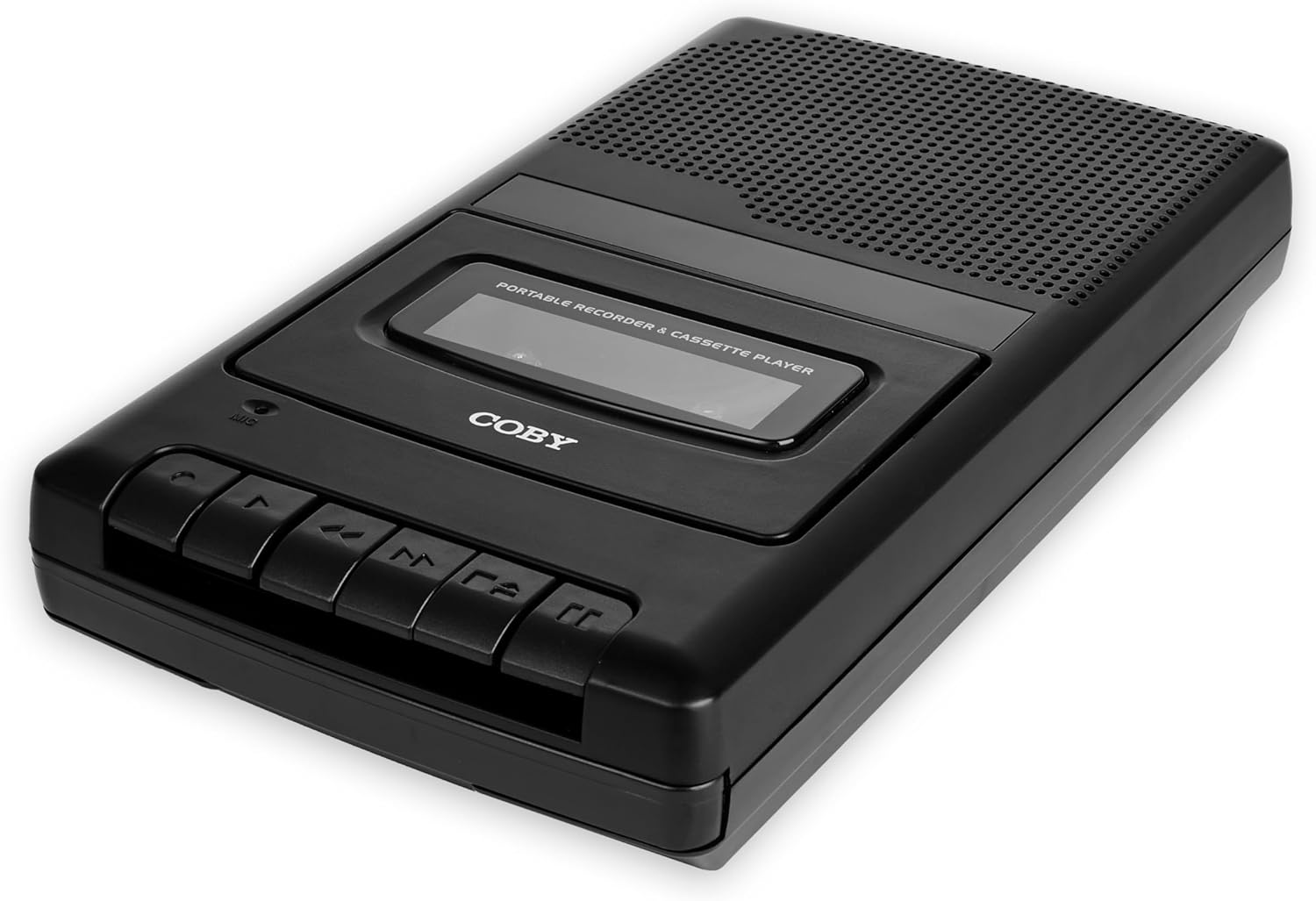
Image: The Coby CVR-22 Portable Cassette Recorder, showcasinด้วยดีไซน์ที่กะทัดรัดและปุ่มควบคุม
การตั้งค่า
การจ่ายไฟให้กับอุปกรณ์
The CVR-22 operates on two (2) AA batteries. Ensure batteries are inserted correctly according to polarity markings inside the battery compartment.
- หาช่องใส่แบตเตอรี่ที่ด้านล่างหรือด้านหลังของตัวเครื่อง
- เปิดฝาช่องใส่แบตเตอรี่
- Insert two AA batteries, matching the positive (+) and negative (-) terminals as indicated.
- ปิดฝาช่องใส่แบตเตอรี่ให้แน่น

Image: The Coby CVR-22 showing a cassette being inserted and indicating its 2x AA battery power requirement.
คำแนะนำการใช้งาน
Inserting a Cassette Tape
- กดปุ่ม หยุด/นำออก ปุ่มสำหรับเปิดประตูช่องใส่ตลับเทป
- Insert a standard audio cassette tape with the open edge facing upwards and the tape side facing the unit.
- ปิดประตูช่องใส่ตลับเทปอย่างเบามือจนกระทั่งปิดเข้าที่
การเล่นซ้ำ
- ตรวจสอบให้แน่ใจว่าใส่เทปคาสเซ็ตอย่างถูกต้อง
- กดปุ่ม เล่น ปุ่ม เทปจะเริ่มเล่น
- Adjust the volume using the volume control dial, typically located on the side of the unit.
- หากต้องการหยุดเล่นให้กดปุ่ม หยุด/นำออก ปุ่ม.
- หากต้องการกรอไปข้างหน้า ให้กด FF (กรอไปข้างหน้า) ปุ่ม.
- ในการกรอกลับ ให้กด REW (กรอกลับ) ปุ่ม.

Image: A user holding the Coby CVR-22, illustrating the joy of rediscovering a classic tape collection.
การบันทึก
The CVR-22 features one-touch recording and a built-in microphone for convenient audio capture.
- Ensure a blank or recordable cassette tape is inserted.
- กดปุ่ม บันทึก button (usually red). The เล่น ปุ่มดังกล่าวจะทำงานพร้อมกันด้วย
- The built-in microphone will begin recording audio. Position the recorder appropriately for optimal sound capture.
- หากต้องการหยุดบันทึก ให้กด หยุด/นำออก ปุ่ม.

Image: The Coby CVR-22 being used in a classroom setting, highlighting its utility for recording classes and lectures.

Image: The Coby CVR-22 positioned on a meeting table, demonstrating its suitability for recording meetings with its one-touch record button.
การเชื่อมต่อภายนอก
The CVR-22 includes a 3.5mm headphone jack for private listening and potentially an external microphone input (check your specific unit for microphone input if needed, as the built-in mic is standard).
- แจ็คหูฟัง: Connect standard 3.5mm headphones for personal audio playback.
- External Microphone Input (if available): For higher quality recordings or specific recording scenarios, an external microphone can be connected to the designated input jack.

Image: The Coby CVR-22 connected to an external microphone setup, illustrating its built-in audio input/output ports for versatile use.
การซ่อมบำรุง
การทำความสะอาดตัวเครื่อง
- เช็ดภายนอกตัวเครื่องด้วยผ้าแห้งและนุ่ม
- ห้ามใช้สารทำความสะอาดที่มีฤทธิ์กัดกร่อนหรือตัวทำละลาย เพราะอาจทำให้พื้นผิวเสียหายได้
- Periodically clean the tape head and pinch roller using a specialized cassette head cleaner or a cotton swab lightly dampened with isopropyl alcohol. This helps maintain optimal sound quality.
การดูแลแบตเตอรี่
- ถอดแบตเตอรี่ออกหากจะไม่ได้ใช้งานเครื่องเป็นเวลานานเพื่อป้องกันการรั่วไหล
- ทิ้งแบตเตอรี่ที่ใช้แล้วอย่างรับผิดชอบตามข้อบังคับท้องถิ่น
การแก้ไขปัญหา
| ปัญหา | สาเหตุที่เป็นไปได้ | สารละลาย |
|---|---|---|
| เครื่องไม่เปิด | แบตเตอรี่หมดหรือใส่ไม่ถูกต้อง | เปลี่ยนแบตเตอรี่ใหม่โดยตรวจสอบให้แน่ใจว่าใส่ขั้วถูกต้อง |
| ไม่มีเสียงในระหว่างการเล่น | Volume too low; headphones not connected properly; tape head dirty. | Increase volume; ensure headphones are fully inserted; clean tape head. |
| Recording is distorted or unclear. | Microphone too far from sound source; tape head dirty; faulty tape. | Move closer to sound source; clean tape head; try a different tape. |
| เทปไม่เคลื่อนที่หรือติดขัด | Tape is tangled or damaged; unit mechanism issue. | Carefully remove and inspect tape; try a different tape. If issue persists, contact support. |
ข้อมูลจำเพาะ
| คุณสมบัติ | รายละเอียด |
|---|---|
| ยี่ห้อ | โคบี้ |
| หมายเลขรุ่น | ซีวีอาร์-22 |
| สี | สีดำ |
| แหล่งพลังงาน | 2 x AA Batteries (Not rechargeable) |
| สื่อบันทึก | เทปคาสเซ็ท |
| คุณสมบัติการบันทึก | One-Touch Recording, Built-in Microphone, Auto-Stop |
| คุณสมบัติการเล่น | หยุดรถ |
| เอาท์พุตเสียง | ลำโพงในตัว, ช่องเสียบหูฟัง 3.5 มม. |
| ขนาด (D x W x H) | 14.8 ซม. x 25.9 ซม. x 5 ซม. (โดยประมาณ) |
| รับมือ | สามารถยืดหดได้ |
การรับประกันและการสนับสนุน
Specific warranty information for the Coby CVR-22 Portable Cassette Recorder is not available in this manual. Please refer to the product packaging or the manufacturer's official webเว็บไซต์สำหรับข้อกำหนดและเงื่อนไขการรับประกันโดยละเอียด
For technical support or service inquiries, please contact Coby customer service through their official channels. Keep your purchase receipt as proof of purchase.
Manufacturer: Summit Electronics, US


