1. สินค้าหมดview
This manual provides instructions for the Keyless2Go Replacement Keyless Entry Remote Car Key, designed to replace lost or broken remote car keys for compatible vehicles. Each replacement unit is pre-tested to ensure quality and functionality, and comes complete with batteries.

รูปที่ 1.1: ด้านหน้า view of the Keyless2Go 6-button remote car key, showing the key blade and button layout including lock, unlock, panic, and two remote start/trunk buttons.

รูปที่ 1.2: มุม view of the Keyless2Go remote car key, highlighting its ergonomic design and the integrated key blade.
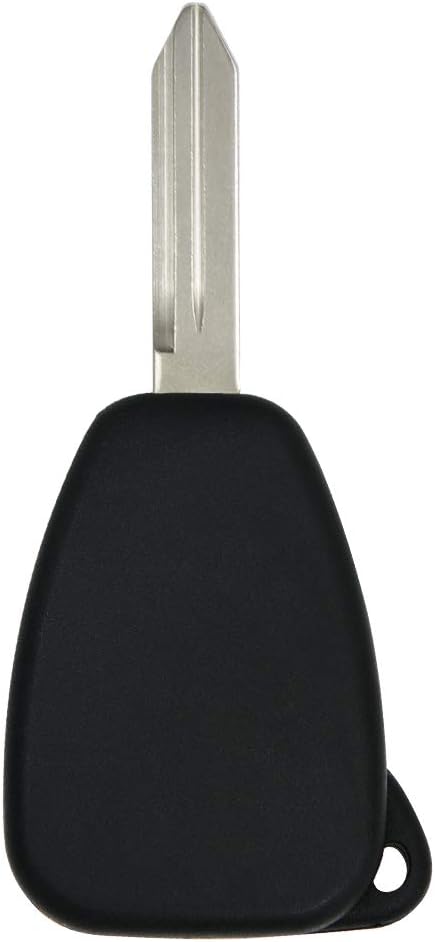
รูปที่ 1.3: กลับ view of the Keyless2Go remote car key, showing its smooth, black plastic casing.
2. คุณสมบัติของผลิตภัณฑ์
- ทดแทนโดยตรง: Designed to replace lost or broken remote car keys for compatible vehicles.
- Home Programming Capability: If you possess two working original keys, you can program this remote key from home using the provided instructions.
- ความเข้ากันได้ในวงกว้าง: Compatible with a wide range of Chrysler, Dodge, and Jeep vehicles that utilize the 6-button M3N5WY72XX key fob.
- FCC ID Match: Functions as a replacement for remote keys with FCC ID: M3N5WY72XX.
- Pre-Tested Quality: Each replacement unit is pre-tested for functionality and includes pre-installed batteries.

รูปที่ 2.1: Visual confirmation of the FCC ID (M3N5WY72XX) and Part Number (05183683AA) for the Keyless2Go replacement remote, crucial for verifying compatibility.
3. การตั้งค่าและการเขียนโปรแกรม
3.1 Key Blade Cutting
The key blade of your new Keyless2Go remote will require cutting to match your vehicle's ignition. This service must be performed by a qualified locksmith or an authorized dealer. It is not a process that can be completed at home.
3.2 Remote Programming
หมายเหตุสำคัญ: Self-programming is possible only if you currently possess two working original keys that can start your vehicle's engine. If you do not have two working original keys, or if you have no keys at all, you will need to seek assistance from an automotive locksmith or dealer for both key cutting and programming.
- First, ensure your new key blade has been cut by a professional locksmith to match your vehicle.
- Once the key blade is cut, you can proceed with programming the remote functions at home. Detailed instructions for your specific vehicle model are typically provided with the product or can be found online.
- Follow the step-by-step instructions carefully. This process usually involves a sequence of turning the ignition on and off, pressing buttons on the existing and new remotes, and listening for confirmation signals from the vehicle.

รูปที่ 3.1: Visual guide illustrating the process of key blade cutting by a professional and the conditions for self-programming the remote functions.
3.3 วิดีโอผลิตภัณฑ์อย่างเป็นทางการ
3.1 วิดีโอ: An official video from Keyless2Go demonstrating the features and benefits of their replacement key fobs, including the ease of obtaining and using them. This video highlights the convenience of Keyless2Go products as an alternative to dealership replacements.
4. คู่มือการใช้งาน
Once your Keyless2Go remote car key is successfully cut and programmed, it will function identically to your original factory remote. The 6-button layout provides comprehensive control over your vehicle's keyless entry and other features.
- ปุ่มล็อค (🔒): กดหนึ่งครั้งเพื่อล็อกประตูรถทุกบาน
- ปุ่มปลดล็อก (🔓): กดหนึ่งครั้งเพื่อปลดล็อกประตูคนขับ กดสองครั้งเพื่อปลดล็อกประตูทุกบาน
- ปุ่มฉุกเฉิน (ตื่นตกใจ): กดค้างไว้เพื่อเปิดใช้งานระบบเตือนภัยของรถยนต์ กดอีกครั้งเพื่อปิดใช้งาน
- Remote Start/Trunk Release Buttons (🚗 x2): These buttons typically control remote engine start or trunk/hatch release, depending on your vehicle's specific features and configuration. Refer to your vehicle's owner's manual for exact functionality.
Ensure you are within range of your vehicle for the remote functions to operate correctly. Obstructions or interference may affect signal strength.
5. การบำรุงรักษา
5.1 การเปลี่ยนแบตเตอรี่
The Keyless2Go remote comes with a pre-installed battery. When the remote's range decreases or it stops responding, the battery may need replacement. The specific battery type (e.g., CR2032) is usually indicated inside the remote casing.
- เปิดรีโมทอย่างระมัดระวังasing. This may require a small flat-head screwdriver or a prying tool.
- Note the orientation of the old battery before removing it.
- ใส่แบตเตอรี่ใหม่ โดยตรวจสอบให้แน่ใจว่าขั้วถูกต้อง
- ดีดรีโมทasinกลับเข้าด้วยกันอย่างแน่นหนา
ทิ้งแบตเตอรี่เก่าด้วยความรับผิดชอบตามข้อบังคับท้องถิ่น
6 การแก้ไขปัญหา
| ปัญหา | สาเหตุที่เป็นไปได้ | สารละลาย |
|---|---|---|
| Remote not responding after programming. | Incorrect programming steps; battery low or dead; incompatible remote. | Review programming instructions carefully and repeat the process. Replace battery. Verify FCC ID and part number match your vehicle's requirements. |
| ระยะห่างไกลไม่ดี | Low battery; signal interference; environmental factors. | Replace battery. Move away from sources of strong electromagnetic interference. Try operating in a different location. |
| ใบกุญแจไม่หมุนในช่องเสียบกุญแจ | Key blade not cut correctly or not cut at all. | Ensure the key blade was cut by a professional locksmith. If it was, contact the locksmith for re-evaluation. |
| Vehicle does not start after key blade is cut. | Transponder chip not programmed or faulty. | The transponder chip (if applicable to your vehicle) needs to be programmed to the vehicle's immobilizer system. This typically requires specialized equipment from a locksmith or dealer. |
7. ข้อมูลจำเพาะ
| คุณลักษณะ | รายละเอียด |
|---|---|
| ยี่ห้อ | คีย์เลสทูโก |
| ชื่อรุ่น | 2AOKM-CYV3 |
| หมายเลขชิ้นส่วนของผู้ผลิต | RK-CHY-M3N-6.go |
| รหัส FCC | M3N5WY72XX |
| จำนวนปุ่ม | 6 |
| สี | สีดำ |
| วัสดุ | พลาสติก |
| น้ำหนักสินค้า | 0.96 ออนซ์ (ประมาณ 0.06 ปอนด์) |
| ขนาดสินค้า | 1 x 0.5 x 3 นิ้ว |
| ประเภทบริการยานพาหนะ | Car (Chrysler, Dodge, Jeep compatible) |
| วันที่พร้อมใช้งานครั้งแรก | 20 พฤษภาคม 2015 |
8. การรับประกันและการสนับสนุน
8.1 ข้อสงวนสิทธิ์ทางกฎหมาย
All product names, brands, logos, and/or other trademarks within our sales information are the property of their respective owners. These are used to simplify the identification of the proper parts for a particular vehicle. None of the companies or trademarks affiliate with, endorse, or sponsor us or our products.
For specific warranty information or technical support regarding your Keyless2Go product, please refer to the documentation included with your purchase or visit the official Keyless2Go website. You may also contact Keyless2Go customer service directly for assistance with product functionality or compatibility questions.


