การแนะนำ
This manual provides comprehensive instructions for the installation, operation, and maintenance of your Alcatel-Lucent 4018 Extended Edition IPTouch VoIP Phone. Please read this manual carefully before using the device to ensure proper functionality and to prevent damage.
ข้อมูลด้านความปลอดภัย
โปรดปฏิบัติตามข้อควรระวังด้านความปลอดภัยต่อไปนี้ เพื่อลดความเสี่ยงจากไฟไหม้ ไฟฟ้าช็อต และการบาดเจ็บ:
- ใช้เฉพาะอะแดปเตอร์แปลงไฟที่มาพร้อมกับโทรศัพท์เท่านั้น
- อย่าให้โทรศัพท์โดนน้ำหรือความชื้น
- หลีกเลี่ยงการวางโทรศัพท์ใกล้แหล่งความร้อนหรือแสงแดดโดยตรง
- อย่าพยายามเปิดหรือซ่อมแซมโทรศัพท์ด้วยตนเอง แนะนำให้ส่งช่างผู้ชำนาญเข้ารับบริการทั้งหมด
- ตรวจสอบให้แน่ใจว่ามีการระบายอากาศที่เหมาะสมรอบๆ อุปกรณ์
เนื้อหาแพ็คเกจ
ตรวจสอบว่าแพ็คเกจของคุณมีรายการต่อไปนี้:
- Alcatel-Lucent 4018 Extended Edition IPTouch VoIP Phone
- โทรศัพท์มือถือ
- สายโทรศัพท์
- สายเคเบิลอีเทอร์เน็ต
- อะแดปเตอร์ไฟฟ้า (ถ้ามี)
- คู่มือเริ่มต้นอย่างรวดเร็ว
สินค้าเกินview
The Alcatel-Lucent 4018 Extended Edition IPTouch VoIP Phone is designed for efficient communication. Familiarize yourself with its components:
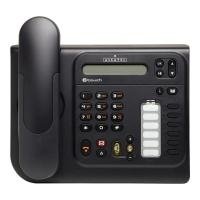
ด้านหน้า view of the Alcatel-Lucent 4018 Extended Edition IPTouch VoIP Phone, showing the display, keypad, and function buttons.
ส่วนประกอบหลัก:
- หน้าจอแสดงผล: แสดงข้อมูลการโทร เมนู และสถานะการโทร
- คีย์บริบท: Buttons below the display that change function based on the current menu.
- ปุ่มนำทาง: สำหรับการเลื่อนดูเมนูและตัวเลือก
- แป้นกดหมายเลข: แป้นตัวเลขมาตรฐานสำหรับการโทรออก
- ปุ่มฟังก์ชัน: Dedicated buttons for features like voicemail, hold, transfer, and speakerphone.
- โทรศัพท์มือถือ: สำหรับการสนทนาส่วนตัว
- สปีกเกอร์โฟน: เพื่อการสื่อสารแบบแฮนด์ฟรี
การตั้งค่า
1. การเชื่อมต่อโทรศัพท์
- Connect the handset cord to the handset and the designated port on the phone base.
- ต่อปลายด้านหนึ่งของสายอีเธอร์เน็ตเข้ากับพอร์ต LAN ด้านหลังโทรศัพท์ และต่อปลายอีกด้านหนึ่งเข้ากับสวิตช์เครือข่ายหรือเราเตอร์ของคุณ
- If Power over Ethernet (PoE) is not available, connect the power adapter to the phone's power port and then to an electrical outlet.
2. การกำหนดค่าเริ่มต้น
Upon first power-up, the phone will attempt to connect to your network and register with your VoIP server. This process may require network credentials or specific server settings, which are typically provided by your IT administrator.
- ปฏิบัติตามคำแนะนำบนหน้าจอเพื่อการตั้งค่าเริ่มต้น
- Contact your system administrator for specific IP address, subnet mask, gateway, and DNS server settings if manual configuration is required.
คำแนะนำการใช้งาน
การโทร:
- ยกหูโทรศัพท์หรือกด ลำโพง ปุ่ม.
- กดหมายเลขโทรศัพท์ที่ต้องการโดยใช้ปุ่มกด
- กดปุ่ม โทรออก contextual key or wait for the call to connect automatically.
รับสาย:
- เมื่อโทรศัพท์ดัง ให้ยกหูโทรศัพท์ขึ้นหรือกดปุ่ม ลำโพง ปุ่ม.
- อีกวิธีหนึ่งคือกด คำตอบ contextual key.
การวางสาย:
- เปลี่ยนหูฟังหรือกดปุ่ม วางสาย contextual key or ลำโพง ปุ่ม.
ข้อความเสียง:
- กดปุ่มเฉพาะ ระบบฝากข้อความเสียง button (often indicated by an envelope icon).
- Follow the audio prompts to access and manage your messages.
Hold and Transfer:
- ในระหว่างการสนทนา ให้กดปุ่ม ถือ ปุ่มพักสาย
- To transfer a call, press the โอนย้าย ปุ่มกดหมายเลขใหม่แล้วกด โอนย้าย again or hang up (consult your system's specific transfer method).
การซ่อมบำรุง
- การทำความสะอาด: ใช้ผ้าแห้งนุ่มเช็ดทำความสะอาดพื้นผิวโทรศัพท์ ห้ามใช้น้ำยาทำความสะอาดหรือสเปรย์ฉีดพ่นลงบนโทรศัพท์โดยตรง
- พื้นที่จัดเก็บ: หากต้องเก็บโทรศัพท์ไว้เป็นเวลานาน ควรตัดการเชื่อมต่อจากแหล่งจ่ายไฟและเครือข่าย และเก็บไว้ในที่แห้งและเย็น
- การอัปเดตซอฟต์แวร์: Firmware updates are typically managed by your IT department. Do not attempt to update the firmware without guidance from your administrator.
การแก้ไขปัญหา
| ปัญหา | สาเหตุที่เป็นไปได้ | สารละลาย |
|---|---|---|
| โทรศัพท์ไม่สามารถเปิดเครื่องได้ | ไม่มีการเชื่อมต่อไฟ หรืออะแดปเตอร์แปลงไฟชำรุด | Check power cable connection. Ensure power adapter is functional. If using PoE, verify network cable and switch. |
| ไม่สามารถโทรออกหรือรับสายได้ | ปัญหาการเชื่อมต่อเครือข่ายหรือการลงทะเบียน VoIP ล้มเหลว | Check Ethernet cable connection. Restart the phone. Contact your IT administrator to verify VoIP server settings and registration status. |
| ไม่มีเสียงโทรออก | โทรศัพท์ไม่ได้เชื่อมต่ออย่างถูกต้อง หรือโทรศัพท์ยังไม่ได้ลงทะเบียน | Ensure handset cord is securely connected. Verify phone is registered to the VoIP server (check display for status). |
| คุณภาพเสียงไม่ดี | Network congestion or faulty handset/speaker. | Check network connection. Try restarting the phone. If problem persists, contact support. |
For issues not listed here, please contact your IT support or the product manufacturer.
ข้อมูลจำเพาะ
| คุณสมบัติ | รายละเอียด |
|---|---|
| หมายเลขรุ่น | 3GV27063DB |
| อุปกรณ์ที่รองรับ | Internet, computers, VoIP services |
| ประเภทโทรศัพท์ | แบบมีสาย |
| วัสดุ | พลาสติก |
| แหล่งพลังงาน | สายไฟฟ้า |
| ประเภทผู้โทรออก | แป้นพิมพ์เดี่ยว |
| ประเภทของระบบตอบรับ | ดิจิตอล |
| น้ำหนักสินค้า | 4.52 ปอนด์ |
| การระบุหมายเลขผู้โทร | ใช่ |
| แบตเตอรี่ที่จำเป็น | Non-standard battery requires batteries (Note: This usually implies a backup battery or specific type, not standard AA/AAA) |
การรับประกันและการสนับสนุน
For warranty information, technical support, or service inquiries, please contact your vendor or IT administrator. Alcatel-Lucent provides support through authorized channels.
Spare parts availability: Information unavailable on spare parts.
Software updates guaranteed until: Information not available.


