1. บทนำ
Thank you for choosing the TFA 35.1133.01 Sun Funk Weather Station. This device provides accurate indoor and outdoor temperature readings, along with a weather forecast based on atmospheric pressure changes. This manual will guide you through the setup, operation, and maintenance of your weather station to ensure optimal performance and longevity.
2. ข้อมูลด้านความปลอดภัย
- Read this instruction manual carefully before using the device.
- เก็บคู่มือนี้ไว้เพื่อใช้อ้างอิงในอนาคต
- อย่าให้อุปกรณ์สัมผัสกับอุณหภูมิที่สูงเกินไป การสั่นสะเทือน หรือแรงกระแทก
- หลีกเลี่ยงแสงแดดและความชื้นโดยตรง
- ห้ามจุ่มอุปกรณ์ลงในน้ำ
- Use only specified batteries. Ensure correct polarity.
- Remove depleted batteries promptly to prevent leakage.
- อย่าพยายามซ่อมแซมอุปกรณ์ด้วยตนเอง โปรดติดต่อช่างผู้ชำนาญการเพื่อขอรับบริการ
- เก็บอุปกรณ์และแบตเตอรี่ให้พ้นมือเด็ก
3. เนื้อหาบรรจุภัณฑ์
โปรดตรวจสอบว่าส่วนประกอบทั้งหมดอยู่ครบถ้วนและไม่ได้รับความเสียหาย:
- TFA 35.1133.01 Main Weather Station Unit
- เซ็นเซอร์ไร้สายกลางแจ้ง
- คู่มือการใช้งาน
- Note: Batteries (4 x AAA) are typically required and may not be included.
4. สินค้าหมดview
The TFA 35.1133.01 Sun Funk Weather Station consists of a main display unit and a wireless outdoor sensor. The main unit displays indoor temperature, outdoor temperature, and a weather forecast. The outdoor sensor transmits temperature data wirelessly to the main unit.
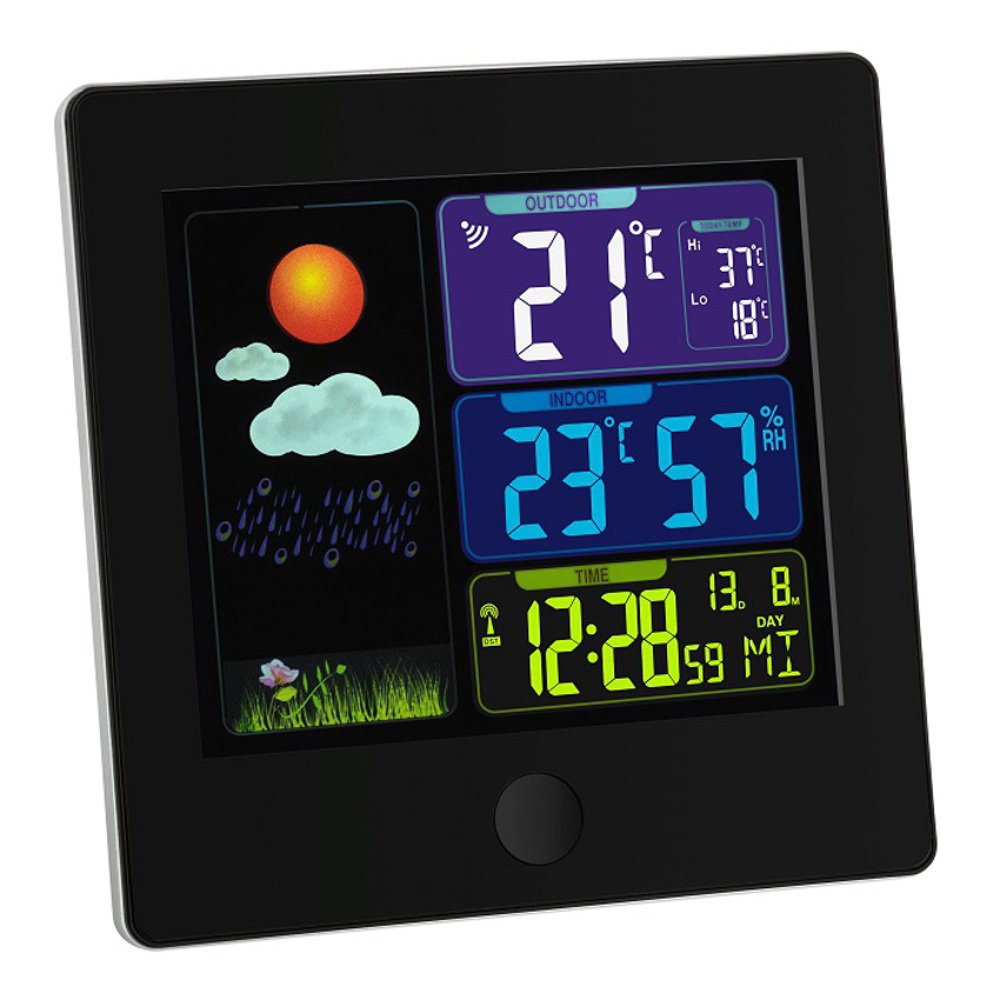
Image 1: TFA 35.1133.01 Sun Funk Weather Station. This image shows the main display unit and the compact wireless outdoor sensor. The main unit features a clear digital display, while the outdoor sensor is designed for external placement.
คุณสมบัติหน่วยหลัก:
- Large LCD display for easy reading.
- Indoor temperature display.
- Outdoor temperature display (from wireless sensor).
- Weather forecast icons (sunny, partly cloudy, cloudy, rainy).
- Radio-controlled clock (DCF77 signal for automatic time synchronization).
- ช่องใส่แบตเตอรี่
คุณสมบัติของเซ็นเซอร์ภายนอกอาคาร:
- เซ็นเซอร์วัดอุณหภูมิ
- การส่งสัญญาณแบบไร้สายไปยังตัวเครื่องหลัก
- ช่องใส่แบตเตอรี่
- Wall mounting option.
5. การตั้งค่า
5.1 การติดตั้งแบตเตอรี่
- เซ็นเซอร์กลางแจ้ง: Open the battery compartment cover on the back of the outdoor sensor. Insert 2 x AAA batteries, observing the correct polarity (+/-). Close the cover securely.
- หน่วยหลัก: Open the battery compartment cover on the back of the main unit. Insert 2 x AAA batteries, observing the correct polarity (+/-). Close the cover securely.
- Important: Always insert batteries into the outdoor sensor first, then into the main unit. This ensures proper synchronization.
5.2 การวางตำแหน่งเซ็นเซอร์
- Place the outdoor sensor in a shaded, dry location, protected from direct sunlight and rain, to ensure accurate temperature readings.
- Ensure the sensor is within the wireless range of the main unit (typically up to 30 meters in open air). Walls and other obstacles can reduce this range.
- Avoid placing the sensor near heat sources (e.g., vents, windows) or cold sources (e.g., refrigerators).
5.3 การซิงโครไนซ์เบื้องต้นและการตั้งเวลา
- After inserting batteries, the main unit will automatically search for the outdoor sensor signal. This may take a few minutes. The outdoor temperature will appear on the display once connected.
- The main unit will also attempt to receive the DCF77 radio time signal. This signal automatically sets the correct time and date. Place the main unit near a window for better reception. This process can take several minutes or even hours, depending on your location and signal strength.
- If the DCF77 signal is not received, you may need to manually set the time and date. Refer to the specific button functions on your device (e.g., MODE, SET buttons) for manual adjustment.
6. คู่มือการใช้งาน
6.1 แสดงข้อมูล
The main unit's display typically shows the following information:
- เวลาและวันที่: Automatically set by the DCF77 radio signal.
- อุณหภูมิในร่ม: อุณหภูมิปัจจุบันที่วัดได้จากตัวเครื่องหลัก
- อุณหภูมิภายนอก: Current temperature transmitted from the wireless sensor.
- พยากรณ์อากาศ: Represented by icons (e.g., sun, clouds, rain) indicating predicted weather changes based on atmospheric pressure trends.
- ตัวบ่งชี้ความแรงของสัญญาณ: For both the outdoor sensor and the DCF77 time signal.
6.2 Button Functions (Exampเลอ)
While specific button labels may vary, common functions include:
- โหมด/ชุด: Used to switch between display modes (e.g., time, alarm) or to enter setting mode.
- +/ADJ: Used to increase values during setting or to manually adjust time/date.
- -/MEM: Used to decrease values during setting or to view minimum/maximum temperature records.
- ช่อง: If multiple outdoor sensors are supported, this button cycles through channels.
Refer to the specific button layout on your device for precise functions.
7. การบำรุงรักษา
7.1 การเปลี่ยนแบตเตอรี่
- When the battery indicator appears on the display, replace the batteries in the respective unit (main unit or outdoor sensor).
- ควรเปลี่ยนแบตเตอรี่ทั้งหมดในเครื่องพร้อมกันด้วยแบตเตอรี่ใหม่ชนิดเดียวกันเสมอ
- กำจัดแบตเตอรี่ที่หมดตามข้อบังคับท้องถิ่น
7.2 การทำความสะอาด
- ทำความสะอาดอุปกรณ์ด้วยผ้านุ่มๆamp ผ้า ห้ามใช้สารทำความสะอาดที่มีฤทธิ์กัดกร่อนหรือตัวทำละลาย
- Ensure no moisture enters the device's interior.
7.3 พื้นที่จัดเก็บ
- If the device will not be used for an extended period, remove all batteries to prevent leakage.
- เก็บอุปกรณ์ไว้ในที่แห้งและเย็น
8 การแก้ไขปัญหา
| ปัญหา | สาเหตุที่เป็นไปได้ | สารละลาย |
|---|---|---|
| ไม่มีหน้าจอแสดงผลบนตัวเครื่องหลัก | Depleted or incorrectly inserted batteries. | เปลี่ยนแบตเตอรี่โดยตรวจสอบให้แน่ใจว่าใส่ขั้วถูกต้อง |
| Outdoor temperature not displayed or flashing. | Outdoor sensor out of range, depleted batteries, or interference. |
|
| Incorrect outdoor temperature reading. | เซ็นเซอร์ได้รับแสงแดดโดยตรงหรือแหล่งความร้อน | Relocate the outdoor sensor to a shaded, well-ventilated area. |
| Time not automatically set (DCF77 signal). | Poor signal reception due to location or interference. |
|
9. ข้อมูลจำเพาะ
| คุณสมบัติ | รายละเอียด |
|---|---|
| หมายเลขรุ่น | 35.1133.01 |
| ยี่ห้อ | TFA-ดอสท์มันน์ |
| ขนาดสินค้า | Main Unit: 2.5 x 12 x 12 cm; 168 g |
| แหล่งจ่ายไฟ (ตัวเครื่องหลัก) | แบตเตอรี่ AAA 2 ก้อน (ไม่รวม) |
| พลังงาน (เซ็นเซอร์ภายนอกอาคาร) | แบตเตอรี่ AAA 2 ก้อน (ไม่รวม) |
| วัสดุ | พลาสติก |
| คุณสมบัติพิเศษ | Lightweight, Radio-controlled time (DCF77) |
| ข้อแนะนำการใช้ | Indoor/Outdoor temperature monitoring |
| ช่วงสาย | Up to 30 meters (open air, may vary with obstacles) |
10. การรับประกันและการสนับสนุน
10.1 ข้อมูลการรับประกัน
ผลิตภัณฑ์นี้โดยทั่วไปอยู่ภายใต้การคุ้มครองของ รับประกันเชิงพาณิชย์ 1 ปี from the date of purchase. This warranty covers manufacturing defects and material faults. It does not cover damage caused by improper use, accidents, unauthorized repairs, or normal wear and tear. Please retain your proof of purchase for warranty claims.
10.2 การสนับสนุนลูกค้า
For technical assistance, warranty claims, or further information, please contact your retailer or the manufacturer's customer service department. Contact details can usually be found on the product packaging or the manufacturer's official webเว็บไซต์.
ผู้ผลิต: TFA-ดอสท์มันน์


