1. บทนำ
Thank you for choosing the Orion HCCA5000.1DSPLX High Performance Class-D Monoblock Ampเครื่องฟอก นี้ amplifier is engineered for exceptional power and sound quality in car audio systems, designed to drive low impedances with high output levels. This manual provides essential information for proper installation, operation, and maintenance to ensure optimal performance and longevity of your ampชีวิต.
2. ข้อมูลด้านความปลอดภัย
โปรดอ่านคำแนะนำด้านความปลอดภัยทั้งหมดอย่างละเอียดก่อนติดตั้งและใช้งาน amplifier. Failure to follow these guidelines may result in injury or damage to the ampไลไฟเออร์หรือยานพาหนะ
- แนะนำการติดตั้งอย่างมืออาชีพ: การติดตั้งอุปกรณ์เครื่องเสียงรถยนต์อาจมีความซับซ้อน หากคุณไม่แน่ใจเกี่ยวกับขั้นตอนการติดตั้งใดๆ ควรขอความช่วยเหลือจากผู้เชี่ยวชาญที่มีคุณสมบัติเหมาะสม
- การตัดการเชื่อมต่อไฟฟ้า: Always disconnect the vehicle's battery negative terminal before starting any electrical work to prevent short circuits and electrical shock.
- การเดินสายไฟที่ถูกต้อง: Use appropriate gauge wiring for power, ground, and speaker connections as specified in this manual. Incorrect wiring can lead to overheating, fire, or damage to components.
- การระบายอากาศ : ให้แน่ใจว่า amplifier is mounted in a location with adequate ventilation to prevent overheating. Do not block cooling fins or air vents.
- การสัมผัสความชื้น: หลีกเลี่ยงการติดตั้ง amplifier in locations where it may be exposed to moisture or excessive humidity.
- การติดตั้งที่ปลอดภัย: ติดตั้ง ampติดตั้งตัวขยายสัญญาณให้แน่นเพื่อป้องกันไม่ให้หลุดออกระหว่างการขับขี่ยานพาหนะ ซึ่งอาจก่อให้เกิดการบาดเจ็บหรือความเสียหายได้
- การป้องกันการได้ยิน: การสัมผัสกับระดับความดันเสียงสูงเป็นเวลานานอาจทำให้การได้ยินเสียหายอย่างถาวร โปรดใช้ความระมัดระวังเมื่อปรับระดับเสียง
3. คุณสมบัติของผลิตภัณฑ์
The Orion HCCA5000.1DSPLX amplifier incorporates advanced features for superior audio performance and system protection:
- กำลังขับสูง: Delivers 5000W RMS, designed for competition-level sound pressure.
- Class-D Topology: Ensures high efficiency and powerful output with minimal heat generation.
- 1 Ohm Stable: Capable of driving low impedance loads for maximum power delivery to subwoofers.
- ฟิลเตอร์กรองความถี่ต่ำ (LPF): Adjustable 40Hz - 300Hz for precise subwoofer frequency control.
- การควบคุมเสียงเบส: Enhances low-frequency response.
- แหล่งจ่ายไฟ MOSFET: Provides stable and efficient power delivery.
- Fault and Protection Monitoring: ปกป้อง amplifier and connected components from electrical issues.
- ปุ่มควบคุมเสียงเบสระยะไกล: ช่วยให้สามารถปรับระดับเสียงเบสได้อย่างสะดวกจากที่นั่งคนขับ
4. เนื้อหาบรรจุภัณฑ์
ตรวจสอบว่ามีรายการทั้งหมดอยู่ในแพ็คเกจ:
- แอมป์กีตาร์ Orion HCCA5000.1DSPLX แบบโมโนบล็อก Ampชีวิต
- Remote Bass Control Knob with Cable
- คู่มือการใช้งาน (เอกสารนี้)
- Mounting Hardware (screws, etc.) - (Typically included, verify upon unboxing)
5. การติดตั้งและการตั้งค่า
การติดตั้งที่ถูกต้องเป็นสิ่งสำคัญต่อประสิทธิภาพและความปลอดภัยของคุณ ampเครื่องขยายเสียง โปรดทำตามขั้นตอนเหล่านี้อย่างระมัดระวัง
5.1. ตำแหน่งการติดตั้ง
Choose a mounting location that provides:
- Adequate ventilation for heat dissipation.
- Protection from moisture and direct sunlight.
- Secure attachment to a solid surface.
- Accessibility for wiring and adjustments.
Common locations include the trunk, under seats, or behind rear seats.
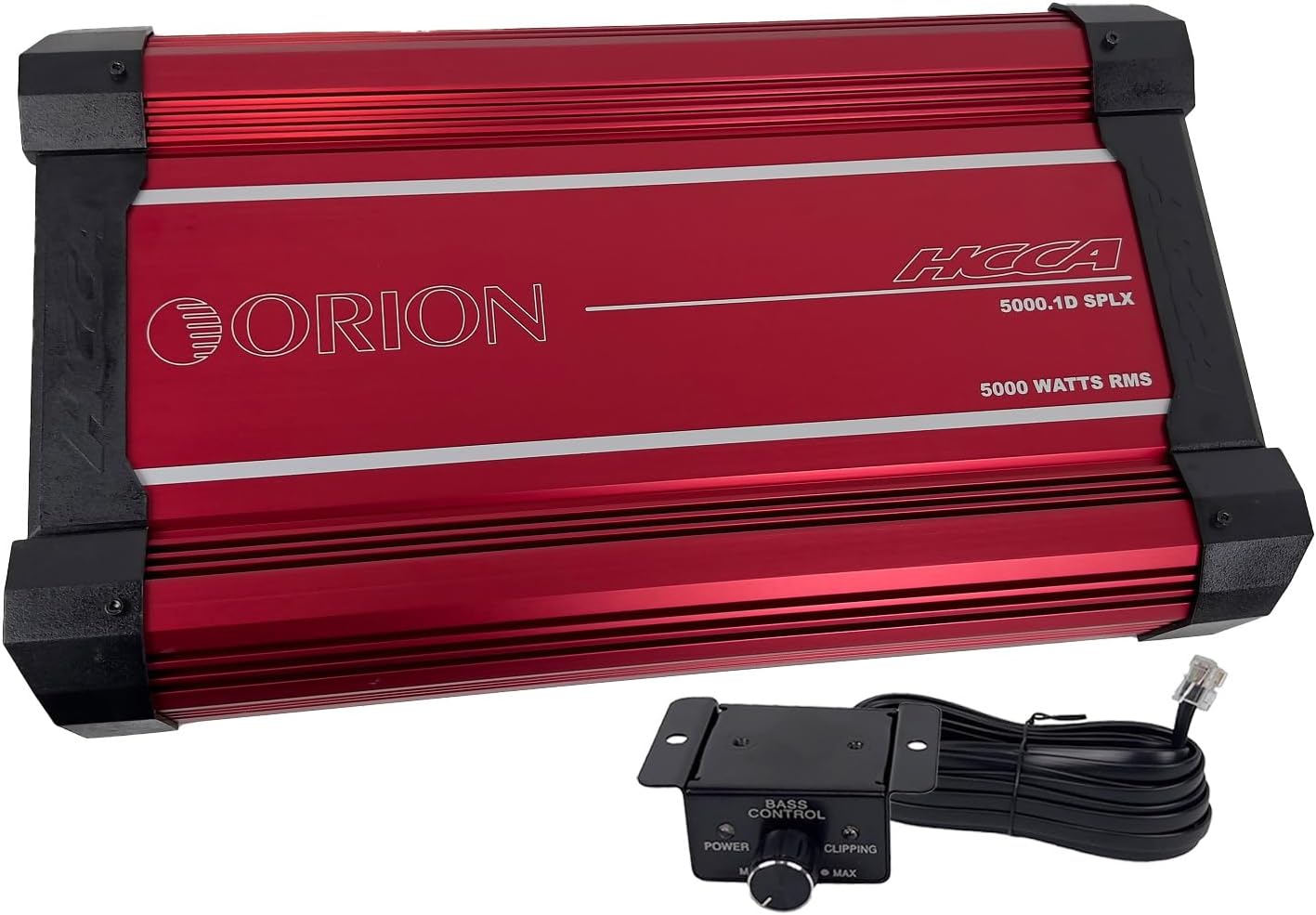
ภาพนี้แสดงด้านบน view of the red Orion HCCA5000.1DSPLX amplifier along with its wired remote bass control knob. The amplifier features the "ORION" logo and "HCCA 5000.1D SPLX 5000 WATTS RMS" text. The remote knob has "BASS CONTROL" and "POWER" and "CLIPPING" indicators.
5.2. การเชื่อมต่อสายไฟ
ตรวจสอบให้แน่ใจว่าการเชื่อมต่อทั้งหมดมีความปลอดภัยและมีฉนวนป้องกันอย่างเหมาะสม
5.2.1. Power and Ground Wiring
- กำลังไฟ (B+): Connect a heavy-gauge power cable (e.g., 0-gauge or 4-gauge, depending on total system power requirements) directly from the positive terminal of the vehicle's battery to the amplifier's B+ terminal. Install an appropriate fuse holder (ANL or Mini-ANL) within 18 inches (45 cm) of the battery.
- กราวด์ (GND): เชื่อมต่อสายดินขนาดหนาที่มีขนาดเดียวกับสายไฟจาก amplifier's GND terminal to a clean, unpainted metal surface of the vehicle chassis. Ensure a solid electrical connection. The ground cable should be as short as possible, ideally less than 3 feet (1 meter).
- ระยะไกล (REM): ต่อสายไฟขนาดเล็กกว่า (เช่น สายไฟขนาด 18 เกจ) จาก ampขั้วต่อ REM ของเครื่องขยายเสียงเข้ากับเอาต์พุตเปิดเครื่องระยะไกลของชุดเครื่องเสียงหลักของคุณ สายนี้จะเปลี่ยน ampเปิดและปิดเครื่องขยายเสียงพร้อมกับเครื่องเสียงของคุณ

This image shows the power and speaker connection side of the Orion HCCA5000.1DSPLX amplifier. Clearly visible are the large terminals labeled "POWER" for battery positive, ground, and remote, and "SPEAKERS" for connecting subwoofers.
5.2.2. อินพุตและเอาต์พุตเสียง
- อาร์ซีเออินพุต: Connect RCA cables from the subwoofer pre-out of your head unit to the amplifier's RCA input terminals (L-CH Input, R-CH Input).
- RCA Output (Optional): If daisy-chaining multiple amplifiers, connect RCA cables from the amplifier's RCA output terminals (L-CH Output, R-CH Output) to the input of the next ampชีวิต.

This image displays the audio input and control panel side of the Orion HCCA5000.1DSPLX amplifier. It features RCA input and output jacks, along with various control knobs for gain, low pass filter, bass boost, and phase adjustment.
5.2.3. การเชื่อมต่อลำโพง
เชื่อมต่อซับวูฟเฟอร์ของคุณเข้ากับ amplifier's speaker terminals. Ensure the total impedance of the connected speakers is within the amplifier's stable operating range (1 Ohm minimum for this model).
- For a single subwoofer, connect its positive terminal to the amplifier's positive speaker terminal and its negative terminal to the amplifier's negative speaker terminal.
- For multiple subwoofers, refer to a wiring diagram to achieve the desired impedance (series, parallel, or series-parallel).
5.3. Remote Bass Knob Connection
Connect the provided remote bass control knob to the "Remote Gain" port on the amplifier using the supplied cable. Mount the knob in a convenient location for easy access.

This image shows the remote bass control knob with its attached cable. The knob allows for convenient adjustment of bass levels and includes power and clipping indicator lights.
6. คู่มือการใช้งาน
เมื่อครั้งหนึ่ง amplifier is installed and wired, follow these steps to configure and operate it.
6.1. การเพิ่มพลังครั้งแรก
- ตรวจสอบให้แน่ใจว่าการเชื่อมต่อทั้งหมดถูกต้องและปลอดภัย
- เปิดการควบคุมอัตราขยายบน amplifier to its minimum setting (fully counter-clockwise).
- ต่อขั้วลบของแบตเตอรี่รถยนต์กลับเข้าไปใหม่
- เปิดเครื่องหลักของคุณ amplifier should power on, indicated by its power LED.
6.2. การปรับการควบคุม
การ amplifier features several controls to fine-tune its performance:
- Gain (Level): การควบคุมนี้ตรงกับ ampความไวอินพุตของเครื่องขยายเสียงต่อปริมาตรเอาต์พุตtage of your head unit. Start with the gain at minimum. Play a familiar track at about 75% of your head unit's maximum volume. Slowly increase the amplifier's gain until you hear distortion, then back off slightly. The remote bass knob also has a clipping indicator to assist in setting the gain.
- ฟิลเตอร์กรองความถี่ต่ำ (LPF): This filter allows only frequencies below the set point to pass through to the subwoofer. Adjust the LPF (40Hz - 300Hz) to blend the subwoofer's output seamlessly with your main speakers. A common starting point is 80Hz-100Hz.
- เพิ่มเสียงเบส: This control provides an increase in output at a specific low frequency. Use sparingly, as excessive bass boost can lead to distortion and potential damage to subwoofers.
- เฟส: The phase control (0°/180°) helps to align the subwoofer's output with the main speakers. Experiment with both settings to find the one that provides the most impactful and coherent bass response.
7. การบำรุงรักษา
การบำรุงรักษาตามปกติจะช่วยให้มีอายุการใช้งานยาวนานและประสิทธิภาพการทำงานที่เหมาะสมที่สุด ampชีวิต.
- การทำความสะอาด: ทำความสะอาด .เป็นระยะ ampเช็ดทำความสะอาดภายนอกของเครื่องขยายเสียงด้วยผ้าแห้งเนื้อนุ่ม ห้ามใช้สารเคมีรุนแรงหรือน้ำยาทำความสะอาดที่มีฤทธิ์กัดกร่อน ตรวจสอบให้แน่ใจว่าครีบระบายความร้อนปราศจากฝุ่นและสิ่งสกปรก
- การตรวจสอบการเชื่อมต่อ: Annually, inspect all power, ground, remote, and speaker connections for tightness and corrosion. Loose connections can cause power loss, overheating, or intermittent operation.
- การระบายอากาศ : ให้แน่ใจว่า amplifier's mounting location remains clear of obstructions to maintain proper airflow.
8 การแก้ไขปัญหา
หากคุณประสบปัญหาเกี่ยวกับ ampหากต้องการใช้เครื่องขยายเสียง โปรดดูตารางต่อไปนี้ก่อนติดต่อฝ่ายสนับสนุนด้านเทคนิค
| ปัญหา | สาเหตุที่เป็นไปได้ | สารละลาย |
|---|---|---|
| ไม่มีไฟฟ้า / Amplifier ไม่เปิด |
|
|
| ไม่มีเสียงออก |
|
|
| เสียงผิดเพี้ยน |
|
|
| Amplifier Overheats / Goes into Protection |
|
|
9. ข้อมูลจำเพาะ
Key technical specifications for the Orion HCCA5000.1DSPLX Monoblock Ampเครื่องฟอก:
| คุณสมบัติ | ข้อมูลจำเพาะ |
|---|---|
| หมายเลขรุ่น | HCCA5000.1D |
| ยี่ห้อ | โอไรออน |
| จำนวนช่องสัญญาณ | 1 (โมโนบล็อก) |
| กำลังขับ (RMS) | 5000 วัตต์ |
| Minimum Stable Impedance | 1 โอห์ม |
| การตอบสนองความถี่ | 15Hz - 250Hz |
| ตัวกรองความถี่ต่ำ (LPF) | 40Hz - 300Hz |
| เล่มที่tage | 12 โวลต์ (ขณะทำงาน) |
| ปริมาณอุปทานสูงสุดtage | 16 โวลต์ |
| ขนาด (กว้าง x ยาว x สูง) | 21.3 x 11.7 x 2.8 นิ้ว (541.02 มม. x 297.18 มม. x 71.12 มม.) |
| น้ำหนักสินค้า | 31.2 ปอนด์ |
| วัสดุ | Aluminum, MOSFET |
| ประเภทการติดตั้ง | การติดตั้งบนพื้นผิว |
| อุณหภูมิในการทำงาน | 660 องศาเซลเซียส (Note: This value seems unusually high and likely refers to a component's maximum junction temperature, not ambient operating temperature. Operate within reasonable vehicle interior temperatures.) |
| การรับรอง | เอฟซีซี |
10. การรับประกันและการสนับสนุน
Orion products are designed for reliability and performance. For specific warranty terms and conditions, please refer to the warranty card included with your product or visit the official Orion Car Audio webไซต์นี้ โปรดเก็บหลักฐานการซื้อไว้เพื่อใช้ยืนยันการรับประกัน
For technical assistance, troubleshooting beyond this manual, or warranty inquiries, please contact Orion Car Audio customer support through their official channels. Contact information can typically be found on their webบรรจุภัณฑ์ไซต์หรือผลิตภัณฑ์
Webเว็บไซต์: www.orioncaraudio.com (อดีตample link, verify actual webงาน)


