การแนะนำ
Thank you for choosing the SAMI SM-S9939L Alarm Clock Radio. This device combines a digital clock, an alarm function, and an FM/AM radio into a compact unit, ideal for your bedside table. Please read this manual carefully before operating the device to ensure proper use and to maximize its lifespan. Keep this manual for future reference.
ข้อมูลด้านความปลอดภัย
- อย่าให้เครื่องโดนฝน ความชื้น หรืออุณหภูมิที่สูงหรือต่ำเกินไป
- ควรหลีกเลี่ยงการวางเครื่องไว้ใกล้แหล่งความร้อน เช่น เครื่องทำความร้อน ช่องระบายความร้อน เตา หรืออุปกรณ์อื่นๆ (รวมถึง) ampเครื่องให้ความร้อน) ที่ผลิตความร้อน
- อย่าปิดกั้นช่องระบายอากาศใดๆ ติดตั้งตามคำแนะนำของผู้ผลิต
- ปกป้องสายไฟไม่ให้ถูกเหยียบหรือถูกหนีบ โดยเฉพาะที่ปลั๊ก เต้ารับไฟฟ้า และจุดที่สายไฟออกจากเครื่อง
- ใช้เฉพาะอุปกรณ์เสริม/สิ่งที่แนบตามที่ผู้ผลิตกำหนดเท่านั้น
- ถอดปลั๊กอุปกรณ์นี้ในระหว่างพายุฝนฟ้าคะนองหรือเมื่อไม่ได้ใช้งานเป็นเวลานาน
- แจ้งบริการทั้งหมดให้ช่างที่ผ่านการรับรองทราบ จำเป็นต้องให้บริการเมื่ออุปกรณ์ได้รับความเสียหายในลักษณะใดก็ตาม เช่น สายไฟหรือปลั๊กชำรุด ของเหลวหกหรือมีวัตถุตกลงไปในอุปกรณ์ อุปกรณ์โดนฝนหรือความชื้น ไม่สามารถทำงานได้ตามปกติ หรือตกหล่น
เนื้อหาแพ็คเกจ
กรุณาตรวจสอบว่ารายการต่อไปนี้รวมอยู่ในแพ็คเกจของคุณ:
- SAMI SM-S9939L Alarm Clock Radio Unit
- Power Adapter (if mains powered)
- คู่มือการใช้งาน (เอกสารนี้)
สินค้าเกินview
The SAMI SM-S9939L features a clear digital display and intuitive controls for easy operation. Below is a general representation of the product.
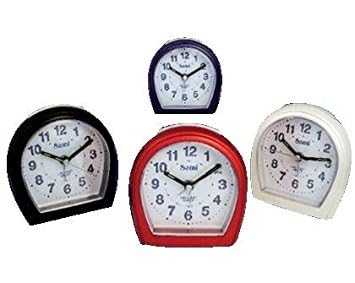
รูปที่ 1: ด้านหน้า view of the SAMI SM-S9939L Alarm Clock Radio. This image shows the compact rectangular design, the digital display, and several control buttons on the front panel, typical for setting time, alarm, and radio functions.
Common controls typically include:
- ปุ่มตั้งเวลา: ใช้สำหรับปรับเวลาปัจจุบัน
- ปุ่มตั้งค่านาฬิกาปลุก: Used to set or adjust the alarm time.
- ปุ่มเลื่อนปลุก/ปิดเสียง: Activates snooze function or sets sleep timer.
- ปุ่มเปิด/ปิดวิทยุ: เปิดหรือปิดวิทยุ
- Tuning Buttons (+/-): ปรับความถี่วิทยุ
- ปุ่มปรับระดับเสียง (+/-): ควบคุมระดับเสียงเอาต์พุต
- ปุ่มโหมด: Switches between clock, radio, or other functions.
การตั้งค่า
1. การเชื่อมต่อไฟฟ้า
- If your unit is mains powered, connect the power adapter to the DC input jack on the back of the alarm clock. Plug the other end into a standard wall outlet.
- If your unit is battery powered, insert the required batteries (not included) into the battery compartment, observing correct polarity (+/-).
- The display should illuminate, indicating the unit is powered on.
2. การตั้งเวลาเริ่มต้น
- กดปุ่มค้างไว้ การตั้งเวลา กดปุ่มค้างไว้จนกว่าตัวเลขชั่วโมงจะเริ่มกระพริบ
- ใช้ - (or dedicated hour/minute) buttons to adjust the hour. Pay attention to AM/PM indicators if applicable.
- กดปุ่ม การตั้งเวลา กดปุ่มอีกครั้งเพื่อยืนยันชั่วโมง แล้วจึงปรับเป็นนาที
- ใช้ - ปุ่มปรับนาที
- กดปุ่ม การตั้งเวลา กดปุ่มอีกครั้งเพื่อบันทึกเวลาปัจจุบัน
คำแนะนำการใช้งาน
การตั้งปลุก
- กดปุ่มค้างไว้ ตั้งปลุก กดปุ่มจนกว่าตัวเลขชั่วโมงปลุกจะกะพริบ
- ใช้ - ปุ่มสำหรับตั้งเวลาปลุกที่ต้องการ
- กดปุ่ม ตั้งปลุก กดปุ่มอีกครั้งเพื่อยืนยันชั่วโมง แล้วจึงปรับเป็นนาที
- ใช้ - ปุ่มสำหรับตั้งนาทีปลุกตามต้องการ
- กดปุ่ม ตั้งปลุก กดปุ่มอีกครั้งเพื่อบันทึกเวลาปลุก
- หากต้องการเปิดหรือปิดสัญญาณเตือน ให้กดปุ่ม เปิด/ปิดนาฬิกาปลุก button (or repeatedly press the ตั้งปลุก button until the alarm icon appears/disappears).
การใช้วิทยุ
- กดปุ่ม เปิด/ปิดวิทยุ ปุ่มเพื่อเปิดวิทยุ
- ใช้ ปรับ +/- buttons to manually scan for radio stations.
- หากต้องการสแกนสถานีอัตโนมัติ ให้กดปุ่มค้างไว้ ปรับ +/- กดปุ่มค้างไว้สองสามวินาที วิทยุจะทำการสแกนหาคลื่นและหยุดที่สถานีที่มีสัญญาณแรงที่สุดถัดไป
- ปรับระดับเสียงโดยใช้ปุ่ม ปริมาณ +/- ปุ่ม
- ในการปิดวิทยุ ให้กด เปิด/ปิดวิทยุ ปุ่มอีกครั้ง
ฟังก์ชั่นการพักชั่วคราว
เมื่อเสียงปลุกดัง ให้กด งีบหลับ button to temporarily silence the alarm. The alarm will sound again after a few minutes (typically 5-9 minutes, depending on the model).
นอนฟังก์ชั่นจับเวลา
ขณะที่วิทยุกำลังเล่นอยู่ ให้กดปุ่ม นอน button (often combined with Snooze) repeatedly to cycle through available sleep timer durations (e.g., 90, 60, 30, 15 minutes, or OFF). The radio will automatically turn off after the selected time.
การซ่อมบำรุง
- การทำความสะอาด: เช็ดตัวเครื่องด้วยผ้านุ่มและแห้ง ห้ามใช้น้ำยาทำความสะอาดที่มีฤทธิ์กัดกร่อนหรือตัวทำละลาย
- พื้นที่จัดเก็บ: If not in use for an extended period, unplug the unit and store it in a cool, dry place. If battery-powered, remove batteries before storage.
- การระบายอากาศ : ตรวจสอบให้แน่ใจว่าช่องระบายอากาศไม่มีฝุ่นและเศษขยะเพื่อป้องกันความร้อนสูงเกินไป
การแก้ไขปัญหา
| ปัญหา | สาเหตุที่เป็นไปได้ | สารละลาย |
|---|---|---|
| เครื่องไม่เปิด | ไม่ได้เสียบสายไฟ; แบตเตอรี่หมดหรือใส่ไม่ถูกต้อง | Ensure power cord is securely plugged in. Check battery orientation and replace if necessary. |
| สัญญาณเตือนภัยไม่ดัง | สัญญาณเตือนไม่ทำงาน; ระดับเสียงเตือนต่ำเกินไป; ตั้งเวลาเตือนไม่ถูกต้อง | Verify alarm is activated (alarm icon visible). Increase alarm volume. Re-check alarm time setting. |
| การรับสัญญาณวิทยุไม่ดี | Antenna not extended; interference from other electronic devices; weak signal area. | Extend the FM wire antenna fully. Reposition the unit to improve reception. Move away from other electronics. |
| จอแสดงผลมืดหรือว่างเปล่า | Brightness setting too low; power issue. | Check if there is a display brightness control. Ensure stable power supply. |
ข้อมูลจำเพาะ
- ยี่ห้อ: ซามิ
- หมายเลขรุ่น: SM-S9939L (8435128415597)
- คุณสมบัติพิเศษ: วิทยุ
- แหล่งพลังงาน: Battery Powered / Electric (Mains)
- ประเภทจอภาพ: ดิจิตอล
- วัสดุ: อะคริโลไนไตรล์ บิวทาไดอีน สไตรีน (ABS)
- ฟังก์ชั่นปลุก: ใช่
- ประเภทการติดตั้ง: โต๊ะวางของ
- รูปร่าง: สี่เหลี่ยมผืนผ้า
การรับประกันและการสนับสนุน
SAMI products are designed for reliability and performance. For specific warranty information, please refer to the warranty card included with your purchase or contact your retailer. For technical support or inquiries, please visit the official SAMI webเว็บไซต์หรือติดต่อฝ่ายบริการลูกค้าของพวกเขา


