1. บทนำ
This manual provides detailed instructions for the setup, operation, and maintenance of your Intermec EasyCoder PX4i Thermal Transfer Printer. The PX4i is a robust and flexible industrial printer designed for high-volume label printing, offering monochrome output at a resolution of 203 dpi and speeds up to 12 inches per second. Please read this manual thoroughly before using the printer to ensure safe and efficient operation.
2. คุณสมบัติของผลิตภัณฑ์
- การพิมพ์ความเร็วสูง: Capable of printing at speeds up to 12 inches per second.
- ความละเอียดสูง: Delivers clear monochrome prints at 203 dpi.
- การจัดการสื่อที่ยืดหยุ่น: Supports various media types including black mark, continuous label, fanfold, gap, general identification label, notch, roll fed, tag, and ticket.
- การเชื่อมต่ออีเธอร์เน็ต: Integrated Ethernet for network integration.
- สามารถตั้งโปรแกรมได้: Designed for optimized printing operations and streamlined deployment.
- การออกแบบที่ทนทาน: Industrial-grade construction for demanding environments.
3. เนื้อหาบรรจุภัณฑ์
Verify that all items listed below are included in your printer package. If any items are missing or damaged, contact your supplier immediately.
- Intermec EasyCoder PX4i Thermal Transfer Printer
- สายไฟ
- Labels (Included Components)
- User Documentation (This manual)
4. ข้อมูลด้านความปลอดภัย
โปรดปฏิบัติตามข้อควรระวังด้านความปลอดภัยต่อไปนี้เสมอ เพื่อป้องกันการบาดเจ็บและความเสียหายต่อเครื่องพิมพ์:
- ตรวจสอบให้แน่ใจว่าเครื่องพิมพ์วางอยู่บนพื้นผิวที่มั่นคงและระดับ
- Connect the printer to a grounded power outlet.
- ห้ามใช้งานเครื่องพิมพ์ในสภาพที่เปียกหรือมีความชื้นสูงเกินไป
- ให้เก็บมือและเสื้อผ้าที่หลวมๆ ให้ห่างจากชิ้นส่วนที่กำลังเคลื่อนไหวในระหว่างการทำงาน
- ตัดการเชื่อมต่อไฟฟ้าก่อนดำเนินการบำรุงรักษาหรือทำความสะอาดใดๆ
- ใช้เฉพาะชิ้นส่วนทดแทนและอุปกรณ์เสริมที่ได้รับการอนุมัติเท่านั้น
5. การตั้งค่า
5.1 การแกะกล่อง
- นำเครื่องพิมพ์ออกจากบรรจุภัณฑ์อย่างระมัดระวัง
- นำวัสดุบรรจุภัณฑ์ เทปกาว และฟิล์มป้องกันออกทั้งหมด
- เก็บบรรจุภัณฑ์เดิมไว้เพื่อการขนส่งหรือจัดเก็บในอนาคต
5.2 การต่อสายไฟ
- ตรวจสอบให้แน่ใจว่าสวิตช์เปิดปิดของเครื่องพิมพ์อยู่ในตำแหน่งปิด
- Connect the power cord to the printer's power inlet.
- เสียบปลายอีกด้านของสายไฟเข้ากับเต้ารับไฟฟ้าที่มีสายดิน
5.3 การโหลดสื่อ (ป้ายกำกับ)
The PX4i printer supports various label types. Follow these general steps to load your labels:

ภาพ: ด้านหน้า view of the Intermec EasyCoder PX4i printer, showing a label being fed out of the front slot. The control panel with an LCD screen and numeric keypad is visible on the top front.
- เปิดฝาครอบสื่อของเครื่องพิมพ์
- Place the roll of labels onto the media supply spindle, ensuring it unwinds correctly.
- Feed the leading edge of the labels through the media guides and under the printhead assembly.
- Adjust the media guides to fit the width of your labels snugly but without binding.
- Close the media cover. The printer may automatically calibrate to the new media.
5.4 การเชื่อมต่อกับคอมพิวเตอร์/เครือข่าย
The PX4i offers Ethernet connectivity for network integration.
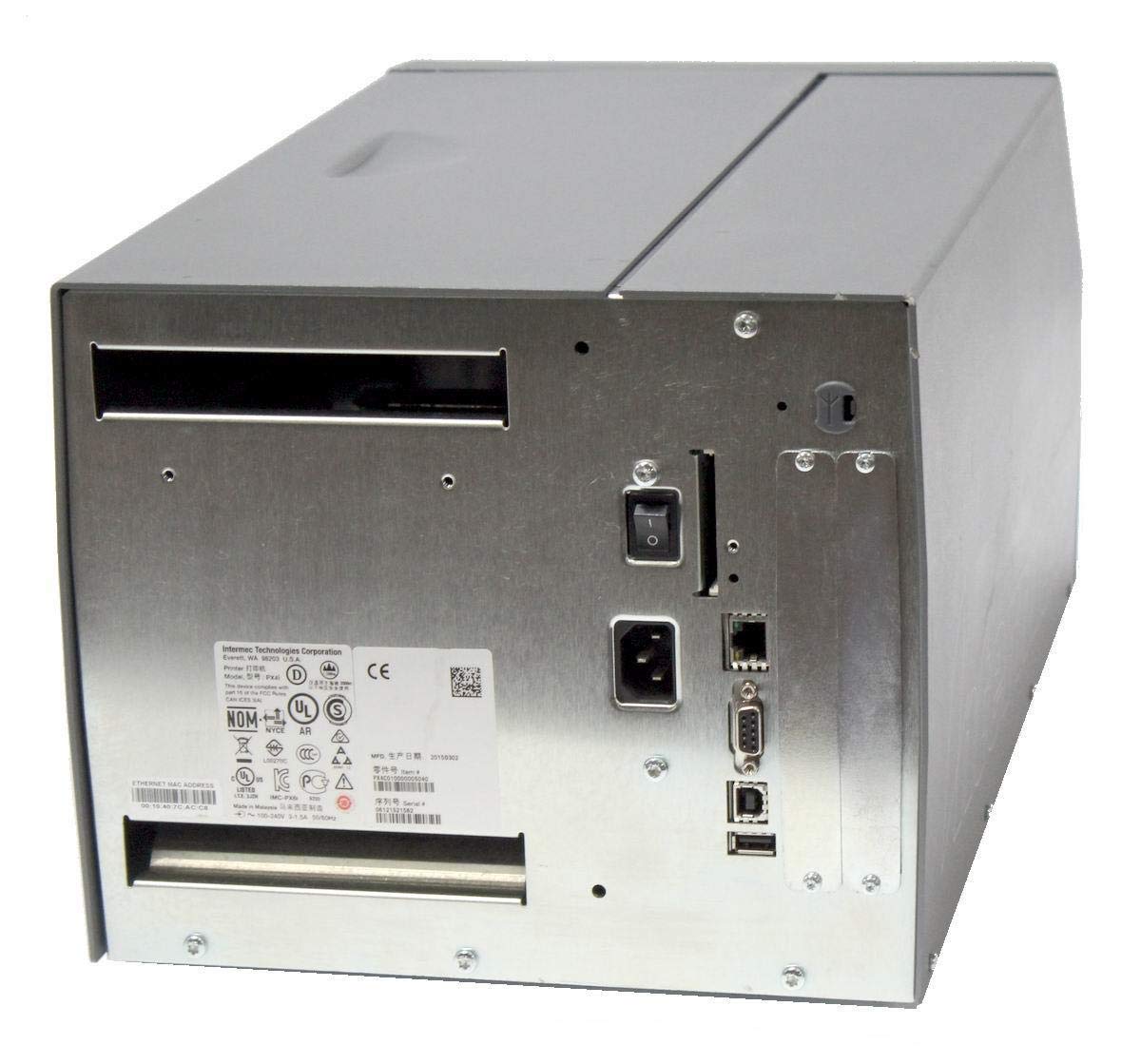
ภาพ: ด้านหลัง view of the Intermec EasyCoder PX4i printer, displaying the power inlet, power switch, Ethernet port, serial ports, and USB ports. The metallic casing is clearly visible.
- Locate the Ethernet port on the rear of the printer.
- Connect a standard Ethernet cable from the printer to your network router or switch.
- For direct connection to a computer, use an appropriate USB or serial cable if supported by your system and printer configuration.
- Refer to the printer's network configuration guide for setting up IP addresses and other network parameters.
6. การดำเนินการ
6.1 แผงควบคุมโอเวอร์view
The front control panel provides access to printer functions and status information.
Image: Close-up of the Intermec EasyCoder PX4i control panel, featuring an LCD display, navigation buttons (up, down, left, right, enter), and a numeric keypad with function keys like Pause, Feed, and Clear.
- จอแสดงผล LCD: แสดงสถานะเครื่องพิมพ์ ตัวเลือกเมนู และข้อความแสดงข้อผิดพลาด
- ปุ่มนำทาง: ใช้สำหรับเลื่อนดูเมนูและเลือกตัวเลือกต่างๆ
- ปุ่มกดตัวเลข: For entering data or selecting numbered options.
- ปุ่มหยุดชั่วคราว: Temporarily stops printing.
- ปุ่มฟีด: เลื่อนระดับขึ้นหนึ่งป้าย
- ปุ่มตั้งค่า: Accesses printer configuration menus.
6.2 การพิมพ์ขั้นพื้นฐาน
- ตรวจสอบให้แน่ใจว่าเครื่องพิมพ์เปิดอยู่และเชื่อมต่อกับคอมพิวเตอร์หรือเครือข่ายของคุณแล้ว
- Open the document or application from which you wish to print labels.
- Select the Intermec PX4i printer from your printer list.
- Configure print settings such as label size, orientation, and quantity as needed.
- Initiate the print job. The printer will begin feeding and printing labels.
6.3 การปรับการตั้งค่าการพิมพ์
Advanced print settings can be adjusted through the printer's control panel or via the printer driver on your computer. These settings include print darkness, print speed, label gap sensing, and more. Consult your printer driver documentation for software-based adjustments.
7. การบำรุงรักษา
การบำรุงรักษาอย่างสม่ำเสมอจะช่วยให้เครื่องพิมพ์ทำงานได้อย่างมีประสิทธิภาพสูงสุดและยืดอายุการใช้งานของเครื่องพิมพ์
7.1 การทำความสะอาดหัวพิมพ์
The printhead should be cleaned regularly, especially if print quality degrades.
- ปิดเครื่องพิมพ์และถอดสายไฟออก
- เปิดชุดหัวพิมพ์
- ใช้ผ้าที่ไม่เป็นขุยหรือปากกาทำความสะอาดหัวพิมพ์ที่ชุบด้วยไอโซโพรพิลแอลกอฮอล์ เช็ดพื้นผิวหัวพิมพ์เบาๆ จากตรงกลางไปยังขอบ
- ปล่อยให้หัวพิมพ์แห้งสนิทก่อนปิดชุดประกอบและต่อสายไฟอีกครั้ง
7.2 การเปลี่ยนสื่อบันทึกและริบบิ้น
When the label roll or thermal transfer ribbon (if used) runs out, replace it promptly.
- ปิดเครื่องพิมพ์และเปิดฝาครอบกระดาษ
- Remove the empty label roll and/or used ribbon core.
- Install a new roll of labels and/or a new ribbon, following the loading instructions in Section 5.3.
- Ensure media and ribbon are properly tensioned and aligned.
- ปิดฝาครอบสื่อ
8 การแก้ไขปัญหา
This section addresses common issues you might encounter with your PX4i printer.
- เครื่องพิมพ์ไม่เปิดเครื่อง: Check power cord connection, power outlet, and printer's power switch.
- ไม่มีผลลัพธ์การพิมพ์: Verify printer is online, connected to the computer/network, and has media loaded. Check for error messages on the LCD.
- คุณภาพการพิมพ์ไม่ดี: Clean the printhead (Section 7.1). Adjust print darkness settings. Ensure correct media and ribbon are used.
- ป้ายกำกับแสดงผลไม่ถูกต้อง: Check media loading (Section 5.3) and ensure media guides are properly adjusted. Calibrate media sensors if necessary.
- ข้อความแสดงข้อผิดพลาด: Refer to the printer's LCD display for specific error codes and consult the full Intermec PX4i technical manual for detailed explanations and solutions.
9. ข้อมูลจำเพาะ
| คุณสมบัติ | คำอธิบาย |
|---|---|
| ชื่อรุ่น | PX4i |
| หมายเลขรุ่นสินค้า | PX4C010000000020 |
| เทคโนโลยีการพิมพ์ | ถ่ายโอนความร้อน |
| พิมพ์สี | เอกรงค์ |
| ความเร็วการพิมพ์สูงสุด | 12 in/s (Monochrome) |
| ความละเอียดการพิมพ์สูงสุด | 203 จุดต่อนิ้ว |
| เทคโนโลยีการเชื่อมต่อ | อีเธอร์เน็ต |
| ขนาดสื่อสูงสุด | 12 นิ้ว |
| ส่วนประกอบที่รวมอยู่ | ฉลาก |
| ประเภทตัวควบคุม | ปุ่มกด |
| ผู้ผลิต | INTERMEC INDUSTRIAL PRINTERS |
| ขนาดแพ็คเกจ | 23.25 x 15.5 x 15.25 นิ้ว; 36.2 ปอนด์ |
10. การรับประกันและการสนับสนุน
The Intermec EasyCoder PX4i Thermal Transfer Printer comes with a standard manufacturer's warranty. For specific warranty terms and conditions, please refer to the warranty card included with your product or visit the official Intermec (Honeywell) support website. For technical assistance, troubleshooting beyond this manual, or to inquire about service, please contact Intermec customer support or your authorized dealer.
แหล่งข้อมูลออนไลน์: For the latest drivers, firmware updates, and additional documentation, please visit the official Intermec support portal.


