การแนะนำ
The DigiTech TRIO is an innovative electric guitar multi-effect pedal designed to be your personal band. It listens to your guitar playing and automatically generates accompanying bass and drum parts. This manual provides comprehensive instructions for setting up, operating, and maintaining your TRIO pedal, ensuring you get the most out of its unique features.
คุณสมบัติหลัก
- Seven Music Genres and Twelve Song Styles Per Genre to Choose From
- The TRIO can learn up to three different song parts that can be recalled on-the-fly
- Adjustable Tempo & Alternate Half Time/Double Time Variants Bass & Drum Level Controls
- Hands-Free Control Using a DigiTech FS3X Footswitch (optional)
- Amp & Mixer Outputs Headphone Output w/Level Control Power Supply Included
คู่มือการติดตั้ง
Follow these steps to set up your DigiTech TRIO pedal:
- Connect the included 9V DC power supply to the พลัง input on the pedal and plug it into a power outlet.
- เชื่อมต่อกีตาร์ไฟฟ้าของคุณเข้ากับ... กีต้าร์อิน เสียบแจ็คโดยใช้สายเคเบิลเครื่องดนตรีขนาดมาตรฐาน 1/4 นิ้ว
- เชื่อมต่อ AMP ออก แจ็คสำหรับกีตาร์ของคุณ ampต่อสายสัญญาณเสียงขนาด 1/4 นิ้วอีกเส้นหนึ่งเข้ากับช่องสัญญาณเข้าของแอมป์
- For connecting to a mixer or PA system, use the มิกเซอร์ออก แจ็ค.
- For private practice, connect headphones to the หูฟังออก แจ็ค.
- Optionally, connect a DigiTech FS3X Footswitch to the ควบคุมใน jack for extended hands-free control.
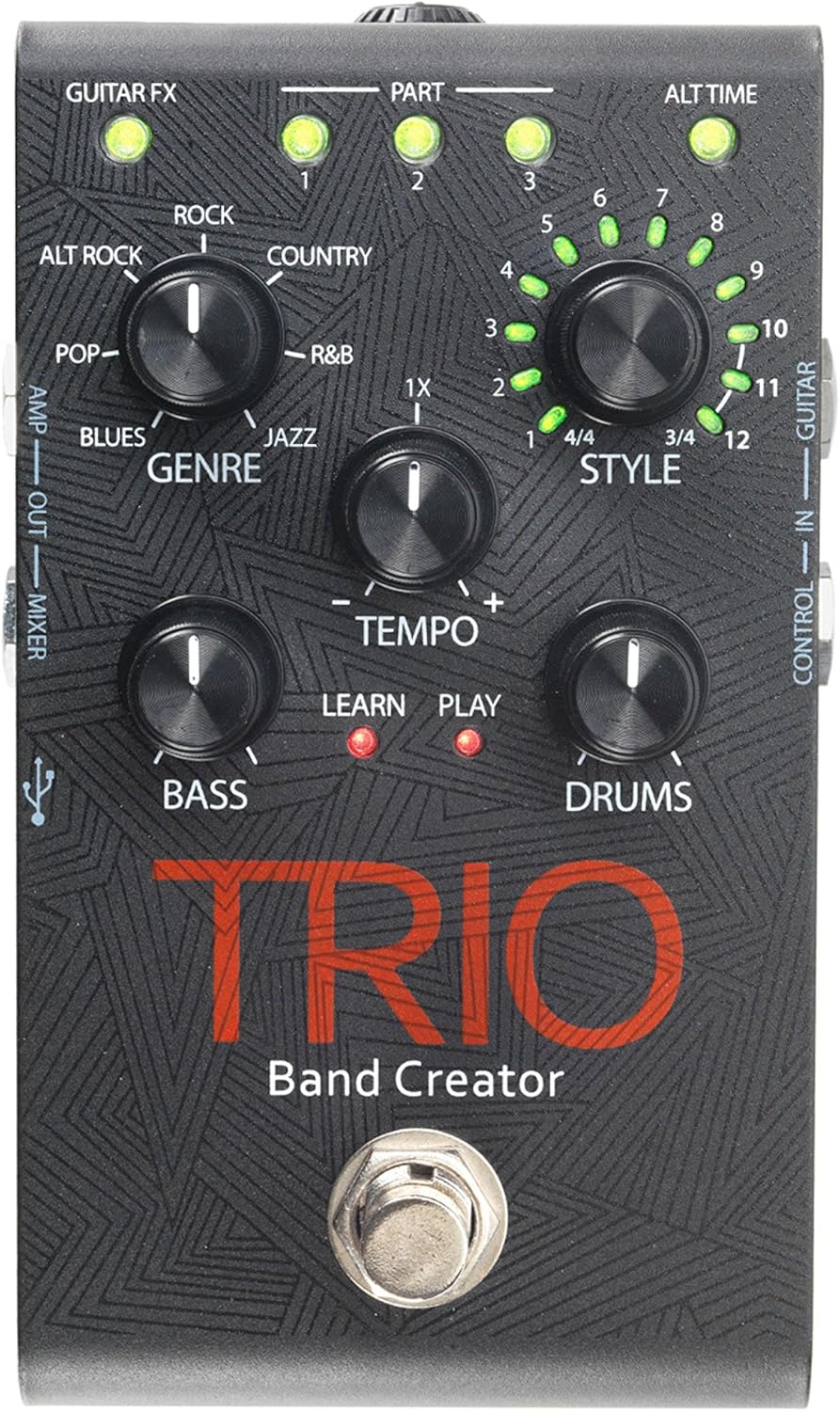
รูปที่ 1: ด้านบน view of the DigiTech TRIO pedal, showing the main controls and footswitch.
คำแนะนำการใช้งาน
Basic Operation: Teaching the TRIO a Song
- กดปุ่ม วงดนตรี footswitch once to enter 'Listen' mode. The เรียนรู้ ไฟ LED จะสว่างขึ้น
- Play your desired chord progression and rhythm clearly. The TRIO will analyze your playing.
- กดปุ่ม วงดนตรี footswitch again to stop 'Listen' mode. The เล่น LED will illuminate, and the TRIO will immediately begin playing generated bass and drum parts.
- You can now play along with your virtual band.
Genre and Style Selection
- ใช้ ประเภท knob to select from Blues, Pop, Alternative Rock, Rock, Country, R&B, and Jazz. The genre affects the overall feel of the generated bass and drum parts.
- ใช้ สไตล์ knob to choose from twelve different song styles available for each genre. This allows for further customization of the rhythm and feel.
- การ ALT TIME button allows you to switch between 3/4 and 4/4 time signatures.
Looping and Song Parts
- The TRIO can learn up to 3 different song parts. To record a new part, select an empty ส่วนหนึ่ง slot (1, 2, or 3) using the corresponding buttons.
- Follow the 'Basic Operation' steps to teach the TRIO the new song part.
- During playback, you can switch between learned song parts on-the-fly by pressing the corresponding ส่วนหนึ่ง ปุ่ม.
- การ Looper footswitch allows you to record and playback your own guitar loops. Press once to start recording, press again to stop recording and start playback, and press and hold to clear the loop.
Adjusting Levels and Tempo
- การ จังหวะ knob adjusts the playback speed of the band and loops.
- การ BASS knob controls the volume level of the generated bass line.
- การ กลอง knob controls the volume level of the generated drum track.
- การ ลูป knob controls the volume level of your recorded guitar loop.

รูปที่ 2: มุม view of the DigiTech TRIO pedal, highlighting the control knobs and input/output jacks.
การควบคุมและการเชื่อมต่อ
The DigiTech TRIO pedal features a user-friendly layout with clearly labeled controls and versatile connection options:
แผงควบคุมด้านหน้า:
- GUITAR FX: Activates built-in guitar effects tailored to the selected genre.
- PART 1, 2, 3: Buttons to select and recall different learned song parts.
- ALT TIME: Toggles between 3/4 and 4/4 time signatures.
- TEMPO Knob: Adjusts the overall playback speed.
- ปุ่มปรับแนวเพลง: Selects the musical genre (Blues, Pop, Alt Rock, Rock, Country, R&B, Jazz).
- STYLE Knob: Selects one of twelve styles within the chosen genre.
- LOOP Knob: Controls the volume of your recorded guitar loop.
- ลูกบิดเบส: Controls the volume of the generated bass line.
- DRUMS Knob: Controls the volume of the generated drum track.
- ลูเปอร์ ฟุตสวิตช์: Records/plays/clears guitar loops.
- สวิตช์เท้า BAND: Enters 'Listen' mode to learn chords/rhythm, or starts/stops band playback.
Side and Rear Panel Connections:
- กีตาร์ใน: 1/4-inch input for your electric guitar.
- AMP ออก: 1/4-inch output to your guitar ampชีวิต.
- MIXER OUT: 1/4-inch output for connecting to a mixer or PA system.
- หูฟังออก: 1/8-inch stereo output for headphones.
- การควบคุมใน: 1/4-inch input for optional DigiTech FS3X Footswitch.
- พลัง: 9V DC input for the included power supply.
- ยูเอสบี: Mini-USB port for firmware updates.

รูปที่ 3: ด้านหลัง view of the DigiTech TRIO pedal, showing the power input and headphone jack.
ข้อมูลจำเพาะ
| คุณสมบัติ | รายละเอียด |
|---|---|
| น้ำหนักสินค้า | 10.6 ออนซ์ (0.3 กก.) |
| ขนาดสินค้า | 4.63 x 3.19 x 2.13 นิ้ว (11.76 x 8.10 x 5.41 ซม.) |
| หมายเลขรุ่นสินค้า | ทริโอ |
| แบตเตอรี่ | 1 9V battery required (for internal use, not primary power) |
| ฮาร์ดแวร์อินเตอร์เฟซ | เสียงขนาด 1/4 นิ้ว |
| รูปแบบสัญญาณ | อนาล็อก |
| แหล่งพลังงาน | Corded Electric (9V DC adapter included) |
| เล่มที่tage | 9 โวลต์ |
| Ampอีเรจ | 300 มิลลิวินาทีamps |
การซ่อมบำรุง
- รักษาแป้นเหยียบให้สะอาดด้วยการเช็ดด้วยผ้านุ่มและแห้ง หลีกเลี่ยงการใช้น้ำยาทำความสะอาดหรือสารละลายที่มีฤทธิ์กัดกร่อน
- เก็บแป้นเหยียบไว้ในที่แห้งและเย็น หลีกเลี่ยงแสงแดดโดยตรงและอุณหภูมิที่สูงหรือต่ำเกินไป
- ตรวจสอบให้แน่ใจว่าสายเคเบิลทั้งหมดเชื่อมต่ออย่างแน่นหนาเพื่อป้องกันการสูญเสียหรือความเสียหายของสัญญาณ
- หลีกเลี่ยงการเหยียบคันเร่งตกหรือได้รับแรงกระแทกรุนแรง
การแก้ไขปัญหา
- ไม่มีเสียง: ตรวจสอบการเชื่อมต่อสายเคเบิลทั้งหมด (กีตาร์, amp, power). Ensure the pedal is powered on and the volume knobs are not set to zero.
- คุณภาพเสียงไม่ดี: ตรวจสอบให้แน่ใจว่าเครื่องมือของคุณและ amplifier are functioning correctly. Check for damaged cables.
- Band Not Generating Correctly: Ensure you are playing clear, distinct chords during the 'Listen' phase. Try different genres and styles to see if a different setting better interprets your playing.
- Footswitch Unresponsive: Disconnect and reconnect the power supply. If using an optional FS3X footswitch, ensure it is properly connected.
การรับประกันและการสนับสนุน
สำหรับข้อมูลการรับประกันและการสนับสนุนทางเทคนิค โปรดดูที่เว็บไซต์อย่างเป็นทางการของ DigiTech webหรือติดต่อฝ่ายบริการลูกค้า เก็บหลักฐานการซื้อไว้เพื่อใช้ในการเคลมประกัน


