1. บทนำ
The SUNROAD FR500 is a versatile handheld digital device designed for outdoor enthusiasts, offering a comprehensive suite of functions including an altimeter, barometer, compass, thermometer, hygrometer, pedometer, and a built-in flashlight. This device is engineered to provide essential environmental data and navigation assistance for various outdoor activities such as hiking, campการเดินเรือ และการปีนเขา
Key features include a clear LCD digital display for easy readability, 24-hour altitude record and trend charts, and a durable, lightweight design suitable for rugged outdoor conditions. It is powered by a convenient built-in rechargeable battery.
2. เนื้อหาบรรจุภัณฑ์
เมื่อเปิดบรรจุภัณฑ์ โปรดตรวจสอบว่าประกอบด้วยสิ่งของต่อไปนี้ทั้งหมด:
- 1 x SUNROAD FR500 Multifunction Digital Altimeter
- สายชาร์จ USB 1 เส้น
- ผ้าทำความสะอาด 1 ผืน
- 1 x คู่มือผู้ใช้ (เอกสารนี้)
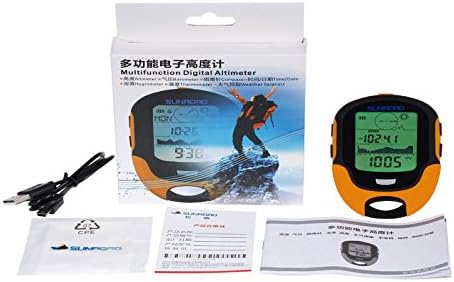
Image: Contents of the SUNROAD FR500 package, including the device, USB charging cable, and cleaning cloth.
3. สินค้าหมดview
The SUNROAD FR500 features a compact and ergonomic design, making it comfortable to hold and easy to operate during outdoor activities. The large LCD screen provides clear digital readouts of various parameters.

ภาพ: ด้านหน้า view of the SUNROAD FR500, showcasing its LCD display and overall design.
3.1 การควบคุมและการแสดงผล
The device is equipped with several buttons for navigation and function selection, along with a clear LCD display that shows various data points and indicators.

Image: Diagram illustrating the button layout and functions on the SUNROAD FR500.
- Button A (HISTORY/SET): Used to access historical data records and enter settings mode.
- Button B (COMPASS/VIEW): Activates the compass function and cycles through different display views.
- Button C (ALTI/UP): Used to navigate upwards in menus or adjust values, and for altimeter-related functions.
- Button D (BARO/DOWN): Used to navigate downwards in menus or adjust values, and for barometer-related functions.
- FLASH LIGHT/BACK LIGHT Button: Activates the built-in flashlight and controls the display backlight.
4. การตั้งค่า
4.1 การชาร์จอุปกรณ์
The SUNROAD FR500 features a built-in rechargeable battery. Before first use, or when the battery indicator shows low power, connect the device to a USB power source using the provided USB charging cable. A full charge typically takes a few hours. The charging indicator on the display will show the charging status.
4.2 การเปิดเครื่องครั้งแรก
To power on the device, press and hold the power button (refer to the product overview for button location) for a few seconds until the display illuminates. The device will typically start in its default mode, often displaying time or altitude.
4.3 Basic Settings (Time, Date, Units)
After powering on, it is recommended to set the correct time, date, and preferred measurement units (e.g., meters/feet for altitude, Celsius/Fahrenheit for temperature). Access the settings menu by pressing and holding Button A (HISTORY/SET). Use Buttons C (ALTI/UP) and D (BARO/DOWN) to navigate through options and adjust values, and Button A or B to confirm selections and move to the next setting.
5. คู่มือการใช้งาน
The SUNROAD FR500 integrates multiple functions essential for outdoor activities. Familiarize yourself with each mode to maximize the device's utility.

Image: The SUNROAD FR500 showcasing its common outdoor functions: Time, Date, Alarm Clock, and Compass.
5.1 Altimeter Mode
The altimeter measures your current altitude. The device can display 24-hour altitude records and trend charts, allowing you to monitor changes in elevation over time. To view altitude data, cycle through modes using the appropriate button (often Button C or a dedicated mode button). The trend chart provides a visual representation of altitude changes, which is useful for tracking ascent and descent during a hike.

Image: The SUNROAD FR500 showing 7-day, 24-hour high record trend charts and curves for altitude tracking.
5.2 Barometer Mode
The barometer measures atmospheric pressure. Changes in atmospheric pressure can indicate changes in weather conditions. Monitor the barometric pressure readings to anticipate weather shifts. This function is often integrated with the weather forecast feature.
5.3 Compass Mode
The digital compass provides directional guidance. For accurate readings, ensure the device is held level and away from strong magnetic fields. Calibration may be required periodically or after significant changes in location. Refer to the on-screen prompts or specific instructions in the manual for compass calibration procedures.
5.4 เทอร์โมมิเตอร์และไฮโกรมิเตอร์
The device displays current ambient temperature and humidity. These readings are useful for assessing environmental conditions. The device can also record historical highest and lowest values for atmospheric pressure, temperature, and humidity.

Image: The SUNROAD FR500 displaying historical data for atmospheric pressure, weather, temperature, and humidity records.
5.5 โหมดนับก้าว
The pedometer tracks your steps taken. Activate this mode to count your steps during walking or hiking activities. Ensure the device is securely carried for accurate step counting.
5.6 พยากรณ์อากาศ
Based on barometric pressure trends, the device provides a basic weather forecast. This is typically indicated by icons on the display representing sunny, cloudy, rainy, etc. Use this as a general guide for planning outdoor activities.
5.7 ไฟฉาย
The built-in flashlight provides illumination in low-light conditions. Press the FLASH LIGHT/BACK LIGHT button to activate the flashlight. Press it again to turn it off or to cycle through backlight settings.
6. การบำรุงรักษา
6.1 การทำความสะอาด
To clean the device, use the provided cleaning cloth or a soft, dry cloth. For stubborn dirt, a slightly damp cloth can be used, but ensure no moisture enters the device openings. Avoid using abrasive cleaners or solvents.
6.2 การดูแลแบตเตอรี่
To prolong battery life, avoid fully discharging the battery frequently. Charge the device regularly, especially if it has not been used for an extended period. Store the device with a partial charge (around 50%) if storing for long durations.
6.3 พื้นที่จัดเก็บ
Store the SUNROAD FR500 in a cool, dry place away from direct sunlight and extreme temperatures. Keep it away from strong magnetic fields, which can affect compass accuracy.
7 การแก้ไขปัญหา
If you encounter issues with your SUNROAD FR500, refer to the following common problems and their solutions:
- อุปกรณ์ไม่เปิดเครื่อง: Ensure the battery is charged. Connect to a USB power source and attempt to power on again.
- Inaccurate Altimeter/Barometer readings: Environmental conditions can affect accuracy. Ensure the device is properly calibrated if a calibration option is available. For altimeter, ensure you are not in an enclosed space.
- Compass not accurate: Perform a compass calibration as per the device's instructions. Ensure you are away from strong magnetic fields (e.g., large metal objects, other electronic devices).
- จอแสดงผลมืดหรือว่างเปล่า: Check battery level. Adjust backlight settings using the FLASH LIGHT/BACK LIGHT button.
- ปัญหาการชาร์จ: Ensure the USB cable is securely connected to both the device and the power source. Try a different USB port or power adapter.
หากปัญหายังคงมีอยู่หลังจากพยายามแก้ไขปัญหาเหล่านี้แล้ว โปรดติดต่อฝ่ายสนับสนุนลูกค้า
8. ข้อมูลจำเพาะ
| คุณสมบัติ | รายละเอียด |
|---|---|
| แบบอย่าง | FR500 |
| ยี่ห้อ | ซันโร้ด |
| ประเภทจอภาพ | จอแอลซีดี |
| แหล่งพลังงาน | ใช้พลังงานจากแบตเตอรี่ (ชาร์จใหม่ได้) |
| วัสดุ | อะครีลิค |
| สี | สีเหลือง |
| น้ำหนักสินค้า | 0.1 กิโลกรัม |
| ขนาดรายการ (LxWxH) | 3.94 x 0.79 x 2.6 นิ้ว |
| ความแม่นยำของอุณหภูมิ | 0.5 องศาเซลเซียส |
| คุณสมบัติพิเศษ | Alarm, Clock, Hygro, Thermometer, Altimeter, Barometer, Compass, Pedometer, Flashlight, Weather Forecast |
| เทคโนโลยีเซ็นเซอร์ | สวิส |
| ยูพีซี | 717080881381, 709127280714, 602731979701, 796389780809 |
9. การรับประกันและการสนับสนุน
For information regarding the product warranty, please refer to the warranty card included in your package or visit the official SUNROAD webไซต์ โปรดเก็บใบเสร็จรับเงินไว้เป็นหลักฐานการซื้อ
If you require technical assistance, have questions about product functionality, or need to report an issue, please contact SUNROAD customer support through their official channels. Contact details can typically be found on the manufacturer's webเว็บไซต์หรือในบรรจุภัณฑ์ของผลิตภัณฑ์


