การแนะนำ
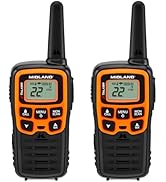
This manual provides comprehensive instructions for the setup, operation, maintenance, and troubleshooting of your Midland T10 X-TALKER Two-Way Radios. These radios offer reliable communication with 22 FRS channels and 38 privacy codes, along with NOAA Weather Alert capabilities, making them suitable for various outdoor activities and general use.
มีอะไรอยู่ในกล่อง
Your Midland T10 X-TALKER package includes the following items:
- Two (2) Midland T10 X-TALKER Two-Way Radios
- Two (2) Belt Clips
- One (1) Owner's Manual

คำอธิบายภาพ: แบบบน-ล่าง view of the package contents, showing two black Midland X-TALKER radios, two black belt clips, and an owner's manual, all neatly arranged.
คุณสมบัติมากกว่าview
The Midland T10 X-TALKER radios are designed for clear and efficient communication with several key features:
- 22 FRS Channels: Provides a wide range of communication options.
- 38 รหัสความเป็นส่วนตัวของ CTCSS: Enhances communication privacy by filtering out unwanted transmissions.
- การตรวจสอบสภาพอากาศและการแจ้งเตือนจาก NOAA: Automatically scans 10 weather band channels and alerts you to severe weather.
- eVOX (Easy Voice and Sound Activated Transmission): Allows for hands-free operation.
- การสื่อสารระยะไกล: Optimized for extended range in open areas.
- การออกแบบที่กะทัดรัดและน้ำหนักเบา: Easy to carry and handle.
- จอแสดงผล LCD ย้อนแสง: Provides visibility in low-light conditions.

คำอธิบายภาพ: ภาพระยะใกล้ view of the Midland T10 X-TALKER radio, with key features labeled: Push to Talk Button, Channel Display, VOX - Hands-Free Communication, Battery Meter, Menu, Scan, Silent Operation, and WX (Weather) button.
การตั้งค่า
การติดตั้งแบตเตอรี่
The Midland T10 radios are designed to operate with a rechargeable Li-ion battery (Model: BL-10C, 3.7V/1200mAh). To install the battery:
- Remove the belt clip by pinching the release tab and sliding the clip upwards.
- Open the battery compartment cover located on the back of the radio.
- Insert the BL-10C Li-ion battery into the compartment, ensuring correct polarity.
- Replace the battery compartment cover and reattach the belt clip.
การชาร์จแบตเตอรี่
To charge your Midland T10 radio:
- Locate the USB-C charging port on the side of the radio, protected by a rubber flap.
- Connect the provided USB-C charging cable to the radio's charging port.
- เชื่อมต่อปลายอีกด้านหนึ่งของสาย USB เข้ากับแหล่งพลังงาน USB ที่ใช้งานร่วมกันได้ (เช่น อะแดปเตอร์ติดผนัง พอร์ต USB ของคอมพิวเตอร์)
- ตัวแสดงสถานะแบตเตอรี่บนหน้าจอ LCD จะแสดงสถานะการชาร์จ
คำอธิบายวิดีโอ: A user demonstrates how to remove the belt clip, open the battery compartment, insert the rechargeable Li-ion battery, and then connect the USB-C charging cable to the radio. The video also shows the battery specifications on the battery itself.
การทำงานพื้นฐาน
เปิด/ปิดเครื่อง
To power on or off the radio, press and hold the เมนู/พาวเวอร์ button located below the display.
การควบคุมระดับเสียง
ปรับระดับเสียงโดยใช้ปุ่ม UP และ ลง arrow buttons. The current volume level will be displayed on the screen.
การเลือกช่องทาง
ในการเลือกช่อง:
- กดปุ่ม เมนู กดปุ่มหนึ่งครั้ง หมายเลขช่องจะกะพริบ
- ใช้ UP or ลง ปุ่มลูกศรเพื่อเลือกช่องที่คุณต้องการ (1-22)
- กดปุ่ม เมนู button again to confirm your selection, or wait a few seconds for the radio to automatically confirm.
Push-to-Talk (ปตท.)
หากต้องการส่งสัญญาณ ให้กดปุ่มค้างไว้ ปตท. button located on the left side of the radio. Speak clearly into the microphone. Release the ปตท. button to receive transmissions.
คุณสมบัติขั้นสูง
รหัสความเป็นส่วนตัว (CTCSS)
The T10 radios feature 38 CTCSS (Continuous Tone Coded Squelch System) Privacy Codes to minimize interference from other users on the same channel. To set a privacy code:
- กดปุ่ม เมนู button twice. The privacy code number will flash.
- ใช้ UP or ลง arrow buttons to select your desired privacy code (1-38).
- กดปุ่ม เมนู button again to confirm, or wait for automatic confirmation.
Note: Both radios must be on the same channel and privacy code to communicate.
สแกนสภาพอากาศ NOAA + แจ้งเตือน
Stay informed about weather conditions with the NOAA Weather Scan and Alert feature:
- Weather Scan: กดปุ่มค้างไว้ WX button to activate NOAA Weather Scan. The radio will automatically scan through 10 available weather (WX) band channels and lock onto the strongest weather channel.
- การแจ้งเตือนสภาพอากาศ: When activated, the NOAA Weather Alert will sound an alarm indicating a risk of severe weather in your area. NOAA Weather Radio also broadcasts AMBER alerts.
eVOX (การทำงานแบบแฮนด์ฟรี)
The eVOX feature allows you to transmit without pressing the PTT button. The radio detects your voice and automatically transmits. Refer to the owner's manual for detailed eVOX sensitivity settings.
ระยะและประสิทธิภาพ
The Midland T10 X-TALKER radios offer varying ranges depending on terrain and obstructions:
- No Obstruction: Up to 20 miles in open areas with clear line of sight.
- Partial Obstruction: 2-5 miles in areas with some trees or light buildings.
- สิ่งกีดขวาง: Less than 1 mile in urban areas with heavy buildings or dense foliage.
คำอธิบายภาพ: A diagram showing three scenarios for radio range: 'No Obstruction' (up to 20 miles), 'Partial Obstruction' (2-5 miles with trees), and 'Obstructed' (less than 1 mile with city buildings). Actual distance may vary.
คำอธิบายวิดีโอ: วิดีโอแสดงผลิตภัณฑ์อย่างเป็นทางการasing the Midland X-TALKER T10 walkie-talkie, highlighting its features and ease of use for various communication needs.
การซ่อมบำรุง
To ensure optimal performance and longevity of your Midland T10 radios:
- การทำความสะอาด: ใช้แบบนุ่มๆamp ผ้าเช็ดทำความสะอาดภายนอกวิทยุ ห้ามใช้สารเคมีรุนแรงหรือน้ำยาทำความสะอาดที่มีฤทธิ์กัดกร่อน
- การดูแลแบตเตอรี่ Fully charge batteries before extended storage. If storing for long periods, remove batteries.
- พื้นที่จัดเก็บ: Store radios in a cool, dry place away from extreme temperatures and direct sunlight.
- ความต้านทานน้ำ: The radios are water resistant. Avoid submerging them in water. Ensure the USB-C port cover is securely closed when not charging.
การแก้ไขปัญหา
If you experience issues with your Midland T10 radios, try the following:
- ไม่มีไฟฟ้า: Check battery charge level. Ensure batteries are correctly installed.
- ไม่สามารถส่ง/รับ: Verify both radios are on the same channel and privacy code. Ensure the PTT button is fully pressed when transmitting. Check for obstructions if range is limited.
- Static/Poor Audio: Move to an area with fewer obstructions. Adjust volume. Try a different channel.
- ปุ่มกดถูกล็อค: If the keypad is locked, press and hold the lock button (usually the MENU button) until the lock icon disappears from the display.
ข้อมูลจำเพาะ
| น้ำหนักสินค้า | 2.7 ออนซ์ |
| ขนาดสินค้า | 2 x 1.2 x 5.5 นิ้ว |
| หมายเลขรุ่นสินค้า | T10 |
| ประเภทแบตเตอรี่ | Rechargeable Li-ion (BL-10C, 3.7V/1200mAh) |
| จำนวนช่องสัญญาณ | 22 |
| ช่วงความถี่ | 400-512 เมกะเฮิรตซ์ |
| ระยะการสนทนาสูงสุด | 20 Miles (in optimal conditions) |
| ระดับความต้านทานต่อน้ำ | ทนน้ำ |
| ผู้ผลิต | มิดแลนด์ |
การรับประกันและการสนับสนุน
The Midland T10 X-TALKER Two-Way Radios come with a Three Year Warranty. For warranty claims, technical support, or additional information, please refer to the contact details provided in your owner's manual or visit the official Midland webเว็บไซต์.


