1. บทนำ
This manual provides essential information for the safe and efficient operation of your COTEC SP2000-224 Pure Sine Wave Inverter. This advanced inverter offers high efficiency and power density, featuring selectable output voltage and frequency, all housed within a robust aluminum casing. Please read this manual thoroughly before installation and use to ensure proper function and longevity of the device.
2. ข้อมูลด้านความปลอดภัย
Always observe the following safety precautions to prevent injury and damage to the inverter or connected equipment:
- การระบายอากาศ : ตรวจสอบให้แน่ใจว่ามีการระบายอากาศที่เพียงพอรอบๆ อินเวอร์เตอร์ อย่าปิดกั้นช่องระบายอากาศ
- สิ่งแวดล้อม: Install the inverter in a dry, cool, and well-ventilated area, away from direct sunlight, heat sources, and flammable materials.
- การต่อลงดิน: Properly ground the inverter chassis to prevent electrical shock.
- อินพุต DC: Connect the inverter only to a 24V DC battery bank. Ensure correct polarity (positive to positive, negative to negative). Reverse polarity will damage the unit.
- เอาต์พุต AC: Do not overload the inverter. Ensure the total wattage of connected AC devices does not exceed the inverter's rated output.
- การบริการ: ห้ามเปิดหรือซ่อมแซมอินเวอร์เตอร์ด้วยตนเอง ควรส่งต่อให้ช่างผู้ชำนาญการเป็นผู้ดำเนินการซ่อมแซม
- การสัมผัสน้ำ: Keep the inverter away from water, rain, or excessive moisture.
3. คุณสมบัติของผลิตภัณฑ์
The COTEC SP2000-224 Inverter incorporates several advanced features for reliable power conversion:
- สัญญาณเอาต์พุตแบบคลื่นไซน์บริสุทธิ์ เหมาะสำหรับอุปกรณ์อิเล็กทรอนิกส์ที่ต้องการความไวสูง
- Power ON / OFF remote control capability via a dedicated green terminal.
- Full input and output isolation for enhanced safety.
- Temperature and load-controlled cooling fan for efficient heat dissipation.
- อินเทอร์เฟซใช้งานง่าย พร้อมไฟแสดงสถานะ LED 3 สี
- Output frequency selectable between 50 Hz and 60 Hz via DIP switch.
- ปริมาณการส่งออกtagสามารถเลือกได้ผ่านสวิตช์ DIP
- Power saving mode adjustable via a variable resistor.
- Comprehensive input protection: Reverse Polarity (via fuse), Under Voltage, มากกว่า Voltage.
- Comprehensive output protection: Short Circuit, Overload, Over Temperature.
- Certifications: E13, UL, CE, FCC approved.
4. การตั้งค่าและการติดตั้ง
Proper installation is crucial for the inverter's performance and safety.
4.1 การติดตั้งทางกายภาพ
Mount the inverter securely in a location that meets the safety requirements mentioned in Section 2. Ensure sufficient space around the unit for airflow.
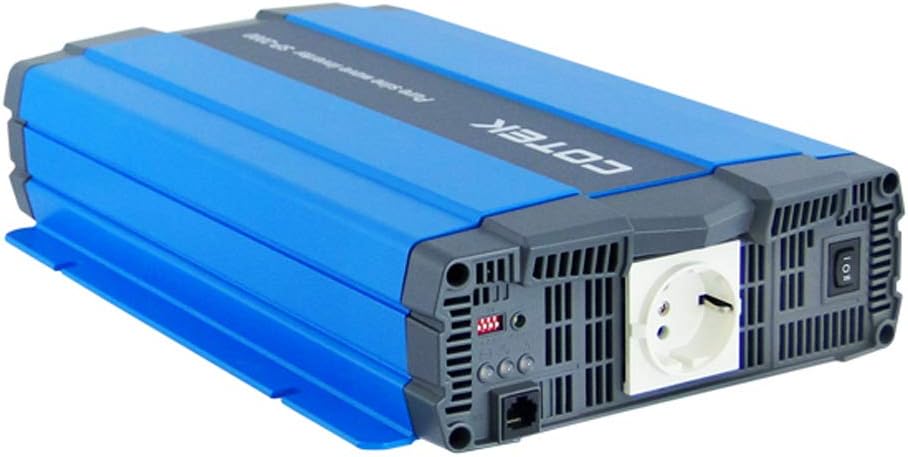
รูปที่ 4.1: มุม view of the COTEC SP2000-224 Pure Sine Wave Inverter, showcasing its robust blue and gray casing.
4.2 การเชื่อมต่ออินพุต DC
Connect the inverter to a 24V DC battery bank using appropriate gauge cables. Ensure the positive (+) terminal of the inverter connects to the positive terminal of the battery, and the negative (-) terminal of the inverter connects to the negative terminal of the battery. Install an appropriate fuse or circuit breaker in the positive DC line close to the battery.

รูปที่ 4.2: หลัง view of the inverter, highlighting the DC input terminals (red for positive, black for negative), the chassis ground screw, and the remote control terminal.
4.3 Chassis Ground Connection
Connect the chassis ground terminal (labeled 'CHASSIS GROUND') to a reliable earth ground point. This is a critical safety step.
4.4 AC Output and Controls
The inverter features a standard AC outlet and control switches on its front panel.

รูปที่ 4.3: ด้านหน้า view of the inverter, displaying the AC output socket, the main power switch, LED indicators, and DIP switches for configuration.
4.5 การตั้งค่าสวิตช์ DIP
The inverter features DIP switches for configuring output frequency and voltage. Refer to the specifications table (Section 7) or the product label for specific settings. Ensure the inverter is powered off before adjusting DIP switches.
- ความถี่เอาท์พุต: Select 50 Hz or 60 Hz based on your regional requirements.
- ปริมาณการส่งออกtage: เลือกปริมาณไฟฟ้ากระแสสลับเอาต์พุตที่ต้องการtage (e.g., 230VAC for this model).
5. คู่มือการใช้งาน
5.1 การเปิด/ปิดเครื่อง
After all connections are secure and verified, switch the main power button on the inverter to the 'ON' position. The LED indicators will illuminate to show the inverter's status. To power off, switch the button to 'OFF'. A remote control terminal is also available for external ON/OFF control.
5.2 ไฟแสดงสถานะ LED
The 3-color LED indicators provide visual feedback on the inverter's operational status and any potential faults. Consult the product documentation or the specifications table for a detailed explanation of each LED state.
5.3 โหมดประหยัดพลังงาน
The power saving mode can be adjusted via a variable resistor. This feature helps reduce quiescent current draw when no load or a very light load is connected, conserving battery power.
5.4 การเชื่อมต่ออุปกรณ์ไฟฟ้ากระแสสลับ
Plug your AC appliances into the inverter's AC output socket. Ensure the total power consumption does not exceed the inverter's continuous power rating (2000W for this model). For inductive loads (e.g., motors, refrigerators), consider their surge power requirements, which can be significantly higher than their running power.
6. การบำรุงรักษา
การบำรุงรักษาอย่างสม่ำเสมอจะช่วยให้เครื่องแปลงกระแสไฟฟ้าทำงานได้อย่างมีประสิทธิภาพสูงสุดและยืดอายุการใช้งาน
- การทำความสะอาด: รักษาอินเวอร์เตอร์ให้สะอาดและปราศจากฝุ่น ใช้ผ้าแห้งเช็ดทำความสะอาดภายนอก ห้ามใช้น้ำยาทำความสะอาด
- การระบายอากาศ : Periodically check that the cooling fan and ventilation openings are clear of obstructions.
- การเชื่อมต่อ: Inspect all DC and AC connections regularly to ensure they are tight and free from corrosion. Loose connections can cause overheating and poor performance.
- การบำรุงรักษาแบตเตอรี่: Follow the manufacturer's recommendations for your battery bank's maintenance.
7 การแก้ไขปัญหา
If the inverter is not functioning correctly, refer to the following common issues and solutions:
- ไม่มีกำลังขับ:
- Check DC input connections and battery voltage.
- Verify the inverter's power switch is ON.
- Check for blown DC input fuses (if applicable).
- บ่งชี้โอเวอร์โหลด:
- ลดปริมาณโหลดรวมที่ต่อกับอินเวอร์เตอร์
- Disconnect and reconnect the load to reset the inverter.
- Over Temperature Indication:
- Ensure adequate ventilation around the inverter.
- Check if the cooling fan is operating.
- Reduce the load if operating in a hot environment.
- ระดับแบตเตอรี่ต่ำtage Alarm/Shutdown:
- Recharge the battery bank.
- Check battery connections for looseness or corrosion.
For persistent issues, contact COTEC customer support.
8. ข้อมูลจำเพาะ
The following table details the technical specifications for the COTEC SP2000 series, with specific values for the SP2000-224 model highlighted where applicable.

รูปที่ 8.1: Detailed technical specifications for the COTEC SP-2000 series, including the SP2000-224 model.
| คุณสมบัติ | ข้อมูลจำเพาะ |
|---|---|
| ยี่ห้อ | โคเทค |
| ชื่อรุ่น | SP2000 (SP2000-224 variant) |
| กำลังไฟที่กำหนด | 2000วัตต์ |
| Surge Power (1 Sec) | 4000วัตต์ |
| กระแสตรงอินพุตVoltage | 24VDC (Operating Range: 21.0-33.0VDC) |
| กระแสไฟขาออกVoltage | 230VAC (เลือกได้) |
| ความถี่เอาต์พุต | 50/60 Hz (เลือกได้) |
| รูปคลื่นเอาท์พุต | Pure Sine Wave (THD<3% at nominal load) |
| ประสิทธิภาพ (สูงสุด) | 93% |
| การทำให้เย็น | Temperature & load controlled fan |
| อุณหภูมิในการทำงาน | -20°C ถึง +40°C |
| อุณหภูมิในการจัดเก็บ | -30°C ถึง +70°C |
| ขนาด (กว้าง x สูง x ลึก) | 17.44 x 9.76 x 3.27 นิ้ว (443 x 248 x 83 มม.) |
| น้ำหนักสินค้า | 1 pounds (approximate, actual unit weight may vary) |
| ขนาดแพ็คเกจ | 19 x 12 x 6 นิ้ว |
| การรับรอง | E13, UL, CE, FCC approved |
8.1 แบบเขียนแบบเครื่องกล
For detailed physical dimensions and mounting information, refer to the mechanical drawings below.
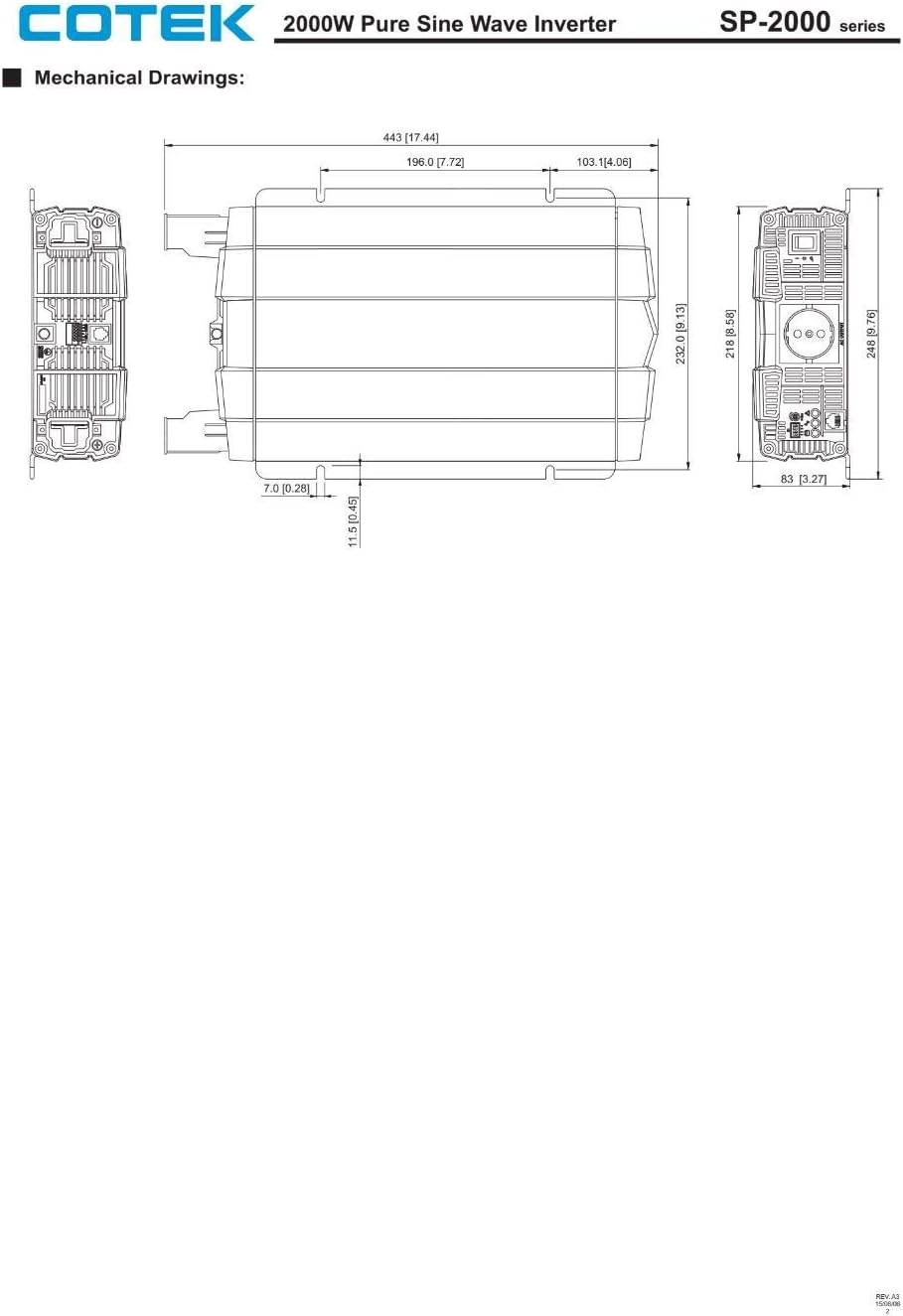
รูปที่ 8.2: Mechanical drawings providing precise dimensions for installation planning.
9. การรับประกันและการสนับสนุน
COTEC products are designed for reliability and performance. For warranty information, technical support, or service inquiries, please refer to the warranty card included with your product or visit the official COTEC webไซต์ โปรดเก็บใบเสร็จรับเงินไว้เป็นหลักฐานการซื้อสำหรับการเรียกร้องการรับประกัน


