1. บทนำ
This manual provides essential information for the installation, operation, and maintenance of your FSP Group Mini ITX/Flex ATX 300W Power Supply, model FSP300-60LG-5K. This unit is designed to provide stable and efficient power for compact PC systems, featuring 80 Plus Bronze certification for energy efficiency and reliable performance at altitudes up to 5000 meters.
2. ข้อมูลด้านความปลอดภัย
คำเตือน: เสี่ยงต่อการเกิดไฟฟ้าช็อต ห้ามเปิดชุดจ่ายไฟ ไม่มีชิ้นส่วนใดภายในที่ผู้ใช้สามารถซ่อมแซมได้
- ตรวจสอบให้แน่ใจว่าได้ตัดการเชื่อมต่อแหล่งจ่ายไฟจากเต้ารับไฟฟ้ากระแสสลับก่อนการติดตั้งหรือการบำรุงรักษา
- ติดตั้งแหล่งจ่ายไฟในบริเวณที่มีอากาศถ่ายเทได้ดีเพื่อป้องกันความร้อนสูงเกินไป
- Use only the provided power cord or a certified equivalent.
- อย่าวางอุปกรณ์ไว้ในที่ชื้นหรืออุณหภูมิที่สูงหรือต่ำเกินไป
- This product is designed for use with compatible computer components. Refer to your system's documentation for compatibility.
3. เนื้อหาบรรจุภัณฑ์
ตรวจสอบว่ามีรายการทั้งหมดอยู่ในแพ็คเกจ:
- FSP300-60LG-5K Flex ATX 300W Power Supply Unit
- สายไฟ AC
- เอกสารประกอบ (คู่มือนี้)

Image: Contents of the FSP300-60LG-5K package, including the power supply unit, AC power cord, and brown cardboard box.
4. สินค้าหมดview
The FSP300-60LG-5K is a compact Flex ATX power supply featuring a 40mm ball-bearing fan for cooling and a comprehensive set of connectors for various system components.

ภาพ: จากบนลงล่าง view of the FSP300-60LG-5K power supply unit, showing its compact form factor and product label.
4.1 ขั้วต่อ
The power supply includes the following connectors:
- Main 24-Pin ATX Connector: For motherboard power.
- P4-Pin Connector: For CPU power.
- Serial-ATA (SATA) Connectors (x3): For SATA hard drives, SSDs, and optical drives.
- Molex 4-Pin Connectors (x2): สำหรับอุปกรณ์ต่อพ่วงหรือพัดลมเคสรุ่นเก่า

Image: The FSP300-60LG-5K power supply unit with its various power cables, including 24-pin ATX, P4, SATA, and Molex connectors, spread out for clear viewการไอเอ็นจี
4.2 ระบบทำความเย็น
The unit features a single 40mm ball-bearing fan designed to provide efficient cooling while maintaining low noise levels. Proper airflow within the PC chassis is crucial for optimal performance and longevity.

ภาพ: ภาพระยะใกล้ view of the FSP300-60LG-5K power supply, highlighting the 40mm cooling fan and the bundled power cables exiting the unit.
5. การตั้งค่าและการติดตั้ง
Follow these steps to install the FSP300-60LG-5K power supply into your system:
- เตรียมระบบของคุณ: Ensure your computer is powered off and unplugged from the wall outlet. Open your computer case to access the power supply bay.
- ติดตั้งแหล่งจ่ายไฟ: Carefully slide the FSP300-60LG-5K into the Flex ATX power supply bay of your chassis. Secure it with the appropriate screws.
- เชื่อมต่อพลังงานเมนบอร์ด: Connect the 24-Pin ATX connector to the corresponding port on your motherboard. Ensure it clicks into place.
- เชื่อมต่อพลังงาน CPU: Connect the P4-Pin connector to the CPU power port on your motherboard.
- เชื่อมต่ออุปกรณ์ต่อพ่วง: Connect the SATA power connectors to your hard drives, SSDs, or optical drives. Use the Molex connectors for any other compatible peripherals or case fans.
- จัดการสายเคเบิล: เดินสายเคเบิลอย่างเรียบร้อยเพื่อปรับปรุงการไหลเวียนของอากาศและความสวยงามภายในเคสของคุณ
- ปิดฝาเคสและเสียบปลั๊กไฟ: Close your computer case. Connect the AC power cord to the power supply's inlet and then to a grounded wall outlet.
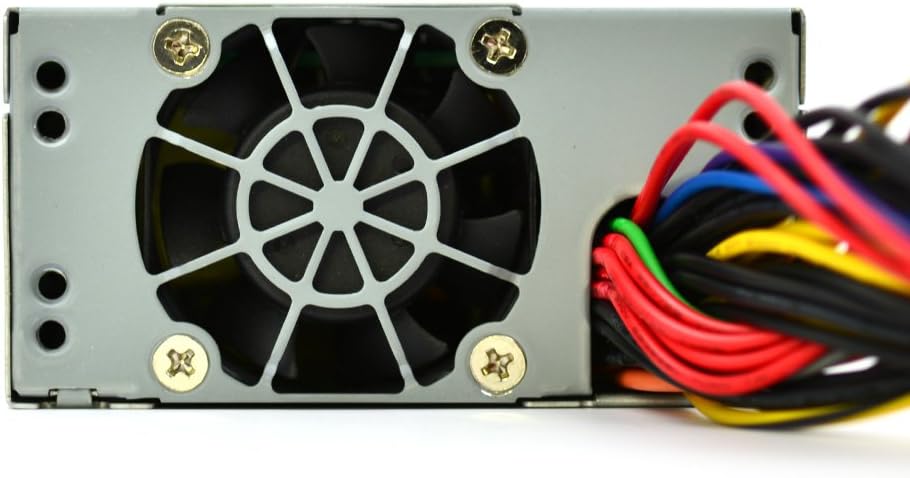
ภาพ: รายละเอียด view of the FSP300-60LG-5K power supply's rear panel, showing the AC power input socket and the hexagonal ventilation grille.
6. คู่มือการใช้งาน
After successful installation, you can power on your system. The FSP300-60LG-5K will automatically provide power to your components. The 40mm fan will operate to cool the unit. No specific user interaction is required for the power supply's operation beyond system power control.
7. การบำรุงรักษา
การบำรุงรักษาตามปกติจะช่วยให้แหล่งจ่ายไฟของคุณมีอายุการใช้งานยาวนานและมีประสิทธิภาพเหมาะสมที่สุด:
- การกำจัดฝุ่น: ควรทำความสะอาดฝุ่นจากพัดลมและตะแกรงระบายอากาศของแหล่งจ่ายไฟเป็นระยะ โดยใช้ลมเป่าอัดแรงดันสูง ตรวจสอบให้แน่ใจว่าระบบปิดเครื่องและถอดปลั๊กออกก่อนทำความสะอาด
- การระบายอากาศ : Ensure that the computer case has adequate airflow and that the power supply's intake and exhaust vents are not obstructed.
- การจัดการสายเคเบิล: Keep internal cables tidy to prevent interference with airflow.
8 การแก้ไขปัญหา
หากคุณพบปัญหาเกี่ยวกับแหล่งจ่ายไฟ โปรดดูขั้นตอนการแก้ไขปัญหาทั่วไปต่อไปนี้:
- ไม่มีไฟฟ้า:
- ตรวจสอบว่าสายไฟ AC เชื่อมต่อกับแหล่งจ่ายไฟและเต้ารับที่ผนังอย่างแน่นหนาหรือไม่
- ตรวจสอบว่าปลั๊กไฟที่ผนังใช้งานได้ปกติ
- Ensure all internal power connectors (24-Pin ATX, P4-Pin, SATA, Molex) are firmly seated.
- ระบบไม่เสถียร/ปิดเครื่องเองโดยไม่ทราบสาเหตุ:
- This could indicate insufficient power or overheating. Ensure the power supply is adequately ventilated.
- ตรวจสอบว่าความต้องการพลังงานของระบบของคุณไม่เกินความจุ 300 วัตต์ของแหล่งจ่ายไฟ
- เสียงพัดลมดังเกินไป:
- เสียงพัดลมในระดับหนึ่งถือเป็นเรื่องปกติ โดยเฉพาะเมื่อใช้งานหนัก
- If the noise is unusually loud or grinding, check for dust accumulation in the fan. If the issue persists, contact support.
If these steps do not resolve the issue, contact FSP Group technical support.
9. ข้อมูลจำเพาะ
| คุณสมบัติ | คำอธิบาย |
|---|---|
| ยี่ห้อ | FSP |
| หมายเลขรุ่น | FSP300-60LG-5K |
| ฟอร์มแฟกเตอร์ | เฟล็กซ์ เอทีเอ็กซ์ |
| เอาท์พุต วัดtage | 300 วัตต์ |
| ประสิทธิภาพ | 80 พลัสบรอนซ์ |
| อินพุตไฟฟ้ากระแสสลับ | 90-264โวลต์ |
| วิธีการทำความเย็น | Air (40mm ball-bearing fan) |
| ขนาด (กxยxส) | 5.9 x 3.2 x 1.6 นิ้ว |
| น้ำหนัก | 2.2 ปอนด์ |
| ตัวเชื่อมต่อหลัก | 24-Pin ATX, P4-Pin |
| Peripheral Connectors | 3x Serial-ATA, 2x Molex 4-Pin |
| การคุ้มครอง | OVP (มากกว่าVoltage Protection), Line input fuse protection |
| การรับรอง | CE, FCC, cUL, CCC, TUV, CB, RoHS, Lead-Free, Green Product (G.P) |
| จักรยานเสือภูเขา | 100,000 hours at full load at 25℃ |
| คะแนนระดับความสูง | 5km (5000 meters) |
10. การรับประกันและการสนับสนุน
For warranty information and technical support, please refer to the official FSP Group website or contact your local FSP Group distributor. Keep your purchase receipt for warranty claims.


