การแนะนำ
This manual provides detailed instructions for the setup, operation, and maintenance of your Astrum ELETE Combe UB USB Keyboard and Mouse Combo KC110. Please read this manual thoroughly before using the product to ensure proper functionality and longevity.
The Astrum ELETE Combe UB is designed for comfort and efficiency, featuring low-profile Quiet Touch keys and a spill-resistant design. It is a plug-and-play device, making it easy to set up for both home and office environments.
คุณสมบัติผลิตภัณฑ์
- การพิมพ์ที่สะดวกสบาย: Designed with low-profile Quiet Touch keys for a comfortable typing experience.
- การออกแบบที่ทนต่อการรั่วไหล: Protects the keyboard from accidental liquid spills.
- การออกแบบที่หรูหรา: Suitable for various home and office setups.
- เสียบแล้วใช้งานได้เลยผ่าน USB: Simple USB connection for immediate use without driver installation.
- คีย์มัลติมีเดีย: Features 7 hot multimedia keys for easy access to common functions and web เรียกดู
- Optical Mouse: Includes a 1000dpi optical mouse for precise and smooth cursor control.
- US Layout: Keyboard features a standard US layout.
เนื้อหาแพ็คเกจ
- Astrum ELETE Combe UB USB Keyboard
- Astrum ELETE Combe UB USB Mouse

Image: The Astrum ELETE Combe UB Keyboard and Mouse Combo as packaged in its retail box.
คำแนะนำการตั้งค่า
- แกะคอมโบ: ถอดคีย์บอร์ดและเมาส์ออกจากบรรจุภัณฑ์อย่างระมัดระวัง
- เชื่อมต่อคีย์บอร์ด: ค้นหาพอร์ต USB ที่ว่างอยู่บนคอมพิวเตอร์ของคุณ เสียบขั้วต่อ USB ของแป้นพิมพ์เข้ากับพอร์ต USB
- เชื่อมต่อเมาส์: หาพอร์ต USB ที่ว่างอยู่บนคอมพิวเตอร์ของคุณ เสียบขั้วต่อ USB ของเมาส์เข้ากับพอร์ต USB นั้น
- การจดจำระบบ: Your operating system (Windows, macOS, Linux) should automatically detect and install the necessary drivers. This process typically takes a few seconds. No additional software installation is required.
- ทดสอบฟังก์ชันการทำงาน:
- Open a text editor (e.g., Notepad, WordPad) and type to ensure the keyboard is functioning correctly.
- Move the mouse cursor around the screen and click to verify mouse functionality.

Image: The Astrum ELETE Combe UB USB Keyboard and Mouse Combo, ready for connection.
คำแนะนำการใช้งาน
การใช้แป้นพิมพ์
The Astrum ELETE Combe UB keyboard operates like a standard USB keyboard. Its low-profile ปุ่มต่างๆ มอบประสบการณ์การพิมพ์ที่สะดวกสบายและเงียบ
ปุ่มลัดมัลติมีเดีย
The keyboard features 7 dedicated multimedia hotkeys located at the top right. These keys provide quick access to common functions:
- เล่น/หยุดชั่วคราว: ควบคุมการเล่นสื่อ
- หยุด: หยุดการเล่นสื่อ
- แทร็กก่อนหน้า: Go to the previous media track.
- เพลงถัดไป: Go to the next media track.
- ปรับระดับเสียงขึ้น: Increase system volume.
- ลดเสียงลง: Decrease system volume.
- ปิดเสียง: Mute/unmute system volume.
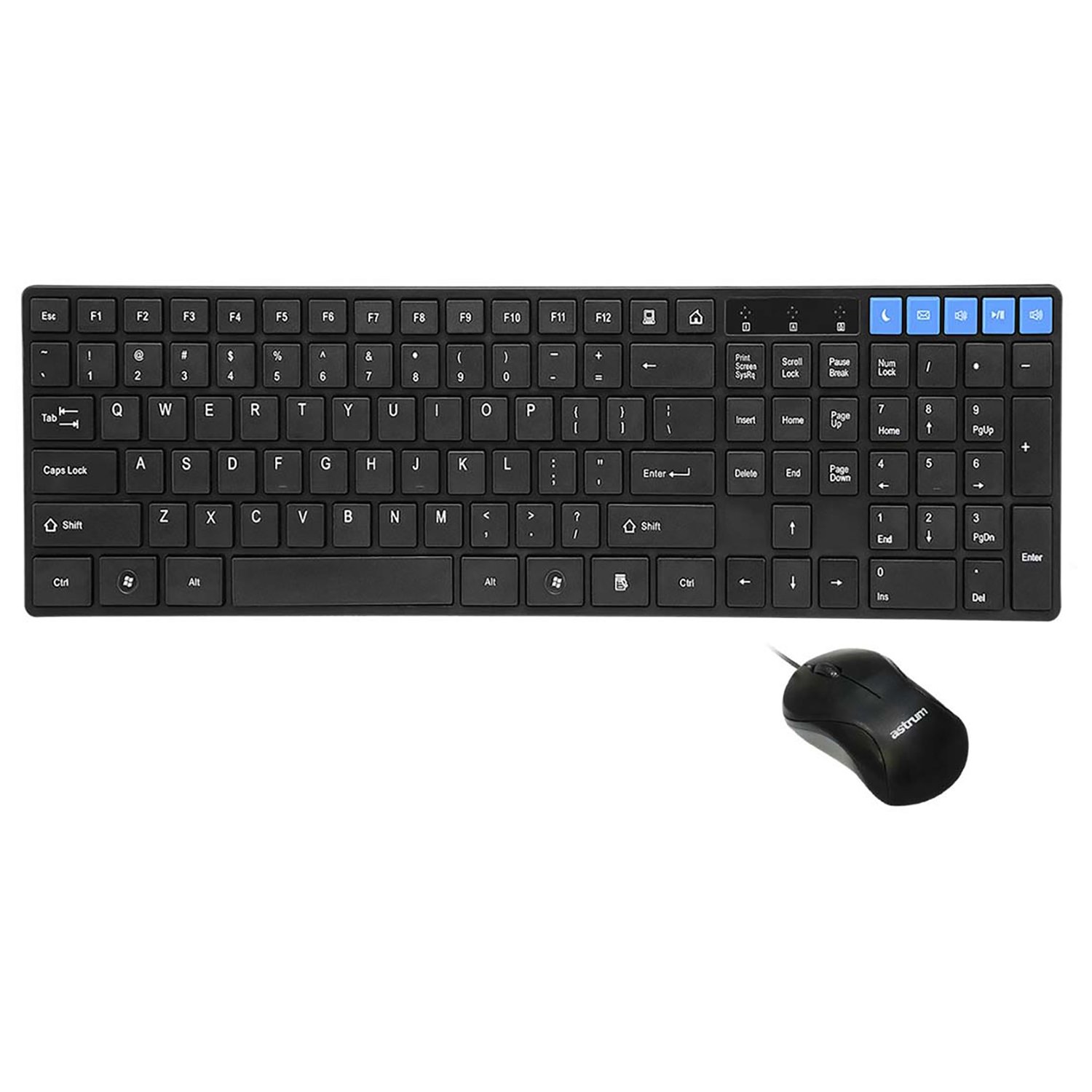
ภาพ: จากบนลงล่าง view of the keyboard and mouse, showing the layout and multimedia keys.
การใช้เมาส์
The included optical mouse provides precise cursor control. It features standard left-click, right-click, and scroll wheel functionality.
- คลิกซ้าย: Primary action, selection, opening items.
- คลิกขวา: เปิดเมนูบริบท
- ล้อเลื่อน: เลื่อนดูเอกสารและ web pages. Can also function as a middle-click button.
การบำรุงรักษาและการดูแล
To ensure the longevity and optimal performance of your Astrum ELETE Combe UB combo, follow these maintenance guidelines:
- การทำความสะอาด:
- Disconnect the keyboard and mouse from your computer before cleaning.
- ใช้ผ้านุ่มไม่เป็นขุยเช็ดเล็กน้อยampened with water or a mild cleaning solution. Avoid harsh chemicals, abrasives, or solvents.
- สำหรับแป้นพิมพ์ คุณสามารถใช้ลมเป่าเพื่อกำจัดฝุ่นและเศษสิ่งสกปรกที่อยู่ระหว่างปุ่มได้
- For the mouse, clean the optical sensor area periodically to ensure smooth tracking.
- ความต้านทานการรั่วไหล: While the keyboard is spill-resistant, it is not waterproof. In case of a spill, immediately disconnect the keyboard, wipe off the liquid, and allow it to dry completely before reconnecting.
- พื้นที่จัดเก็บ: Store the combo in a cool, dry place away from direct sunlight and extreme temperatures when not in use for extended periods.
- การจัดการ: Avoid dropping the devices or subjecting them to strong impacts. Do not attempt to disassemble the keyboard or mouse, as this will void the warranty.
การแก้ไขปัญหา
If you encounter issues with your Astrum ELETE Combe UB combo, please refer to the following common solutions:
- แป้นพิมพ์หรือเมาส์ไม่ตอบสนอง:
- Ensure both USB connectors are firmly plugged into the computer's USB ports.
- Try plugging the keyboard and mouse into different USB ports on your computer.
- รีสตาร์ทเครื่องคอมพิวเตอร์ของคุณ
- If using a USB hub, try connecting directly to the computer's USB ports.
- Keys Not Working or Typing Incorrectly:
- ตรวจสอบดูว่ามีสิ่งกีดขวางใดๆ อยู่ใต้แป้นกุญแจหรือไม่
- Ensure the keyboard layout in your operating system settings matches a US layout.
- ทดสอบแป้นพิมพ์บนคอมพิวเตอร์เครื่องอื่นเพื่อตัดปัญหาเฉพาะระบบออกไป
- เคอร์เซอร์เมาส์กระโดดหรือไม่แน่นอน:
- ทำความสะอาดเซ็นเซอร์ออปติคอลที่ด้านล่างของเมาส์
- Ensure you are using the mouse on a clean, non-reflective, and uniform surface. Mouse pads are recommended.
- ลองเชื่อมต่อเมาส์กับพอร์ต USB อื่น
- ปุ่มมัลติมีเดียไม่ทำงาน:
- Ensure your media player or browser is active and supports standard multimedia key commands.
- Some operating systems may require specific settings for multimedia keys; consult your OS documentation if issues persist.
If the problem persists after trying these steps, please contact Astrum customer support.
ข้อมูลจำเพาะ
| ยี่ห้อ | แอสตรัม |
| หมายเลขรุ่น | ELETE-COMBE-UB |
| ผู้ผลิต | แอสตรัม |
| แพลตฟอร์มฮาร์ดแวร์ | ยูเอสบี |
| เค้าโครงแป้นพิมพ์ | US Layout, Chocolate Keys Flat |
| DPI ของเมาส์ | 1000 dpi Optical |
| ขนาดสินค้า (กxยxส) | 52.1 x 14 x 4.4 Centimeters (approx. 52.07 x 13.97 x 4.45 cm) |
| น้ำหนักสินค้า | 680 กรัม |
| แบตเตอรี่ที่จำเป็น | เลขที่ |
| วันที่พร้อมใช้งานครั้งแรก | 5 มีนาคม 2015 |
การรับประกันและการสนับสนุน
Astrum products are designed for reliability and performance. For information regarding warranty coverage and terms, please refer to the warranty policy provided with your purchase or visit the official Astrum webเว็บไซต์.
For technical support, troubleshooting assistance beyond this manual, or inquiries about replacement parts, please contact Astrum customer service through their official channels. Details can typically be found on the product packaging or the Astrum brand webเว็บไซต์.
Legal Disclaimer: The information provided in this manual is for general guidance. Specifications and features are subject to change without notice.


