1. สินค้าหมดview
The Brother LC101 Ink Cartridges utilize Innobella™ ink technology, designed to produce fade-resistant and colorfast prints. This technology ensures high-quality output with vivid colors and clear definition, suitable for various inkjet printer models. Each cartridge is designed to deliver a page yield of approximately 300 pages.
This package includes individual Cyan, Magenta, and Yellow ink cartridges, allowing for replacement of specific colors as needed.
2. อะไรอยู่ในกล่อง
- 1 x Brother LC101 Cyan Ink Cartridge
- 1 x Brother LC101 Magenta Ink Cartridge
- 1 x Brother LC101 Yellow Ink Cartridge
3. การตั้งค่าและการติดตั้ง
Follow these steps to properly install your Brother LC101 ink cartridges into your compatible Brother inkjet printer.
3.1 Unboxing the Ink Cartridges

Figure 1: Brother LC101 3-pack ink cartridge retail box.
The Brother LC101 ink cartridges come in a retail box containing three individually sealed color cartridges (Cyan, Magenta, Yellow). Each cartridge is sealed in its own plastic bag to maintain freshness and prevent leakage until use.
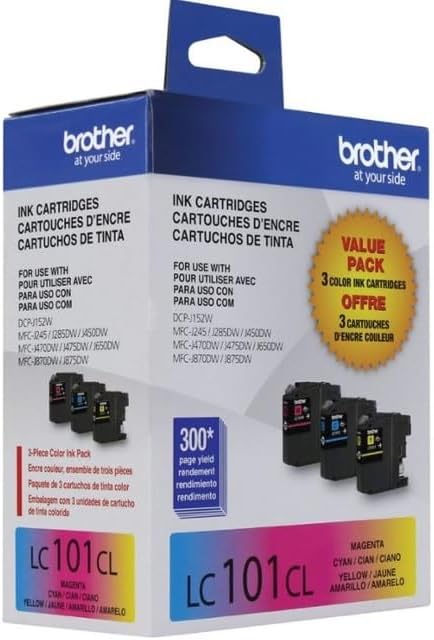
Figure 2: Individual Brother LC101 ink cartridges within their sealed packaging.
3.2 Preparing the Cartridge for Installation
Carefully open the individual plastic packaging for the color cartridge you wish to replace. Unlike some black ink cartridges, the Brother LC101 color cartridges typically do not have a plastic locking seal or tab that needs to be removed before installation. Simply remove the cartridge from its protective bag.
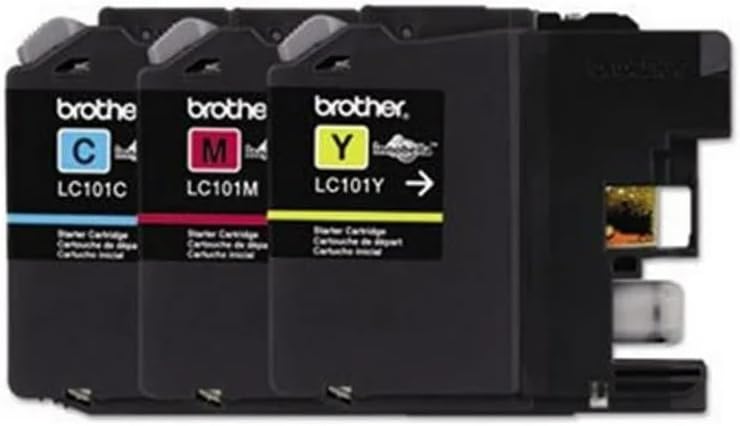
Figure 3: Brother LC101 ink cartridges ready for installation.
3.3 Installing the Cartridge into the Printer
- โปรดตรวจสอบให้แน่ใจว่าเครื่องพิมพ์ Brother ของคุณเปิดใช้งานอยู่
- Open the ink cartridge cover on your printer. Refer to your printer's specific manual for the exact location.
- Locate the empty color slot corresponding to the cartridge you are replacing (Cyan, Magenta, or Yellow).
- Gently push the new ink cartridge into the slot until it clicks securely into place. Do not force the cartridge.
- Close the ink cartridge cover. The printer will typically detect the new cartridge and initiate a brief setup process.
The installation process is designed to be quick and straightforward, minimizing printer downtime.
4. Operating Your Printer with LC101 Cartridges
Once installed, the Brother LC101 cartridges are ready for use. The Innobella™ ink technology ensures consistent, high-quality prints for documents and images. These cartridges are rated for approximately 300 pages, providing a reliable supply for your printing needs.
เพื่อให้ได้คุณภาพการพิมพ์ที่ดีที่สุด โปรดตรวจสอบให้แน่ใจว่าไดรเวอร์เครื่องพิมพ์ของคุณเป็นเวอร์ชันล่าสุด และดำเนินการทำความสะอาดหัวพิมพ์ตามคำแนะนำในคู่มือเครื่องพิมพ์ของคุณ
5. การบำรุงรักษาและการจัดเก็บ
5.1 การจัดเก็บตลับหมึก
Store unused Brother LC101 ink cartridges in their original, sealed packaging in a cool, dry place away from direct sunlight and extreme temperatures. This helps to preserve the ink's quality and prevent drying.
5.2 การบำรุงรักษาเครื่องพิมพ์
Regularly perform printer maintenance tasks such as print head cleaning and nozzle checks through your printer's utility software. This prevents clogs and ensures consistent print quality, extending the life of your cartridges and printer.
6. การแก้ไขปัญหาทั่วไป
6.1 "Ink Almost Out" or Low Ink Warnings
If your printer displays a "low ink" or "ink almost out" warning, it indicates that the cartridge is nearing the end of its life. While the LC101 cartridges are rated for 300 pages, actual yield can vary based on print content and usage. Replace the indicated cartridge when print quality degrades or the printer stops printing.
6.2 Cartridge Not Recognized
If a newly installed cartridge is not recognized by the printer:
- Ensure the cartridge is fully seated in its slot and has clicked into place.
- Remove and reinsert the cartridge firmly.
- Verify that you are using genuine Brother LC101 cartridges.
- Clean the electrical contacts on the cartridge and inside the printer with a lint-free cloth if necessary.
6.3 คุณภาพการพิมพ์ไม่ดี
If prints appear faded, streaky, or have incorrect colors:
- Perform a print head cleaning and nozzle check from your printer's maintenance menu.
- Ensure the paper type setting in your printer driver matches the paper loaded in the tray.
- Check ink levels and replace any empty or very low cartridges.
7. ข้อมูลจำเพาะผลิตภัณฑ์
| คุณสมบัติ | รายละเอียด |
|---|---|
| ยี่ห้อ | พี่ชาย |
| ชื่อรุ่น | LC101 |
| สีหมึก | สีฟ้า, สีม่วงแดง, สีเหลือง |
| ผลผลิตหน้า | 300 pages (approximate) |
| เทคโนโลยีหมึก | Innobella™ |
| อุปกรณ์ที่รองรับ | Inkjet Printers (Brother models compatible with LC101 series) |
| น้ำหนักสินค้า | 4.6 ounces (total for 3-pack) |
| ขนาดสินค้า | 2 x 3.7 x 4.7 นิ้ว |
| ประเภทการจัดหา | หมึก |
| ฐานหมึก | น้ำ |
8. ข้อมูลการรับประกัน
Brother LC101 ink cartridges are covered by Brother's standard manufacturer warranty, which typically protects against defects in materials and workmanship. For specific warranty terms and conditions, please refer to the documentation included with your product or visit the official Brother support webเว็บไซต์.
9. การสนับสนุนลูกค้า
For further assistance, technical support, or to inquire about compatible printer models, please contact Brother customer support. You can find contact information and additional resources on the official Brother webเว็บไซต์.


