1. บทนำ
The Bogen 1126-BG-UTI1 is a single-zone paging controller designed to integrate a paging system with a telephone system. It provides a reliable interface for making announcements over a public address system from a telephone. This manual provides detailed instructions for the proper installation, operation, and maintenance of your Bogen paging controller.
2. ข้อมูลด้านความปลอดภัยที่สำคัญ
โปรดอ่านและทำความเข้าใจคำแนะนำด้านความปลอดภัยทั้งหมดก่อนใช้งานอุปกรณ์นี้ เก็บคู่มือนี้ไว้เพื่อใช้อ้างอิงในอนาคต
- แหล่งพลังงาน: เชื่อมต่อเครื่องเข้ากับแหล่งจ่ายไฟที่ระบุเท่านั้นtage.
- ความชื้น: อย่าให้เครื่องโดนฝนหรือความชื้น
- การระบายอากาศ : ตรวจสอบให้แน่ใจว่ามีการระบายอากาศที่เหมาะสม อย่าปิดกั้นช่องระบายอากาศ
- การบริการ: โปรดส่งผลิตภัณฑ์นี้ให้ช่างผู้ชำนาญการเป็นผู้ดำเนินการซ่อมบำรุง ห้ามซ่อมแซมผลิตภัณฑ์นี้ด้วยตนเอง
- การทำความสะอาด: ทำความสะอาดด้วยผ้าแห้งเท่านั้น
3. เนื้อหาบรรจุภัณฑ์
ตรวจสอบว่ามีรายการทั้งหมดอยู่ในแพ็คเกจ:
- Bogen 1126-BG-UTI1 Single Zone Paging Controller Unit
- อะแดปเตอร์แปลงไฟ
- คู่มือการใช้งาน (เอกสารนี้)
- ฮาร์ดแวร์สำหรับติดตั้ง (ถ้ามี)
4. สินค้าหมดview
The Bogen 1126-BG-UTI1 features various ports and indicators for seamless integration and operation. Familiarize yourself with the unit's components before installation.
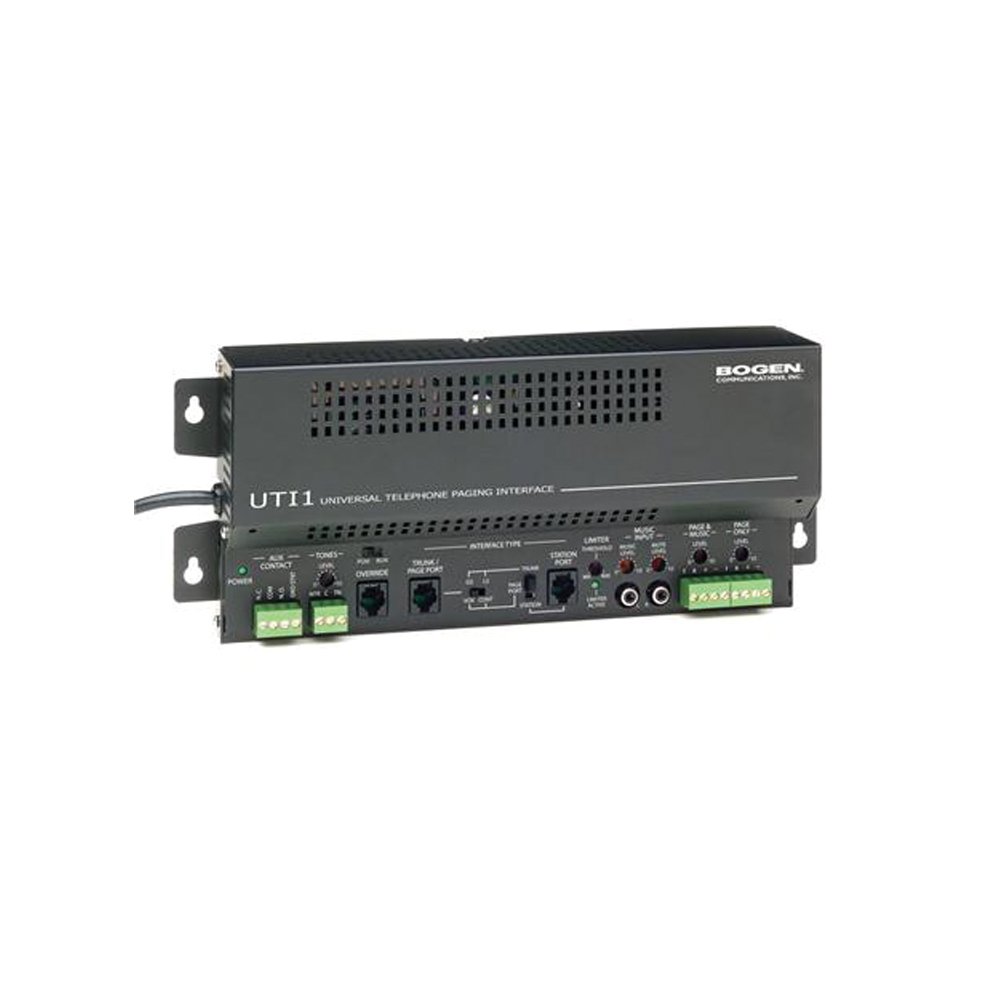
รูปที่ 1: ด้านหน้า view of the Bogen Single Zone Paging Controller. This image displays the main unit, highlighting its compact design and essential connection points for audio input and output, as well as power. The various ports and indicators are visible, crucial for understanding the device's functionality and connectivity.
4.1 แผงด้านหน้า
- กำลังไฟ LED: บ่งชี้สถานะพลังงาน
- การควบคุมระดับอินพุต: Adjusts the audio input sensitivity.
- การควบคุมระดับเอาต์พุต: ปรับระดับเสียงเอาต์พุต
4.2 แผงด้านหลัง
- Telephone Line Input: RJ-11 jack for connecting to the telephone system.
- เอาต์พุตเสียง: RCA or screw terminal connections for connecting to an ampชีวิต.
- กำลังไฟเข้า: Jack for connecting the power adapter.
- MOH Output: Music On Hold output (if applicable).
5. การตั้งค่าและการติดตั้ง
Follow these steps to properly install your paging controller:
- การติดตั้ง: Choose a suitable location for the controller, away from excessive heat or moisture. Secure the unit using appropriate mounting hardware if desired.
- Connect to Telephone System: Connect an RJ-11 cable from your telephone system's paging port or a suitable analog extension to the "Telephone Line Input" on the controller. Consult your telephone system's manual for specific paging port details.
- เชื่อมต่อกับ Ampเครื่องฟอก: Connect the "Audio Output" of the paging controller to an available input on your paging amplifier. Ensure correct polarity if using screw terminals.
- เชื่อมต่อพลังงาน: Plug the provided power adapter into the "Power Input" jack on the controller, then plug the adapter into a standard electrical outlet. The Power LED should illuminate.
- Initial Level Adjustment: Start with the Input Level and Output Level controls set to their minimum positions.
6. คู่มือการใช้งาน
Once installed, the Bogen 1126-BG-UTI1 is ready for operation.
6.1 Making a Page
- From a telephone connected to the system, dial the designated paging access code or extension.
- Wait for the confirmation tone or voice prompt from the paging controller.
- Speak clearly into the telephone handset to make your announcement.
- Hang up the telephone when finished.
6.2 การปรับระดับเสียง
- ระดับอินพุต: Slowly increase the "Input Level Control" until the paging audio is clear and distortion-free. If the audio is too loud or distorted, decrease this level.
- ระดับขาออก: Adjust the "Output Level Control" to achieve the desired volume through the paging speakers. This should be done in conjunction with the ampการควบคุมระดับเสียงของเครื่องขยายเสียง
7. การบำรุงรักษา
The Bogen 1126-BG-UTI1 is designed for reliable operation with minimal maintenance.
- การทำความสะอาด: Periodically wipe the unit with a soft, dry cloth. Do not use liquid cleaners or aerosols.
- การระบายอากาศ : Ensure that ventilation openings remain clear of dust and debris.
- การเชื่อมต่อ: ควรตรวจสอบการเชื่อมต่อสายเคเบิลทั้งหมดเป็นระยะ เพื่อให้แน่ใจว่าแน่นหนาดีแล้ว
8 การแก้ไขปัญหา
หากคุณพบปัญหา โปรดดูคำแนะนำการแก้ไขปัญหาต่อไปนี้:
| ปัญหา | สาเหตุที่เป็นไปได้ | สารละลาย |
|---|---|---|
| ไม่มีไฟแสดงสถานะการทำงาน | Power adapter not connected or faulty; no power at outlet. | Check power adapter connection. Verify outlet has power. Test with another adapter if available. |
| No paging audio. | Incorrect telephone system connection; amplifier off or muted; audio levels too low. | Verify telephone line and audio output connections. Ensure amplifier is on and not muted. Adjust Input and Output Level controls. |
| Paging audio is distorted. | Input or output levels set too high. | Reduce Input Level and/or Output Level controls. |
| Cannot access paging from telephone. | Incorrect paging access code; telephone system not configured correctly. | Confirm the correct paging access code with your telephone system administrator. Verify telephone system programming. |
If the problem persists after attempting these solutions, contact Bogen technical support.
9. ข้อมูลจำเพาะ
| คุณสมบัติ | รายละเอียด |
|---|---|
| หมายเลขรุ่น | 1126-BG-UTI1 |
| ยี่ห้อ | โบเก้น |
| ขนาดแพ็คเกจ | 15 x 9 x 7 นิ้ว |
| น้ำหนักสินค้า | 6.7 ปอนด์ |
| ASIN | B00P1AOL2C |
| ผู้ผลิต | โบเก้น |
| Paging Zones | โซนเดียว |
| ความเข้ากันได้ | Telephone systems with analog paging port or extension |
10. การรับประกันและการสนับสนุน
Bogen products are designed for durability and performance. For specific warranty information, please refer to the warranty card included with your product or visit the official Bogen website. Technical support is available to assist with any questions or issues you may encounter.
- การสนับสนุนทางออนไลน์: เยี่ยม www.bogen.com/support for FAQs, documentation, and contact information.
- ข้อมูลติดต่อ: Refer to the Bogen website for current telephone numbers and email addresses for technical assistance.


