Campus SP-FY24

CAMPUS Poppy Music Portable Bluetooth Speaker

คู่มือการใช้งาน

Model: SP-FY24

สินค้าเกินview

ซีAMPUS Poppy Music is a compact and portable Bluetooth 3.0 speaker designed for on-the-go music enjoyment. It features a unique pop-art design with interchangeable silicone covers, allowing you to customize its appearance. Equipped with a built-in microphone, it also supports hands-free calling.

CAMPUS Poppy Music Speaker in blue

ภาพ: เดอะ ซีAMPUS Poppy Music speaker, showcasing its compact design and blue silicone cover.

คู่มือการติดตั้ง

1. เนื้อหาบรรจุภัณฑ์

ก่อนเริ่มต้น โปรดตรวจสอบให้แน่ใจว่ามีสินค้าทั้งหมดอยู่ในแพ็คเกจ:

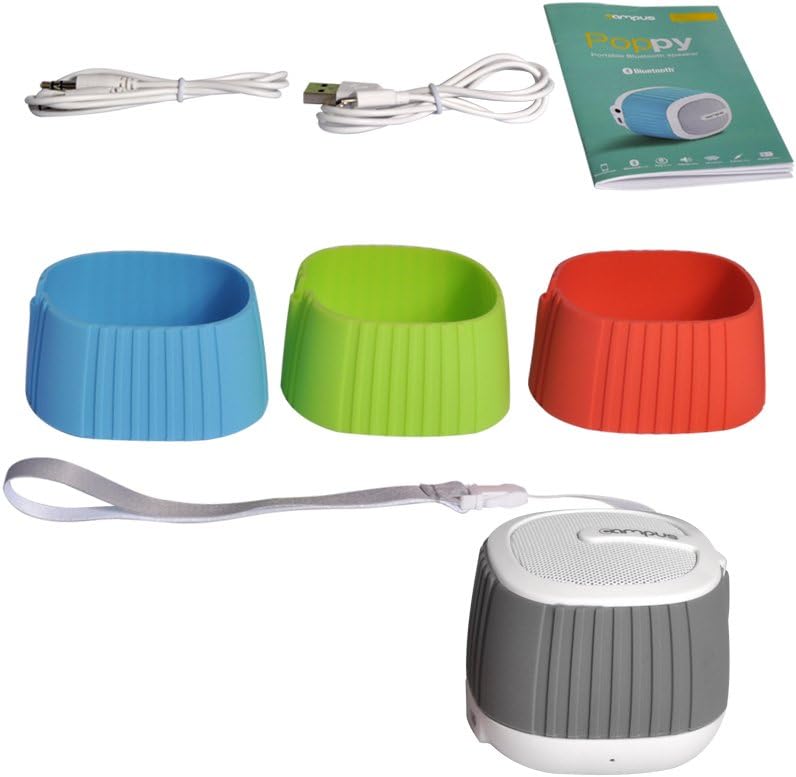
Contents of CAMPUS Poppy Music speaker package

Image: The complete package contents, including the speaker, multiple silicone covers, charging cable, audio cable, and user manual.

  • CAMPUS Poppy Music Portable Bluetooth Speaker
  • Interchangeable Silicone Covers (Red, Blue, Green, Gray)
  • สายชาร์จไมโคร USB
  • สายสัญญาณเสียง 3.5 มม. (AUX)
  • คู่มือการใช้งาน

2. การชาร์จครั้งแรก

For optimal performance, fully charge the speaker before first use.

  1. Connect the supplied Micro-USB cable to the charging port (DC 5V) on the speaker.
  2. เชื่อมต่อปลายอีกด้านหนึ่งของสาย USB เข้ากับอะแดปเตอร์ไฟ USB (ไม่รวมอยู่ด้วย) หรือพอร์ต USB ของคอมพิวเตอร์
  3. ไฟ LED จะสว่างขึ้นขณะชาร์จ
  4. Charging typically takes 2 to 3 hours. The LED indicator will change or turn off once fully charged.

3. Changing Silicone Covers

Customize your speaker's look by easily swapping the silicone covers.

Speaker with silicone covers being changed

ภาพ: ชิ้นส่วนที่ถูกถอดประกอบ view of the speaker, showing how the silicone cover can be removed and replaced.

  1. Gently peel off the current silicone cover from the speaker body.
  2. Select your desired color cover.
  3. Align the new cover with the speaker and carefully stretch it over the body until it fits snugly.
Four CAMPUS Poppy Music speakers with different colored silicone covers

Image: Four CAMPUS Poppy Music speakers, each with a different colored silicone cover (red, blue, green, gray), demonstrating the customization options.

คำแนะนำการใช้งาน

1. เปิด/ปิดเครื่อง

  • การเปิดเครื่อง: Locate the power button (often integrated with play/pause or a dedicated switch) and press and hold it until you hear an audible prompt or the LED indicator lights up.
  • วิธีปิดเครื่อง: Press and hold the power button again until the speaker powers down.

2. การจับคู่บลูทู ธ

Connect your speaker wirelessly to your device.

  1. Ensure the speaker is powered on and in pairing mode (the LED indicator may flash rapidly).
  2. บนสมาร์ทโฟน แท็บเล็ต หรืออุปกรณ์อื่นๆ ที่เปิดใช้งาน Bluetooth ให้ไปที่การตั้งค่า Bluetooth
  3. ค้นหา available devices. The speaker should appear as "Poppy Music" or similar.
  4. Select the speaker from the list to pair. You will hear a confirmation sound once successfully connected.
  5. ลำโพงจะเชื่อมต่อกับอุปกรณ์ที่จับคู่ล่าสุดโดยอัตโนมัติเมื่อเปิดเครื่อง หากบลูทูธของอุปกรณ์นั้นเปิดใช้งานอยู่และอยู่ในระยะทำการ

3. การเล่นเสียงและการควบคุม

Control your music and calls using the speaker's integrated controls.

  • เล่น/หยุดชั่วคราว: Press the Play/Pause button (often a central button) to start or pause music playback.
  • การควบคุมระดับเสียง: ใช้ปุ่มเพิ่มเสียง (+) และลดเสียง (-) เพื่อปรับระดับเสียง
  • เพลงถัดไป / ก่อนหน้า: Press and hold or short press (depending on model) the volume buttons or dedicated track buttons to skip tracks.
  • การโทรแบบแฮนด์ฟรี:
    • รับสาย: กดปุ่มเล่น/หยุดชั่วคราวหนึ่งครั้งเพื่อรับสายเรียกเข้า
    • วางสาย: กดปุ่มเล่น/หยุดชั่วคราวหนึ่งครั้งในระหว่างการโทรเพื่อวางสาย
    • ปฏิเสธสาย: กดปุ่มเล่น/หยุดชั่วคราวค้างไว้เพื่อปฏิเสธสายเรียกเข้า

4. AUX Input (Wired Connection)

For devices without Bluetooth, use the 3.5mm audio cable.

  1. เชื่อมต่อปลายด้านหนึ่งของสายสัญญาณเสียงขนาด 3.5 มม. เข้ากับพอร์ตอินพุต AUX บนลำโพง
  2. Connect the other end to the headphone jack of your audio device (e.g., MP3 player, computer).
  3. ลำโพงจะเปลี่ยนเป็นโหมด AUX โดยอัตโนมัติ

การซ่อมบำรุง

การแก้ไขปัญหา

ปัญหาสาเหตุที่เป็นไปได้สารละลาย
ลําโพงไม่เปิดขึ้นแบตเตอรี่เหลือน้อยหรือหมดชาร์จลำโพงเป็นเวลา 2-3 ชั่วโมง
ไม่สามารถจับคู่ผ่านบลูทูธได้
  • ลำโพงไม่ได้อยู่ในโหมดจับคู่
  • Bluetooth is off on your device.
  • Speaker is already connected to another device.
  • Too far from the device.
  • Ensure speaker is powered on and LED is flashing (pairing mode).
  • เปิดใช้งานบลูทูธบนอุปกรณ์ของคุณ
  • Disconnect from other devices or turn off their Bluetooth.
  • เลื่อนลำโพงให้ใกล้กับอุปกรณ์ของคุณมากขึ้น (ภายในระยะ 10 เมตร)
ไม่มีเสียง.
  • เสียงเบาเกินไป
  • Incorrect input mode (Bluetooth/AUX).
  • Device not playing audio.
  • เพิ่มระดับเสียงทั้งบนลำโพงและอุปกรณ์ที่เชื่อมต่อ
  • Ensure correct mode is active (Bluetooth connected or AUX cable inserted).
  • Check if audio is playing on your source device.
คุณภาพเสียงไม่ดี
  • การรบกวนหรือระยะทาง
  • แบตเตอรี่อ่อน
  • Move speaker closer to the device, away from obstacles or other wireless devices.
  • ชาร์จลำโพง

ข้อมูลจำเพาะ

ยี่ห้อCampus
ชื่อรุ่นPoppy Music
หมายเลขรุ่นSP-FY24
เทคโนโลยีการเชื่อมต่อBluetooth 3.0, AUX (3.5mm)
กำลังขับสูงสุดของลำโพงกำลังไฟ 3 วัตต์ RMS
อายุการใช้งานแบตเตอรี่5 ถึง 8 ชั่วโมง
เวลาในการชาร์จ2 to 3 hours (via Micro-USB, 5V)
อุปกรณ์ที่รองรับSmartphones, Tablets, Bluetooth-enabled devices
ขนาด (แพ็คเกจ)15.4 x 9.2 x 8.2 ซม.
น้ำหนัก (แพ็คเกจ)240.4 กรัม
ประเภทตัวควบคุมTouchpad (Pekplatta)

การรับประกันและการสนับสนุน

This product is covered by standard consumer warranty laws in your region. Please retain your proof of purchase for any warranty claims.

For technical support or further assistance, please refer to the contact information provided by your retailer or visit the official Campus webเว็บไซต์.

Note: Software updates are not guaranteed for this product.

เอกสารที่เกี่ยวข้อง - SP-FY24

พรีview PizzaMaster 700/800/900 Series Parts Overview และรายการ
Comprehensive parts overview and list for PizzaMaster 700, 800, and 900 series ovens. Find part numbers, descriptions, and diagrams for essential oven components.
พรีview MaxMate Soft Roll Up Tonneau Cover Installation Guide
Comprehensive installation guide for the MaxMate Soft Roll Up Tonneau Cover, including tools required, items list, assembly steps, positioning, latching, rolling up/down, tension control, special bracket instructions, and troubleshooting.
พรีview เลนส์ ZEISS Supreme Prime และ Supreme Prime Radiance: ตารางแสดงระยะชัดลึก
ตารางแสดงระยะชัดลึกโดยละเอียดสำหรับเลนส์ ZEISS Supreme Prime และ Supreme Prime Radiance ซึ่งให้รายละเอียดประสิทธิภาพในช่วงค่า T-stop ต่างๆ และรูปแบบเซ็นเซอร์ต่างๆ สำหรับผู้สร้างภาพยนตร์และศิลปินด้านภาพ
พรีview กาว Bostik ISOGRIP®: รายงานการประเมิน ICC-ES ESR-1140 สำหรับแผงแซนด์วิช
รายงานการประเมิน ICC-ES ฉบับสมบูรณ์ (ESR-1140) สำหรับกาว ISOGRIP® ของ Bostik รายละเอียดข้อมูลจำเพาะของผลิตภัณฑ์ การใช้งานในแผงแซนด์วิชโครงสร้าง แนวทางการติดตั้ง และการปฏิบัติตามมาตรฐาน IBC, IRC และกฎหมายอาคารของรัฐแคลิฟอร์เนีย
พรีview คู่มือการใช้งานและคำแนะนำสำหรับเครื่องอบผ้าปั่นแห้ง Umelome
โปรดอ่านคู่มือการใช้งานเครื่องอบผ้า Umelome Spin Dryer สำหรับคำแนะนำด้านความปลอดภัยและรายละเอียดผลิตภัณฑ์viewรวมถึงการติดตั้ง การใช้งาน การทำความสะอาด และข้อมูลทางเทคนิค เรียนรู้วิธีการใช้งานและบำรุงรักษาเครื่องอบผ้าแบบหมุนอย่างถูกต้อง
พรีview คู่มือการติดตั้งและการใช้งานฝักบัวเทอร์โมสแตติกและแบบแมนนวล NewTeam 1000 Plus
คู่มือการติดตั้งและการใช้งานที่ครอบคลุมสำหรับฝักบัวเทอร์โมสตัทและแบบใช้มือ NewTeam 1000 Plus ครอบคลุมถึงการวางแผน การติดตั้ง การเริ่มต้นใช้งาน คำแนะนำสำหรับผู้ใช้ การแก้ไขปัญหา และชิ้นส่วนอะไหล่