การแนะนำ
This manual provides comprehensive instructions for the setup, operation, and maintenance of your Genius SW-2.1 355 Speaker System. Please read this manual thoroughly before using the product to ensure proper functionality and to maximize your listening experience.
ข้อมูลด้านความปลอดภัย
ปฏิบัติตามข้อควรระวังด้านความปลอดภัยต่อไปนี้เพื่อป้องกันความเสียหายต่ออุปกรณ์หรือการบาดเจ็บต่อตัวคุณเอง:
- อย่าให้ลำโพงโดนน้ำหรือความชื้น
- ควรหลีกเลี่ยงการวางลำโพงไว้ใกล้แหล่งความร้อนหรือในที่ที่มีแสงแดดส่องโดยตรง
- ตรวจสอบให้แน่ใจว่ามีการระบายอากาศที่เหมาะสมรอบ ๆ ซับวูฟเฟอร์เพื่อป้องกันความร้อนสูงเกินไป
- ใช้เฉพาะอะแดปเตอร์ไฟฟ้าที่มาพร้อมกับเครื่องเท่านั้น
- อย่าพยายามเปิดหรือซ่อมแซมเครื่องด้วยตัวเอง แนะนำให้ช่างผู้ชำนาญเข้ารับบริการทั้งหมด
- เก็บให้พ้นจากมือเด็ก
เนื้อหาแพ็คเกจ
ตรวจสอบว่ามีรายการทั้งหมดอยู่ในแพ็คเกจ:
- ซับวูฟเฟอร์ 1 ตัว
- ลำโพงดาวเทียม 2 ตัว
- 1 x Audio input cable (3.5mm stereo jack)
- อะแดปเตอร์ไฟฟ้า 1 ตัว
- 1 x คู่มือผู้ใช้ (เอกสารนี้)
สินค้าเกินview
The Genius SW-2.1 355 Speaker System consists of a subwoofer and two satellite speakers designed to deliver clear audio and powerful bass for your multimedia needs.
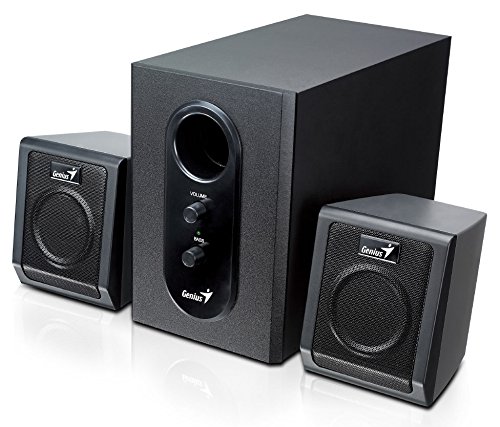
This image displays the Genius SW-2.1 355 Speaker System. It features a central, larger subwoofer unit with volume and bass control knobs on its front panel, and two smaller satellite speakers positioned on either side. All components are black.
ส่วนประกอบ:
- ซับวูฟเฟอร์: The main unit housing the bass driver and control panel.
- ลำโพงดาวเทียม: Two compact speakers for mid-range and high-frequency audio.
- แผงควบคุม: Located on the subwoofer, featuring Volume and Bass adjustment knobs.
การตั้งค่า
- การจัดวางตำแหน่งลำโพง: Place the subwoofer on the floor or a sturdy surface. Position the satellite speakers on either side of your listening area, facing towards you for optimal stereo separation.
- การเชื่อมต่อลำโพงแซทเทิลไลท์: Connect the cables from the two satellite speakers to the corresponding output jacks on the rear of the subwoofer unit. Ensure a secure connection.
- เชื่อมต่อแหล่งสัญญาณเสียง: Connect one end of the 3.5mm audio input cable to the "Audio In" jack on the subwoofer. Connect the other end to the audio output jack (e.g., headphone jack) of your computer, MP3 player, smartphone, or other audio source.
- การเชื่อมต่อพลังงาน: Plug the power adapter into the DC input jack on the subwoofer. Then, plug the power adapter into a standard electrical outlet.
- เปิดเครื่อง: Turn on the speaker system using the power switch, usually integrated with the volume knob.
การดำเนินการ
- เปิด/ปิดเครื่องและควบคุมระดับเสียง: The main knob on the subwoofer controls both power and overall volume. Rotate clockwise to turn on and increase volume; rotate counter-clockwise to decrease volume and turn off.
- การปรับเสียงเบส: Use the "Bass" knob on the subwoofer to adjust the level of low-frequency sound. Rotate clockwise to increase bass, and counter-clockwise to decrease it, according to your preference.
- ระดับเสียงของแหล่งกำเนิดเสียง: For optimal sound quality, set the volume on your audio source (computer, phone, etc.) to about 75% and then use the speaker system's volume control for fine adjustments.
การซ่อมบำรุง
- การทำความสะอาด: Use a soft, dry cloth to clean the surfaces of the speakers. Do not use liquid cleaners or abrasive materials.
- พื้นที่จัดเก็บ: หากต้องเก็บรักษาลำโพงเป็นเวลานาน ควรตัดการเชื่อมต่อจากแหล่งจ่ายไฟและเก็บไว้ในที่แห้งและเย็น
- การจัดการสายเคเบิล: ตรวจสอบให้แน่ใจว่าสายเคเบิลไม่พันกันหรือถูกหนีบ เพื่อป้องกันความเสียหาย
การแก้ไขปัญหา
| ปัญหา | สาเหตุที่เป็นไปได้ | สารละลาย |
|---|---|---|
| ไม่มีเสียง |
|
|
| เสียงเพี้ยน |
|
|
| เบสที่อ่อนแอ |
|
|
ข้อมูลจำเพาะ
| คุณสมบัติ | รายละเอียด |
|---|---|
| ชื่อรุ่น | สว-2.1 355 |
| ประเภทลำโพง | 2.1 Channel Multimedia Speaker System (Bookshelf, Satellite, Subwoofer) |
| กำลังขับรวม | 10 Watts RMS (5W Subwoofer + 2.5W x 2 Satellites) |
| วัสดุ | ไม้ (ซับวูฟเฟอร์) |
| เทคโนโลยีการเชื่อมต่อ | แบบมีสาย (อินพุตเสียง 3.5 มม.) |
| อุปกรณ์ที่รองรับ | MP3 Player, Personal Computer, Smartphones, Tablets, Televisions |
| การควบคุม | วอลลุ่มเสียงเบส |
| แหล่งพลังงาน | DC |
| น้ำหนักสินค้า | 2.78 กก. |
| ขนาดแพ็คเกจ | 39.6 x 25 x 18.4 ซม. |
การรับประกันและการสนับสนุน
Genius products are designed for reliability and performance. For information regarding warranty coverage, technical support, or service inquiries, please refer to the warranty card included with your product or visit the official Genius webไซต์ โปรดเก็บใบเสร็จรับเงินไว้เป็นหลักฐานการซื้อ


