การแนะนำ
This manual provides comprehensive instructions for the setup, operation, and troubleshooting of your Amazon Fire TV Stick Replacement Remote, model CV98LM. Please read these instructions carefully to ensure proper use and to maximize your experience with the device.
สินค้าเกินview
The Amazon Fire TV Stick Replacement Remote (Model CV98LM) is designed to provide seamless control over your Amazon Fire TV Stick. This remote is not voice-operated and offers standard navigation and playback controls for an intuitive user experience. It connects to your Fire TV Stick via Bluetooth, allowing control from various locations within a room.
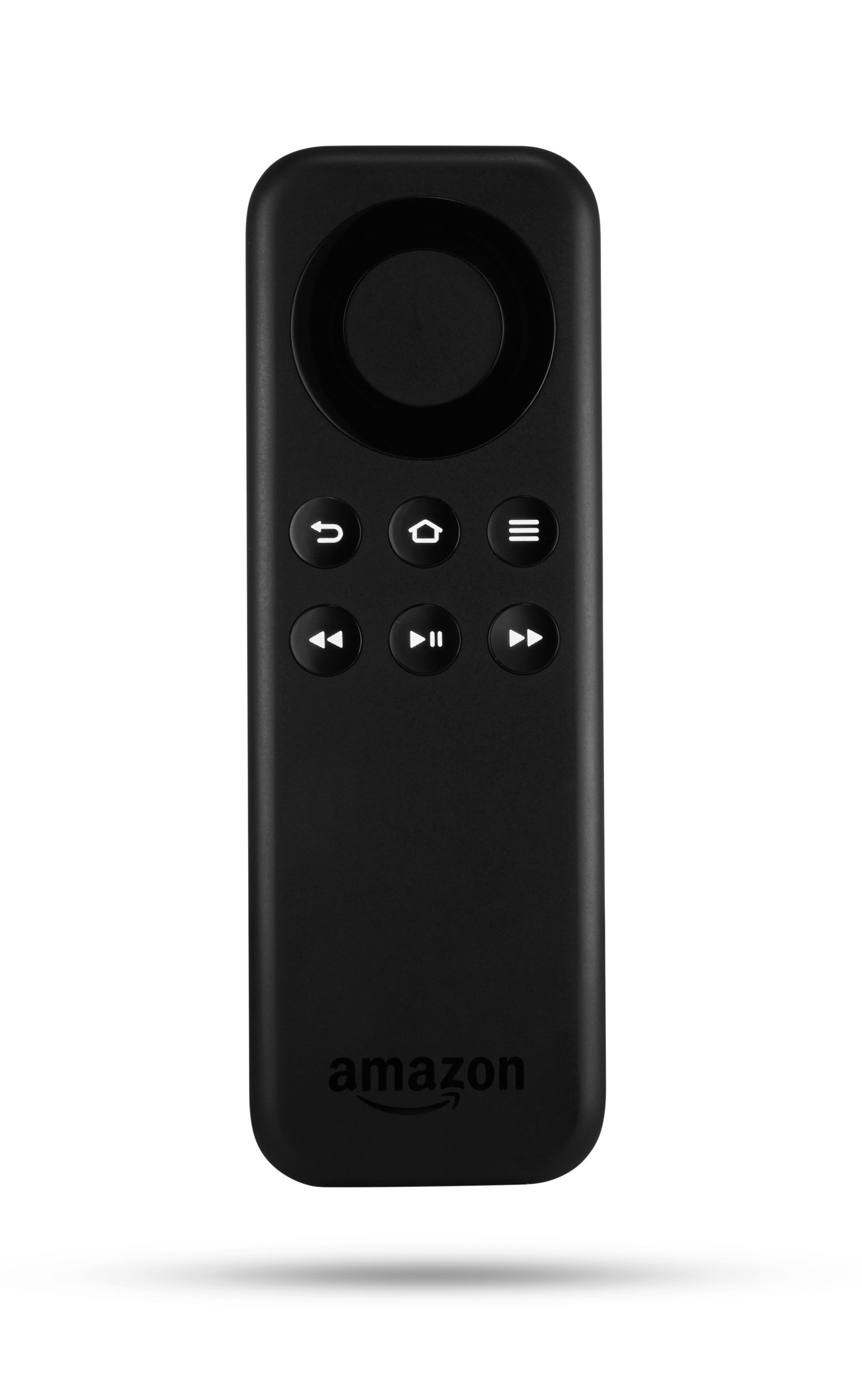
ภาพ: ด้านหน้า view of the Amazon Fire TV Stick Replacement Remote, showing its buttons and ergonomic design.
คุณสมบัติหลัก:
- Direct replacement for Amazon Fire TV Stick remotes (non-voice models).
- Standard navigation and playback controls for easy content management.
- Bluetooth connectivity for reliable control.
ตั้งค่าและจับคู่
Follow these steps to pair your replacement remote with your Amazon Fire TV Stick:
- ถอดแบตเตอรี่ออก: Take the batteries out of the replacement remote.
- Unplug Fire TV Stick: Disconnect the power cable from your Fire TV Stick and unplug the Fire TV Stick from the HDMI port on your television. Wait for approximately 40 seconds.
- Reinsert Batteries: Place the batteries back into the replacement remote, ensuring correct polarity.
- Reconnect Fire TV Stick: Plug the Fire TV Stick back into the HDMI port and reconnect its power cable.
- เริ่มการจับคู่: As soon as the Amazon Fire TV logo appears on your screen, press and hold the บ้าน button on your new replacement remote.
- Finalize Pairing (using existing remote or app): If you have an existing remote or the Fire TV Remote app on your smartphone, navigate to การตั้งค่า > รีโมทและอุปกรณ์บลูทูธ > รีโมท Amazon Fire TV > เพิ่มรีโมทใหม่. Select your new remote (it may appear as "Amazon Fire TV Remote") from the list to complete the pairing process.
- Your new remote should now be ready for use.
คำแนะนำการใช้งาน
The replacement remote provides intuitive controls for navigating your Fire TV Stick:
- วงแหวนนำทาง: Use the circular ring to move up, down, left, and right through menus and content.
- ปุ่มเลือก: The center button within the navigation ring confirms selections.
- ปุ่มโฮม: นำคุณกลับสู่หน้าจอหลักของ Fire TV
- ปุ่มย้อนกลับ: กลับไปที่หน้าจอหรือเมนูก่อนหน้า
- ปุ่มเมนู: Accesses contextual options within apps or menus.
- ปุ่มเล่น/หยุดชั่วคราว: ควบคุมการเล่นสื่อ
- ปุ่มกรอไปข้างหน้า/ย้อนกลับ: ข้ามไปข้างหน้าหรือข้างหลังในการเล่นสื่อ
การแก้ไขปัญหา
If you encounter issues with your replacement remote, try the following solutions:
Remote Not Responding or Pairing:
- Power Cycle Remote and Device:
- ถอดแบตเตอรี่ออกจากรีโมท
- Unplug the Fire TV Stick from its HDMI port and disconnect its micro USB power cable.
- รออย่างน้อย 1 นาที
- Reconnect the micro USB power cable to the Fire TV Stick, then plug the Fire TV Stick back into the HDMI port.
- Once the Fire TV logo appears on the screen, insert fresh batteries into the remote.
- After the home screen loads, press and hold the บ้าน button on the remote for 10 seconds to attempt pairing.
- Perform a Software Reset on the Remote:
- กดปุ่มค้างไว้พร้อมกัน เมนู ปุ่ม ซ้าย button (left side of the navigational ring), and the กลับ button (the arrow that curves back toward the left) for 10 seconds.
- The remote will become inactive for up to 2 minutes during this reset.
- If the remote does not automatically pair afterward, press and hold the บ้าน button for at least 10 seconds to make it discoverable for pairing.
- ตรวจสอบแบตเตอรี่: ตรวจสอบให้แน่ใจว่าใส่แบตเตอรี่ถูกต้องและแบตเตอรี่ไม่หมด หากจำเป็นให้เปลี่ยนแบตเตอรี่ใหม่
- ล้างสิ่งกีดขวาง: Ensure there are no physical obstructions between the remote and the Fire TV Stick.
ข้อมูลจำเพาะ
| คุณสมบัติ | รายละเอียด |
|---|---|
| หมายเลขรุ่น | CV98LM |
| ขนาดสินค้า | 4.68 x 1.59 x 0.55 นิ้ว |
| น้ำหนักสินค้า | 1.12 ออนซ์ |
| การเชื่อมต่อ | บลูทูธ |
| ผู้ผลิต | AMDSI |
| วันที่พร้อมใช้งานครั้งแรก | 27 ตุลาคม 2014 |
การรับประกันและการสนับสนุน
For information regarding warranty coverage and customer support, please refer to the documentation provided with your original Amazon Fire TV Stick or visit the official Amazon support webไซต์นี้ โปรดเก็บใบเสร็จรับเงินที่ซื้อไว้เพื่อใช้เรียกร้องการรับประกัน