1. บทนำ
The Celestron TrekGuide 48006-DS is a versatile 4-in-1 digital outdoor device designed for various outdoor activities. It integrates a digital compass, barometer, altimeter, and thermometer into a single, compact unit. This manual provides detailed instructions for setup, operation, and maintenance to ensure optimal performance and longevity of your device.

รูปที่ 1.1: The Celestron TrekGuide 48006-DS device shown in its retail packaging, highlighting its 4-in-1 functionality as a digital compass, barometer, altimeter, and thermometer.
2. เนื้อหาบรรจุภัณฑ์
ตรวจสอบว่ามีสินค้าทั้งหมดที่ระบุไว้ด้านล่างอยู่ในแพ็คเกจของคุณ:
- Celestron TrekGuide 48006-DS Digital Device
- Lanyard / Wrist Strap
- 2 x CR2032 Lithium-ion Batteries (pre-installed or separate)
- คู่มือผู้ใช้เล่มนี้
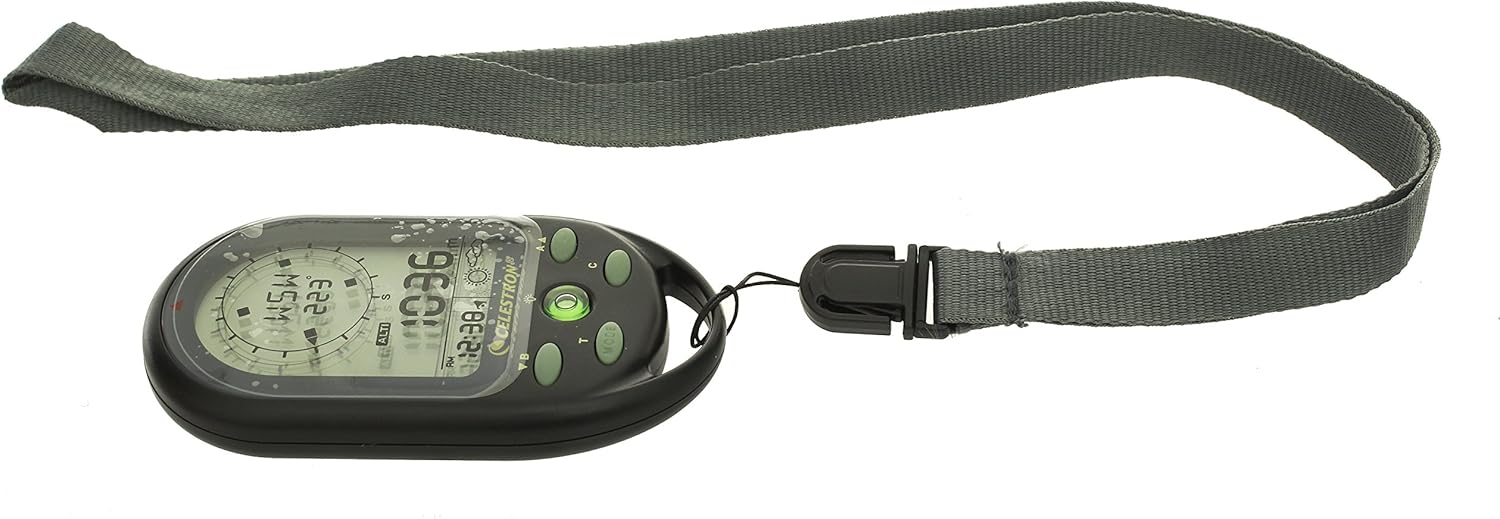
รูปที่ 2.1: All components included with the Celestron TrekGuide: the main device, a gray lanyard, and two CR2032 batteries.
3. อุปกรณ์โอเวอร์view
Familiarize yourself with the various parts and controls of your TrekGuide device.

รูปที่ 3.1: ด้านหน้า view of the TrekGuide display, showing the digital compass, altitude reading, time, and weather forecast icon. Buttons for navigation and mode selection are visible below the screen.

รูปที่ 3.2: หลัง view of the TrekGuide device, displaying the "TrekGuide Digital Compass" logo, model number 48006, and regulatory markings. The battery compartment is located on the back.
3.1. Buttons and Display
- MODE Button (M): Cycles through different functions (Compass, Altimeter, Barometer, Thermometer, Time).
- SET Button (S): Used to enter settings mode for the currently displayed function.
- UP/DOWN Buttons (A/B): Adjust values or navigate menu options in settings mode.
- LIGHT Button (L): เปิดใช้งานไฟแบ็คไลท์ของจอแสดงผล
- จอแสดงผล LCD: Shows readings, time, and settings.
4. การตั้งค่า
4.1. การติดตั้งแบตเตอรี่
- ค้นหาช่องใส่แบตเตอรี่ที่ด้านหลังของอุปกรณ์ (ดูรูปที่ 3.2)
- Using a small Phillips head screwdriver, carefully remove the screws securing the battery cover.
- Insert two CR2032 Lithium-ion batteries, ensuring correct polarity (+/-).
- ปิดฝาครอบแบตเตอรี่กลับเข้าที่และขันให้แน่นด้วยสกรู
4.2. การเปิดเครื่องครั้งแรกและการตั้งค่าพื้นฐาน
Upon first power-on or after battery replacement, you may need to set the time, date, and measurement units.
- กดปุ่มค้างไว้ โหมด ปุ่มเพื่อเปิดเครื่อง
- กดปุ่ม โหมด button repeatedly until the Time display is shown.
- กดปุ่มค้างไว้ ชุด button to enter time setting mode. The hour digit will flash.
- ใช้ ขึ้น/ลง ปุ่มสำหรับปรับชั่วโมง กด ชุด to confirm and move to the next setting (minutes, 12/24 hour format, year, month, day).
- Repeat step 4 for all time and date settings.
- After setting the date, you may be prompted to set units (e.g., Celsius/Fahrenheit for temperature, meters/feet for altitude, hPa/inHg for pressure). Use ขึ้น/ลง เพื่อเลือกและ ชุด เพื่อยืนยัน.
- กด โหมด เพื่อออกจากการตั้งค่า
5. คู่มือการใช้งาน
The TrekGuide features multiple functions accessible via the โหมด ปุ่ม.
5.1. เข็มทิศดิจิตอล
The digital compass provides directional bearings. For accurate readings, ensure the device is held level and away from strong magnetic fields.
- กดปุ่ม โหมด button until the compass display appears (showing cardinal directions and degrees).
- การปรับเทียบเข็มทิศ: For first use or if accuracy issues arise, calibrate the compass.
- In compass mode, press and hold the ชุด กดปุ่มเพื่อเข้าสู่โหมดการปรับเทียบ
- Follow the on-screen instructions, typically involving rotating the device slowly in a figure-eight motion or 360-degree horizontal rotation.
- Once calibrated, the device will return to compass display.
- Hold the device horizontally and point the top edge in the desired direction. The display will show the cardinal direction (e.g., N, NE, E) and the bearing in degrees.
5.2. Altimeter
The altimeter measures current altitude based on atmospheric pressure. For best accuracy, calibrate it at a known altitude.
- กดปุ่ม โหมด button until the altimeter display appears (showing altitude in meters or feet).
- การสอบเทียบเครื่องวัดความสูง:
- If you know your current altitude (e.g., from a map or sign), press and hold the ชุด button in altimeter mode.
- ใช้ ขึ้น/ลง buttons to adjust the displayed altitude to the known value.
- กด ชุด เพื่อยืนยัน.
- The device will now display your current altitude. Note that altitude readings can fluctuate with changes in atmospheric pressure.
5.3. บารอมิเตอร์
The barometer measures atmospheric pressure and can provide a basic weather forecast.
- กดปุ่ม โหมด button until the barometer display appears (showing pressure in hPa or inHg).
- The device may also display a weather forecast icon (e.g., sun for clear, cloud for cloudy, rain for precipitation) based on recent pressure trends. This is an estimation and should not replace official weather forecasts.
5.4. เครื่องวัดอุณหภูมิ
The thermometer measures ambient temperature.
- กดปุ่ม โหมด button until the thermometer display appears (showing temperature in Celsius or Fahrenheit).
- For accurate readings, remove the device from your body and allow it to acclimate to the ambient air temperature for several minutes.
5.5. Clock, Calendar, and Alarm
The TrekGuide also functions as a clock with date display and an alarm feature.
- การแสดงเวลา/วันที่: กดปุ่ม โหมด button until the time and date are shown.
- การตั้งปลุก: ในโหมดเวลา ให้กดปุ่ม ชุด กดปุ่มจนกว่าการตั้งค่านาฬิกาปลุกจะปรากฏขึ้น ใช้ ขึ้น/ลง to adjust the alarm time and ชุด to confirm. You can usually toggle the alarm on/off in this mode.
5.6. การทำงานของไฟแบ็คไลท์
กดปุ่ม แสงสว่าง button to illuminate the display for better visibility in low-light conditions. The backlight will typically remain on for a few seconds before automatically turning off to conserve battery power.
6. การบำรุงรักษา
6.1. การทำความสะอาด
เช็ดเครื่องเบาๆงamp ใช้ผ้าเช็ดทำความสะอาด ห้ามใช้สารทำความสะอาดที่มีฤทธิ์กัดกร่อนหรือตัวทำละลาย เพราะอาจทำให้ผ้าเสียหายได้asing or display. Ensure the device is dry before storage.
6.2. การเปลี่ยนแบตเตอรี่
When the display becomes dim or the device functions erratically, it is time to replace the batteries. Refer to Section 4.1 for battery installation instructions. Always use two new CR2032 Lithium-ion batteries. Dispose of old batteries responsibly according to local regulations.
6.3. การจัดเก็บ
Store the TrekGuide in a cool, dry place away from direct sunlight and extreme temperatures. If storing for an extended period, it is recommended to remove the batteries to prevent leakage.
7 การแก้ไขปัญหา
| ปัญหา | สาเหตุที่เป็นไปได้ | สารละลาย |
|---|---|---|
| อุปกรณ์ไม่เปิดเครื่อง | แบตเตอรี่เสียหรือติดตั้งไม่ถูกต้อง | Check battery polarity. Replace batteries with new CR2032 cells. |
| การอ่านค่าเข็มทิศไม่แม่นยำ | Needs calibration; strong magnetic interference. | Perform compass calibration (Section 5.1). Move away from electronic devices or metal objects. |
| Inaccurate altimeter readings. | Needs calibration; changes in atmospheric pressure. | Calibrate altimeter at a known altitude (Section 5.2). Note that pressure changes affect readings. |
| จอภาพมืดหรือกระพริบ | พลังงานแบตเตอรี่ต่ำ | เปลี่ยนแบตเตอรี่ |
| อุปกรณ์ไม่ตอบสนอง | ซอฟต์แวร์มีปัญหาชั่วคราว | Remove batteries for 30 seconds, then reinsert. This performs a soft reset. |
8. ข้อมูลจำเพาะ
- แบบอย่าง: Celestron TrekGuide 48006-DS
- ฟังก์ชั่น: Digital Compass, Barometer, Altimeter, Thermometer, Clock, Calendar, Alarm
- แสดง: LCD พร้อม Backlight
- ความต้านทานน้ำ: Yes (Splash-proof, not submersible)
- แหล่งพลังงาน: 2 x CR2032 Lithium-ion Batteries
- ขนาด : ประมาณ 104.5 x 26.3 x 50 มม. (4.1 x 1.0 x 2.0 นิ้ว)
- น้ำหนัก: ประมาณ 130 กรัม (0.29 ปอนด์)
- อุณหภูมิในการทำงาน: (Not specified, typical for electronics)
- ช่วงระดับความสูง: (Not specified, typical for similar devices)
- ช่วงความดัน: (Not specified, typical for similar devices)
- ช่วงอุณหภูมิ: (Not specified, typical for similar devices)
Note: Specific ranges for altitude, pressure, and temperature are not provided in the product data. Refer to the device's on-screen display or packaging for precise details if available.
9. การรับประกันและการสนับสนุน
For warranty information and technical support, please refer to the official Celestron webหรือติดต่อฝ่ายบริการลูกค้า โปรดเก็บใบเสร็จรับเงินไว้เป็นหลักฐานการซื้อสำหรับการเรียกร้องการรับประกันใดๆ
Celestron Official Webเว็บไซต์: www.celestron.com


