1. บทนำ
This manual provides essential information for the safe and effective operation, maintenance, and troubleshooting of your Seca 374 Digital Baby Scale. Please read this manual thoroughly before using the device to ensure proper functionality and to prevent injury or damage.
The Seca 374 is designed for precise weighing of infants and toddlers, featuring an extra-large tray and advanced functions like Auto-HOLD, TARE, and BMIF (Breast-Milk-Intake-Function).
2. ข้อมูลด้านความปลอดภัย
ปฏิบัติตามหลักเกณฑ์ด้านความปลอดภัยต่อไปนี้เสมอ:
- Ensure the scale is placed on a stable, flat surface before use.
- Do not leave infants unattended on the scale.
- ควรเก็บเครื่องชั่งให้ห่างจากน้ำและอุณหภูมิที่สูงจัด
- ใช้เฉพาะอะแดปเตอร์แปลงไฟหรือแบตเตอรี่ที่ระบุไว้เท่านั้น
- อย่าพยายามถอดประกอบหรือซ่อมเครื่องชั่งด้วยตนเอง โปรดติดต่อเจ้าหน้าที่บริการที่ได้รับอนุญาต
- ทำความสะอาดตะกรันด้วยความนุ่มนวลงamp ผ้า. หลีกเลี่ยงน้ำยาทำความสะอาดที่มีฤทธิ์กัดกร่อน
3. สินค้าหมดview
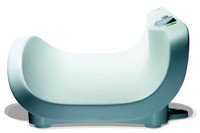
Figure 1: Seca 374 Digital Baby Scale. This image shows the scale from a side angle, highlighting its large, curved weighing tray designed to comfortably accommodate infants and toddlers. The digital display and control buttons are visible on the right side of the tray.
The Seca 374 Digital Baby Scale is designed for accurate and comfortable weighing of infants. Key features include:
- Large Weighing Tray: Accommodates seated toddlers up to 44 lbs.
- ปรับ Dampฟังก์ชั่น ing: Ensures fast and precise measurements even with fidgety children.
- Auto-HOLD Function: Locks the weight display for easy reading.
- ฟังก์ชั่น TARE: Allows for weighing net weight (e.g., excluding diaper weight).
- BMIF (Breast-Milk-Intake-Function): Calculates the amount of milk consumed by a baby.
- แหล่งพลังงานคู่: Operates on batteries or via power adapter.
4. การตั้งค่า
- การแกะกล่อง: นำเครื่องชั่งออกจากบรรจุภัณฑ์อย่างระมัดระวัง เก็บรักษาบรรจุภัณฑ์ไว้สำหรับการขนส่งหรือจัดเก็บในอนาคต
- แหล่งจ่ายไฟ:
- แบตเตอรี่: Open the battery compartment on the underside of the scale. Insert the required number of batteries (e.g., AA or AAA, refer to battery compartment label) ensuring correct polarity. Close the compartment securely.
- อะแดปเตอร์ไฟฟ้า: If using the power adapter, plug the adapter into the scale's power input port and then into a suitable electrical outlet.
- การจัดวาง: Place the scale on a firm, level, and stable surface, free from vibrations. Avoid placing it near heat sources or direct sunlight.
- เปิดเครื่องครั้งแรก: Press the ON/OFF button. The display should illuminate and show "0.00" or similar, indicating it is ready for use.
5. คู่มือการใช้งาน
5.1 การชั่งน้ำหนักพื้นฐาน
- เปิดเครื่องชั่งโดยกดปุ่ม เปิด/ปิด ปุ่ม.
- Wait for the display to show "0.00".
- Gently place the infant or toddler in the center of the weighing tray. Ensure the child is calm and still for an accurate reading.
- The scale will automatically stabilize and display the weight. The Auto-HOLD function will lock the reading.
- Remove the child from the scale. The display will return to "0.00" or prepare for the next measurement.
5.2 TARE Function (Net Weight)
Use the TARE function to subtract the weight of a diaper, blanket, or clothing to obtain the net weight of the baby.
- เปิดเครื่องชั่ง
- Place the item to be tared (e.g., blanket) on the weighing tray.
- กดปุ่ม ทดค่า button. The display will reset to "0.00" with the weight of the item subtracted.
- Gently place the infant on the tray. The displayed weight will be the net weight of the infant.
5.3 BMIF (Breast-Milk-Intake-Function)
This function helps determine the amount of breast milk consumed by the baby during feeding.
- ชั่งน้ำหนักทารก ก่อน feeding using the basic weighing procedure. Note this initial weight.
- ป้อนนมให้ทารก
- ชั่งน้ำหนักทารก หลังจาก การให้อาหาร
- กดปุ่ม BMIF button (or equivalent, refer to scale buttons). The scale will calculate and display the difference in weight, indicating the amount of milk consumed.
6. การบำรุงรักษาและการดูแล
- การทำความสะอาด: เช็ดพื้นผิวของเกล็ดด้วยผ้าเนื้อนุ่มและแห้งamp cloth using a mild detergent. Do not use abrasive cleaners, solvents, or immerse the scale in water.
- พื้นที่จัดเก็บ: When not in use for extended periods, store the scale in a dry, cool place. If using batteries, remove them to prevent leakage.
- การสอบเทียบ: The scale is factory calibrated. If you suspect inaccuracies, contact Seca customer support for professional calibration services.
7 การแก้ไขปัญหา
| ปัญหา | สาเหตุที่เป็นไปได้ | สารละลาย |
|---|---|---|
| เครื่องชั่งน้ำหนักไม่เปิด | Dead batteries or power adapter not connected. | Replace batteries or ensure power adapter is securely plugged in. |
| การอ่านที่ไม่ถูกต้อง | Scale not on a level surface; child moving; scale overloaded. | Place on a stable, flat surface; ensure child is still; check weight limit. |
| "Err" or error message on display. | โอเวอร์โหลด; ความผิดปกติภายใน | Remove weight if overloaded; turn off and on again. If persistent, contact support. |
8. ข้อมูลจำเพาะ
| แบบอย่าง | Seca 374 |
| ความจุ | มากถึง 44 ปอนด์ (20 กก.) |
| แหล่งจ่ายไฟ | Batteries or AC Adapter |
| ฟังก์ชั่น | Auto-HOLD, TARE, BMIF, Adjustable Dampกำลังทำ |
| Dimensions (Tray) | Extra-large tray (specific dimensions not provided) |
| ผู้ผลิต | Seca Scales |
| ASIN | B00LERY4YQ |
หมายเหตุ: ข้อมูลจำเพาะอาจเปลี่ยนแปลงได้โดยไม่ต้องแจ้งให้ทราบล่วงหน้า
9. การรับประกันและการสนับสนุน
Seca products are manufactured to high-quality standards. For information regarding warranty coverage, please refer to the warranty card included with your product or visit the official Seca webเว็บไซต์.
For technical support, service, or spare parts, please contact Seca customer service:
- Webเว็บไซต์: www.seca.com
- ข้อมูลติดต่อ: Refer to the "Contact Us" section on the Seca website for regional phone numbers and email addresses.
When contacting support, please have your model number (Seca 374) and ASIN (B00LERY4YQ) ready.


