การแนะนำ
This user manual provides comprehensive instructions for the operation and maintenance of your NEC Air Conditioner Remote Control, model NER-Z28A(K). Please read this manual thoroughly before using the remote control to ensure proper function and longevity of the device. Keep this manual for future reference.
ข้อมูลด้านความปลอดภัย
- อย่าให้รีโมทคอนโทรลโดนแสงแดดโดยตรง อุณหภูมิสูง หรือความชื้นสูง
- หลีกเลี่ยงการทำรีโมทคอนโทรลตกหรือโดนแรงกระแทกรุนแรง
- Do not attempt to disassemble or modify the remote control. This may cause malfunction and void the warranty.
- เก็บแบตเตอรี่ให้พ้นมือเด็ก หากกลืนกิน ให้ไปพบแพทย์ทันที
- ทิ้งแบตเตอรี่ที่ใช้แล้วตามระเบียบข้อบังคับของท้องถิ่น
การระบุชิ้นส่วน
Familiarize yourself with the various parts and buttons of your remote control.
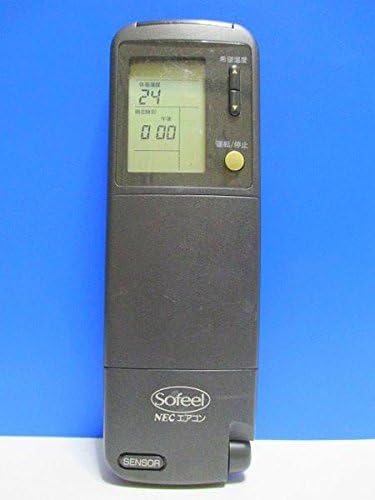
รูปที่ 1 : ด้านหน้า View
This image displays the front of the remote control, featuring the LCD screen at the top which shows temperature and time, and a yellow power button below it. The brand "Sofeel NEC エアコン" is visible at the bottom.

Figure 2: Hidden Buttons
This image shows the remote control with its lower cover slid open, exposing a panel of additional buttons. These buttons control functions such as automatic operation, heating, cooling, dry mode, fan speed adjustment (strong, medium, weak), and various timer settings (on-timer, off-timer, combination timer, sleep timer).

รูปที่ 3: ย้อนกลับ View
The back of the remote control is shown, highlighting the battery compartment cover. Text on the back provides instructions regarding battery installation, replacement, and the location of the ACL button for resetting the remote after battery changes.
ปุ่มฟังก์ชั่น:
- ปุ่มเปิด/ปิด (สีเหลือง): Turns the air conditioner ON/OFF.
- ปุ่มปรับอุณหภูมิ: ปรับอุณหภูมิได้ตามต้องการ
- Mode Selection (under cover): Selects operation modes (Auto, Heat, Cool, Dry).
- Fan Speed (under cover): Adjusts fan speed (Auto, Strong, Medium, Weak).
- Timer Buttons (under cover): Sets On/Off timers, Combination timer, and Sleep timer.
- Clock/Time Adjustment (under cover): Sets the current time and timer settings.
- Sleep Mode (under cover): Activates sleep operation.
- System Button (under cover): For system-specific functions.
การตั้งค่า
การติดตั้งแบตเตอรี่:
- Slide open the battery compartment cover on the back of the remote control (refer to Figure 3).
- Insert two AAA alkaline batteries, ensuring the correct polarity (+/-) as indicated inside the compartment.
- ปิดฝาช่องใส่แบตเตอรี่ให้แน่น
- After installing new batteries, press the ACL button (usually a small recessed button requiring a pointed object like a pen tip) to reset the remote control. This ensures proper function.
คำแนะนำการใช้งาน
การใช้งานพื้นฐาน:
- การเปิด/ปิด: Point the remote control towards the air conditioner unit and press the yellow Power button.
- ปรับอุณหภูมิ: Use the temperature adjustment buttons (usually up/down arrows) to set your desired temperature. The current setting will be displayed on the LCD screen.
Advanced Functions (under cover):
Slide down the front cover to access additional function buttons.
- การเลือกโหมด: Press the "冷暖切換" (Cool/Heat Switch) button or individual mode buttons (自動運転 - Auto, 暖房 - Heating, ドライ - Dry, 冷房 - Cooling) to select the desired operating mode.
- การปรับความเร็วพัดลม: Press the "風速切換" (Fan Speed Switch) button to cycle through fan speeds (自動 - Auto, 強 - Strong, 中 - Medium, 弱 - Weak).
- การตั้งค่าตัวจับเวลา:
- 入時刻 (On-Timer): Sets the time for the air conditioner to turn on.
- 切時刻 (Off-Timer): Sets the time for the air conditioner to turn off.
- 組合せ (Combination Timer): Combines On and Off timers.
- スリープタイマー (Sleep Timer): Activates sleep mode, which adjusts temperature gradually for comfortable sleep.
- การปรับนาฬิกา: Use the "時計" (Clock) and "時刻調整" (Time Adjustment) buttons to set the current time on the remote's display.
การซ่อมบำรุง
การเปลี่ยนแบตเตอรี่:
Replace batteries when the display becomes dim or the remote control's range decreases. Always replace both batteries at the same time with new ones of the same type (AAA alkaline).
- เปิดฝาช่องใส่แบตเตอรี่
- ถอดแบตเตอรี่เก่าออก
- Insert new AAA alkaline batteries, observing correct polarity.
- ปิดฝาครอบ
- Press the ACL button to reset the remote control.
การทำความสะอาด:
เช็ดรีโมทคอนโทรลด้วยผ้านุ่มและแห้ง ห้ามใช้น้ำยาทำความสะอาดหรือวัสดุที่มีฤทธิ์กัดกร่อน
การแก้ไขปัญหา
| ปัญหา | สาเหตุที่เป็นไปได้ | สารละลาย |
|---|---|---|
| รีโมทคอนโทรลไม่สามารถควบคุมเครื่องปรับอากาศได้ | Batteries are dead or inserted incorrectly. Obstruction between remote and AC unit. Remote control is out of range. | Replace batteries, ensuring correct polarity. Remove any obstructions. Move closer to the air conditioner unit. |
| หน้าจอ LCD มืดหรือว่างเปล่า | พลังงานแบตเตอรี่ต่ำ | เปลี่ยนแบตเตอรี่ทั้งสองก้อนด้วยแบตเตอรี่ใหม่ |
| Remote control functions are erratic after battery replacement. | ต้องรีเซ็ตรีโมทคอนโทรล | Press the ACL button on the back of the remote control. |
ข้อมูลจำเพาะ
- ยี่ห้อ: เอ็นอีซี
- แบบอย่าง: NER-Z28A(K)
- เทคโนโลยีการเชื่อมต่อ: อินฟราเรด
- ประเภทตัวควบคุม: ปุ่มควบคุม
- ประเภทแบตเตอรี่: AAA Alkaline (not included)
- น้ำหนักผลิตภัณฑ์: ประมาณ 100 กรัม
การรับประกันและการสนับสนุน
For warranty information or technical support, please refer to the documentation provided with your air conditioner unit or contact NEC customer service directly. Keep your purchase receipt as proof of purchase.
บันทึก: This remote control is designed specifically for compatible NEC air conditioner models. Compatibility with other brands or models is not guaranteed.


