การแนะนำ
ขอบคุณสำหรับการซื้อasing the Marantz CD5005 CD Player. This manual provides detailed instructions for the proper setup, operation, and maintenance of your new audio component. The CD5005 is designed to deliver high-quality audio playback from various disc formats, including CD, CD-R, CD-RW, MP3, and WMA files. It features high-quality audio components such as the CS4398 DAC and Marantz HDAM SA2, ensuring exceptional sound reproduction. Please read this manual thoroughly before using the unit to ensure optimal performance and longevity.
คำแนะนำเพื่อความปลอดภัย
Always follow these basic safety precautions when operating the CD5005 CD Player:
- แหล่งพลังงาน: เชื่อมต่อเครื่องเข้ากับเต้ารับไฟฟ้ากระแสสลับของโวลท์เท่านั้นtage ระบุไว้ที่แผงด้านหลัง
- การระบายอากาศ : Ensure adequate ventilation. Do not block ventilation openings. Avoid installing in confined spaces.
- น้ำและความชื้น: อย่าวางเครื่องไว้ในที่ที่มีฝน ความชื้น หรือความชื้นสูงเกินไป อย่าวางสิ่งของที่บรรจุของเหลวไว้บนเครื่อง
- ความร้อน: เก็บเครื่องให้ห่างจากแหล่งความร้อน เช่น หม้อน้ำ เครื่องทำความร้อน เตา หรืออุปกรณ์อื่นๆ ที่ผลิตความร้อน
- การทำความสะอาด: ถอดปลั๊กเครื่องออกจากเต้ารับที่ผนังก่อนทำความสะอาด ใช้ผ้าแห้งเท่านั้น
- การบริการ: อย่าพยายามซ่อมบำรุงเครื่องด้วยตนเอง แนะนำให้ช่างผู้ชำนาญการเป็นผู้ซ่อมบำรุงทุกครั้ง
- การจัดการดิสก์: Handle discs by their edges. Avoid touching the shiny surface. Keep discs clean and free from scratches.
เนื้อหาแพ็คเกจ
ตรวจสอบว่าแพ็คเกจของคุณมีรายการต่อไปนี้:
- Marantz CD5005 CD Player
- สายไฟที่ถอดออกได้
- Audio Cables (L/R Analog)
- Digital Audio Cable (Coaxial)
- หน่วยควบคุมระยะไกล
- AA Batteries for Remote Control (x2)
- Quick Setup Guide (Printed)
- Interactive CD-ROM Manual (except Japan)
สินค้าเกินview
แผงด้านหน้า

รูปที่ 1 : ด้านหน้า view of the Marantz CD5005 CD Player. This image shows the disc tray, display, control buttons, and headphone jack on the front panel.
The front panel of the CD5005 features the disc tray, a clear dual-line display, essential playback control buttons (Play, Pause, Stop, Skip), and a headphone output with a dedicated volume control. The power button is located on the left side.
แผงด้านหลัง

รูปที่ 2: ด้านหลัง view of the Marantz CD5005 CD Player. This image displays the various input and output terminals, including analog audio outputs, digital coaxial and optical outputs, and the AC power inlet.
The rear panel provides connectivity options including gold-plated analog audio outputs, digital coaxial output, and digital optical output for connecting to an amplifier or receiver. A remote control input/output terminal is also present for system integration, along with the detachable AC power inlet.
รีโมทคอนโทรล
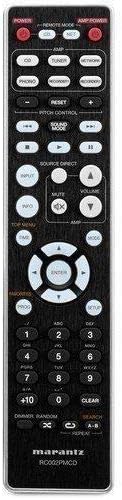
Figure 3: The remote control unit for the Marantz CD5005 CD Player. This remote allows for comprehensive control of the CD player's functions, including playback, track selection, pitch control, and display dimmer.
The included remote control unit provides full functionality for the CD5005, including features not available on the front panel such as pitch control, display dimmer, track randomization, and various repeat functions. It also allows for control of other compatible Marantz components.
การตั้งค่า
1 การวาง
Place the CD5005 on a stable, level surface away from direct sunlight, heat sources, and excessive vibration. Ensure there is adequate space around the unit for proper ventilation.
2. การเชื่อมต่อสายสัญญาณเสียง
Choose one of the following methods to connect the CD5005 to your ampเครื่องขยายเสียงหรือเครื่องรับสัญญาณ:
- การเชื่อมต่อแบบอะนาล็อก: Use the supplied L/R analog audio cables to connect the AUDIO OUT jacks on the CD5005 to the corresponding CD input jacks on your amplifier. Ensure red plugs connect to red jacks (right channel) and white plugs to white jacks (left channel).
- การเชื่อมต่อแบบดิจิทัลโคแอกเซียล: Use the supplied digital coaxial cable to connect the COAXIAL DIGITAL AUDIO OUT jack on the CD5005 to a digital coaxial input on your ampเครื่องขยายเสียงหรือตัวรับสัญญาณ
- การเชื่อมต่อแบบดิจิตอลออปติคอล: Use an optical digital audio cable (not supplied) to connect the OPTICAL DIGITAL AUDIO OUT jack on the CD5005 to a digital optical input on your ampเครื่องขยายเสียงหรือตัวรับสัญญาณ
บันทึก: Do not connect both analog and digital outputs to the same input on your amplifier simultaneously, as this may cause interference or unexpected behavior. Select the appropriate input on your amplifier after connecting.
3. การเชื่อมต่อสายไฟ
Connect the detachable power cord to the AC inlet on the rear panel of the CD5005, then plug the other end into a suitable AC wall outlet.
4. การติดตั้งแบตเตอรี่รีโมทคอนโทรล
Open the battery compartment on the back of the remote control unit. Insert two AA batteries, ensuring correct polarity (+/-) as indicated inside the compartment. Close the cover securely.
คำแนะนำการใช้งาน
การเล่นซีดีขั้นพื้นฐาน
- กดปุ่ม พลัง กดปุ่มบนแผงด้านหน้าหรือรีโมทคอนโทรลเพื่อเปิดเครื่อง
- กดปุ่ม เปิด/ปิด ปุ่มเพื่อเปิดถาดใส่แผ่นดิสก์
- Place a CD, CD-R, CD-RW, MP3, or WMA disc onto the disc tray with the label side facing up.
- กดปุ่ม เปิด/ปิด กดปุ่มอีกครั้งเพื่อปิดถาดใส่แผ่น เครื่องจะอ่านแผ่น
- กดปุ่ม เล่น ปุ่มเพื่อเริ่มเล่น
- หากต้องการหยุดการเล่นชั่วคราว ให้กดปุ่ม หยุดชั่วคราว ปุ่ม กดอีกครั้งเพื่อดำเนินการต่อ
- หากต้องการหยุดเล่นให้กดปุ่ม หยุด ปุ่ม.
- ใช้ ข้าม ปุ่มสำหรับนำทางระหว่างแทร็ก
Advanced Features (Remote Control)
- การควบคุมระดับเสียง: ใช้ การควบคุมระดับเสียง buttons on the remote to adjust the playback speed and pitch.
- การแสดงข้อความ CD: If a disc supports CD Text, the display will show track and artist information. Use the แสดง button on the remote to cycle through display modes.
- เล่นซ้ำ: กดปุ่ม ทำซ้ำ button on the remote to select repeat modes (e.g., repeat one track, repeat all tracks, repeat A-B segment).
- การเล่นแบบสุ่ม: กดปุ่ม สุ่ม button on the remote to play tracks in a random order.
- เอาท์พุตหูฟัง: Connect headphones to the front panel headphone jack. Adjust the ระดับ knob next to the jack to control headphone volume independently. Note that plugging in headphones does not mute the main analog or digital outputs.
- การควบคุมแอพ: The CD5005 supports app control via RC-5 with a compatible Marantz network player. Refer to the network player's manual for details on this integration.
การซ่อมบำรุง
การทำความสะอาดตัวเครื่อง
Wipe the exterior surfaces of the CD5005 with a soft, dry cloth. Do not use abrasive cleaners, waxes, or solvents, as these can damage the finish. Avoid spraying liquids directly onto the unit.
Disc Handling and Care
- Always hold discs by their edges to prevent fingerprints and scratches on the playing surface.
- If a disc is dirty, wipe it gently from the center outwards with a soft, lint-free cloth. Do not use circular motions.
- Do not use solvents such as benzene, thinner, or commercially available record cleaners, as they may damage the disc.
- ควรเก็บแผ่นดิสก์ไว้ในกล่องเมื่อไม่ได้ใช้งาน เพื่อป้องกันฝุ่นและรอยขีดข่วน
- Avoid exposing discs to direct sunlight or high temperatures for extended periods.
การแก้ไขปัญหา
If you experience issues with your Marantz CD5005, refer to the following common problems and solutions:
| ปัญหา | สาเหตุที่เป็นไปได้ | สารละลาย |
|---|---|---|
| ไม่มีไฟฟ้า | สายไฟไม่ได้เชื่อมต่ออย่างแน่นหนา | ตรวจสอบการเชื่อมต่อสายไฟเข้ากับเครื่องและเต้ารับที่ผนัง |
| ไม่มีเสียงออก | Incorrect audio cable connection; wrong input selected on ampเครื่องฟอก; ampระดับเสียงของเครื่องขยายเสียงเบาเกินไป | ตรวจสอบการเชื่อมต่อสายสัญญาณเสียง เลือกอินพุตที่ถูกต้องบนอุปกรณ์ของคุณ amplifier. Increase ampปริมาตรของตัวฟอก |
| แผ่นไม่เล่น / เกิดข้อผิดพลาด "ไม่มีแผ่น" | ใส่แผ่นไม่ถูกต้อง แผ่นสกปรกหรือมีรอยขีดข่วน หรือแผ่นไม่รองรับรูปแบบนี้ | Insert disc with label side up. Clean the disc. Try a different disc. Ensure disc format (CD, CD-R/RW, MP3, WMA) is supported. |
| การเล่นข้ามหรือเล่นไม่ต่อเนื่อง | Disc is dirty or scratched; unit is subject to vibration. | Clean the disc. Place the unit on a stable surface away from vibrations. |
| รีโมตคอนโทรลไม่ทำงาน | Batteries are depleted or inserted incorrectly; obstacle between remote and unit; remote sensor blocked. | Replace batteries, ensuring correct polarity. Remove any obstacles. Ensure the remote sensor on the unit is clear. |
If the problem persists after trying these solutions, please contact Marantz customer support.
ข้อมูลจำเพาะ
| คุณสมบัติ | รายละเอียด |
|---|---|
| หมายเลขรุ่น | ซีดี5005 |
| ความเข้ากันได้ของดิสก์ | ซีดี, ซีดี-อาร์/อาร์ดับเบิลยู, เอ็มพี3, ดับเบิลยูเอ็มเอ |
| ตัวแปลงดิจิทัลเป็นแอนะล็อก (DAC) | ซีเอส4398 |
| Analog Output Circuit | Marantz HDAM SA2 |
| เอาท์พุต | Analog L/R (Gold-plated), Digital Coaxial, Digital Optical, Headphone |
| คุณสมบัติพิเศษ | Pitch Control, CD Text Display, App Control (via RC-5 with Marantz network player), Auto Standby |
| การใช้พลังงาน (สแตนด์บาย) | ต่ำ |
| ขนาดสินค้า (กว้าง x ลึก x สูง) | 17.3 x 14.6 x 4.1 นิ้ว (43.9 x 37.1 x 10.4 ซม.) |
| น้ำหนักสินค้า | 11.02 ปอนด์ (5.0 กก.) |
| ผู้ผลิต | มารันทซ์ |
| สี | สีดำ |
การรับประกันและการสนับสนุน
For warranty information and customer support, please refer to the warranty card included with your product or visit the official Marantz webไซต์นี้ โปรดเก็บหลักฐานการซื้อไว้เพื่อใช้ยืนยันการรับประกัน
Marantz Official Webเว็บไซต์: www.marantz.com