1. บทนำ
The Mastech MS6612 is a digital luxmeter designed for measuring illuminance. It features a large LCD display with backlight and a bar graph for easy reading. This device offers automatic and manual range switching, data hold, peak value measurement, relative value measurement, and zero calibration functions. It is capable of measuring up to 200,000 Lux or 20,000 Foot-Candles (Fc).
2. ข้อมูลด้านความปลอดภัย
โปรดอ่านและทำความเข้าใจคำแนะนำด้านความปลอดภัยทั้งหมดก่อนใช้งานอุปกรณ์ การไม่ปฏิบัติตามคำแนะนำเหล่านี้อาจส่งผลให้เกิดการบาดเจ็บหรือความเสียหายต่อมิเตอร์ได้
- Do not operate the meter in environments with explosive gas, vapor, or dust.
- ควรหลีกเลี่ยงการวางเครื่องวัดไว้ในที่ที่มีอุณหภูมิสูงหรือความชื้นสูงเกินไป
- ถอดแบตเตอรี่ออกหากไม่ได้ใช้งานมิเตอร์เป็นเวลานานเพื่อป้องกันการรั่วไหล
- Do not attempt to repair or modify the meter. Refer all servicing to qualified personnel.
- รักษามิเตอร์ให้สะอาดและแห้ง
3. สินค้าหมดview
The Mastech MS6612 Digital Luxmeter consists of a main unit with an LCD display and control buttons, and a silicon photoelectric diode sensor for light detection.
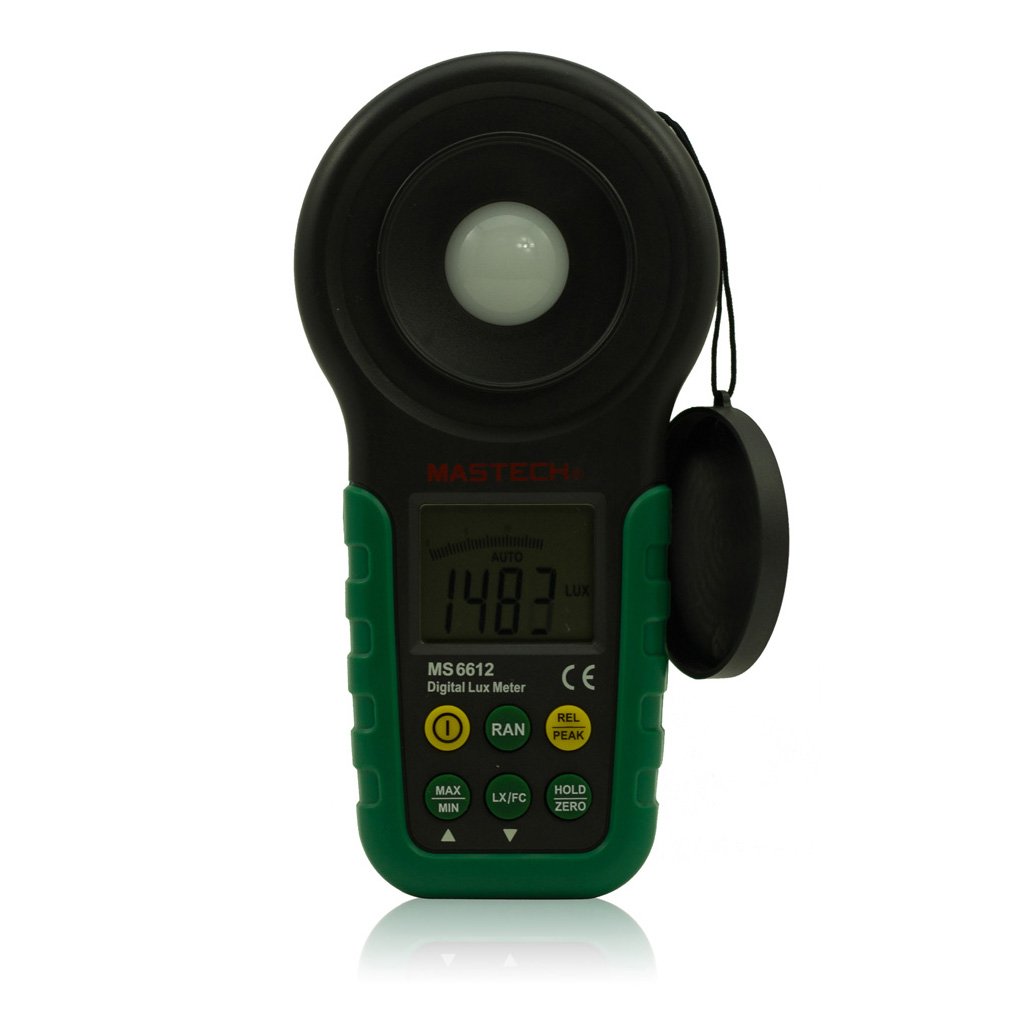
รูปที่ 1: ด้านหน้า view of the Mastech MS6612 Digital Luxmeter. This image shows the main body of the device, including the large LCD screen, control buttons, and the light sensor located at the top.
ส่วนประกอบหลัก:
- จอแสดงผล LCD: 3½ digits with analog bar display for clear readings.
- ปุ่มควบคุม: For various functions such as power, range, hold, peak, relative, zero, unit conversion, and mute.
- เซ็นเซอร์แสง: Silicon photoelectric diode for accurate light measurement.
- ช่องใส่แบตเตอรี่: Located at the rear for a 9V battery.
4. การตั้งค่า
4.1 การติดตั้งแบตเตอรี่
- ค้นหาฝาครอบช่องใส่แบตเตอรี่ที่ด้านหลังของมิเตอร์
- Use a screwdriver (if necessary) to open the battery compartment.
- Insert one 9V (IEC 6LR61) battery, observing the correct polarity (+/-).
- ปิดฝาช่องใส่แบตเตอรี่กลับเข้าที่และขันให้แน่น
Note: A low battery indicator will appear on the display when the battery needs replacement.
5. คู่มือการใช้งาน
5.1 เปิด/ปิดเครื่อง
- กดปุ่ม พลัง ปุ่มเพื่อเปิดมิเตอร์
- กดปุ่ม พลัง กดปุ่มอีกครั้งเพื่อปิดมิเตอร์
- The meter features an automatic power-off function, which will turn off the device if no keys are operated for more than 10 minutes.
5.2 การวัดพื้นฐาน
- เปิดมิเตอร์.
- Point the light sensor towards the light source to be measured.
- The illuminance value will be displayed on the LCD. The meter automatically selects the appropriate range.
5.3 Range Switching (Auto/Manual)
The MS6612 supports both automatic and manual range switching.
- In auto-ranging mode, the meter automatically selects the best measurement range.
- กดปุ่ม ประเภท button to switch between auto and manual ranging modes. In manual mode, you can cycle through available ranges.
- If the measured value exceeds the current range in manual mode, the LCD will display "OL" (Overload).
5.4 ฟังก์ชั่นการเก็บข้อมูล
เพื่อหยุดการแสดงค่าปัจจุบันบนหน้าจอ:
- กดปุ่ม ถือ button. The "HOLD" indicator will appear on the display.
- กดปุ่ม ถือ กดปุ่มอีกครั้งเพื่อยกเลิกการระงับข้อมูลและกลับมาทำการวัดแบบเรียลไทม์ต่อ
5.5 Maximum/Minimum Value Measurement
ถึง view the maximum or minimum illuminance recorded during a measurement session:
- กดปุ่ม สูงสุด/ต่ำสุด button. The display will show the maximum recorded value.
- กด สูงสุด/ต่ำสุด again to cycle to the minimum recorded value.
- กด สูงสุด/ต่ำสุด a third time to exit this mode and return to live measurement.
5.6 Peak Value Measurement
This function captures the highest instantaneous illuminance value.
- กดปุ่ม จุดสูงสุด button to activate peak measurement. The "PEAK" indicator will appear.
- The display will show the highest illuminance detected since activating the function.
- กด จุดสูงสุด อีกครั้งเพื่อออกจากโหมดนี้
5.7 Relative Value Measurement
This function allows you to set a reference point and measure the difference from that point.
- In a stable light environment, press the เรล button. The current reading becomes the reference, and the display will show "0".
- Subsequent measurements will show the difference (positive or negative) from this reference value.
- กด เรล again to exit relative measurement mode.
5.8 Zero Calibration Function
To ensure accuracy, especially in low light conditions, perform a zero calibration.
- Place the light sensor in a completely dark environment (e.g., cover it with an opaque cap).
- กดปุ่ม ศูนย์ button. The display should read "0.00".
- This calibrates the meter to account for any residual sensor output in darkness.
5.9 Unit Conversion (Fc/Lux)
The meter can display measurements in Lux or Foot-Candles (Fc).
- กดปุ่ม หน่วย button to toggle between Lux and Fc units.
- The selected unit will be indicated on the LCD.
- การแปลง: 1 Fc = 10.764 Lux; 1 Lux = 0.09290 Fc.
5.10 Touch Tone and Mute Function
The meter may emit a touch tone when buttons are pressed. This can be muted.
- Refer to the specific button on your device for muting the touch tone.
6. การบำรุงรักษา
6.1 การทำความสะอาด
- เช็ดทำความสะอาดมิเตอร์asing กับ d อ่อนamp ผ้า ห้ามใช้สารทำความสะอาดที่มีฤทธิ์กัดกร่อนหรือตัวทำละลาย
- Keep the light sensor clean and free from dust or smudges to ensure accurate readings. Use a soft, lint-free cloth.
6.2 การเปลี่ยนแบตเตอรี่
Replace the 9V battery when the low battery indicator appears on the display. Follow the steps in Section 4.1 for battery installation.
6.3 พื้นที่จัดเก็บ
- If storing the meter for an extended period, remove the battery to prevent leakage and potential damage.
- เก็บเครื่องวัดไว้ในที่แห้งและเย็น หลีกเลี่ยงแสงแดดโดยตรงและอุณหภูมิที่สูงหรือต่ำเกินไป
7 การแก้ไขปัญหา
| ปัญหา | สาเหตุที่เป็นไปได้ | สารละลาย |
|---|---|---|
| มิเตอร์ไม่เปิดใช้งาน | แบตเตอรี่เสียหรือติดตั้งไม่ถูกต้อง | ตรวจสอบขั้วแบตเตอรี่ หากพบปัญหา ให้เปลี่ยนแบตเตอรี่ |
| แสดง "OL" บนหน้าจอ | Measurement value exceeds current range (manual mode). | Switch to a higher range or enable auto-ranging. |
| การอ่านที่ไม่ถูกต้อง | Dirty sensor, uncalibrated zero, or incorrect range. | Clean sensor, perform zero calibration, ensure correct range. |
| ไฟแสดงสถานะแบตเตอรี่ต่ำ | พลังงานแบตเตอรี่เหลือน้อย | เปลี่ยนแบตเตอรี่ 9V |
8. ข้อมูลจำเพาะ
| พารามิเตอร์ | ค่า |
|---|---|
| ช่วงการวัด | 20, 200, 2000, 20000, 200000 ลักซ์ 20, 200, 2000, 20000 Fc |
| แสดง | 3½ digits, max reading of 1999, with analog bar display |
| เซ็นเซอร์ | Silicon photoelectric diode |
| Measured Spectral Range | 320~730นาโนเมตร |
| Sampลิงอัตรา | ≥2 times/s |
| อุณหภูมิในการทำงาน | -10~50 °C, max 80% RH (Non-Condensed) |
| อุณหภูมิในการจัดเก็บ | -10~50 °C, max 80% RH (Non-Condensed, removing batteries) |
| สภาพแวดล้อมการทำงาน | การใช้งานภายในอาคาร |
| ความสูง | 2000m highest |
| แหล่งจ่ายไฟ | 1 x 9V, IEC 6LR61 battery |
| อายุการใช้งานแบตเตอรี่ | ประมาณ 200 ชั่วโมง |
| ขนาด (กxยxล) | 190 มม. x 89 มม. x 42.5 มม. (7.48 x 3.50 x 1.67 นิ้ว) |
| น้ำหนัก (ไม่รวมแบตเตอรี่) | ประมาณ 360 กรัม (12.7 ออนซ์) |
| น้ำหนัก (รวมแบตเตอรี่) | ประมาณ 420 กรัม (14.8 ออนซ์) |
Illuminance Unit Conversion:
- 1 Foot-Candle (Fc) = 10.764 Lux
- 1 Lux = 0.09290 Foot-Candle (Fc)
9. การรับประกันและการสนับสนุน
Mastech products are designed for reliability and performance. For specific warranty information, please refer to the warranty card included with your purchase or visit the official Mastech website. For technical support or service inquiries, please contact Mastech customer service through their official channels.
โปรดเก็บใบเสร็จรับเงินไว้เป็นหลักฐานการซื้อสำหรับการเรียกร้องการรับประกัน


