การแนะนำ
The SINGER Monami Delight SP-70G is a computerized sewing machine designed for ease of use and versatility. This manual provides essential information for setting up, operating, and maintaining your sewing machine to ensure optimal performance and longevity.

Figure 1: SINGER Monami Delight SP-70G Computerized Sewing Machine. This image displays the overall design of the sewing machine, highlighting its compact and user-friendly appearance.
การตั้งค่า
1. การแกะกล่องและการจัดวาง
- นำเครื่องออกจากบรรจุภัณฑ์อย่างระมัดระวัง
- วางเครื่องบนพื้นผิวเรียบและมั่นคง
- จัดให้มีแสงสว่างและพื้นที่เพียงพอเพื่อการทำงานที่สะดวกสบาย
2. การเชื่อมต่อไฟฟ้า
- เชื่อมต่อสายไฟเข้ากับเครื่องแล้วจึงเสียบเข้ากับเต้ารับไฟฟ้าที่เหมาะสม
- เปิดสวิตช์ไฟ ซึ่งโดยทั่วไปจะอยู่ที่ด้านข้างของเครื่อง
3. การพันด้ายกระสวย
The SP-70G features an automatic bobbin winding stop function to prevent over-winding.
- Place a bobbin onto the bobbin winder spindle.
- นำเส้นด้ายจากม้วนด้ายผ่านแผ่นปรับความตึงและพันรอบกระสวย
- ดันแกนกรอไส้กระสวยไปทางขวา
- Press the foot controller or start/stop button to begin winding. The machine will stop automatically when the bobbin is full.
4. Threading the Machine (News Threading System)
The News Threading System simplifies upper thread threading regardless of the needle position.
- ยกตีนผีขึ้น
- วางม้วนด้ายลงบนแกนม้วนด้าย
- Follow the numbered threading path indicated on the machine.
- Use the automatic needle threader by lowering the lever to easily pass the thread through the needle eye. (Note: This feature is generally not suitable for household sewing machine needles smaller than size 11 or larger than size 16).
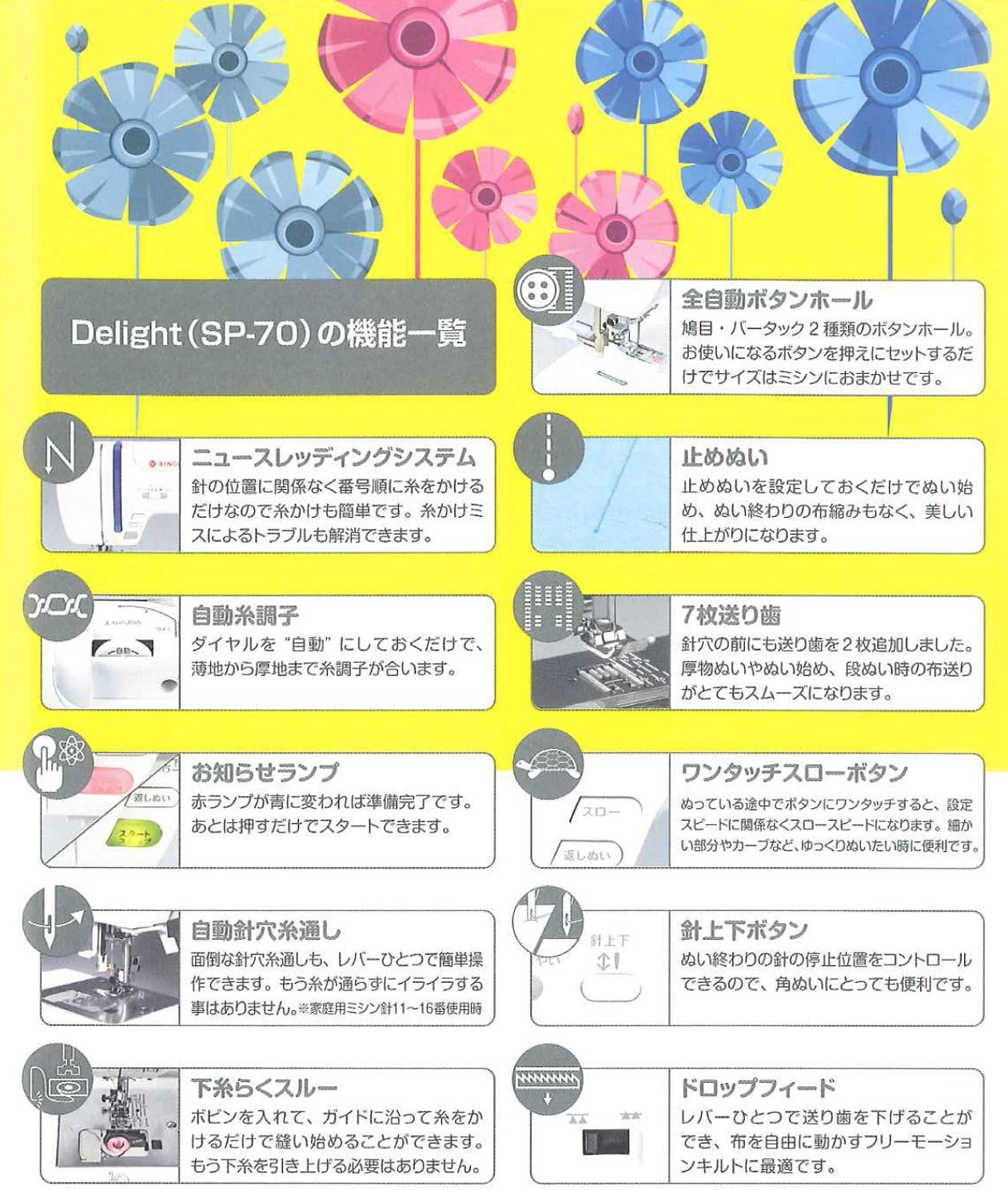
Figure 2: Key features of the SINGER Monami Delight SP-70G. This diagram illustrates various components and functions such as the News Threading System, Automatic Thread Tension, and Needle Up/Down button.
คำแนะนำการใช้งาน
1. Stitch Selection (Pattern Direct Selection)
The machine offers 12 practical stitch patterns, which can be directly selected using the dedicated buttons.
- Refer to the stitch pattern chart on the machine or in this manual.
- Press the button corresponding to your desired stitch pattern.

Figure 3: The 12 practical stitch patterns available on the SINGER Monami Delight SP-70G. This image displays various utility and decorative stitches, including straight stitch, zigzag, and buttonhole options.
2. Automatic Thread Tension
Set the thread tension dial to "Auto" for automatic adjustment. The machine will optimize tension for various fabric thicknesses, from thin to thick materials.
3. Needle Up/Down Button
Use the Needle Up/Down button to control the needle's stopping position. This is particularly useful for pivoting fabric at corners or when removing the fabric from the machine.
4. Stop Stitch / Backstitch
To secure your seams, the machine can automatically perform a stop stitch (backstitch) at the beginning and end of your sewing. This feature ensures a neat and durable finish.
5. One-Touch Slow Button
Activate the One-Touch Slow Button for precise control when sewing intricate details, curves, or starting a seam. This reduces the sewing speed for enhanced accuracy.
6. Drop Feed
Lower the feed dogs using the Drop Feed mechanism to engage in free-motion sewing, darning, or embroidery. This allows you to move the fabric freely under the needle.
7. Free Arm
Remove the accessory storage compartment to reveal the free arm. This feature is ideal for sewing cylindrical items such as sleeves, pant hems, and small openings.
8. Presser Foot Lift Button
The Presser Foot Lift Button helps keep the presser foot horizontal, which is beneficial when starting to sew on thick fabrics or multiple layers, ensuring a smooth start.
9. การปรับความยาวและความกว้างของตะเข็บ
Adjust the stitch length and width according to your fabric type and desired sewing effect. This applies to various patterns including straight stitches, zigzags, and buttonholes.

รูปที่ 4: เกินview of additional useful features of the SINGER Monami Delight SP-70G. This image highlights features like the Horizontal Full Rotary Hook, LED Hand Lamp, Wide Sewing Base, and Quiet Design.
การซ่อมบำรุง
1. การทำความสะอาด
- ถอดปลั๊กเครื่องก่อนทำความสะอาดทุกครั้ง
- ควรทำความสะอาดเศษฝุ่นและสิ่งสกปรกออกจากบริเวณกระสวยและฟันเฟืองของจักรเย็บผ้าเป็นประจำ โดยใช้แปรงขนาดเล็ก
- เช็ดทำความสะอาดภายนอกเครื่องด้วยผ้าแห้งเนื้อนุ่ม ห้ามใช้สารเคมีรุนแรง
2. การเปลี่ยนเข็ม
- Replace the needle frequently, especially after 8-10 hours of sewing or if it becomes bent or dull.
- Use only SINGER-approved needles appropriate for your fabric type.
การแก้ไขปัญหา
หัวข้อนี้จะกล่าวถึงปัญหาทั่วไปที่คุณอาจพบ สำหรับปัญหาที่ซับซ้อนกว่านี้ โปรดปรึกษาช่างเทคนิคบริการผู้เชี่ยวชาญ
1. Skipped Stitches
- ตรวจสอบให้แน่ใจว่าได้เสียบเข็มอย่างถูกต้อง และเข็มไม่บิดงอหรือทื่อ
- Check that the machine is threaded properly, both upper and bobbin threads.
- ตรวจสอบให้แน่ใจว่าได้ใช้เข็มเย็บผ้าชนิดและขนาดที่ถูกต้องสำหรับเนื้อผ้าแล้ว
2. Thread Jamming
- ปิดเครื่องและถอดปลั๊กออก
- Remove the bobbin case and clear any tangled threads from the bobbin area.
- Re-thread the machine completely, ensuring the presser foot is raised during upper threading.
3. Uneven Stitches
- Check the thread tension settings. While the machine has automatic tension, manual adjustment may sometimes be necessary for specific fabrics.
- Ensure the fabric is fed evenly and not pulled or pushed excessively.
ข้อมูลจำเพาะ
| คุณสมบัติ | รายละเอียด |
|---|---|
| หมายเลขรุ่น | เอสพี-70จี |
| น้ำหนักสินค้า | 21.2 ปอนด์ |
| ขนาดแพ็คเกจ | 19.92 x 15.51 x 11.1 นิ้ว |
| ASIN | B00K2IREWM |
| วันที่พร้อมใช้งานครั้งแรก | 18 พฤษภาคม 2014 |
การรับประกันและการสนับสนุน
ข้อมูลการรับประกัน
For detailed information regarding the warranty coverage for your SINGER Monami Delight SP-70G sewing machine, please refer to the warranty card included with your product or visit the official SINGER webไซต์ เงื่อนไขการรับประกันอาจแตกต่างกันไปในแต่ละภูมิภาค
การสนับสนุนลูกค้า
If you require technical assistance, have questions about your machine's operation, or need to arrange for service, please contact SINGER customer support. Contact details can typically be found on the SINGER official webไซต์หรือในเอกสารที่ให้มาพร้อมกับการซื้อของคุณ