1. บทนำ
This manual provides comprehensive instructions for the proper installation, configuration, operation, and maintenance of the MOXA CA-104-T 4-Port RS-232 PC/104 Module. This module is designed to expand serial communication capabilities in embedded systems, offering robust performance across a wide temperature range. Please read this manual thoroughly before attempting to install or operate the device.
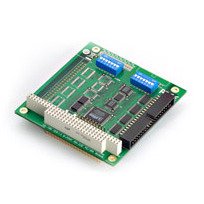
Image 1: MOXA CA-104-T 4-Port RS-232 PC/104 Module. This image displays the compact design of the PC/104 module with its four RS-232 serial ports.
2. การตั้งค่าและการติดตั้ง
Follow these steps to correctly install the CA-104-T module into your PC/104 system:
- การเตรียมระบบ: Power off your PC/104 system and disconnect all power sources. Ensure the system is placed on a stable, anti-static surface.
- การวางตำแหน่งโมดูล: Carefully align the CA-104-T module with the PC/104 expansion bus connectors on your host board. Apply even pressure to seat the module firmly into the connectors.
- การรักษาความปลอดภัยของโมดูล: Use appropriate standoffs and screws to secure the module to the host board, preventing movement and ensuring stable connections.
- Connecting Serial Devices: Connect your RS-232 compatible devices to the serial ports on the CA-104-T module using standard serial cables. Ensure secure connections.
- เปิดเครื่อง: Reconnect power to your PC/104 system and power it on.
- การติดตั้งไดร์เวอร์: Install the necessary device drivers for the CA-104-T module on your operating system. Refer to the MOXA website for the latest driver versions and installation guides.
3. คู่มือการใช้งาน
Once the CA-104-T module is physically installed and drivers are loaded, it is ready for operation. The module provides four independent RS-232 serial ports.
- การกำหนดค่าพอร์ต: Each serial port can be configured individually through your operating system's device manager or through MOXA's provided utility software. Settings typically include baud rate, data bits, parity, and stop bits.
- การส่งผ่านข้อมูล: Use standard serial communication protocols and software applications to transmit and receive data through the configured ports.
- การทำงานของอุณหภูมิ: The CA-104-T is designed for reliable operation in a wide temperature range of -40 to 85°C. Ensure your system's overall thermal management is adequate for the operating environment.
4. การบำรุงรักษา
The MOXA CA-104-T module is designed for high reliability and requires minimal maintenance. Adhere to the following guidelines:
- การควบคุมสิ่งแวดล้อม: ควรใช้งานโมดูลภายในช่วงอุณหภูมิและความชื้นที่กำหนด เพื่อให้มั่นใจได้ถึงประสิทธิภาพสูงสุดและอายุการใช้งานที่ยาวนาน
- การทำความสะอาด: If necessary, gently clean the module's exterior with a soft, dry cloth. Avoid using liquid cleaners or solvents.
- การอัปเดตเฟิร์มแวร์/ไดรเวอร์: ตรวจสอบ MOXA เป็นระยะ website for updated drivers or firmware that may enhance performance or address known issues.
- การตรวจร่างกาย: Occasionally inspect the module for any signs of physical damage or loose connections.
5 การแก้ไขปัญหา
If you encounter issues with your CA-104-T module, consider the following troubleshooting steps:
- ไม่พบโมดูล:
- Ensure the module is correctly seated in the PC/104 slot.
- Verify that the system's BIOS or operating system recognizes the PC/104 bus.
- Check if the correct drivers are installed and updated.
- ข้อผิดพลาดในการสื่อสาร:
- Confirm that the serial cable connections are secure and correct.
- Verify that the baud rate, data bits, parity, and stop bits settings match between the module and the connected device.
- Test with a different serial cable or device if possible.
- การทำงานเป็นระยะ:
- Check for power supply stability to the PC/104 system.
- ตรวจสอบให้แน่ใจว่าสภาพแวดล้อมในการทำงานอยู่ในช่วงอุณหภูมิที่กำหนดไว้
- Inspect for any physical damage or loose components on the module.
If problems persist after following these steps, contact MOXA technical support for further assistance.
6. ข้อมูลจำเพาะ
| คุณสมบัติ | คำอธิบาย |
|---|---|
| ยี่ห้อ | โมกซ่า |
| หมายเลขรุ่น | CA-104 |
| พอร์ต | 4 x RS-232 |
| อินเทอร์เฟซ | PC/104 |
| อุณหภูมิในการทำงาน | -40 ถึง 85°C (-40 ถึง 185°F) |
| อุปกรณ์ที่รองรับ | Desktop (PC/104 systems) |
| ยูพีซี | 720355974411 |
7. ข้อมูลการรับประกัน
MOXA products are covered by a limited warranty. For detailed information regarding the warranty period, terms, and conditions applicable to the CA-104-T module, please refer to the official MOXA webหรือบัตรรับประกันที่ให้มาพร้อมกับผลิตภัณฑ์ของคุณ โปรดเก็บใบเสร็จรับเงินไว้เป็นหลักฐานการซื้อสำหรับการเรียกร้องการรับประกัน
8. การสนับสนุนด้านเทคนิค
For technical assistance, driver downloads, or further product information, please visit the official MOXA webงาน. NS website provides a comprehensive knowledge base, FAQs, and contact information for regional support centers. When contacting support, please have your product model number (CA-104-T) and any relevant system information ready.
MOXA อย่างเป็นทางการ Webเว็บไซต์: www.moxa.com


