Boxlight ACTG042

Boxlight Replacement Lamp คู่มือผู้ใช้โมดูล

Models: LC-XG110, LC-XG210, LX32 (Part Number: ACTG042)

การแนะนำ

This manual provides essential information for the safe and effective installation, operation, and maintenance of your Boxlight replacement lamp module. This module is designed for use with Boxlight LC-XG110, LC-XG210, and LX32 projector models. Please read these instructions carefully before proceeding with installation.

Boxlight Replacement Lamp โมดูล

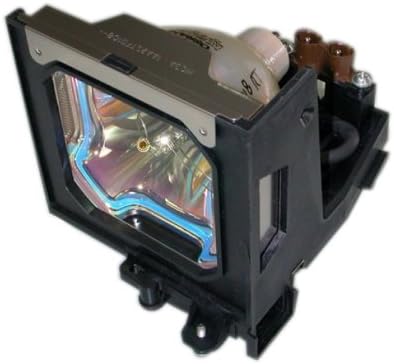
Image: Boxlight replacement lamp module, showing the bulb encased in its housing with electrical connectors.

The Boxlight replacement lamp module (Part Number: ACTG042) includes an original bulb and housing, ensuring compatibility and optimal performance with your projector. It features a 250-watt bulb with an average lamp life of 2000 hours under normal operating conditions.

ข้อมูลด้านความปลอดภัยที่สำคัญ

หลอดไฟในล.นี้amp contains Mercury (Hg). Please dispose of in accordance with local, state, or federal laws. Do not dispose of with regular household waste.

คำแนะนำในการติดตั้ง

  1. ปิดและตัดการเชื่อมต่อ: Ensure your Boxlight projector is turned off and completely unplugged from the power source.
  2. คลายความร้อน: Allow the projector to cool down for at least 30 minutes. The lamp operates at high temperatures and can cause burns if handled while hot.
  3. Locate Lamp ปิดบัง: Refer to your projector's user manual to locate the lamp compartment cover. This is typically secured by one or more screws.
  4. ลบ Lamp ปิดบัง: Using a suitable screwdriver, carefully remove the screw(s) securing the lamp cover and then remove the cover.
  5. Unscrew Old Lamp: แอลเก่าamp module will be secured by one or more screws. Unscrew these fasteners.
  6. ถอด L เก่าออกamp: Gently pull the handle on the old lamp module to slide it out of the projector. Be careful not to drop it.
  7. ใส่ L ใหม่amp: Carefully insert the new Boxlight replacement lamp module into the projector, ensuring it slides smoothly into place. Do not force it.
  8. Secure New Lamp: Fasten the new lamp module with the screw(s) you removed earlier. Ensure it is securely seated.
  9. แทนที่Lamp ปิดบัง: ใส่ l . กลับเข้าไปใหม่amp compartment cover and secure it with its screw(s).
  10. เชื่อมต่อพลังงานอีกครั้ง: Plug the projector back into the power outlet.
  11. รีเซ็ต Lamp ตัวจับเวลา: Consult your projector's user manual for instructions on how to reset the lamp timer. This is crucial for accurate lamp life tracking.

แนวทางปฏิบัติ

การซ่อมบำรุง

การแก้ไขปัญหา

If you encounter issues after installing the new lamp, พิจารณาสิ่งต่อไปนี้:

For further assistance, refer to your projector's original user manual or contact Boxlight customer support.

ข้อมูลจำเพาะผลิตภัณฑ์

ยี่ห้อกล่องไฟ
หมายเลขรุ่นACTG042
รุ่นโปรเจคเตอร์ที่ใช้งานร่วมกันได้LC-XG110, LC-XG210, LX32
Lamp หมายเลขชิ้นส่วน03-000712-01P; 610 305 5602; MP56T-930; POA-LMP59
วัดtage250 วัตต์
Lamp Life (Normal)2000 ชั่วโมง
ประเภทไฟซีนอน
Lamp เทคโนโลยีจอแอลซีดี
น้ำหนักสินค้า13.3 ออนซ์ (0.83 ปอนด์)
ขนาดสินค้า5.32 x 4.53 x 4.13 นิ้ว
ยูพีซี840398106805

ข้อมูลการรับประกัน

This Boxlight replacement lamp module is covered by a 180 รับประกัน 1 วัน นับจากวันที่ซื้อ การรับประกันนี้ครอบคลุมถึงความบกพร่องของวัสดุและฝีมือการผลิตภายใต้การใช้งานปกติ โปรดเก็บหลักฐานการซื้อไว้เพื่อขอรับสิทธิ์การรับประกัน

For warranty service or inquiries, please contact the seller or manufacturer directly.

การสนับสนุนลูกค้า

If you require further assistance, have questions about installation, or need to report an issue, please contact the retailer where you purchased this product or the manufacturer, Arclyte Tech. (Boxlight's manufacturer).

When contacting support, please have your product model number (ACTG042) and proof of purchase readily available.

เอกสารที่เกี่ยวข้อง - ACTG042

พรีview Micro Portable LCD Projector User's Manual
Comprehensive user manual for the Micro Portable LCD Projector, covering features, setup, connections, OSD menu operations, maintenance, and troubleshooting.
พรีview คู่มือผู้ใช้โปรเจ็กเตอร์ BOXLIGHT Boston Series - การตั้งค่า คุณสมบัติ และคู่มือการใช้งาน
คู่มือผู้ใช้ฉบับสมบูรณ์สำหรับโปรเจคเตอร์ BOXLIGHT Boston Series เรียนรู้เกี่ยวกับคุณสมบัติ แนวทางความปลอดภัย ขั้นตอนการตั้งค่า การใช้งาน การบำรุงรักษา และการแก้ไขปัญหา เยี่ยมชม BOXLIGHT.com เพื่อรับการสนับสนุน
พรีview Boxlight MimioPro G Interactive Flat Panel Display: Unboxing and Installation Guide
Comprehensive guide for unboxing and installing the Boxlight MimioPro G Interactive Flat Panel Display. Covers hardware setup, Wi-Fi module, firmware updates, and initial Google configuration.
พรีview คู่มือผู้ใช้ BOXLIGHT ProjectoWrite5|6
คู่มือผู้ใช้ที่ครอบคลุมสำหรับโปรเจ็กเตอร์ BOXLIGHT ProjectoWrite5 และ ProjectoWrite6 ซึ่งมีรายละเอียดเกี่ยวกับการตั้งค่า คุณสมบัติ การใช้งาน การบำรุงรักษา และการแก้ไขปัญหาสำหรับการนำเสนอที่ได้รับการปรับปรุง
พรีview MimioPro G Interactive Display User Manual | Boxlight
Comprehensive user manual for the Boxlight MimioPro G Interactive Display, covering safety, setup, operation, maintenance, and troubleshooting. Learn how to connect devices, use the remote control, and resolve common issues.
พรีview คู่มืออัปเกรดเฟิร์มแวร์ Boxlight ProColor Series Two IFPD
คู่มือนี้อธิบายรายละเอียดเกี่ยวกับกระบวนการอัปเกรดเฟิร์มแวร์สำหรับจอแสดงผลแบบแบนแบบอินเทอร์แอคทีฟ Boxlight ProColor Series Two (IFPD) ครอบคลุมฟีเจอร์ใหม่ ขั้นตอนการใช้งาน และเครื่องมือที่จำเป็น รวมถึงข้อมูลเกี่ยวกับแอปพลิเคชันอย่าง Unplug'd และ Chrome ยูทิลิตี้อย่าง NDMS และขั้นตอนการอัปเกรดด้วยตนเอง