1. บทนำและเรื่องอื่นๆview
The TC Electronic DITTO X2 LOOPER is a highly intuitive looper pedal designed for guitarists, offering a dedicated stop button and versatile loop effects. This manual provides comprehensive instructions for setting up, operating, and maintaining your DITTO X2 LOOPER pedal.
คุณสมบัติหลัก:
- Dedicated Start/Stop Button
- Loop Import/Export and Backing tracks
- Looper effects: Stop, Reverse and Half Speed
2. ส่วนประกอบและการควบคุมผลิตภัณฑ์
Familiarize yourself with the layout of your DITTO X2 LOOPER pedal:
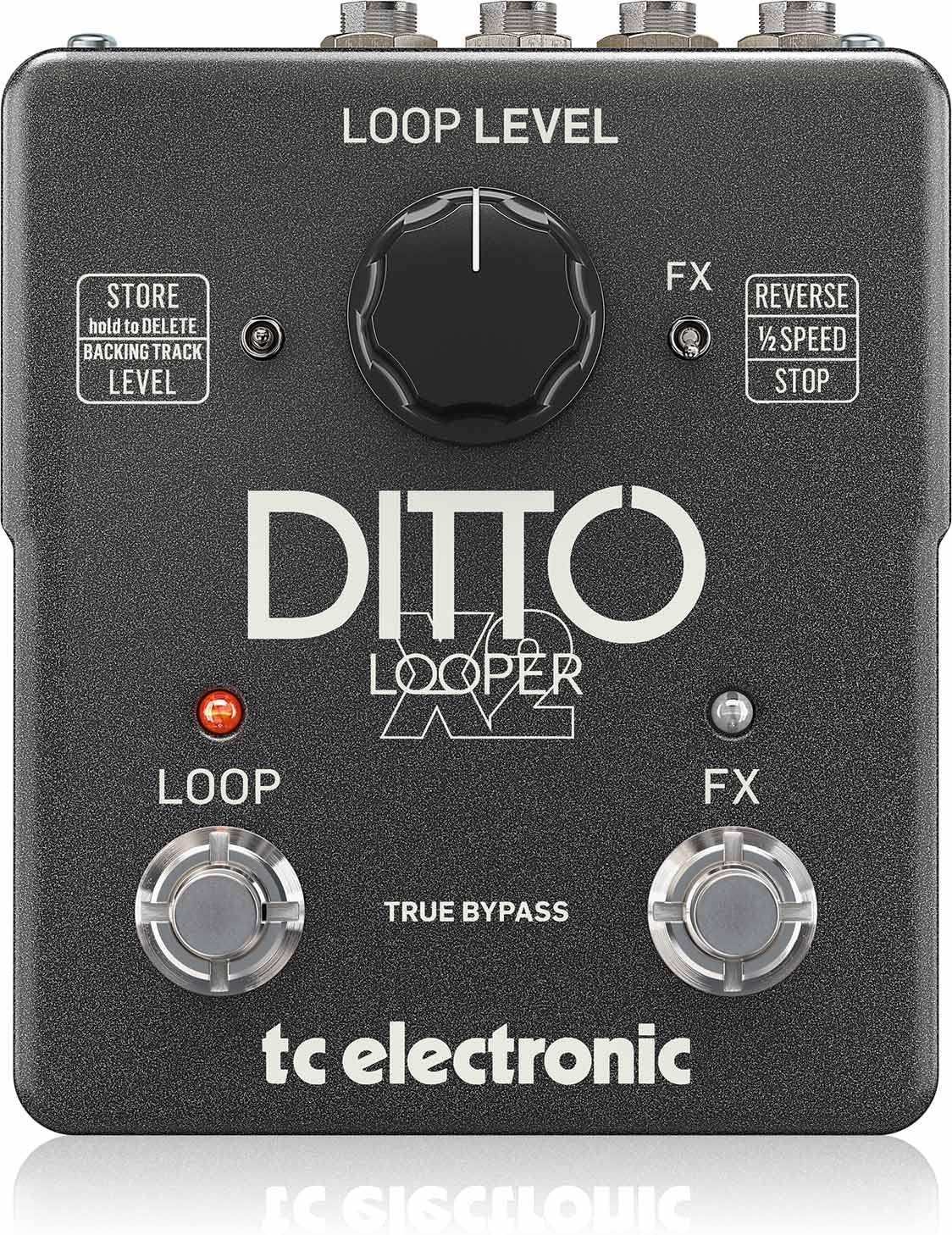
ภาพ: ด้านบน view of the DITTO X2 LOOPER pedal, highlighting the Loop Level knob, Loop footswitch, FX footswitch, and FX/Store toggle switches.
- Loop Level Knob: Controls the playback volume of your recorded loops.
- Loop Footswitch: Primary control for recording, playback, overdubbing, and clearing loops.
- FX Footswitch: Activates/deactivates selected loop effects (Reverse, Half Speed, Stop).
- FX Toggle Switch: Selects the function of the FX footswitch: Reverse, Half Speed, or dedicated Stop.
- Store Toggle Switch: Used for storing and deleting backing tracks.
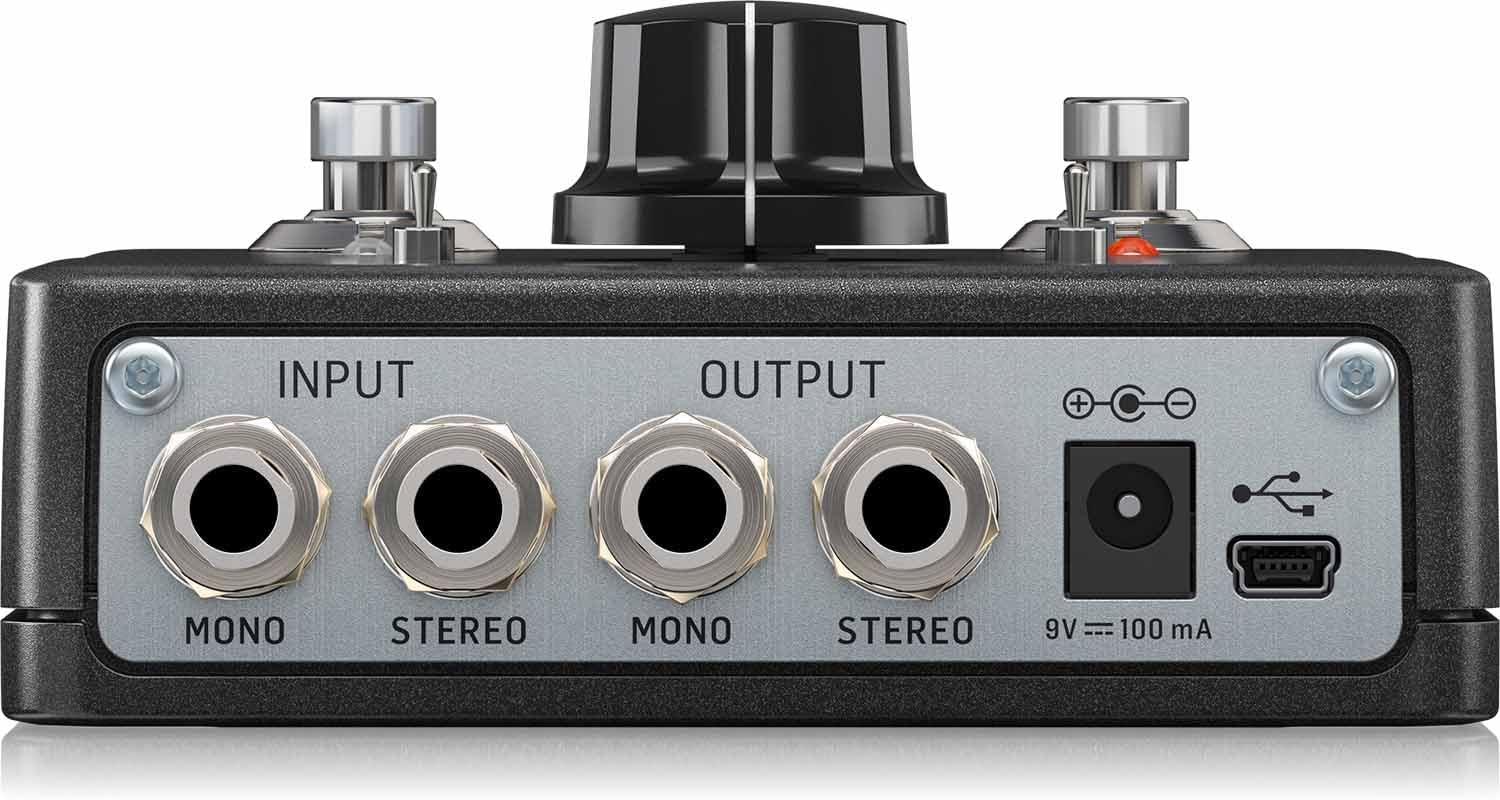
ภาพ: ด้านหลัง view of the DITTO X2 LOOPER pedal, showing the Mono/Stereo Input and Output jacks, 9V DC power input, and Mini-USB port.
- Input Jacks (Mono/Stereo): Connect your instrument(s) here.
- Output Jacks (Mono/Stereo): เชื่อมต่อกับของคุณ amplifier หรืออินเทอร์เฟซเสียง
- อินพุตไฟ DC 9V: Connect a 9V DC power adapter (100mA minimum, center negative).
- พอร์ต Mini-USB: Used for connecting to a computer for loop import/export and firmware updates.
3. การตั้งค่า
- การเชื่อมต่อไฟฟ้า: Connect a 9V DC power adapter (not included) to the 9V DC input jack on the rear of the pedal. The pedal does not support battery operation.
- การเชื่อมต่อเสียง:
- Connect your instrument (e.g., guitar) to the INPUT jack(s). For mono, use the MONO input. For stereo, use both STEREO inputs.
- Connect the OUTPUT jack(s) to your amplifier or audio interface. For mono, use the MONO output. For stereo, use both STEREO outputs.
- การตั้งค่าเริ่มต้น: Set the Loop Level knob to a comfortable starting position (e.g., 12 o'clock).
4. คู่มือการใช้งาน
The DITTO X2 LOOPER offers intuitive operation for creating and manipulating loops.
4.1 ฟังก์ชันการวนซ้ำพื้นฐาน
- บันทึก: Press the LOOP footswitch once. The LED will turn RED, indicating recording has started.
- การเล่นซ้ำ: Press the LOOP footswitch again to stop recording and start playback. The LED will turn GREEN.
- โอเวอร์ดับ: During playback, press the LOOP footswitch once to start overdubbing. The LED will turn RED. Press again to stop overdubbing and return to playback (GREEN LED).
- Undo/Redo Overdub: During playback, hold the LOOP footswitch to undo the last overdub. Hold again to redo it.
- หยุด:
- If the FX toggle switch is set to 'STOP', press the FX footswitch once.
- Alternatively, double-tap the LOOP footswitch. The GREEN LED will flash.
- เคลียร์ลูป: Double-tap and hold the LOOP footswitch. The loop will be deleted.
4.2 Loop Effects (Reverse, Half Speed, Stop)
The DITTO X2 offers creative effects to enhance your loops:
- เลือกเอฟเฟกต์: Use the FX toggle switch to choose between 'REVERSE', '1/2 SPEED', or 'STOP'.
- Activate/Deactivate Effect: Press the FX footswitch once to activate the selected effect. Press again to deactivate it. The FX LED will indicate activation.
4.3 Backing Tracks
The DITTO X2 allows you to import and export backing tracks for practice or performance:
- การนำเข้า/ส่งออก: Connect the pedal to your computer via the Mini-USB port. The pedal will appear as a removable drive, allowing you to drag and drop audio files (WAV format recommended).
- Store/Delete Backing Track: Use the 'STORE' toggle switch to manage your backing tracks. Refer to the official TC Electronic software for detailed management.
4.4 การสาธิตวิดีโอ
Watch this official video for a visual guide on the DITTO X2 LOOPER's functionality:
Video: Official demonstration of the TC Electronic DITTO X2 Looper pedal, showcasinก. คุณสมบัติและการใช้งาน
5. การบำรุงรักษา
- การทำความสะอาด: ใช้ผ้าแห้งนุ่มๆ เช็ดทำความสะอาดแป้นเหยียบ หลีกเลี่ยงการใช้สารทำความสะอาดที่มีฤทธิ์กัดกร่อนหรือตัวทำละลาย
- พื้นที่จัดเก็บ: Store the pedal in a dry environment away from extreme temperatures.
- อัพเดตเฟิร์มแวร์: Periodically check the TC Electronic website for any available firmware updates for your DITTO X2 LOOPER. Updates can be installed via the Mini-USB port.
6 การแก้ไขปัญหา
- ไม่มีเสียง:
- ตรวจสอบให้แน่ใจว่าสายเคเบิลทั้งหมดเชื่อมต่ออย่างแน่นหนา
- Check the Loop Level knob is not set to minimum.
- ตรวจสอบว่าแหล่งจ่ายไฟเชื่อมต่ออย่างถูกต้องและใช้งานได้
- ไฟ LED ไม่ติด:
- Confirm the power adapter is working and correctly connected.
- Loop Not Recording/Playing Back:
- Ensure the input signal is present.
- Check that the correct footswitch actions are being performed for record/playback.
7. ข้อมูลจำเพาะ
- น้ำหนักสินค้า: 0.635 ออนซ์ (18 กรัม)
- ขนาดสินค้า : 6 x 7 x 3 นิ้ว
- หมายเลขรุ่นสินค้า: 000-DE800-00010
- แบตเตอรี่: 1 9V batteries required (for internal dip switch access, not primary power).
- อินเทอร์เฟซฮาร์ดแวร์: ยูเอสบี
- รูปแบบสัญญาณ: อนาล็อก
- เล่มที่tage: 9V
- Ampอายุ: 0.1 มิลลิวินาทีamps (100mA)
- มีจำหน่ายครั้งแรก: 16 มกราคม 2014
8. อะไรอยู่ในกล่อง
- TC Electronic DITTO X2 LOOPER, Highly Intuitive Looper Pedal with Dedicated Stop Button and Loop Effects
9. การรับประกันและการสนับสนุน
This product is covered by the manufacturer's warranty. For detailed warranty information, technical support, or service inquiries, please visit the official TC Electronic webหรือติดต่อฝ่ายสนับสนุนลูกค้าโดยตรง เก็บใบเสร็จรับเงินไว้เพื่อใช้ในการเคลมประกัน


