1. บทนำ
This manual provides detailed instructions for the safe and effective use of your Canon VIXIA HF-R52 HD Digital Camcorder. Please read this manual thoroughly before operating the camcorder and retain it for future reference.
คุณสมบัติหลัก:
- 3.28 Megapixel Full HD CMOS Image Sensor: Captures true 1920 x 1080 resolution video with natural color, even in low light.
- 57x Advanced Zoom & SuperRange Optical Image Stabilizer: Provides stable video across a wide zoom range.
- DIGIC DV 4 Image Processor: Ensures exceptional imaging performance and enables simultaneous dual recording.
- 32GB Internal Flash Drive & SD Card Slot: ข้อเสนอ ample storage for up to 12 hours of HD video, expandable with SD memory cards.
- Wi-Fi ในตัว: Facilitates easy sharing, live streaming, and remote control via compatible mobile devices.
- 3.0-inch Capacitive Touch Panel LCD: Intuitive interface for easy operation and control.
- โหมดเด็ก: Dedicated features for capturing and organizing a child's growth and development.
2. การตั้งค่า
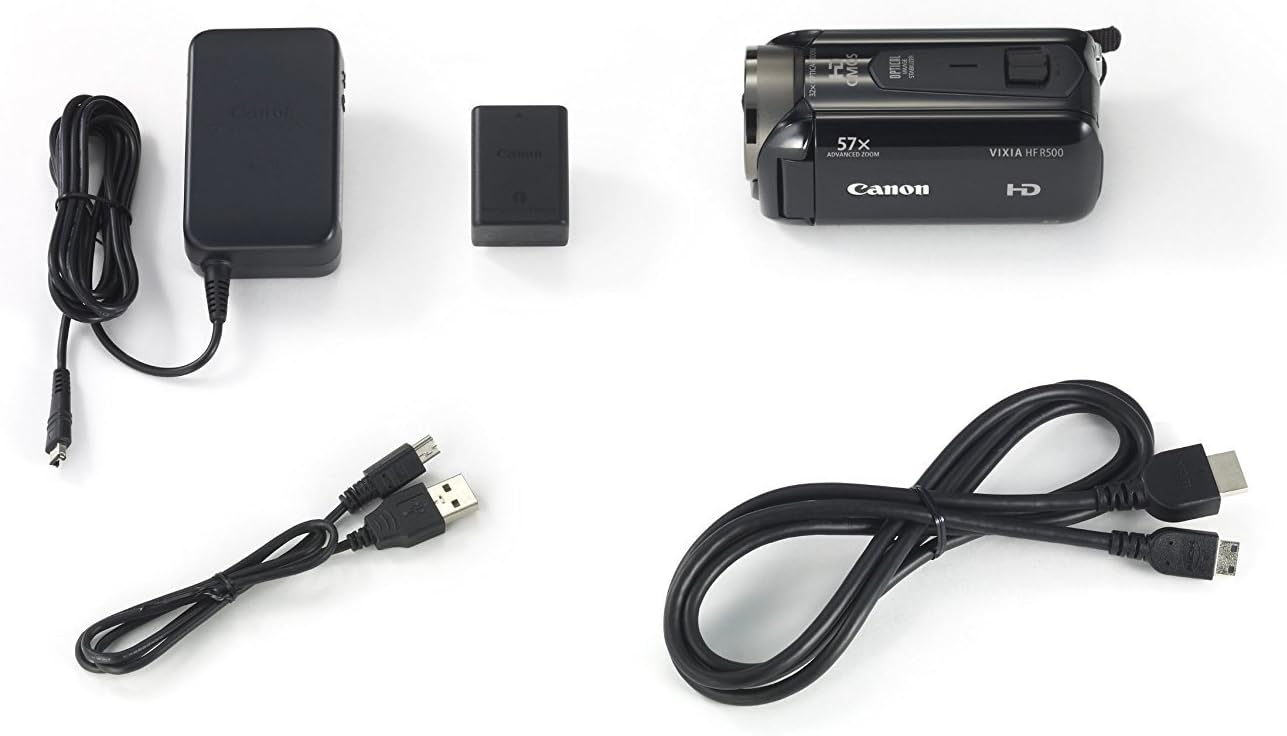
2.1. เนื้อหาบรรจุภัณฑ์
ตรวจสอบว่ามีรายการทั้งหมดอยู่ในแพ็คเกจ:
- Canon VIXIA HF-R52 HD Digital Camcorder
- แบตเตอรี่แพ็ค
- อะแดปเตอร์แปลงไฟขนาดกะทัดรัด
- สาย USB
- สาย HDMI
- คู่มือการใช้งาน (เอกสารนี้)
2.2. การติดตั้งและการชาร์จแบตเตอรี่
- เปิดฝาช่องใส่แบตเตอรี่
- Insert the battery pack, ensuring it clicks into place.
- ปิดฝาช่องใส่แบตเตอรี่
- Connect the compact power adapter to the camcorder and a power outlet to charge the battery. The charging indicator will illuminate.
2.3. การใส่การ์ดหน่วยความจำ
- เปิดฝาช่องใส่การ์ด SD
- Insert an SD memory card with the label facing the front of the camcorder until it clicks.
- ปิดฝาช่องเสียบการ์ด SD
2.4. Attaching the Hand Strap and Lens Cap
Securely attach the hand strap for comfortable and safe handling. Ensure the lens cap is attached to protect the lens when not in use.

3. การใช้งานกล้องวิดีโอ
3.1. เปิด/ปิดเครื่อง
To power on the camcorder, open the LCD panel. To power off, close the LCD panel or press and hold the power button located inside the LCD panel area.
3.2. LCD Touch Panel Usage
The 3.0-inch capacitive touch panel LCD allows for intuitive control. Tap to select menu options, adjust settings, or focus on subjects. The display is clear and responsive.

3.3. Recording Video and Taking Photos
To start recording video, press the REC button. Press it again to stop. To take a still photo, press the PHOTO button.
3.4. ฟังก์ชันการซูม
Use the zoom lever to zoom in (T) or out (W). The camcorder features a 57x Advanced Zoom for capturing distant subjects and a SuperRange Optical Image Stabilizer to minimize camera shake, even when shooting handheld or while walking.
3.5. Special Recording Modes
- โหมดเด็ก: Activates optimal settings for recording children and automatically saves videos to a dedicated Baby Album. Includes features like Pre-Record and Touch Decoration.
- Audio Scene Select: Offers five modes (Standard, Music, Forest and Birds, Speech, Noise Suppression) to optimize audio recording based on the environment.
- สมาร์ทออโต้: Automatically selects optimal settings from 38 shooting situations.
- Cinema-Look Filters: Apply one of seven cinematic styles (e.g., Cinema Standard, Dramatic B&W, Sepia) to your video.
- Video Snapshot: Records short video clips and allows for background music integration.
- 24p Cinema & 30p Progressive Modes: Provides film-like feel or optimized footage for online sharing.
3.6. Wireless Functions
- Wi-Fi ในตัว: Connects to home networks or mobile devices via the Canon Movie Uploader app for sharing and live streaming.
- ถ่ายทอดสด: Stream video to iOS or Android devices, even remotely over the internet, using the CameraAccess plus app.
- การตรวจสอบระยะไกล: Compatible with the optional Camera Pan Table CT-V1 for remote monitoring of a 200-degree area.
4. การบำรุงรักษา
4.1. การทำความสะอาด
- ใช้ผ้าแห้งนุ่มๆ เช็ดทำความสะอาดตัวกล้องวิดีโอ
- For the lens and LCD screen, use a lens cleaning cloth and specialized cleaning fluid if necessary. Avoid harsh chemicals.
4.2. การดูแลแบตเตอรี่
- ชาร์จแบตเตอรี่ให้เต็มก่อนใช้งานแต่ละครั้ง
- เก็บแบตเตอรี่ไว้ในที่เย็นและแห้งเมื่อไม่ได้ใช้งาน
- หลีกเลี่ยงการให้แบตเตอรี่สัมผัสกับอุณหภูมิที่สูงหรือต่ำเกินไป
4.3. การจัดเก็บ
When storing the camcorder for extended periods, remove the battery and memory card. Store the camcorder in a dry, dust-free environment, preferably in its carrying case.
5 การแก้ไขปัญหา
หากคุณพบปัญหาเกี่ยวกับกล้องวิดีโอ โปรดดูวิธีแก้ไขปัญหาทั่วไปต่อไปนี้:
- กล้องวิดีโอไม่สามารถเปิดได้: ตรวจสอบให้แน่ใจว่าแบตเตอรี่ชาร์จเต็มและใส่เข้าไปอย่างถูกต้อง
- คุณภาพวิดีโอไม่ดีในสภาพแสงน้อย: Utilize the 3.28 Megapixel Full HD CMOS Image Sensor and DIGIC DV 4 Image Processor which are designed for improved low-light performance. Consider adding external lighting if available.
- หน้าจอสัมผัสไม่ตอบสนอง: Ensure the screen is clean and dry. Apply gentle pressure as capacitive screens respond to touch, not force.
- ปัญหาเกี่ยวกับเสียง: Check microphone connections and settings in the Audio Scene Select menu.
- Connectivity problems (Wi-Fi/USB): Ensure the camcorder is within range of the Wi-Fi network or that the USB cable is securely connected to a compatible device. Refer to the Canon Movie Uploader or CameraAccess plus app instructions for specific device compatibility.
- อายุการใช้งานแบตเตอรี่สั้น: Ensure the battery is fully charged. High capacity battery packs are designed for extended use, but continuous recording or heavy Wi-Fi usage will consume power faster.
If problems persist, consult the Canon support webเว็บไซต์หรือติดต่อฝ่ายบริการลูกค้า
6. ข้อมูลจำเพาะ
| คุณสมบัติ | ข้อมูลจำเพาะ |
|---|---|
| ยี่ห้อ | แคนนอน |
| หมายเลขรุ่น | 9173B004 |
| ขนาดสินค้า | 4.6 x 2.1 x 2.2 นิ้ว |
| น้ำหนักสินค้า | 8.3 ออนซ์ |
| เทคโนโลยีโฟโต้เซนเซอร์ | ซีมอส |
| ความละเอียดในการจับภาพวิดีโอ | 1080p |
| ความยาวโฟกัสสูงสุด | 89.6 มิลลิเมตร |
| ประเภทหน่วยความจำแฟลช | SD |
| รูปแบบการจับภาพวิดีโอ | AVCHD; MPEG-4 |
| รูปแบบเสียงที่รองรับ | เอเอซี |
| ขนาดหน้าจอ | 3 นิ้ว |
| เทคโนโลยีการเชื่อมต่อ | ยูเอสบี, ไวไฟ |
| สี | สีดำ |
7. การรับประกันและการสนับสนุน
7.1. การปฏิเสธความรับผิดทางกฎหมาย
This product is covered under warranty by Canon. For specific warranty terms and conditions, please refer to the warranty card included with your product or visit the official Canon support webเว็บไซต์.
7.2. การสนับสนุนลูกค้า
หากต้องการความช่วยเหลือเพิ่มเติม การสนับสนุนด้านเทคนิค หรือการสอบถามบริการ โปรดไปที่ ร้านแคนนอน หรือติดต่อฝ่ายสนับสนุนอย่างเป็นทางการของ Canon webเว็บไซต์.


