การแนะนำ
This manual provides essential instructions for the safe and efficient operation, maintenance, and care of your Quest 35200 Stainless Steel Cordless Electric Coffee Percolator. Please read all instructions carefully before first use and retain this manual for future reference.

Image: The Quest 35200 Stainless Steel Cordless Electric Coffee Percolator, featuring a polished stainless steel body, black handle, and a black base with a power button.
คำแนะนำด้านความปลอดภัยที่สำคัญ
เมื่อใช้เครื่องใช้ไฟฟ้า ควรปฏิบัติตามข้อควรระวังด้านความปลอดภัยพื้นฐานเสมอเพื่อลดความเสี่ยงต่อการเกิดไฟไหม้ ไฟฟ้าช็อต และ/หรือการบาดเจ็บต่อบุคคล ซึ่งรวมถึงสิ่งต่อไปนี้:
- อ่านคำแนะนำทั้งหมด
- อย่าสัมผัสพื้นผิวที่ร้อน ใช้ที่จับหรือลูกบิด
- To protect against fire, electric shock, and injury to persons, do not immerse cord, plugs, or the percolator base in water or other liquid.
- จำเป็นต้องมีการดูแลอย่างใกล้ชิดเมื่อมีเด็กหรือใช้งานเครื่องใช้ไฟฟ้าใดๆ ใกล้เด็ก
- ถอดปลั๊กออกเมื่อไม่ได้ใช้งานและก่อนทำความสะอาด ปล่อยให้เย็นลงก่อนใส่หรือถอดชิ้นส่วน และก่อนทำความสะอาดเครื่องใช้ไฟฟ้า
- ห้ามใช้งานอุปกรณ์ใดๆ กับสายไฟหรือปลั๊กที่ชำรุด หรือหลังจากที่เครื่องทำงานผิดปกติหรือได้รับความเสียหายในลักษณะใดๆ ส่งคืนเครื่องไปยังศูนย์บริการที่ได้รับอนุญาตที่ใกล้ที่สุดเพื่อทำการตรวจสอบ ซ่อมแซม หรือปรับแต่ง
- การใช้อุปกรณ์เสริมที่ไม่แนะนำโดยผู้ผลิตเครื่องใช้ไฟฟ้าอาจทำให้เกิดไฟไหม้ ไฟฟ้าช็อต หรือบาดเจ็บบุคคลได้
- ห้ามใช้กลางแจ้ง
- อย่าให้สายไฟห้อยออกจากขอบโต๊ะหรือเคาน์เตอร์ หรือสัมผัสพื้นผิวที่ร้อน
- ห้ามวางบนหรือใกล้เตาแก๊สหรือเตาไฟฟ้าที่ร้อน หรือในเตาอบที่อุ่น
- เสียบปลั๊กเข้ากับเครื่องก่อนเสมอ จากนั้นเสียบสายไฟเข้ากับเต้ารับที่ผนัง หากต้องการยกเลิกการเชื่อมต่อ ให้เปิดส่วนควบคุมใดๆ ที่ "ปิด" จากนั้นถอดปลั๊กออกจากเต้ารับที่ผนัง
- ห้ามใช้เครื่องใช้ไฟฟ้าเพื่อวัตถุประสงค์อื่นนอกเหนือจากที่กำหนดไว้
- อาจเกิดการลวกได้หากเปิดฝาออกระหว่างรอบการชง
- เครื่องใช้ไฟฟ้าชิ้นนี้มีไว้สำหรับใช้ในครัวเรือนเท่านั้น
สินค้าเกินview และคุณสมบัติ
The Quest 35200 Electric Coffee Percolator is designed for convenient coffee brewing. Key features include:
- การออกแบบไร้สาย: Allows for easy pouring and serving.
- โครงสร้างสแตนเลส: ทนทานและทำความสะอาดง่าย
- Built-in Filter: Eliminates the need for disposable paper filters.
- ความจุ 1.5 ลิตร: Brews multiple cups of coffee.
- กำลังไฟ 1100 วัตต์: Ensures quick brewing.
- ฟังก์ชั่น Keep Warm: Maintains coffee temperature for 30-45 minutes.
- ปิดอัตโนมัติ: ช่วยเพิ่มความปลอดภัยและประสิทธิภาพการใช้พลังงาน
- 360° Detachable Base: For flexible placement and easy lifting.
- ไฟแสดงสถานะเพาเวอร์: บ่งชี้สถานะการดำเนินงาน
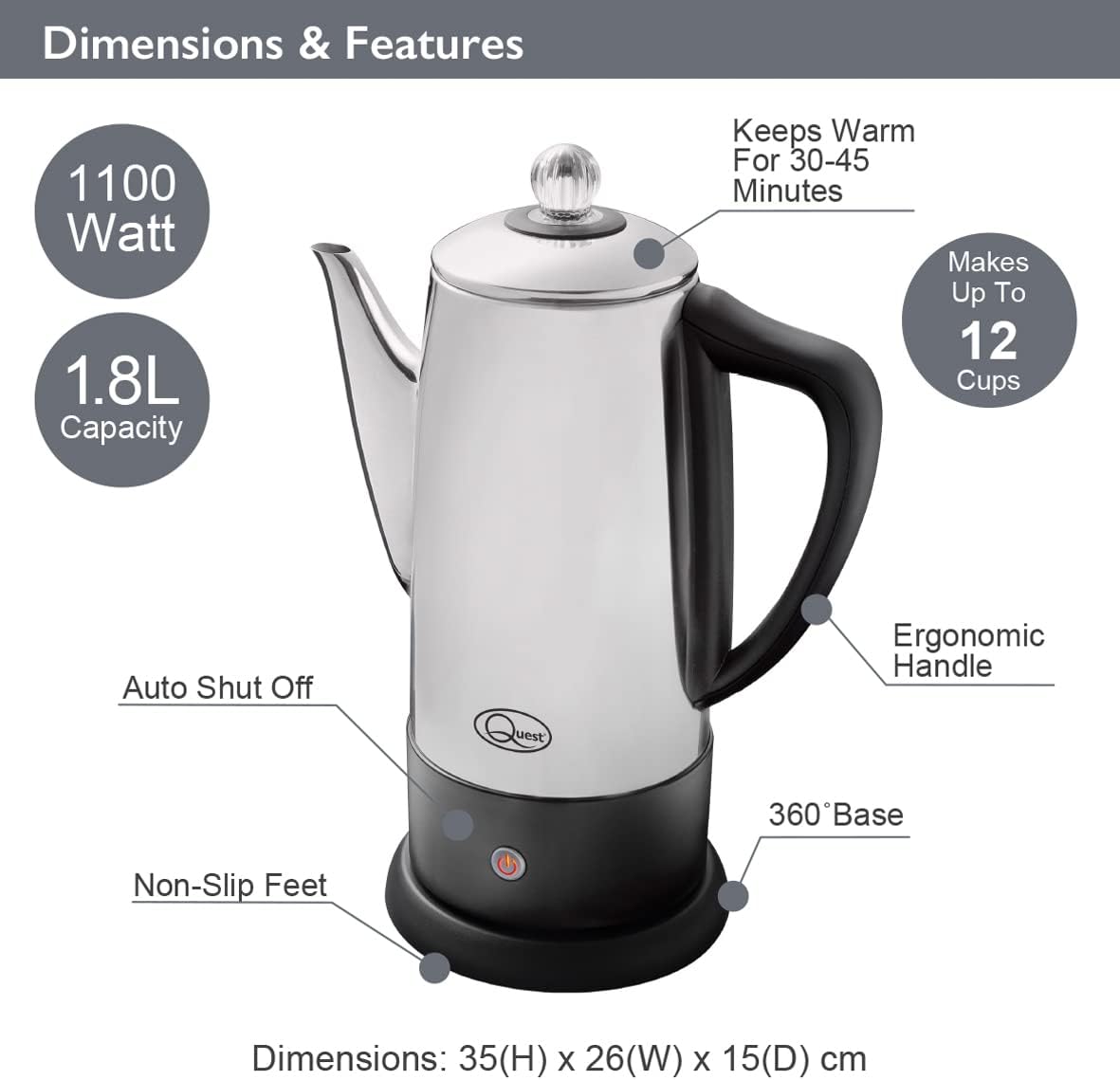
Image: Diagram illustrating the Quest 35200 percolator with callouts for its features: 1100 Watt power, 1.8L capacity (note: product title states 1.5L, using 1.8L from image), auto shut-off, non-slip feet, 360° base, ergonomic handle, keeps warm for 30-45 minutes, and makes up to 12 cups. Dimensions are 35(H) x 26(W) x 15(D) cm.

Image: A collage of four close-up views of the percolator: the interior with water level markings up to 12 cups, the removable filter basket filled with ground coffee, the illuminated power indicator light on the base, and the transparent lid knob.
การตั้งค่า
- แกะ: แกะวัสดุบรรจุภัณฑ์ออกอย่างระมัดระวัง และตรวจสอบตัวกรองกาแฟว่ามีรอยชำรุดเสียหายหรือไม่
- การทำความสะอาดเบื้องต้น: Before first use, wash the interior of the percolator, the filter basket, and the stem in warm, soapy water. Rinse thoroughly and dry. Wipe the exterior with a damp ผ้า.
- การจัดวาง: Place the percolator base on a stable, flat, heat-resistant surface, away from the edge of the counter.
- การเชื่อมต่อไฟฟ้า: ตรวจสอบให้แน่ใจว่าสายไฟสามารถเข้าถึงได้ง่ายและไม่มีสิ่งกีดขวาง
คำแนะนำการใช้งาน
Follow these steps to brew coffee with your Quest 35200 percolator:
- เติมน้ำ: Fill the percolator with cold, fresh water to your desired level, observing the internal markings. Do not exceed the maximum fill line.
- Insert Stem and Basket: Place the percolator stem into the center well of the percolator. Then, place the filter basket onto the stem.
- เพิ่มกากกาแฟ: Add your preferred amount of coarse-ground coffee into the filter basket. Do not use fine-ground coffee as it may seep through the filter.
- ฝาปิดที่ปลอดภัย: Place the lid firmly on the percolator.
- เชื่อมต่อพลังงาน: Place the percolator onto its 360° detachable power base. Plug the power cord into a suitable electrical outlet.
- เริ่มการต้มเบียร์: Press the power button on the base. The indicator light will illuminate, signifying that brewing has begun.
- Percolation Cycle: The water will heat and begin to percolate through the coffee grounds. The brewing process typically takes several minutes, depending on the amount of water.
- ให้ความอบอุ่น: Once the brewing cycle is complete, the percolator will automatically switch to a keep-warm mode, indicated by the power light changing color or remaining illuminated. This function keeps coffee warm for approximately 30-45 minutes.
- ให้บริการ: Carefully remove the percolator from its base and pour coffee into cups. Be cautious of hot surfaces and steam.
- การตัดการเชื่อมต่อ: After serving, unplug the percolator from the wall outlet.

Image: A visual guide showing four steps for using the percolator: 1. Adding cold water to the pot. 2. Adding ground coffee to the filter basket. 3. Pressing the power switch on the base. 4. Pouring the brewed coffee into a cup.

Image: A diagram highlighting the percolator's keep warm functionality, stating it keeps coffee warm for up to 45 minutes, has a 1.8L capacity, and makes up to 12 cups.

ภาพ: ภาพระยะใกล้ view of the percolator's 360° detachable base, showing the central electrical connector.
การบำรุงรักษาและการทำความสะอาด
การทำความสะอาดเป็นประจำจะช่วยให้เครื่องชงกาแฟของคุณทำงานได้อย่างเหมาะสมและมีอายุการใช้งานยาวนาน
- ถอดปลั๊กเสมอ: Before cleaning, ensure the percolator is unplugged from the power outlet and has cooled down completely.
- ถอดแยกชิ้นส่วน: Remove the lid, filter basket, and stem.
- ส่วนประกอบล้าง: Wash the lid, filter basket, and stem in warm, soapy water. Rinse thoroughly and dry.
- ภายในสะอาด: Wash the interior of the percolator with warm, soapy water and a soft sponge or brush. Rinse thoroughly to remove all soap residue.
- ภายนอกสะอาด: Wipe the exterior of the percolator with a damp ใช้ผ้าเช็ดทำความสะอาดเท่านั้น ห้ามใช้สารทำความสะอาดที่มีฤทธิ์กัดกร่อนหรือแผ่นขัดถู เพราะอาจทำให้พื้นผิวสแตนเลสเสียหายได้
- การทำความสะอาดฐาน: เช็ดฐานพลังงานด้วยโฆษณาamp cloth. Never immerse the power base in water or any other liquid.
- การอบแห้ง: Ensure all parts are completely dry before reassembling or storing the percolator.
- การขจัดตะกรัน: Over time, mineral deposits may build up. To descale, fill the percolator with a mixture of equal parts water and white vinegar. Bring to a boil and let it sit for an hour before emptying and rinsing thoroughly. Repeat if necessary.
- ความปลอดภัยของเครื่องล้างจาน: The percolator is ไม่ dishwasher safe. Hand wash all components.
การแก้ไขปัญหา
If you encounter issues with your percolator, refer to the following common problems and solutions:
| ปัญหา | สาเหตุที่เป็นไปได้ | สารละลาย |
|---|---|---|
| เครื่องชงกาแฟไม่เปิด | Not plugged in; power button not pressed; no power at outlet. | Ensure unit is plugged in and power button is pressed. Check outlet with another appliance. |
| กาแฟอ่อนเกินไป | ผงกาแฟไม่เพียงพอ; ผงกาแฟหยาบเกินไป; ระดับน้ำสูงเกินไป | Increase coffee grounds. Use medium-coarse grounds. Reduce water level. |
| กาแฟก็แรงเกินไป | Too many coffee grounds; coffee grounds too fine; water level too low. | Reduce coffee grounds. Use coarser grounds. Increase water level. |
| กากกาแฟในกาแฟที่ชงแล้ว | Coffee grounds too fine; filter basket not seated correctly. | Use coarser grounds. Ensure filter basket is properly seated on the stem. |
| รอยรั่วของตัวกรองน้ำ | Overfilled; lid not seated correctly. | Do not fill above the maximum line. Ensure lid is firmly and correctly placed. |
หากปัญหายังคงมีอยู่หลังจากพยายามแก้ไขปัญหาเหล่านี้แล้ว โปรดติดต่อฝ่ายสนับสนุนลูกค้า
ข้อมูลจำเพาะ
| คุณสมบัติ | รายละเอียด |
|---|---|
| หมายเลขรุ่น | 35200 |
| ยี่ห้อ | ภารกิจ |
| สี | เงิน |
| ความจุ | 1.5 ลิตร (ประมาณ 12 ถ้วย) |
| พลัง | 1100วัตต์ |
| เล่มที่tage | 240โวลต์ |
| คุณสมบัติพิเศษ | Cordless, Built-in Filter, Keep Warm Function |
| ขนาด (กว้าง x ยาว x สูง) | 13.19 x 9.25 x 6.1 นิ้ว (33.5 x 23.5 x 15.5 ซม.) |
| น้ำหนักสินค้า | 2.2 ปอนด์ (1 กก.) |
| ปลอดภัยสำหรับเครื่องล้างจาน | เลขที่ |
การรับประกันและการสนับสนุน
สำหรับข้อมูลการรับประกันและการสนับสนุนลูกค้า โปรดดูเอกสารประกอบที่ให้มา ณ เวลาที่ซื้อ หรือติดต่อตัวแทนจำหน่ายของคุณ โปรดเก็บหลักฐานการซื้อไว้เพื่อใช้ในกรณีที่ต้องการเคลมประกัน


