1. บทนำ
Thank you for choosing the Pro'sKit PT-5501I Variable Speed Rotary Tool Kit. This manual provides essential information for the safe and efficient operation, maintenance, and troubleshooting of your new rotary tool. Please read this manual thoroughly before using the tool and retain it for future reference.

รูปที่ 1.1: The Pro'sKit PT-5501I Variable Speed Rotary Tool. This image shows the main rotary tool unit, highlighting its ergonomic design and power cord connection.
2. คำแนะนำด้านความปลอดภัย
ปฏิบัติตามข้อควรระวังด้านความปลอดภัยพื้นฐานเสมอเพื่อลดความเสี่ยงจากการเกิดไฟไหม้ ไฟฟ้าช็อต และการบาดเจ็บส่วนบุคคลเมื่อใช้เครื่องมือนี้
- ความปลอดภัยในพื้นที่ทำงาน: รักษาพื้นที่ทำงานให้สะอาดและมีแสงสว่างเพียงพอ พื้นที่ที่รกหรือมืดอาจก่อให้เกิดอุบัติเหตุได้ ห้ามใช้เครื่องมือไฟฟ้าในสภาพแวดล้อมที่อาจเกิดการระเบิด เช่น ในบริเวณที่มีของเหลวไวไฟ ก๊าซ หรือฝุ่น
- ความปลอดภัยทางไฟฟ้า: ปลั๊กไฟของเครื่องมือไฟฟ้าต้องตรงกับเต้ารับ ห้ามดัดแปลงปลั๊กไฟไม่ว่ากรณีใดๆ ทั้งสิ้น หลีกเลี่ยงการสัมผัสร่างกายกับพื้นผิวที่ต่อสายดิน เช่น ท่อ หม้อน้ำ เตา และตู้เย็น
- ความปลอดภัยส่วนบุคคล: Always wear eye protection. Use a dust mask if operating in dusty conditions. Do not overreach. Keep proper footing and balance at all times. Dress properly; avoid loose clothing or jewelry.
- การใช้และการดูแลเครื่องมือ: อย่าฝืนใช้เครื่องมือไฟฟ้า ใช้เครื่องมือไฟฟ้าที่ถูกต้องตามการใช้งาน ถอดปลั๊กออกจากแหล่งจ่ายไฟก่อนทำการปรับแต่ง เปลี่ยนอุปกรณ์เสริม หรือจัดเก็บเครื่องมือไฟฟ้า
- การซ่อมบำรุง: บำรุงรักษาเครื่องมือไฟฟ้า ตรวจสอบการไม่ตรงแนวหรือการยึดติดของชิ้นส่วนที่เคลื่อนไหว การแตกหักของชิ้นส่วน และสภาวะอื่นๆ ที่อาจส่งผลต่อการทำงานของเครื่องมือไฟฟ้า
3. เนื้อหาบรรจุภัณฑ์
The Pro'sKit PT-5501I Variable Speed Rotary Tool Kit includes the following items:
- Pro'sKit PT-5501I Rotary Tool (230V)
- ด้ามยืดหยุ่น
- 40-piece Multipurpose Accessory Set
- กระเป๋าใส่อุปกรณ์
- คู่มือการใช้งาน

รูปที่ 3.1: Contents of the Pro'sKit PT-5501I Rotary Tool Kit. This image displays the rotary tool, flexible shaft, various accessories, and the carrying case.
4. คุณสมบัติของผลิตภัณฑ์
The Pro'sKit PT-5501I Rotary Tool is designed for versatility and precision, offering a range of features for various applications:
- การควบคุมความเร็วแบบแปรผัน: Adjust speed from 10,000 to 32,000 RPM for optimal performance across different materials and tasks.
- เพลาแบบยืดหยุ่น: Provides enhanced comfort and precision for detailed work in hard-to-reach areas.
- ล็อคแกน: ช่วยให้เปลี่ยนอุปกรณ์เสริมได้อย่างรวดเร็วและง่ายดาย
- แปรงถ่านภายนอก: Designed for convenient replacement, extending tool lifespan.
- อุปกรณ์เสริมเอนกประสงค์: Includes a 40-piece set suitable for cutting, sanding, polishing, drilling, and burr removal.

รูปที่ 4.1: เกินview of the Pro'sKit PT-5501I Rotary Tool Kit and its accessories. This image illustrates the various components and their potential applications, such as polishing and precision engineering.
5. การตั้งค่า
Follow these steps to set up your rotary tool for operation:
- การแกะกล่อง: นำชิ้นส่วนทั้งหมดออกจากกล่องอย่างระมัดระวัง ตรวจสอบดูว่ามีส่วนใดเสียหายหรือไม่
- Selecting an Accessory: Choose the appropriate accessory for your task (e.g., grinding stone, sanding drum, drill bit).
- Inserting an Accessory:
- กดปุ่มล็อคแกนหมุนที่อยู่บนหัวเครื่องมือค้างไว้
- Unscrew the collet nut counter-clockwise until the collet jaws open.
- เสียบก้านอุปกรณ์เสริมเข้าไปในปลอกจับให้สุด
- Tighten the collet nut clockwise by hand, then release the spindle lock button. Ensure the accessory is securely held.
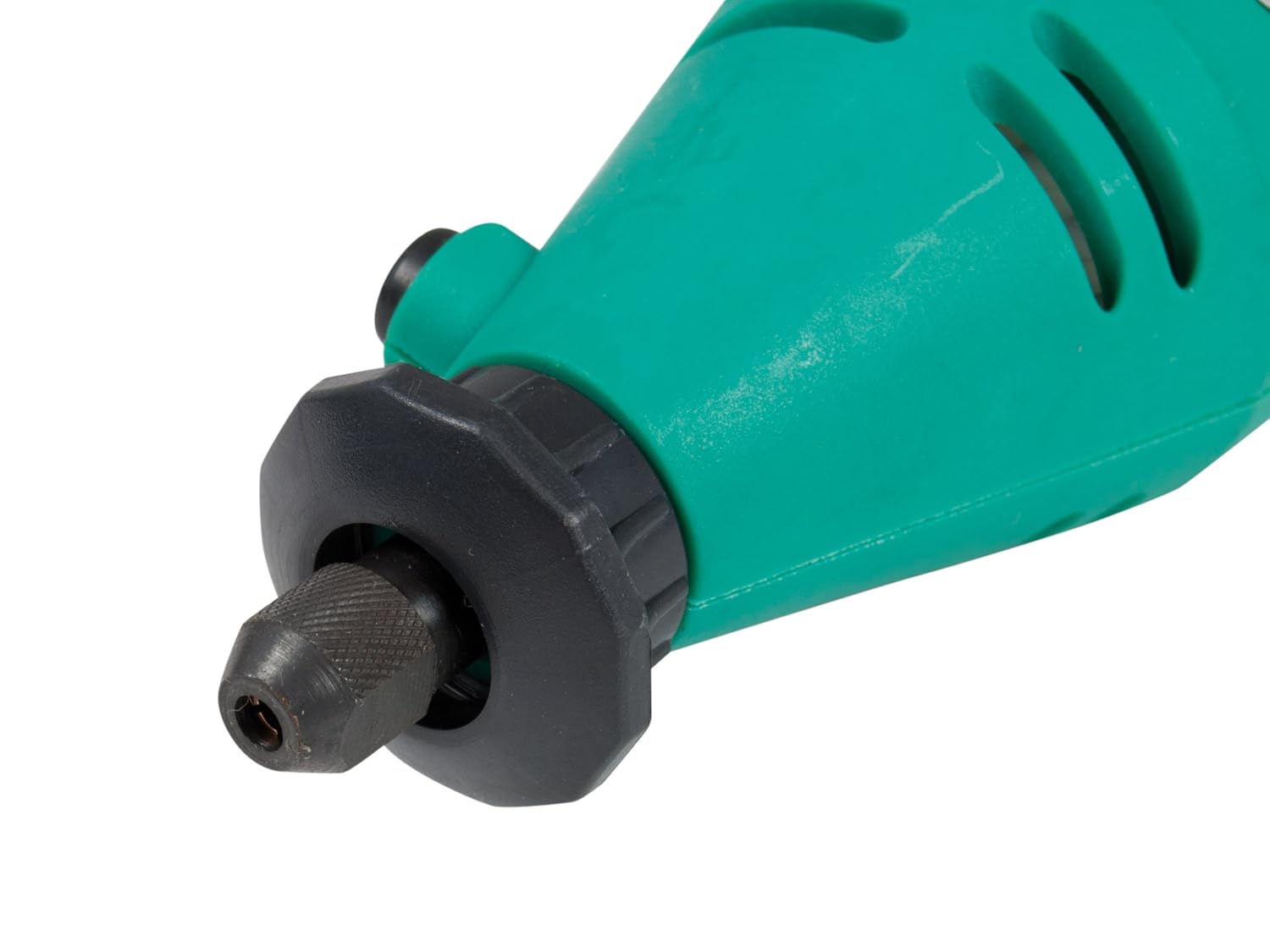
รูปที่ 5.1: ภาพระยะใกล้ view of the rotary tool's chuck and spindle lock mechanism. This image details how accessories are inserted and secured.
- Attaching the Flexible Shaft (Optional):
- ตรวจสอบให้แน่ใจว่าได้ถอดปลั๊กเครื่องมือหมุนแล้ว
- ถอดน็อตและหัวจับออกจากเครื่องมือหมุน
- Screw the flexible shaft coupling onto the rotary tool's threaded collar until secure.
- Insert the flexible shaft's inner drive cable into the rotary tool's chuck.
- Insert the desired accessory into the flexible shaft's collet and tighten.
- การเชื่อมต่อไฟฟ้า: Plug the tool into a standard 230V AC power outlet.
6. คู่มือการใช้งาน
ก่อนเริ่มดำเนินการ โปรดตรวจสอบให้แน่ใจว่าได้เข้าใจและปฏิบัติตามข้อควรระวังด้านความปลอดภัยทั้งหมดแล้ว
- การเปิด/ปิดเครื่อง: Locate the ON/OFF switch on the tool body. Slide it to the 'ON' position to start the tool and to the 'OFF' position to stop it.
- การปรับความเร็ว: Use the variable speed dial to select the desired RPM. Start with a lower speed and gradually increase it as needed for your application and material.
- การทำงานกับเครื่องมือ:
- Hold the tool firmly with both hands or use the flexible shaft for precision.
- Apply light, consistent pressure. Do not force the tool, as this can lead to overheating or damage to the tool or workpiece.
- รอให้เครื่องมือหมุนด้วยความเร็วเต็มที่ก่อนจึงค่อยสัมผัสกับชิ้นงาน
- For cutting, sanding, polishing, drilling, and burr removal, use the appropriate accessory and technique. Refer to accessory-specific instructions if available.
- การระบายความร้อน: During extended use, allow the tool to cool periodically to prevent overheating.
7. การบำรุงรักษา
การบำรุงรักษาอย่างสม่ำเสมอจะช่วยให้เครื่องมือหมุนของคุณทำงานได้อย่างมีประสิทธิภาพสูงสุดและยืดอายุการใช้งาน
- การทำความสะอาด: After each use, unplug the tool and clean the housing with a soft, damp cloth. Use a brush to remove dust and debris from ventilation openings. Do not use harsh chemicals or abrasive cleaners.
- การเปลี่ยนแปรงคาร์บอน: The tool is equipped with external carbon brushes for easy replacement. When the tool's performance decreases or it stops working, the carbon brushes may need replacement. Refer to the diagram on the tool for the location of the brush caps. Unscrew the caps, remove the old brushes, and insert new ones, ensuring they are seated correctly. Replace the caps securely.
- การดูแลอุปกรณ์เสริม: Clean accessories after use. Store them in the provided carrying case to prevent damage and loss.
- พื้นที่จัดเก็บ: Store the tool and all accessories in the original carrying case in a dry, secure location, out of reach of children.

รูปที่ 7.1: The Pro'sKit PT-5501I Rotary Tool Kit stored in its carrying case. Proper storage protects the tool and accessories.
8 การแก้ไขปัญหา
If you encounter issues with your Pro'sKit PT-5501I Rotary Tool, refer to the following table:
| ปัญหา | สาเหตุที่เป็นไปได้ | สารละลาย |
|---|---|---|
| เครื่องมือไม่เริ่มทำงาน | ไม่มีแหล่งจ่ายไฟ; สวิตช์เสีย; แปรงถ่านสึกหรอ | ตรวจสอบการเชื่อมต่อไฟ; ทดสอบเต้ารับ; เปลี่ยนสวิตช์; เปลี่ยนแปรงถ่าน |
| กำลังตก/ความเร็วลดลง | Worn carbon brushes; Overload; Loose connection | Replace carbon brushes; Reduce pressure on workpiece; Check power cord. |
| แรงสั่นสะเทือนมากเกินไป | Bent accessory shank; Improperly seated accessory | Replace bent accessory; Re-seat accessory securely in collet. |
| เครื่องมือร้อนเกินไป | ใช้งานหนักต่อเนื่อง; ช่องระบายอากาศอุดตัน | Allow tool to cool; Clear ventilation slots; Reduce workload. |
หากปัญหายังคงมีอยู่หลังจากพยายามแก้ไขปัญหาเหล่านี้แล้ว โปรดติดต่อฝ่ายสนับสนุนลูกค้า
9. ข้อมูลจำเพาะ
| ข้อมูลจำเพาะ | รายละเอียด |
|---|---|
| หมายเลขรุ่น | PT-5501I |
| ยี่ห้อ | โปรส์คิท |
| เล่มที่tage | 230 โวลต์ |
| แหล่งพลังงาน | สายไฟ |
| ความเร็วรอบการหมุนขั้นต่ำ | 10,000 รอบต่อนาที |
| ความเร็วการหมุนสูงสุด | 32,000 รอบต่อนาที |
| น้ำหนักสินค้า | 1.4 กิโลกรัม (1 กก. 400 กรัม) |
| ขนาดสินค้า (กว้าง x ยาว x สูง) | 23.5 x 28.5 x 7 เซนติเมตร |
| การใช้ที่แนะนำ | Cutting, Sanding, Polishing, Drilling, Burr Removal |
| คุณสมบัติพิเศษ | ความเร็วตัวแปร |
| ส่วนประกอบที่รวมอยู่ | Rotary Tool, Flexible Shaft, 40-piece Accessory Set, Carrying Case |
10. การรับประกันและการสนับสนุน
Pro'sKit products are manufactured to high-quality standards. For warranty information, technical support, or service inquiries, please refer to the contact details provided with your purchase documentation or visit the official Pro'sKit webไซต์ เก็บหลักฐานการซื้อของคุณไว้เพื่อใช้ในกรณีเรียกร้องการรับประกัน


