การแนะนำ
This user manual provides comprehensive instructions for the setup, operation, and maintenance of your Reloop RP-8000 Advanced Hybrid Torque Turntable. The RP-8000 combines traditional direct-drive turntable functionality with advanced digital control features, making it a versatile tool for DJs and audio enthusiasts.
โปรดอ่านคู่มือนี้อย่างละเอียดก่อนใช้งานอุปกรณ์ เพื่อให้มั่นใจได้ถึงการใช้งานที่ถูกต้อง และเพื่อเพิ่มประสิทธิภาพและยืดอายุการใช้งานให้ยาวนานที่สุด
คำแนะนำเพื่อความปลอดภัย
- ตรวจสอบให้แน่ใจว่าแหล่งจ่ายไฟตรงกับปริมาตรtage ตามข้อกำหนดที่ระบุไว้ในหน่วย
- อย่าให้เครื่องโดนฝน ความชื้น หรืออุณหภูมิที่สูงหรือต่ำเกินไป
- หลีกเลี่ยงการวางเครื่องไว้ใกล้แหล่งความร้อนหรือโดนแสงแดดโดยตรง
- อย่าเปิดcasinง. ส่งต่อการบริการทั้งหมดให้กับบุคลากรที่มีคุณสมบัติ
- Always disconnect the power cable before cleaning or moving the unit.
- เก็บให้พ้นจากมือเด็ก
เนื้อหาแพ็คเกจ
ตรวจสอบว่ามีรายการทั้งหมดอยู่ในแพ็คเกจ:
- เครื่องเล่นแผ่นเสียงหลัก
- สายไฟ
- สาย USB
- RCA Cable (with ground wire)
- สลิปแมท
- น้ำหนักถ่วง
- Headshell (cartridge not included)
- คู่มือการใช้งาน (เอกสารนี้)
สินค้าเกินview
Familiarize yourself with the various components of your Reloop RP-8000 turntable.
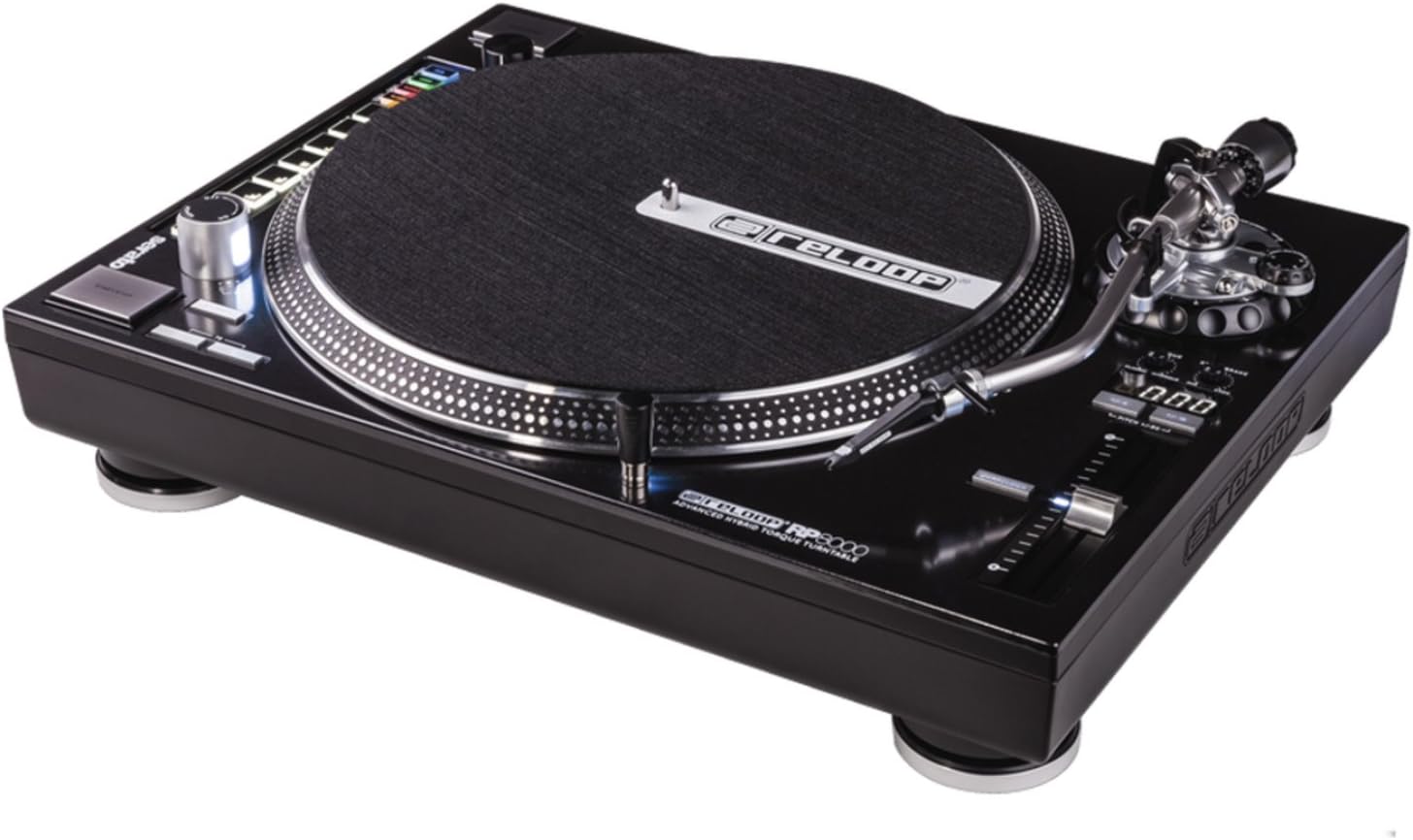
รูปที่ 1: จากบนลงล่าง view of the Reloop RP-8000 turntable, showcasing the platter, tone arm, pitch fader, and MIDI control section with performance pads.

รูปที่ 2: มุม view of the Reloop RP-8000, highlighting the robust construction, the illuminated platter edge, and the integrated MIDI controls on the left side.

รูปที่ 3: Rear panel of the Reloop RP-8000, showing the audio output (Phono/Line), USB ports (USB A and TT Link), power input, and power switch. Note the additional start/stop button for vertical setup.
ส่วนประกอบหลัก:
- แผ่นเสียง: พื้นผิวหมุนที่ใช้สำหรับวางแผ่นเสียง
- แขนโทนเสียง: ทำหน้าที่ยึดหัวเข็มและเข็มไว้ โดยติดตามร่องของแผ่นเสียง
- พิทช์เฟดเดอร์: Adjusts the playback speed (BPM).
- ปุ่มเริ่ม/หยุด: Controls platter rotation. An additional button is provided for battle setup.
- MIDI Control Section: Features a Trax encoder, 8 backlit drum pads, and mode selection buttons for software control.
- Phono/Line Output: RCA jacks for audio output, with a switch to select between phono (turntable level) and line (mixer/amp level) output.
- พอร์ต USB: For connecting to a computer and linking multiple turntables.
การตั้งค่า
1. การแกะกล่องและการจัดวาง
- นำเครื่องเล่นแผ่นเสียงออกจากบรรจุภัณฑ์อย่างระมัดระวัง
- Place the unit on a stable, level surface away from direct vibrations.
- ให้แน่ใจว่ามีการระบายอากาศเพียงพอรอบๆ เครื่อง
2. Tone Arm and Cartridge Assembly
- Attach your preferred headshell and cartridge (sold separately) to the tone arm.
- Install the counterweight onto the rear of the tone arm.
- Adjust the counterweight to balance the tone arm horizontally. Refer to your cartridge's instructions for recommended tracking force.
- ตั้งค่าแป้นหมุนป้องกันการลื่นไถลให้ตรงกับแรงกดติดตาม
3. การเชื่อมต่อ
- การเชื่อมต่อเสียง: Connect the RCA cables from the turntable's PHONO/LINE output to your mixer or ampชีวิต.
- If connecting to a PHONO input on your mixer/amp, set the turntable's PHONO/LINE switch to โฟโน.
- If connecting to a LINE input, set the turntable's PHONO/LINE switch to เส้น.
- Connect the ground wire to the ground terminal on your mixer/amp to reduce hum.
- การเชื่อมต่อ USB: Connect the USB cable from the turntable's USB port to your computer for MIDI control and DVS (Digital Vinyl System) functionality.
- Turntable Link (TT Link): For linking multiple RP-8000 units, connect them in series using standard USB cables. Only one turntable needs to be connected to the computer.
- การเชื่อมต่อไฟฟ้า: Connect the power cable to the turntable and then to a suitable power outlet.
คำแนะนำการใช้งาน
1. การเล่นพื้นฐาน
- Place a record on the platter and put the slipmat on top.
- Select the desired speed (33, 45, or 78 RPM) using the speed selection buttons.
- กดปุ่ม START/STOP เพื่อเริ่มการหมุนของแผ่นเสียง
- Carefully lower the tone arm onto the record using the cue lever.
- Adjust the pitch using the pitch fader as needed.
2. การควบคุมระดับเสียง
- The pitch fader allows for precise adjustment of playback speed.
- Use the Pitch Range buttons (+/-8%, +/-16%, +/-50%) to select the desired pitch adjustment range.
- The LCD display shows the current pitch percentage.
- Press the Quartz Lock button to return the pitch to 0% (nominal speed).
3. MIDI Control and Performance Modes
The RP-8000 features an integrated MIDI control section for seamless integration with DJ software.
- Trax Encoder: Use this large encoder to browse through playlists and load tracks in your DJ software.
- แผ่นประสิทธิภาพ: The 8 backlit drum pads offer various performance modes:
- โหมดคิวร้อน: Trigger up to 8 hot cue points.
- โหมดลูป: Set and trigger loops.
- Sampเลอโหมด: Access and play sampเลส.
- โหมดผู้ใช้: Freely assign MIDI functions to the pads and other control elements.
- Dual Performance Mode: Activate two modes simultaneously (e.g., Hot Cue and Loop) by pressing their respective buttons. The pads will be split to control both functions.
- Turntable Link Mode: Connect up to four RP-8000 turntables via USB. The units automatically assign themselves to available decks in your DJ software, requiring only one USB connection to your computer.
- ปุ่มย้อนกลับ: Instantly reverses platter rotation.
- Adjustable Start/Stop Time: Use the dedicated dials to fine-tune the platter's start and brake times for customized performance.
การซ่อมบำรุง
- การทำความสะอาด: ใช้ผ้าแห้งนุ่มๆ เช็ดทำความสะอาดตัวเครื่อง สำหรับคราบสกปรกฝังแน่น ให้ใช้ผ้าชุบน้ำหมาดๆ เช็ดทำความสะอาดอีกครั้งamp สามารถใช้ผ้าเช็ดทำความสะอาดได้ แต่ต้องระวังอย่าให้ของเหลวเข้าไปในตัวเครื่อง หลีกเลี่ยงน้ำยาทำความสะอาดที่มีฤทธิ์กัดกร่อน
- การดูแลสไตลัส: Regularly clean your stylus with a soft brush designed for this purpose. Replace the stylus when it shows signs of wear to prevent damage to your records.
- ฝาปิดป้องกันฝุ่น: Use a dust cover (if available) when the turntable is not in use to protect it from dust and debris.
การแก้ไขปัญหา
| ปัญหา | สาเหตุที่เป็นไปได้ | สารละลาย |
|---|---|---|
| ไม่มีเสียงหรือเสียงเบา | Incorrect PHONO/LINE switch setting; loose RCA cables; faulty cartridge/stylus. | Ensure PHONO/LINE switch matches input; check cable connections; inspect/replace cartridge/stylus. |
| เสียงฮัมเพลง | Ground wire not connected; interference from other electronics. | Connect ground wire to mixer/amp; move turntable away from other electronic devices. |
| จานหมุนไม่หมุน | Power not connected; power switch off; START/STOP button not pressed. | Check power cable; ensure power switch is ON; press START/STOP button. |
| MIDI controls not responding | USB cable not connected; incorrect software settings; outdated firmware. | Ensure USB cable is connected; check DJ software MIDI settings; update turntable firmware if available. |
If the problem persists after attempting these solutions, please contact Reloop customer support.
ข้อมูลจำเพาะ
| คุณสมบัติ | รายละเอียด |
|---|---|
| ชื่อรุ่น | RP-8000 MK2 (AMS-RP-8000) |
| ประเภทมอเตอร์ | AC Motor, Quartz-driven Direct Drive |
| น้ำหนักสินค้า | 22 ปอนด์ (ประมาณ 9.98 กก.) |
| ขนาดสินค้า (กว้าง x ยาว x สูง) | 20.66 x 16.53 x 7.48 นิ้ว (ประมาณ 52.5 x 42 x 19 ซม.) |
| เทคโนโลยีการเชื่อมต่อ | Wired (RCA, USB 2.0) |
| แหล่งพลังงาน | สายไฟ |
| เล่มที่tage | 220 Volts (Note: Check specific unit for local voltagความเข้ากันได้) |
| ฮาร์ดแวร์อินเตอร์เฟซ | ยูเอสบี 2.0 |
| อุปกรณ์ที่รองรับ | เครื่องคอมพิวเตอร์ส่วนบุคคล |
| รูปแบบสัญญาณ | ดิจิตอล |
การรับประกันและการสนับสนุน
For information regarding warranty coverage, please refer to the warranty card included with your product or visit the official Reloop website. Reloop offers various protection plans for extended coverage, which may be purchased separately.
For technical support, troubleshooting assistance beyond this manual, or spare parts, please contact Reloop customer service through their official webเว็บไซต์หรือตัวแทนจำหน่ายที่ได้รับอนุญาต โปรดเก็บใบเสร็จรับเงินไว้เป็นหลักฐานการซื้อสำหรับการเรียกร้องการรับประกัน
บันทึก: The user manual (PDF) is also available for download at https://manuals.plus/m/8eb0b60ccb1c6d10ac93577b129a938bfbac889fdb461902d354afc8d19b78dd.


