
การแนะนำ
The UOTEK UT-890A is a versatile USB to RS-485/422 serial converter designed for reliable data communication. It facilitates the conversion of a USB signal to RS-485 or RS-422 signals, featuring internal zero-delay automatic receiving and transmitting functions. This device is compatible with various communication software and interface hardware, offering a plug-and-play experience for many operating systems.
คุณสมบัติหลัก:
- Supports RS485 & RS422 interfaces.
- Compatible with Windows XP/7/8/10/CE, Mac, and Linux operating systems.
- Supports 2-wire semi-duplex and 4-wire full-duplex operation.
- Equipped with ±15KV ESD Protection for enhanced durability.
- USB line powered, eliminating the need for an external power supply.
- Automatic hand-shaking protocol supported.
- Remote wake-up and power supply management supported.
- Designed for a wide working environment temperature range: -25°C to 70°C, with relative humidity 5% to 95%.
- ความยาวสายเคเบิล: 5 ฟุต
คุณสมบัติผลิตภัณฑ์
เทคโนโลยีหลัก
The UT-890A converter utilizes a high-performance FTDI chipset, ensuring stable and reliable data conversion. This chipset is crucial for maintaining data integrity and compatibility across various systems.

Figure 1: FTDI Chipset Detail
ภาพนี้ให้รายละเอียด view of the FTDI chip, emphasizing its role in supporting automatic handshake protocols and ensuring overall compatibility and stability of the converter.
ตัวเชื่อมต่อที่ทนทาน
The DB9 connector pins are gold-plated to resist corrosion and high temperatures, ensuring a secure and long-lasting connection for reliable data transmission.

Figure 2: Gold-Plated DB9 Pins
This image highlights the gold-plated pins of the DB9 connector, which are designed to enhance durability and ensure stable electrical contact, resisting corrosion and high temperatures for a more secure connection.
เนื้อหาแพ็คเกจ
ตรวจสอบว่ามีรายการทั้งหมดอยู่ในแพ็คเกจ:
- 1 x UOTEK UT-890A USB to RS485 RS422 Converter (USB V2.0)
- 1 x เทอร์มินัลบล็อก
- 1 x CD Driver (for older operating systems, drivers may also be available online)

Figure 3: Converter and Terminal Block Components
This image shows the individual components of the UOTEK UT-890A package, including the USB to serial converter and the separate terminal block, illustrating how they connect to form the complete interface.
คำแนะนำการตั้งค่า
1. การติดตั้งไดร์เวอร์
For Windows 8/10 and newer operating systems, the UT-890A converter is generally plug-and-play, meaning drivers will install automatically upon connection. For older operating systems (Windows 95/98/2000/XP, NT-IMAG), or if automatic installation fails, use the provided CD driver. Ensure the correct driver for your operating system is installed before connecting the device.

รูปที่ 4: ความเข้ากันได้ของระบบview
This image illustrates the broad operating system compatibility of the UT-890A converter, including various Windows versions, Mac, and Linux, highlighting its versatility for different computing environments.
2. การเชื่อมต่อทางกายภาพ
- Connect the USB end of the UT-890A converter to an available USB port on your computer.
- Attach the provided terminal block to the DB9 connector of the UT-890A converter.
- Connect your RS-485 or RS-422 device to the terminal block, ensuring correct wiring for data transmission (TXD, RXD) and ground (GND). Refer to your device's manual for specific wiring requirements.
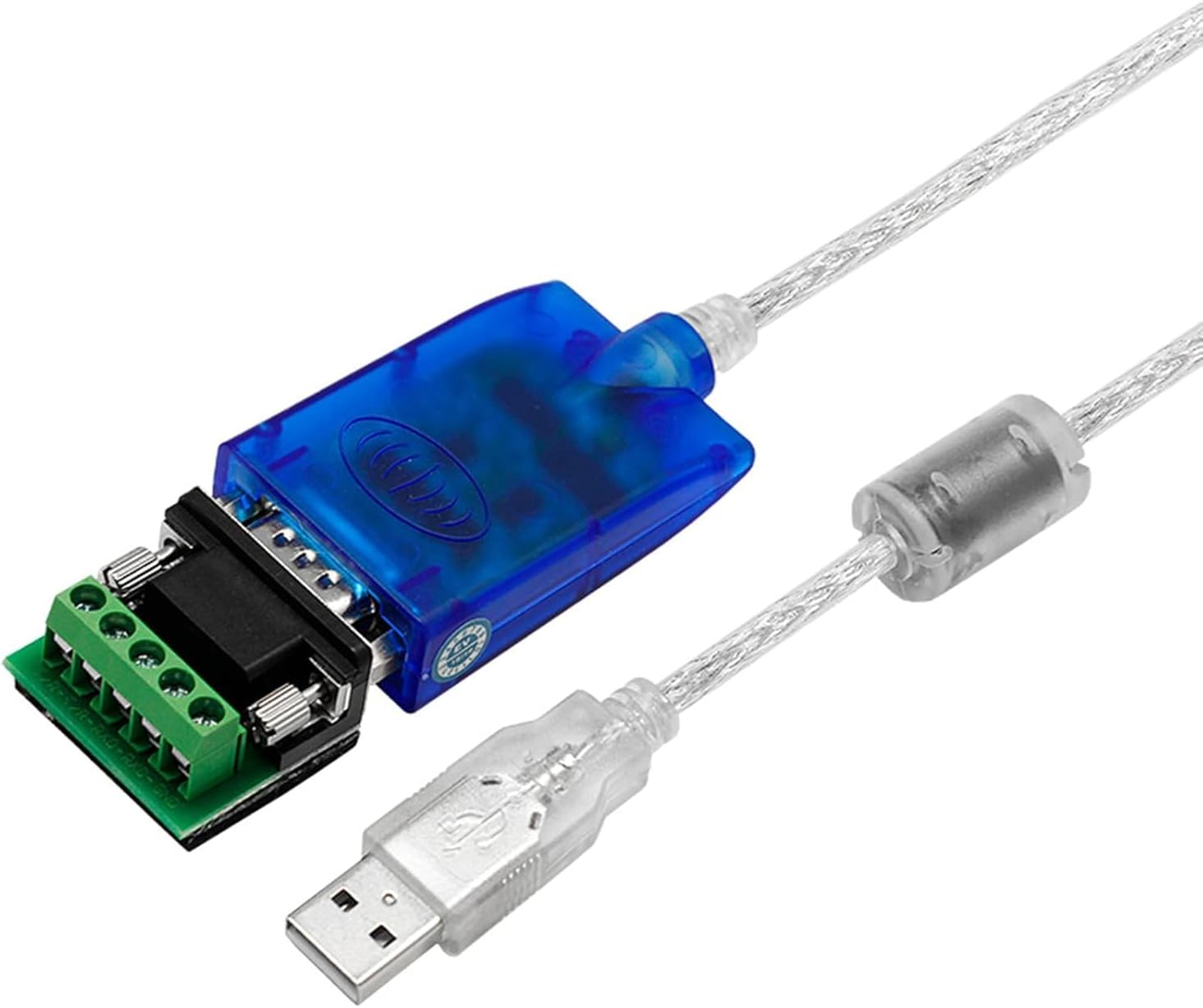
Figure 5: Converter with Terminal Block
This image displays the UOTEK UT-890A converter with its USB connector and the attached terminal block, ready for connection to an RS-485 or RS-422 device. The terminal block simplifies wiring for industrial applications.
คำแนะนำการใช้งาน
Data Flow and Automatic Control
The UT-890A features an internal zero-delay automatic receiving and transmitting function. This means the converter automatically detects the direction of data flow, eliminating the need for manual control signals. This ensures seamless communication between your computer and the connected RS-485/422 device.
ไฟ LED แสดงสถานะ
The converter is equipped with LED indicators to provide visual feedback on its operational status:
- PWR (กำลัง): Indicates that the device is powered on and receiving power from the USB port.
- TXD (Transmit Data): Flashes when data is being transmitted from the computer through the converter to the serial device.
- RXD (Receive Data): Flashes when data is being received by the converter from the serial device and sent to the computer.
Video 1: UOTEK UT-890A Product Introduction
This video provides a brief introduction to the UOTEK UT-890A converter, demonstrating its features and typical usage scenarios, including the LED indicators for power and data transmission.
ข้อมูลจำเพาะ
| คุณสมบัติ | รายละเอียด |
|---|---|
| แบบอย่าง | UT-890A |
| อินเทอร์เฟซ | USB 2.0 (compatible with USB 1.0, 1.1) to RS-485/422 (DB9 connector) |
| Data Flow Control | Internal zero-delay automatic receiving and transmitting |
| Handshaking Protocol | Automatic hand-shaking supported |
| การป้องกัน ESD | ±15KV ESD Protection |
| แหล่งจ่ายไฟ | USB line powered (no external power required) |
| สภาพแวดล้อมการทำงาน | Temperature: -25°C to 70°C, Humidity: 5% to 95% RH |
| ระบบปฏิบัติการที่รองรับ | Windows 95/98/2000/XP/7/8/10/CE, Mac, Linux |
| ความยาวสายเคเบิล | 5 ฟุต (ประมาณ 1.5 เมตร) |
| อัตราการถ่ายโอนข้อมูล | Up to 480 Megabits Per Second (USB 2.0 standard) |
| ขนาด | 8.4 x 6.1 x 1.4 inches (product packaging) |
| น้ำหนักสินค้า | 4.8 ออนซ์ |

Figure 6: Internal Cable Structure and Features
This diagram illustrates the robust construction of the UT-890A cable, detailing its tinned copper core, wave filtering shielding, mesh grid, and transparent PVC tube, all contributing to stable and protected data transmission. Key features like USB V2.0 standard, no external power supply, remote wake-up support, and ±15KV ESD protection are also highlighted.
การแก้ไขปัญหา
- ไม่รู้จักอุปกรณ์:
- Ensure the USB cable is securely connected to both the converter and the computer.
- Verify that the necessary drivers are installed. For Windows 8/10, drivers should install automatically. For older OS, use the provided CD or download from the manufacturer's webเว็บไซต์.
- ลองเชื่อมต่อกับพอร์ต USB อื่นบนคอมพิวเตอร์ของคุณ
- รีสตาร์ทคอมพิวเตอร์ของคุณและลองอีกครั้ง
- No Data Transmission (TXD/RXD LEDs not flashing):
- Check the wiring between the converter's terminal block and your RS-485/422 device. Incorrect wiring is a common cause of communication failure.
- Ensure your serial device is powered on and functioning correctly.
- Verify the communication settings (baud rate, data bits, parity, stop bits) in your software match those of the connected serial device.
- Confirm that the correct COM port is selected in your application software.
- การเชื่อมต่อไม่ต่อเนื่อง:
- Ensure the cable is not excessively bent or damaged.
- Minimize electromagnetic interference by keeping the converter and cable away from strong electrical fields or other electronic devices.
- The converter includes magnet rings to suppress interference, ensuring stable communication.
- ESD Protection Concerns:
- While the device offers ±15KV ESD protection, extreme electrical events like lightning strikes can exceed its protective capabilities. Always take appropriate precautions in environments prone to such events.
การซ่อมบำรุง
The UOTEK UT-890A converter is designed for durability and requires minimal maintenance. To ensure optimal performance and longevity:
- รักษาอุปกรณ์ให้สะอาด ปราศจากฝุ่นและเศษขยะ ใช้ผ้านุ่มและแห้งเช็ดทำความสะอาด
- Operate the converter within its specified environmental conditions: temperature range of -25°C to 70°C and relative humidity of 5% to 95%.
- หลีกเลี่ยงการวางอุปกรณ์ไว้ในอุณหภูมิที่สูงเกินไป แสงแดดโดยตรง หรือมีความชื้นสูง
- Do not attempt to disassemble or modify the converter, as this will void the warranty and may cause damage.
- Ensure connections are secure to prevent accidental disconnections during operation.
การรับประกันและการสนับสนุน
For warranty information, technical support, or service inquiries, please refer to the UOTEK official webหรือติดต่อผู้ค้าปลีกของคุณ เก็บใบเสร็จรับเงินไว้เพื่อใช้ในการเคลมประกัน
Online resources for drivers and additional support may be available on the manufacturer's webเว็บไซต์.


