การแนะนำ
The Nyko Dual Charge Base is designed to conveniently store and charge two Xbox One or Xbox One S wireless controllers. This system includes two custom rechargeable battery packs and special battery covers, enabling a drop-and-charge functionality without the need for additional cords or plugs. The battery covers integrate seamlessly with the controller's design, maintaining its ergonomics. The dual-port recharging dock is AC powered and features LED indicators to display charging status.
มีอะไรอยู่ในกล่อง
Carefully unpack all components. The package should contain the following items:
- 1 x Nyko Dual Charge Base
- 2 x Custom NiMH Rechargeable Battery Packs
- 2 x Custom Battery Covers for Xbox One/Xbox One S Controllers
- 1 x อะแดปเตอร์ไฟ AC

Image: All components included with the Nyko Dual Charge Base.
คำแนะนำการตั้งค่า
1. Install Battery Packs and Covers
- Take your Xbox One or Xbox One S wireless controller.
- Remove the existing battery cover and any standard AA batteries from the controller.
- Insert a Nyko custom rechargeable battery pack into the controller's battery compartment. Ensure the battery pack is oriented correctly, with the "TOP SIDE" label and arrow pointing upwards. It should slide in easily.
- Attach a Nyko custom battery cover over the installed battery pack. Slide it down from the top until it clips securely into place. Verify that the three contact points on the battery cover are visible and unobstructed in the window.
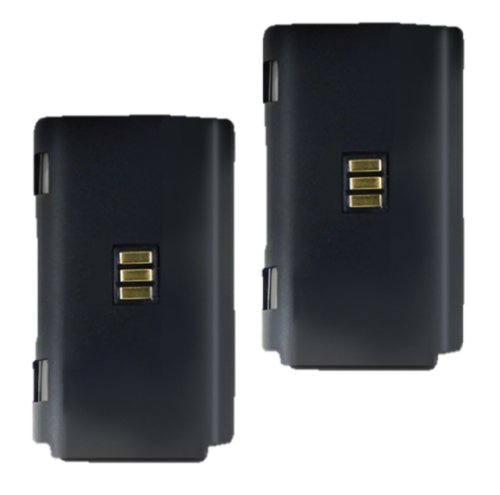
Image: Nyko custom rechargeable battery packs.
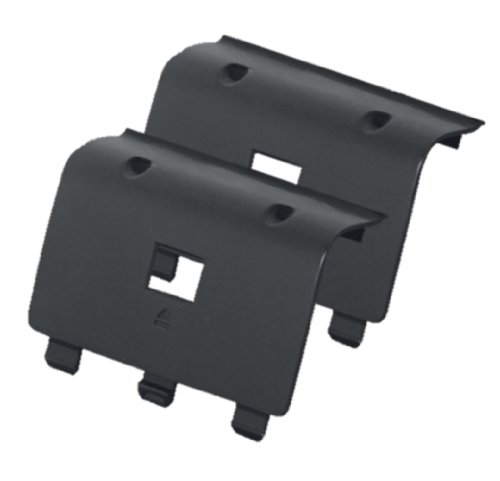
Image: Nyko custom battery covers.
2. Connect the Charge Base to Power
Plug the AC power adapter into the designated port on the Nyko Dual Charge Base, then plug the adapter into a standard wall outlet.
Video: This video demonstrates the installation of the battery pack and cover into an Xbox One controller, followed by placing the controller onto the Nyko Charge Base to initiate charging. It shows the LED indicators changing color to reflect the charging status.
คำแนะนำการใช้งาน
ตัวควบคุมการชาร์จ
- Ensure the Nyko Dual Charge Base is connected to a power source.
- Gently place an Xbox One or Xbox One S controller, with the Nyko battery pack and cover installed, onto one of the charging docks. The controller should sit securely in the dock, ensuring the contact points align.
- The LED indicator on the charge base corresponding to the controller will illuminate. Initially, it may show red or orange, indicating that charging is in progress.
- Once the controller is fully charged, the LED indicator will turn green or turn off, depending on the model, signifying that charging is complete.

Image: Demonstrates the drop-and-charge design, showing a controller being placed onto the base.
การซ่อมบำรุง
- การทำความสะอาด: Use a soft, dry cloth to clean the charge base and controllers. Avoid using abrasive cleaners or solvents.
- พื้นที่จัดเก็บ: Store the charge base and controllers in a cool, dry place when not in use.
- การดูแลแบตเตอรี่ To prolong battery life, avoid completely draining the battery packs frequently. Charge them regularly.
การแก้ไขปัญหา
- ตัวควบคุมไม่ชาร์จ:
- Ensure the charge base is properly plugged into a working wall outlet.
- Verify that the controller is seated correctly on the charge base, ensuring the contact points on the battery cover align with the pins on the dock. Sometimes a slight adjustment is needed to establish a connection.
- Check that the Nyko custom battery pack and cover are correctly installed in the controller. The three contact points on the cover must be visible.
- If only one side is charging, try swapping controllers or battery packs to identify if the issue is with the controller, battery pack, or a specific charging port on the base.
- ไฟแสดงสถานะ LED ไม่ติดสว่าง:
- Confirm the charge base has power.
- Ensure the controller is properly docked and making contact.
- Elite Controller Compatibility:
- The Nyko Dual Charge Base is compatible with the Xbox One Elite Controller. However, the paddles on the Elite controller may need to be removed for it to fit properly on the Charge Base.
- For Elite controller compatible battery covers, please contact Nyko customer support.
ข้อมูลจำเพาะ
| คุณสมบัติ | รายละเอียด |
|---|---|
| หมายเลขรุ่น | 86100 |
| ความเข้ากันได้ | Xbox One, Xbox One S, Xbox One Elite Controllers |
| ประเภทแบตเตอรี่ | NiMH Rechargeable Battery Packs |
| เวลาในการชาร์จ | Rapid recharging (approx. 1 hour for full charge) |
| เวลาเล่น (ต่อการชาร์จหนึ่งครั้ง) | นานถึง 25 ชั่วโมง |
| แหล่งพลังงาน | AC Powered (plugs into standard wall outlet) |
| ขนาดสินค้า | 9.3 x 5 x 2.8 นิ้ว |
| น้ำหนักสินค้า | 14.9 ออนซ์ |
ข้อมูลการรับประกัน
For detailed warranty information, please refer to the documentation included with your product or visit the official Nyko webไซต์ เงื่อนไขการรับประกันอาจแตกต่างกันไปตามภูมิภาคและผลิตภัณฑ์
การสนับสนุนลูกค้า
If you encounter any issues or have questions regarding your Nyko Dual Charge Base, please visit the official Nyko website for support resources, FAQs, and contact information. You may also find assistance by contacting their customer support directly.
For specific inquiries regarding Elite controller compatible battery covers, please contact Nyko customer support as mentioned in the product description.


