1. บทนำและแนวทางด้านความปลอดภัย
This manual provides essential information for the safe operation and maintenance of your Walkera QR X350 Quadcopter. Please read it thoroughly before operating the aircraft.
1.1 ข้อควรระวังเพื่อความปลอดภัยทั่วไป
- Operate the quadcopter in open areas, away from people, buildings, and obstacles.
- Maintain a safe distance from the rotating propellers.
- ห้ามปฏิบัติงานในสภาวะลมแรงหรือสภาพอากาศเลวร้าย
- Ensure all batteries are fully charged and properly installed before each flight.
- Regularly inspect the quadcopter for any damage or loose parts.
- Recommended age for operation is 14 years and up, with adult supervision.
2. เนื้อหาบรรจุภัณฑ์
ตรวจสอบว่าส่วนประกอบทั้งหมดที่ระบุไว้ด้านล่างมีอยู่ในแพ็คเกจของคุณ:
- Walkera QR X350 Quadcopter
- Walkera Devo7 2.4Ghz Transmitter/Receiver
- 25C 3S 2200mAh 11.1v LiPO Battery
- GA-005 2-3 Cell LiPO Balance Charger (Input: 110-240V AC / 5V DC)
- Propellers (set)
- คู่มือผู้ใช้และคู่มือการเริ่มต้นฉบับย่อ

Figure 2.1: Contents of the Walkera QR X350 Quadcopter package.
3. Setup and Pre-Flight Preparation
3.1 Quadcopter Assembly
- ติดตั้งล้อลงจอด: Securely attach the landing gear to the main body of the quadcopter.
- ติดตั้งใบพัด: Carefully attach the propellers to the motor shafts. Ensure correct orientation (clockwise and counter-clockwise) as indicated in the quick start guide or on the propellers themselves.
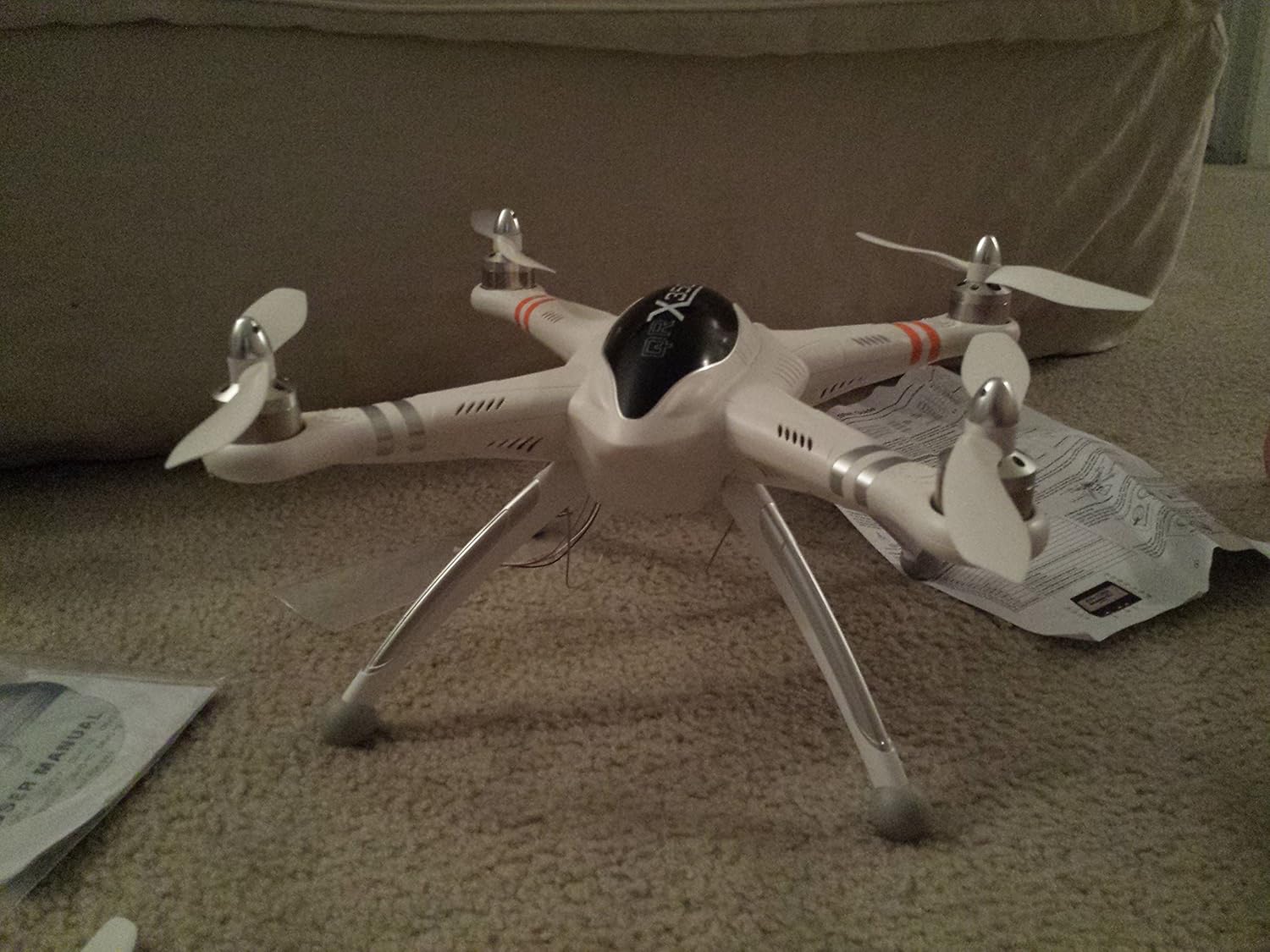
Figure 3.1: Assembled Walkera QR X350 Quadcopter.
3.2 การชาร์จแบตเตอรี่
The quadcopter uses a 25C 3S 2200mAh 11.1v LiPO battery. Use the provided GA-005 balance charger.
- Connect the GA-005 charger to a 110-240V AC power source or a 5V DC source.
- Connect the LiPO battery to the balance charger. Ensure correct polarity.
- Monitor the charging process. Disconnect the battery once fully charged to prevent overcharging.
- Always charge batteries on a fire-resistant surface and never leave charging batteries unattended.
3.3 Transmitter (Devo7) Preparation
The Walkera Devo7 transmitter requires 8 Lithium Ion batteries (included). Install them according to the polarity markings in the battery compartment.
3.4 การสอบเทียบ
Before the first flight and periodically thereafter, perform the following calibrations:
- การปรับเทียบเข็มทิศ: Follow the instructions in the quick start guide to calibrate the compass. This is crucial for accurate GPS functions.
- Gyro and Accelerometer Calibration: Ensure the quadcopter is on a level surface during this calibration to maintain stable flight.
4. คู่มือการใช้งาน
4.1 การควบคุมการบินขั้นพื้นฐาน
Familiarize yourself with the Devo7 transmitter controls. Practice slowly in a safe, open environment until you are comfortable with the quadcopter's response.
คุณสมบัติขั้นสูง 4.2 ประการ
- GPS Altitude Hold System: This feature allows the quadcopter to maintain a stable altitude and position using GPS signals.
- One Key Return Home: Activates an automatic return-to-home function, guiding the quadcopter back to its takeoff point. Ensure GPS signal is strong before using.
- Altitude Sensor: Assists in maintaining a consistent flight height.
- FPV Capability: The quadcopter supports First Person View (FPV) systems for real-time video transmission (additional equipment may be required).
- การควบคุม Wi-Fi: Optional Wi-Fi control allows for operation via a mobile device (additional modules may be required).

Figure 4.1: The Walkera QR X350 Quadcopter in hand.
5. การบำรุงรักษา
Regular maintenance ensures the longevity and safe operation of your QR X350.
- การทำความสะอาด: After each flight, gently clean the quadcopter body and motors to remove dust, dirt, or debris.
- การตรวจสอบใบพัด: Check propellers for cracks, bends, or damage before and after each flight. Replace damaged propellers immediately.
- การตรวจสอบมอเตอร์: Ensure motors spin freely and are free from obstructions.
- การดูแลแบตเตอรี่ Store LiPO batteries at a storage voltage (around 3.8V per cell) if not used for extended periods. Do not fully discharge or overcharge.
- การเดินสายไฟ: Periodically check all wiring connections for looseness or damage. Secure any loose wires, especially antenna and compass cables.
6 การแก้ไขปัญหา
หัวข้อนี้จะกล่าวถึงปัญหาทั่วไปที่คุณอาจพบเจอ
- Quadcopter flies erratically or drifts:
- Ensure proper compass, gyro, and accelerometer calibration.
- Check for damaged propellers or motors.
- Verify strong GPS signal if using GPS-assisted flight modes.
- Loss of signal or control:
- Ensure the transmitter batteries are charged.
- Operate within the specified range of the Devo7 transmitter.
- Avoid areas with high electromagnetic interference.
- Battery not charging or short flight time:
- Verify the charger is correctly connected and functioning.
- Inspect the battery for physical damage or swelling.
- LiPO batteries have a limited cycle life; consider replacing old batteries.
- Quadcopter does not return home accurately:
- Ensure GPS signal was strong and locked at the takeoff point.
- Perform compass calibration before flight.
7. ข้อมูลจำเพาะ
| คุณสมบัติ | รายละเอียด |
|---|---|
| ยี่ห้อ | วอล์คเกอร์ร่า |
| ชื่อรุ่น | QR X350 (WK-QRX350-Devo7) |
| ขนาด (กว้าง x ยาว x สูง) | 11.4" x 11.4" x 7.1" (290 มม. x 290 มม. x 180 มม.) |
| น้ำหนักสินค้า | 6.2 ปอนด์ |
| แบตเตอรี่ | 25C 3S 2200mAh 11.1v LiPO (24.42 Watt Hours) |
| เครื่องชาร์จ | GA-005 2-3 Cell LiPO Balance Charger |
| ประเภทมอเตอร์ | WK-WS-28-008A Brushless Outrunner |
| เครื่องส่งสัญญาณ | Walkera Devo7 2.4Ghz |
| คุณสมบัติพิเศษ | GPS Altitude Hold, One Key Return Home, Altitude Sensor, FPV Capability, Wi-Fi Control |
| เรทอายุ | 14+ With Adult Supervision |
| เทคโนโลยีการเชื่อมต่อ | ไวไฟ |
| ความละเอียดในการจับภาพวิดีโอ | 720p (with optional camera) |
8. การรับประกันและการสนับสนุน
For warranty information and technical support, please refer to the official Walkera webหรือติดต่อตัวแทนจำหน่ายที่ได้รับอนุญาต เก็บใบเสร็จรับเงินไว้เป็นหลักฐานการซื้อ
ผู้ผลิต: Venom Group International
ติดต่อ: Refer to official Walkera support channels for assistance.


