การแนะนำ
Thank you for choosing the Baseus Encok True Wireless Earbuds W06. This manual provides detailed instructions on how to set up, operate, and maintain your earbuds to ensure optimal performance and longevity. Please read this manual thoroughly before using the product.
เนื้อหาแพ็คเกจ
กรุณาตรวจสอบสิ่งของภายในกล่องเมื่อแกะกล่อง หากมีสินค้าใดสูญหายหรือเสียหาย โปรดติดต่อตัวแทนจำหน่ายของคุณ
- Baseus Encok True Wireless Earbuds (L/R)
- เคสชาร์จไฟ
- สายชาร์จ USB-C
- จุกหูฟังซิลิโคน (มีหลายขนาด)
- คู่มือการใช้งาน
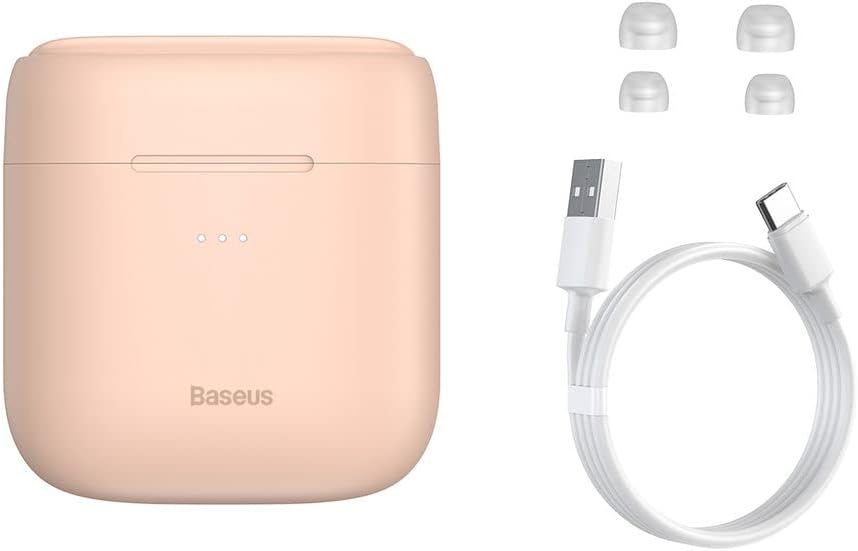
Image: The package contents, showing the charging case, two earbuds, a USB-C charging cable, and several pairs of silicone eartips.
การตั้งค่า
1. การชาร์จหูฟังและเคส
Before first use, fully charge the earbuds and the charging case. Place the earbuds into the charging case. Connect the USB-C cable to the charging case and a power source, or place the charging case on a compatible wireless charging pad.
- ไฟแสดงสถานะบนเคสจะแสดงสถานะการชาร์จ
- โดยทั่วไปการชาร์จเต็มจะใช้เวลาประมาณ 1.5 ชั่วโมง
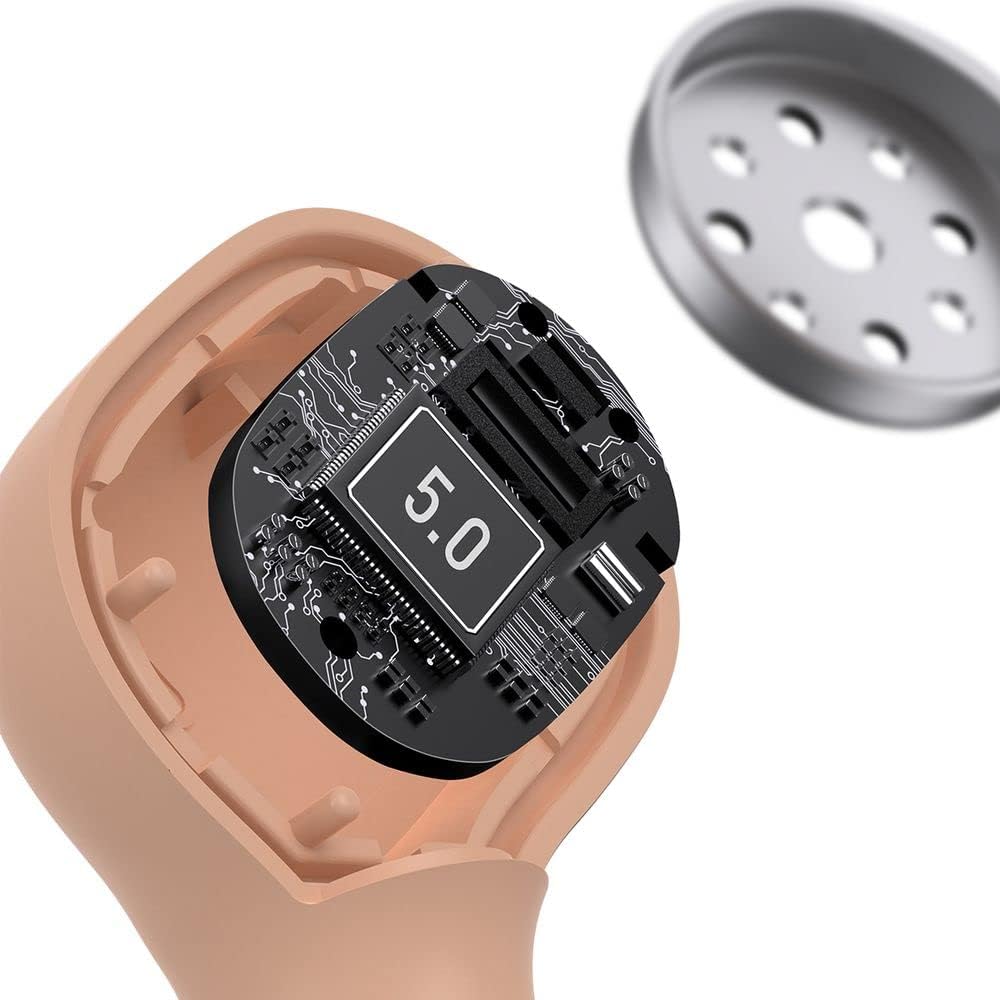
Image: The Baseus Encok W06 earbuds resting inside their open charging case, indicating they are ready for charging or use.

Image: Two Baseus Encok W06 charging cases, one connected via a USB-C cable and another placed on a wireless charging pad, demonstrating charging methods.
2. การจับคู่บลูทู ธ
- ตรวจสอบให้แน่ใจว่าได้ชาร์จเอียร์บัดแล้ว
- เปิดกล่องชาร์จ หูฟังจะเข้าสู่โหมดจับคู่โดยอัตโนมัติ ซึ่งจะแสดงด้วยไฟกระพริบบนหูฟัง
- เปิดใช้งาน Bluetooth บนอุปกรณ์ของคุณ (สมาร์ทโฟน แท็บเล็ต ฯลฯ)
- ค้นหา "Baseus Encok W06" in the list of available Bluetooth devices.
- Select it to connect. Once connected, the indicator light on the earbuds will stop flashing.
เมื่อนำเอียร์บัดออกจากเคส เอียร์บัดจะเชื่อมต่อกับอุปกรณ์ที่จับคู่ไว้ครั้งล่าสุดโดยอัตโนมัติ หากเปิดใช้งาน Bluetooth บนอุปกรณ์
3. การสวมหูฟัง
Choose the silicone eartips that provide the best fit and seal for your ears. Insert the earbuds gently into your ear canal and rotate them slightly until they feel secure and comfortable.

Image: A person wearing a Baseus Encok W06 earbud, illustrating how the earbud sits comfortably and securely in the ear.
คำแนะนำการใช้งาน
The Baseus Encok W06 earbuds feature touch controls for various functions.
- เปิดเครื่อง: Open the charging case, or press and hold the touch panel for 3 seconds if earbuds are out of case.
- หมดแรง: Place earbuds back into the charging case and close the lid, or press and hold the touch panel for 5 seconds.
- เล่น/หยุดชั่วคราว: แตะสองครั้งที่แผงสัมผัสของหูฟังข้างใดข้างหนึ่ง
- เพลงถัดไป: แตะหูฟังเอียร์บัดด้านขวาสามครั้ง
- แทร็กก่อนหน้า: แตะหูฟังเอียร์บัดด้านซ้ายสามครั้ง
- รับ/วางสาย: Double-tap the touch panel on either earbud during an incoming call.
- ปฏิเสธสาย: Press and hold the touch panel on either earbud for 2 seconds during an incoming call.
- เปิดใช้งาน Voice Assistant: กดแผงสัมผัสบนหูฟังข้างใดข้างหนึ่งค้างไว้ 3 วินาที
คุณสมบัติหลัก
- Double-sided Wireless Charging: The charging case supports wireless charging from both sides, allowing flexible placement on a wireless charging pad.
- APT-X Audio Decoding: Provides high-quality audio transmission for a superior listening experience.
- CVC Noise Canceling: Clear Voice Capture technology reduces background noise during calls for clearer communication.
- อายุการใช้งานแบตเตอรี่ที่ยาวนานขึ้น: Offers up to 300 hours of standby time.
- Bluetooth 5.0: รับประกันการเชื่อมต่อไร้สายที่เสถียรและมีประสิทธิภาพ

Image: A visual representation of the Baseus Encok W06 earbuds and charging case, accompanied by text detailing key features such as two-sided wireless charging, APT-X audio decoding, CVC noise canceling, and 300 hours of battery life.

ภาพ: รายละเอียด view of the internal circuitry of a Baseus Encok W06 earbud, prominently displaying '5.0', signifying its Bluetooth 5.0 connectivity.
การซ่อมบำรุง
การทำความสะอาด
- ทำความสะอาดหูฟังและกล่องชาร์จเป็นประจำด้วยผ้าแห้งนุ่มที่ไม่เป็นขุย
- ถอดจุกหูฟังออกแล้วทำความสะอาดด้วยสบู่ชนิดอ่อนและน้ำ จากนั้นเช็ดให้แห้งสนิทก่อนใส่กลับเข้าไปอีกครั้ง
- ห้ามใช้สารทำความสะอาดที่มีฤทธิ์กัดกร่อน แอลกอฮอล์ หรือตัวทำละลายเคมี
- ตรวจสอบให้แน่ใจว่าหน้าสัมผัสการชาร์จบนหูฟังทั้งสองข้างและเคสสะอาดและไม่มีสิ่งสกปรก
พื้นที่จัดเก็บ
- เก็บหูฟังเอียร์บัดไว้ในกล่องชาร์จเมื่อไม่ได้ใช้งานเพื่อปกป้องและชาร์จอยู่เสมอ
- หลีกเลี่ยงการเก็บในอุณหภูมิที่สูงหรือต่ำเกินไป (ร้อนหรือเย็นเกินไป) หรือมีความชื้นสูง
การดูแลแบตเตอรี่
- เพื่อรักษาอายุการใช้งานของแบตเตอรี่ ควรชาร์จหูฟังและเคสเป็นประจำ แม้ว่าจะไม่ได้ใช้งานบ่อยก็ตาม
- ควรหลีกเลี่ยงการปล่อยให้แบตเตอรี่หมดเกลี้ยงเป็นเวลานาน
การแก้ไขปัญหา
| ปัญหา | สารละลาย |
|---|---|
| หูฟังไม่จับคู่กับอุปกรณ์ |
|
| ไม่มีเสียงจากหูฟังข้างหนึ่งหรือทั้งสองข้าง |
|
| เคสชาร์จไม่ชาร์จ |
|
ข้อมูลจำเพาะ
| คุณสมบัติ | รายละเอียด |
|---|---|
| ยี่ห้อ | เบสอุส |
| ชื่อรุ่น | NGJW06-04 (W06) |
| หมายเลขรุ่นสินค้า | B00F2ZIDTS |
| เทคโนโลยีการเชื่อมต่อ | ไร้สาย (บลูทูธ 5.0) |
| ปัจจัยรูปแบบหูฟัง | อินเอียร์ |
| คุณสมบัติสายเคเบิล | ไร้สาย |
| น้ำหนักสินค้า | 50 กรัม |
| ขนาดสินค้า | 10 x 3 x 2 ซม. |
| ผู้ผลิต | เบสอุส |
| การชาร์จแบบไร้สาย | Supported (Double-sided) |
| การถอดรหัสเสียง | APT-X |
| การตัดเสียงรบกวน | CVC (สำหรับการโทร) |
| อายุการใช้งานแบตเตอรี่ (สแตนด์บาย) | นานถึง 300 ชั่วโมง |
ข้อมูลด้านความปลอดภัย
- ห้ามถอดประกอบ ซ่อมแซม หรือดัดแปลงผลิตภัณฑ์
- เก็บผลิตภัณฑ์ให้ห่างจากน้ำ ความชื้น และอุณหภูมิที่สูงเกินไป
- หลีกเลี่ยงการสัมผัสกับระดับเสียงสูงเป็นเวลานานเพื่อป้องกันความเสียหายต่อการได้ยิน
- กำจัดผลิตภัณฑ์และแบตเตอรี่อย่างมีความรับผิดชอบตามกฎระเบียบท้องถิ่น
- เก็บให้พ้นจากมือเด็กและสัตว์เลี้ยง
การรับประกันและการสนับสนุน
Baseus products typically come with a limited warranty. For specific warranty terms and conditions, please refer to the warranty card included in your package or visit the official Baseus website. For technical support, product inquiries, or warranty claims, please contact Baseus customer service or your local retailer.
You can visit the official Baseus store for more information: ร้านเบสอุส


