1. บทนำ
Thank you for choosing the Antec HCG-850M 850W Power Supply. This manual provides essential information for the safe and efficient installation, operation, and maintenance of your power supply unit. Please read this manual thoroughly before installation and retain it for future reference.
2. ข้อมูลด้านความปลอดภัย
ปฏิบัติตามข้อควรระวังด้านความปลอดภัยต่อไปนี้เสมอเพื่อป้องกันการบาดเจ็บหรือความเสียหายต่อระบบของคุณ:
- อย่าทำ open the power supply casinก. ปริมาตรสูงtagอนุภาคยังคงอยู่ภายใน แม้ว่าเครื่องจะถูกถอดปลั๊กแล้วก็ตาม
- อย่าทำ insert any objects into the power supply's ventilation openings.
- ตรวจสอบให้แน่ใจว่าได้ติดตั้งแหล่งจ่ายไฟในบริเวณที่มีการระบายอากาศที่ดี
- Use only the modular cables provided with this power supply. Using incompatible cables can cause damage.
- Disconnect the AC power cord from the wall outlet before installing or removing the power supply.
- This product is designed for use in personal computers only.
3. เนื้อหาบรรจุภัณฑ์
ตรวจสอบว่ามีรายการทั้งหมดอยู่ในแพ็คเกจของคุณ:
- Antec HCG-850M 850W Power Supply
- Modular Cable Set (PCI-E, SATA, Peripheral, CPU)
- สายไฟ AC
- สกรูยึด
- คู่มือการใช้งาน (เอกสารนี้)
4. สินค้าหมดview
The Antec HCG-850M is an 850-watt, 80 PLUS Bronze certified, semi-modular power supply designed for high-performance personal computers. It features a quiet 135mm fan for efficient cooling and robust protection circuits to ensure stable power delivery.
4.1 คุณสมบัติหลัก
- 850 Watts Continuous Power
- 80 PLUS Bronze Certified Efficiency
- Semi-Modular Cable Management
- พัดลมเงียบ 135 มม.
- ฟอร์มแฟกเตอร์ ATX
- Multiple Protection Circuits (OCP, OVP, UVP, SCP, OPP, OTP)
4.2 หน่วยจ่ายไฟ
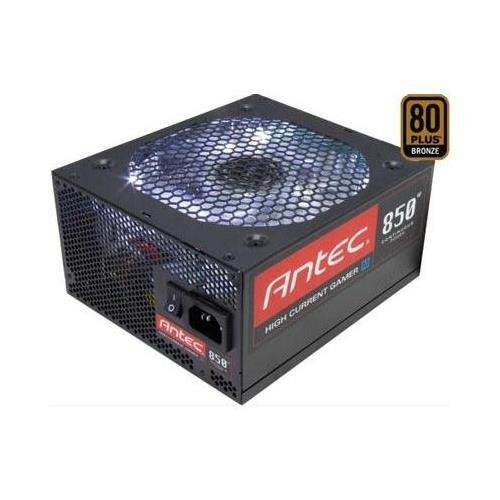
ภาพที่ 1: ด้านหน้า view of the Antec HCG-850M 850W Power Supply, showing the fan grille and modular cable connectors. This unit provides stable power to your computer components.
5. การตั้งค่าและการติดตั้ง
Follow these steps to install your Antec HCG-850M power supply:
- เตรียมระบบของคุณ: ตรวจสอบให้แน่ใจว่าคอมพิวเตอร์ของคุณปิดเครื่องสนิทแล้ว และถอดปลั๊กออกจากเต้ารับที่ผนัง เปิดเคสคอมพิวเตอร์ของคุณ
- ถอด PSU เก่าออก (ถ้ามี): ถอดสายเคเบิลทั้งหมดออกจากแหล่งจ่ายไฟเก่าของคุณ คลายสกรูและถอดแหล่งจ่ายไฟเก่าออกจากเคส
- ติดตั้ง PSU ใหม่: Carefully place the Antec HCG-850M into the power supply bay of your computer case. Secure it with the provided mounting screws. Ensure the fan is oriented correctly for optimal airflow (typically facing down if there's a bottom vent, or up if not).
- เชื่อมต่อสายเคเบิลที่จำเป็น:
- Connect the 24-pin ATX motherboard power cable.
- Connect the 4+4-pin or 8-pin EPS/CPU power cable to your motherboard.
- เชื่อมต่อสายเคเบิลโมดูลาร์: Attach the necessary modular cables for your components (e.g., PCI-E for graphics cards, SATA for hard drives/SSDs, Peripheral for fans/accessories). Connect them securely to both the power supply and the respective components.
- การจัดการสายเคเบิล: เดินสายเคเบิลอย่างเรียบร้อยเพื่อปรับปรุงการไหลเวียนของอากาศและความสวยงาม
- ปิดเคสและเปิดเครื่อง: Close your computer case. Connect the AC power cord to the power supply and then to a wall outlet. Flip the power switch on the PSU to the 'ON' position. Power on your computer.
6. คู่มือการใช้งาน
Once installed, the Antec HCG-850M operates automatically. Here are some general operating guidelines:
- เปิด/ปิดเครื่อง: Use your computer's power button to turn the system on or off. The switch on the power supply itself should generally remain in the 'ON' position during normal operation.
- เสถียรภาพของระบบ: Ensure your system is stable. If you experience unexpected shutdowns or reboots, refer to the troubleshooting section.
- การระบายอากาศ : Maintain good airflow around your computer case to prevent overheating of components, including the power supply.
7. การบำรุงรักษา
การบำรุงรักษาอย่างเหมาะสมสามารถยืดอายุการใช้งานของแหล่งจ่ายไฟของคุณได้:
- การทำความสะอาดฝุ่น: Periodically clean dust from the power supply's fan grille and the interior of your computer case using compressed air. Always disconnect the AC power cord before cleaning.
- ตรวจสอบสายเคเบิล: Occasionally check that all power cables are securely connected to the power supply and components.
- สิ่งแวดล้อม: Operate the power supply in a clean, dry environment with stable temperatures.
8 การแก้ไขปัญหา
If you encounter issues with your power supply, try the following steps:
8.1 No Power to System
- Ensure the AC power cord is securely plugged into both the wall outlet and the power supply.
- Check that the power supply's ON/OFF switch is in the 'ON' position.
- Verify all internal power cables (24-pin ATX, CPU, PCI-E) are correctly and firmly connected.
- ทดสอบเต้ารับไฟที่ผนังด้วยอุปกรณ์อื่นเพื่อให้แน่ใจว่ามีไฟอยู่
- If possible, test the power supply in another known working system or with a PSU tester.
8.2 System Instability or Random Shutdowns
- ตรวจสอบให้แน่ใจว่าความต้องการพลังงานของระบบของคุณไม่เกินความจุ 850W ของ PSU
- Check for overheating components. Ensure proper case ventilation and clean any dust buildup.
- Verify all power connections are secure. Loose connections can cause intermittent power delivery.
- If the issue persists, it may indicate a fault with the power supply or another component. Consider professional diagnosis.
9. ข้อมูลจำเพาะ
| คุณสมบัติ | รายละเอียด |
|---|---|
| หมายเลขรุ่น | HCG-850M |
| เอาท์พุต วัดtage | 850 วัตต์ |
| การรับรองประสิทธิภาพ | 80PLUS บรอนซ์ |
| ฟอร์มแฟกเตอร์ | เอทีเอ็กซ์ |
| วิธีการทำความเย็น | พัดลม (135 มม.) |
| ประเภทโมดูลาร์ | กึ่งโมดูลาร์ |
| อุปกรณ์ที่รองรับ | เครื่องคอมพิวเตอร์ส่วนบุคคล |
| น้ำหนักสินค้า | 9 ปอนด์ (ประมาณ 4.08 กก.) |
| ASIN | B00ESAI3M0 |
10. การรับประกันและการสนับสนุน
Antec products are backed by a manufacturer's warranty. For specific warranty terms and conditions, please refer to the warranty card included with your product or visit the official Antec website. For technical support or customer service, please contact Antec directly through their official support channels.
Official Antec Webเว็บไซต์: www.antec.com


