การแนะนำ
This manual provides essential information for the safe and efficient installation, operation, and maintenance of your Smartwares 01.586.21 Round Ground Spot. Please read these instructions carefully before use and retain them for future reference.
The Smartwares 01.586.21 Round Ground Spot is designed to illuminate outdoor areas such as gardens, terraces, or driveways. Its robust construction allows it to withstand loads of up to 800 kg, making it suitable for areas with pedestrian or light vehicle traffic. This outdoor spot is equipped with a GU10 fitting and includes a 3W LED bulb, emitting a warm white light of 230 lumens.
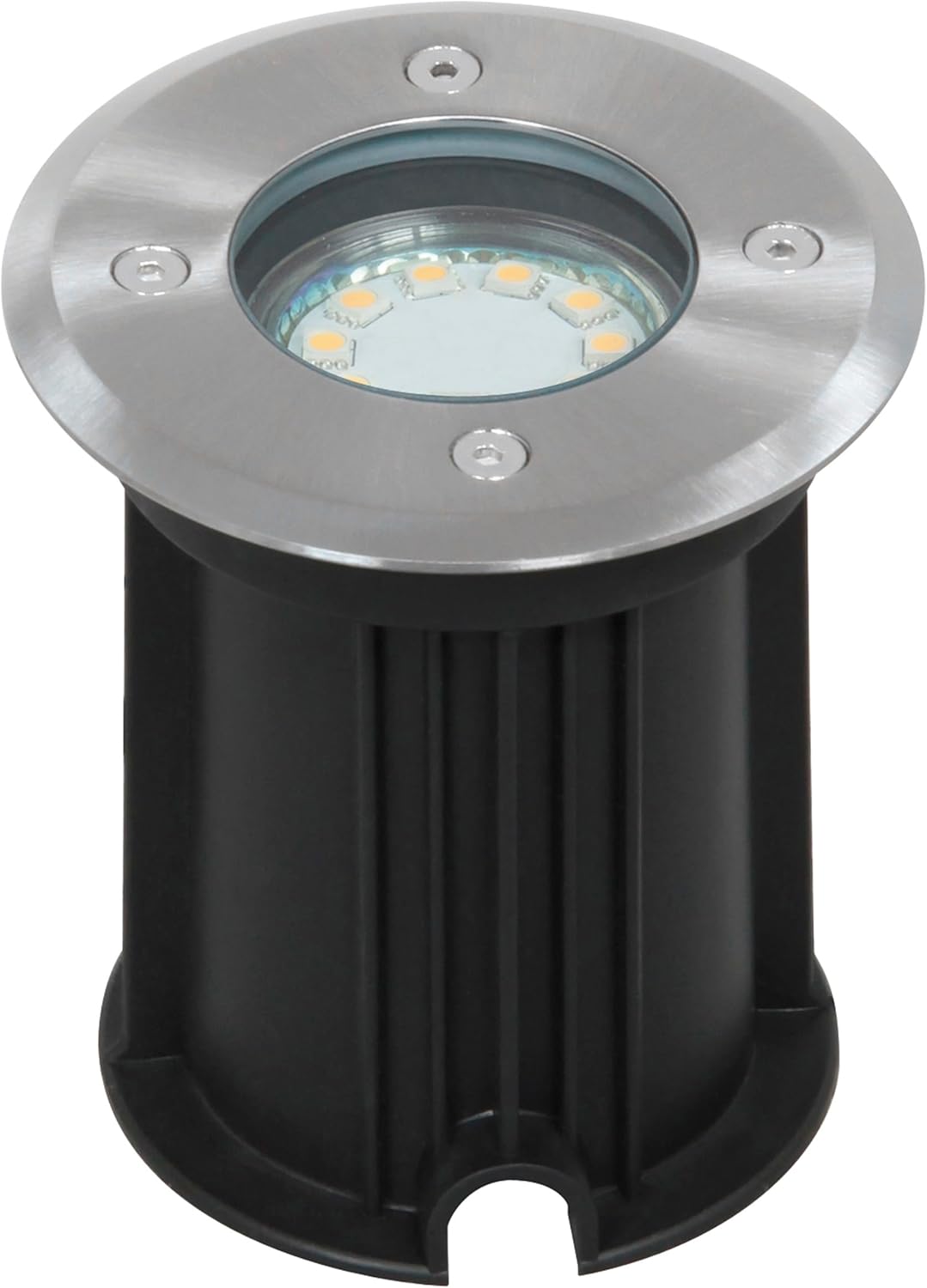
Image: A close-up, slightly angled top-down view of the Smartwares Round Ground Spot. The spot features a brushed stainless steel rim with four visible screws, surrounding a clear glass cover that protects the internal LED light source. The main body of the spot is black, cylindrical, and ribbed, designed for in-ground installation.
ข้อมูลด้านความปลอดภัย
- ตรวจสอบให้แน่ใจว่าตัดการเชื่อมต่อแหล่งจ่ายไฟก่อนการติดตั้ง บำรุงรักษา หรือเปลี่ยนหลอดไฟ
- การติดตั้งควรดำเนินการโดยช่างไฟฟ้าที่มีคุณสมบัติหากคุณไม่แน่ใจเกี่ยวกับสายไฟฟ้า
- Do not connect the product to a damaged power source.
- This product is designed for outdoor use and has an IP67 rating, indicating protection against dust and temporary immersion in water.
- The spot can withstand loads up to 800 kg. Avoid placing excessively heavy objects directly on the spot.
การติดตั้งและการตั้งค่า
Proper installation is crucial for the longevity and performance of your ground spot. Follow these general guidelines:
- การตระเตรียม: Choose a suitable location in your garden, terrace, or driveway. Ensure there is adequate drainage to prevent water accumulation around the spot.
- การขุด: Dig a hole large enough to accommodate the spot's body and allow for proper cable routing. The depth should ensure the top surface of the spot is flush with the ground level.
- การเดินสายไฟ: Route the electrical cable (not supplied) to the installation point. Ensure all electrical connections are made in accordance with local electrical codes and are properly sealed to maintain the IP67 rating. The spot is designed for mains power connection.
- การจัดวาง: Insert the ground spot into the prepared hole. Ensure the cable entry point is secure and watertight.
- การรักษาความปลอดภัย: Backfill the hole with soil, gravel, or concrete, ensuring the spot is firmly in place and its top surface is level with the surrounding ground.
- การเชื่อมต่อไฟฟ้า: Once installed, connect the spot to the main power supply.

ภาพ: ด้านหนึ่ง view of the Smartwares Round Ground Spot, showing its black cylindrical body and the integrated electrical cable extending from the base. This view highlights the robust construction and the cable connection point for installation.

Image: Multiple Smartwares Round Ground Spots are installed flush into a wooden deck, illuminating the area at dusk. The warm light from the spots creates an inviting ambiance along the edge of the deck, next to a garden area.
คำแนะนำการใช้งาน
The Smartwares Round Ground Spot operates upon connection to a suitable power supply. It is designed for continuous outdoor illumination or can be connected to an external switch or timer for controlled operation.
- เปิด/ปิดเครื่อง: The light will turn on when power is supplied and turn off when power is disconnected.
- เอาท์พุตแสง: The integrated 3W LED bulb provides 230 lumens of warm white light, suitable for accent lighting or pathway illumination.

Image: Several Smartwares Round Ground Spots are strategically placed along the base of a house facade, casting upward beams of light to highlight the architectural features and provide ambient illumination in the dark.
การซ่อมบำรุง
Regular maintenance ensures optimal performance and extends the lifespan of your ground spot.
การเปลี่ยนหลอดไฟ:
The ground spot is equipped with a GU10 fitting, allowing for easy replacement of the LED bulb. The included LED bulb is 3W, but the fitting supports bulbs up to 35W.
- ตัดการเชื่อมต่อไฟฟ้า: Always ensure the power supply to the spot is disconnected before attempting to replace the bulb.
- หลอดไฟสำหรับเข้าถึง: Use an appropriate tool (e.g., an Allen key, if provided, to remove the screws on the stainless steel rim) to open the top cover of the spot.
- ถอดหลอดไฟเก่าออก: Carefully remove the old GU10 bulb by pushing it in slightly and twisting counter-clockwise.
- ใส่หลอดไฟใหม่: Insert the new GU10 bulb by aligning the pins, pushing it in, and twisting clockwise until secure.
- ประกอบกลับเข้าที่: Securely reattach the top cover, ensuring all seals are properly seated to maintain the IP67 weather resistance.
- คืนค่าพลัง: เสียบแหล่งจ่ายไฟอีกครั้ง

ภาพ: จากบนลงล่าง view of the Smartwares Round Ground Spot, showing its stainless steel rim and the LED light source. An Allen key is positioned next to the spot, indicating the tool required to open the fixture for bulb replacement or maintenance.

Image: A detailed close-up of the LED array within the Smartwares Round Ground Spot. The image clearly shows multiple small LED chips arranged in a circular pattern under a protective clear cover, indicating the light source for the fixture.
การทำความสะอาด:
To clean the ground spot, wipe the stainless steel and glass surfaces with a soft, damp cloth. Avoid abrasive cleaners or harsh chemicals that could damage the finish or seals. Ensure the spot is cool and disconnected from power before cleaning.
การแก้ไขปัญหา
| ปัญหา | สาเหตุที่เป็นไปได้ | สารละลาย |
|---|---|---|
| ไฟไม่เปิด | ไม่มีไฟเลี้ยง หลอดไฟเสีย การเชื่อมต่อหลวม | Check power supply. Ensure all electrical connections are secure. Replace the GU10 bulb. |
| แสงสลัวหรือกระพริบ | Aging bulb, unstable power supply, loose connection. | Replace the GU10 bulb. Check power supply stability. Verify electrical connections. |
| น้ำภายในอุปกรณ์ | Improper sealing during installation or reassembly. | Disconnect power. Open the fixture, dry it thoroughly. Reassemble carefully, ensuring all seals are correctly seated and screws are tightened. |
| มีจุดสนิมปรากฏบนสแตนเลส | Exposure to harsh chemicals, corrosive environments, or poor quality stainless steel. | Clean regularly with a soft cloth and mild detergent. Avoid harsh chemicals. For existing rust, use a stainless steel cleaner. |
ข้อมูลจำเพาะ
| คุณสมบัติ | รายละเอียด |
|---|---|
| หมายเลขรุ่น | 01.586.21 |
| ขนาด (กว้าง x ยาว x สูง) | 12 x 10.2 x 10.2 ซม. |
| น้ำหนักผลิตภัณฑ์ | 600 กรัม |
| วัสดุ | สแตนเลส |
| แหล่งกำเนิดแสง | Integrated LED (replaceable GU10 bulb) |
| พลังงานไฟ LED | 3 วัตต์ |
| ฟลักซ์ส่องสว่าง | 230 ลูเมน |
| สีอ่อน | สีขาวอุ่น |
| ประเภทการติดตั้ง | GU10 (supports bulbs up to 35W) |
| ระดับการป้องกันน้ำเข้า (IP) | IP67 (Dust tight and protected against temporary immersion in water) |
| ความจุในการรับน้ำหนัก | สูงสุด 800 กก. |
| การใช้งาน | กลางแจ้ง |
การรับประกันและการสนับสนุน
For warranty information or technical support, please refer to the documentation provided with your purchase or visit the official Smartwares website. You may also contact Smartwares customer service directly for assistance.
สำหรับสินค้าและข้อมูลเพิ่มเติม โปรดเยี่ยมชม Smartwares Store on Amazon.


