1. บทนำ
This manual provides essential information for the safe and effective operation of the Rigol DG5352 Function/Arbitrary Waveform Generator. The DG5352 is a high-performance, 2-channel device capable of generating various waveforms with a maximum frequency of 350 MHz and a sampling rate of 1 GSa/s. Please read this manual thoroughly before using the instrument to ensure proper functionality and to prevent damage.
2. ข้อมูลด้านความปลอดภัย
Observe the following safety precautions to prevent injury and avoid damage to the instrument or any connected products.
- แหล่งพลังงาน: Connect the instrument to a power source that provides the specified voltagช่วงอี
- การต่อลงดิน: ตรวจสอบให้แน่ใจว่าได้ต่อสายดินอุปกรณ์อย่างถูกต้องเพื่อป้องกันไฟฟ้าช็อต
- การระบายอากาศ : อย่าปิดกั้นช่องระบายอากาศ ตรวจสอบให้แน่ใจว่าอากาศไหลเวียนรอบเครื่องมือได้เพียงพอ
- สิ่งแวดล้อม: Operate the instrument in a dry, well-ventilated area, away from direct sunlight, high temperatures, and excessive dust.
- การทำความสะอาด: ถอดปลั๊กไฟออกก่อนทำความสะอาด ใช้ผ้านุ่มๆamp ผ้า หลีกเลี่ยงน้ำยาทำความสะอาดที่มีฤทธิ์กัดกร่อนหรือตัวทำละลาย
- การบริการ: ควรส่งเครื่องมือไปให้ช่างผู้ชำนาญการซ่อมบำรุงดูแล ห้ามซ่อมแซมเครื่องมือด้วยตนเอง
3. สินค้าหมดview
The Rigol DG5352 is a versatile function/arbitrary waveform generator designed for a wide range of applications in electronics testing and development. It features two independent output channels, allowing for simultaneous generation of different waveforms or synchronized signals.
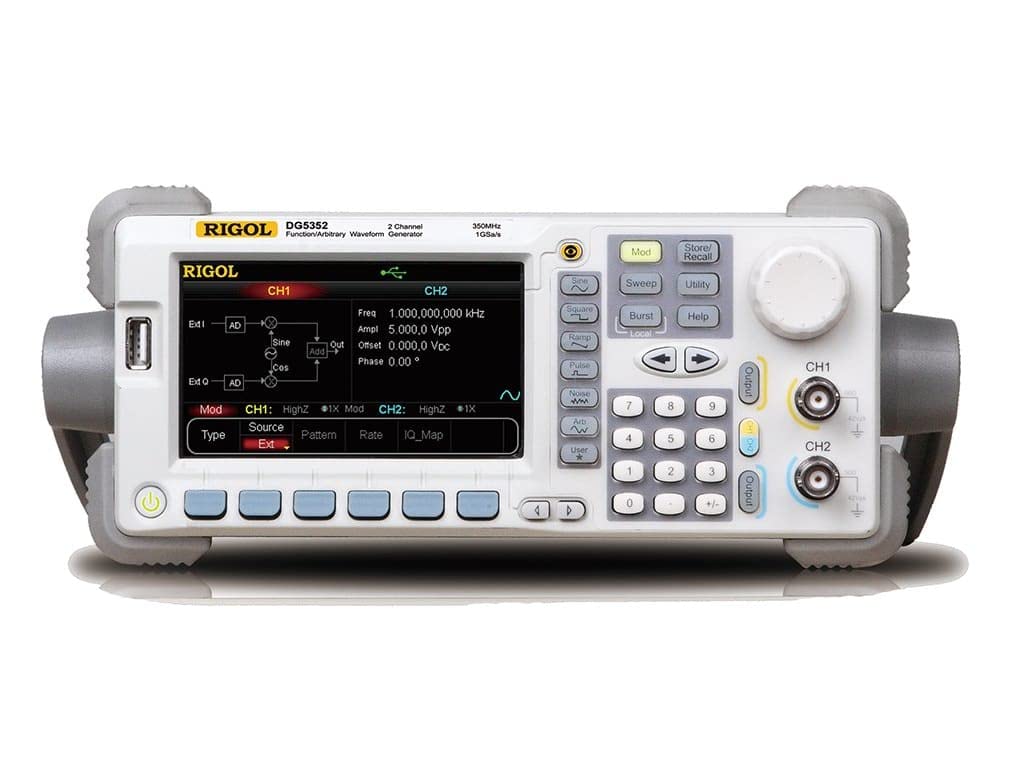
Figure 3.1: Front Panel of the Rigol DG5352. This image displays the front panel of the Rigol DG5352, highlighting its main display, control buttons, rotary knob, and output connectors for Channel 1 (CH1) and Channel 2 (CH2). The display shows current settings for frequency, amplitude, offset, and phase, along with waveform type and modulation options.
คุณสมบัติหลัก:
- ช่องทางการรับชม: 2 independent output channels.
- ช่วงความถี่: Up to 350 MHz.
- Sampหลิงอัตรา: 1 GSa/s.
- ประเภทของรูปคลื่น: ไซน์, กำลังสอง, Ramp, Pulse, Noise, Arbitrary, and more.
- Modulation Functions: AM, FM, PM, FSK, ASK, PSK, PWM, Sweep, Burst.
- อินเทอร์เฟซผู้ใช้: Intuitive front panel with a clear display, dedicated function buttons, and a rotary knob for precise adjustments.
4. การตั้งค่า
- การแกะกล่อง: Carefully remove the DG5352 from its packaging. Verify that all accessories listed in the packing list are present.
- การเชื่อมต่อไฟฟ้า: Connect the provided power cord to the AC input on the rear panel of the instrument, then plug the other end into a grounded AC power outlet.
- เปิดเครื่อง: Press the power button located on the front panel to turn on the instrument. The display will illuminate, and the system will perform a self-test.
- การเชื่อมต่อขาออก: Connect your test leads or cables to the desired output channels (CH1 or CH2) on the front panel. Ensure proper impedance matching for your application.
- USB/LAN Connection (Optional): For remote control or data transfer, connect a USB cable to the USB host/device port or an Ethernet cable to the LAN port on the rear panel.
5. คู่มือการใช้งาน
This section outlines basic operation procedures for generating standard waveforms.
5.1. Generating a Standard Waveform (e.g., Sine Wave)
- เลือกช่อง: กดปุ่ม CH1 or CH2 button on the front panel to select the desired output channel. The active channel will be highlighted on the display.
- Select Waveform Type: กดปุ่ม ไซน์ button (or other waveform buttons like สี่เหลี่ยม, Ramp, ชีพจร) located on the left side of the control panel. The display will show the default sine wave parameters.
- ตั้งความถี่: Use the numeric keypad to enter the desired frequency value, then press the corresponding unit button (e.g., เมกะเฮิรตซ์, เฮิร์ทซ์). Alternatively, use the rotary knob to adjust the frequency.
- ชุด Ampความสูง: กดปุ่ม Ampl softkey on the display. Use the numeric keypad and unit buttons (e.g., วี.พี) or the rotary knob to set the peak-to-peak ampความสูง
- Set Offset: กดปุ่ม ออฟเซ็ต softkey. Use the numeric keypad and unit buttons (e.g., วีดีซี) or the rotary knob to set the DC offset voltage.
- เปิดใช้งานเอาท์พุต: กดปุ่ม เอาท์พุต button for the selected channel (CH1 or CH2) to enable the waveform output. The button will illuminate when active.
5.2. Modulation Functions
The DG5352 supports various modulation types. To access these, press the ม็อด button on the front panel. Follow the on-screen prompts and use the softkeys and rotary knob to configure the desired modulation parameters (e.g., AM, FM, PM).
5.3. Storing and Recalling Settings
To save current instrument settings, press the จัดเก็บ/เรียกคืน button. Select a memory location using the softkeys and rotary knob, then confirm to save. To recall settings, press จัดเก็บ/เรียกคืน again, select the desired memory location, and confirm.
6. การบำรุงรักษา
- การทำความสะอาด: ควรทำความสะอาดภายนอกเครื่องดนตรีเป็นประจำด้วยผ้าแห้งเนื้อนุ่ม สำหรับคราบสกปรกฝังแน่น ให้ใช้ผ้าชุบน้ำหมาดๆ เช็ดเบาๆampเติมน้ำ อย่าใช้สารเคมีหรือตัวทำละลายที่รุนแรง
- การระบายอากาศ : Ensure that the ventilation openings on the instrument remain clear of dust and obstructions to prevent overheating.
- พื้นที่จัดเก็บ: When not in use for extended periods, store the DG5352 in a clean, dry environment within its specified operating temperature range.
- การสอบเทียบ: Periodic calibration by qualified personnel is recommended to maintain measurement accuracy. Refer to Rigol's official support for calibration services.
7 การแก้ไขปัญหา
| ปัญหา | สาเหตุที่เป็นไปได้ | สารละลาย |
|---|---|---|
| เครื่องไม่เปิดใช้งาน | Power cord not connected; power outlet faulty; internal fuse blown. | Check power cord connection; test power outlet; contact service for fuse replacement. |
| ไม่มีสัญญาณเอาต์พุต | Output channel not enabled; incorrect waveform parameters; faulty cable. | กดปุ่ม เอาท์พุต button for the channel; verify frequency/amplitude settings; check/replace cables. |
| หน้าจอแสดงข้อความแสดงข้อผิดพลาด | System error; invalid input. | Refer to the on-screen message for specific instructions; restart the instrument; contact support if persistent. |
8. ข้อมูลจำเพาะ
The following are key specifications for the Rigol DG5352 Function/Arbitrary Waveform Generator.
- หมายเลขรุ่น: ดีจี5352
- ผู้ผลิต: ริโกล
- ช่องทางการรับชม: 2
- ความถี่สูงสุด: 350 เมกะเฮิรตซ์
- Sampหลิงอัตรา: 1 GSa/วินาที
- ASIN: B00EPECMLC
- มีจำหน่ายครั้งแรก: วันที่ 3 กันยายน 2014
9. การรับประกันและการสนับสนุน
Rigol products typically come with a standard manufacturer's warranty. For detailed warranty terms, technical support, or service inquiries, please refer to the official Rigol website or contact your local Rigol distributor. Keep your purchase receipt as proof of purchase for warranty claims.