1. บทนำ
This manual provides detailed instructions for the setup, operation, and maintenance of your Memorex MD6451 Portable CD Player. Please read this manual thoroughly before using the device to ensure proper function and to maximize your listening experience. Keep this manual for future reference.
2. เนื้อหาบรรจุภัณฑ์
ตรวจสอบว่ามีสินค้าทั้งหมดที่ระบุไว้ด้านล่างอยู่ในแพ็คเกจของคุณ:
- Memorex MD6451 Portable CD Player
- หูฟังสเตอริโอ
- รีโมทคอนโทรลแบบอินไลน์
- Power Cord (for DC jack)
3. สินค้าหมดview
The Memorex MD6451 is a portable CD player designed for personal audio playback. It supports standard audio CDs, CD-R, and CD-RW discs. Key features include 60-second skip protection, programmable CD memory, and a bass boost system for enhanced audio.
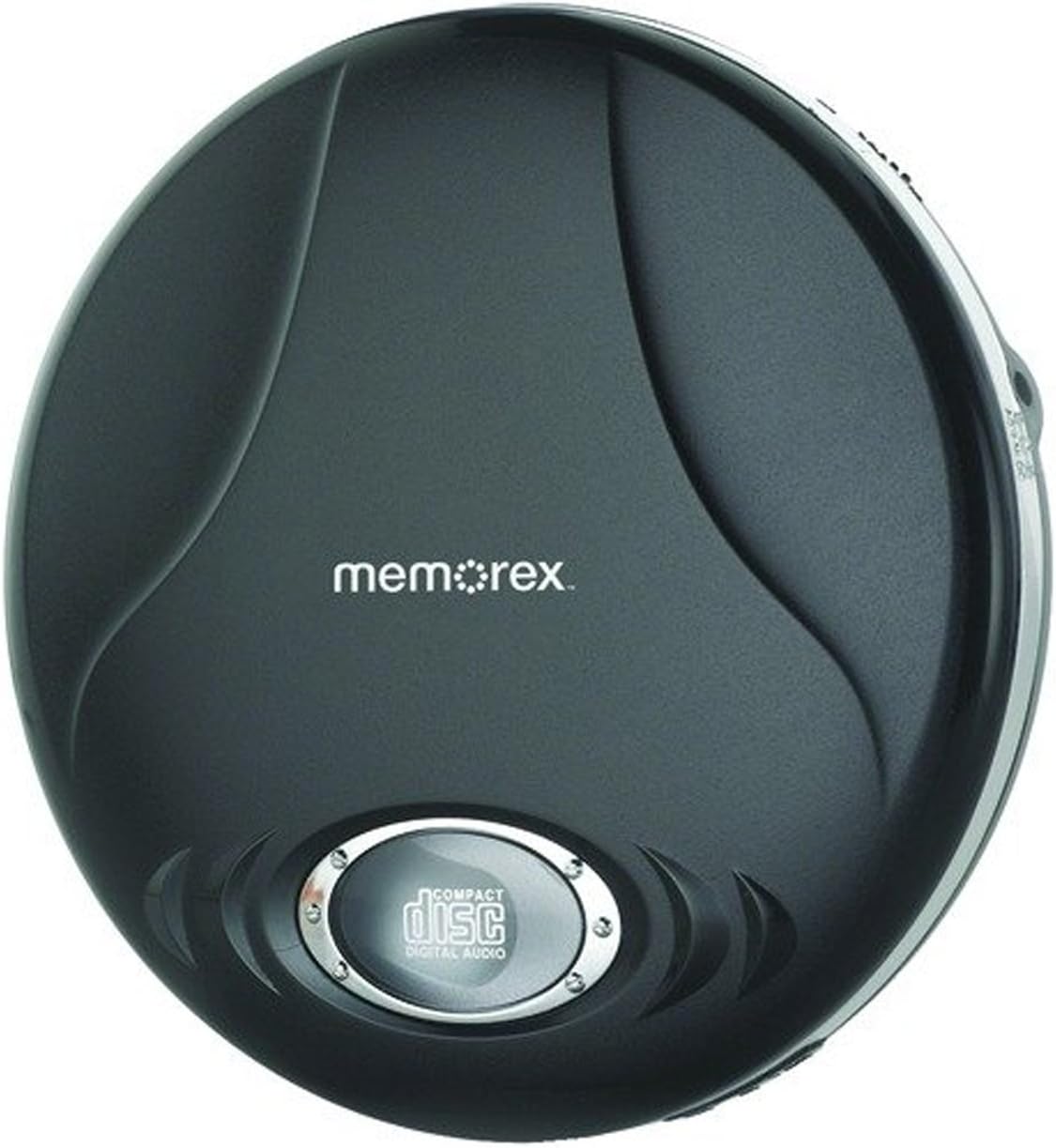
Figure 3.1: Memorex MD6451 Portable CD Player. This image displays the Memorex MD6451 Portable CD Player in its closed, black casing. The 'memorex' logo is centered on the top surface, and a circular window at the bottom shows the 'compact disc digital audio' emblem, indicating the disc tray area.
3.1. การควบคุมและการเชื่อมต่อ
Familiarize yourself with the various controls and connection points on your CD player:
- ช่องใส่ซีดี: สำหรับการใส่แผ่นซีดีเพลง
- ปุ่มเล่น/หยุดชั่วคราว: Initiates or pauses disc playback.
- ปุ่มหยุด: Halts disc playback.
- ปุ่มข้าม/ค้นหา: Navigates between tracks or fast-forwards/rewinds within a track.
- การควบคุมระดับเสียง: ปรับระดับเอาท์พุตเสียง
- สวิตช์เพิ่มเสียงเบส: เปิดใช้งานหรือปิดใช้งานการปรับปรุงเสียงเบส
- ปุ่มโปรแกรม: Used for programming track order.
- ปุ่มโหมด: Selects playback modes (e.g., repeat, random).
- แจ็คหูฟัง 3.5 มม.: Connects stereo earbuds or headphones.
- พอร์ตไลน์เอาท์: Connects to external audio systems (e.g., home stereo, car audio).
- ดีซีแจ็ค: For connecting the external power cord.
4. การตั้งค่า
4.1. Powering the CD Player
The Memorex MD6451 can be powered by batteries or an external power adapter.
- การติดตั้งแบตเตอรี่: Open the battery compartment on the underside of the player. Insert two (2) AA-size batteries (not included), ensuring correct polarity (+/-). Close the compartment securely.
- ไฟฟ้ากระแสสลับ: Connect the provided power cord to the DC jack on the player and plug the other end into a standard electrical outlet.
4.2. Connecting Earbuds/Headphones
Insert the stereo earbuds or your preferred headphones into the 3.5mm headphone jack on the side of the player.
4.3. การใส่แผ่นซีดี
- กดปุ่มเปิดเบาๆ หรือเลื่อนสลักเพื่อเปิดฝาช่องใส่ซีดี
- Place an audio CD (CD, CD-R, or CD-RW) onto the center spindle with the label side facing up.
- กดเบาๆ ตรงกลางแผ่นดิสก์จนกระทั่งมีเสียงคลิกเข้าที่
- ปิดฝาช่องใส่ซีดีให้แน่นจนกระทั่งล็อคเข้าที่
5. การดำเนินการ
5.1. การเล่นพื้นฐาน
- Ensure the player is powered and a CD is inserted.
- กดปุ่ม เล่น/หยุดชั่วคราว button to begin playback. The track number and elapsed time will display.
- ปรับระดับเสียงโดยใช้ตัวควบคุมระดับเสียง
- หากต้องการหยุดการเล่นชั่วคราว ให้กดปุ่ม เล่น/หยุดชั่วคราว กดปุ่มอีกครั้ง กดอีกครั้งเพื่อดำเนินการต่อ
- หากต้องการหยุดเล่นให้กดปุ่ม หยุด ปุ่ม.
5.2. Navigating Tracks
- กดปุ่ม ข้ามไปข้างหน้า ปุ่ม (>>|) to advance to the next track.
- กดปุ่ม ข้ามย้อนกลับ ปุ่ม (-) once to restart the current track, or twice to go to the previous track.
- กดค้างไว้ >>| to fast-forward within a track.
- กดค้างไว้ - to rewind within a track.
5.3. Programmable CD Memory
You can program the player to play tracks in a specific order.
- While the player is stopped, press the โปรแกรม กดปุ่ม หน้าจอจะแสดง "P01"
- ใช้ ข้ามไปข้างหน้า or ข้ามย้อนกลับ buttons to select the desired first track.
- กด โปรแกรม again to confirm the selection. The display will show "P02".
- Repeat steps 2 and 3 to add more tracks to your program list.
- หลังจากตั้งโปรแกรมแทร็กที่ต้องการทั้งหมดเสร็จแล้ว ให้กดปุ่ม เล่น/หยุดชั่วคราว กดปุ่มเพื่อเริ่มเล่นลำดับที่ตั้งโปรแกรมไว้
5.4. Bass Boost System
To enhance the bass frequencies, locate the บูสต์เบส switch on the player and slide it to the ON position. Slide it to OFF to disable the feature.
5.5. 60-Second Skip Protection
The player features a 60-second electronic skip protection system. This buffer stores audio data to prevent interruptions during minor shocks or vibrations. While effective, severe or prolonged movement may still cause playback to skip.
5.6. Using the Line Out Port
The Line Out port allows you to connect your MD6451 to an external audio system, such as a home stereo receiver or car audio input, using a standard 3.5mm audio cable (not included). This bypasses the player's internal amplifier and volume control, relying on the external system's controls for volume adjustment.
5.7. Using the In-line Remote Control
The included in-line remote control provides convenient access to basic playback functions without needing to access the player directly. Connect the remote to the headphone jack, then plug your earbuds into the remote's jack. The remote typically includes buttons for Play/Pause, Stop, and Skip/Search.
6. การบำรุงรักษา
6.1. การทำความสะอาดตัวเครื่อง
Wipe the exterior of the player with a soft, dry cloth. Do not use abrasive cleaners or solvents. For the optical lens inside the CD compartment, use a specialized CD lens cleaning kit if necessary, following its instructions carefully.
6.2. การดูแลแบตเตอรี่
- ถอดแบตเตอรี่ออกหากไม่ได้ใช้งานเครื่องเล่นเป็นเวลานาน เพื่อป้องกันการรั่วไหล
- อย่าใช้แบตเตอรี่เก่าและใหม่ผสมกัน หรือแบตเตอรี่ประเภทต่างๆ
- ทิ้งแบตเตอรี่ที่ใช้แล้วอย่างรับผิดชอบตามข้อบังคับท้องถิ่น
6.3. การดูแลแผ่นดิสก์
Handle CDs by their edges. Clean discs with a soft, lint-free cloth, wiping from the center outwards. Avoid scratching the disc surface.
7 การแก้ไขปัญหา
If you encounter issues with your Memorex MD6451, refer to the following common problems and solutions:
| ปัญหา | สาเหตุที่เป็นไปได้ | สารละลาย |
|---|---|---|
| เครื่องเล่นไม่สามารถเปิดเครื่องได้ | No batteries or dead batteries. Power cord not connected or faulty. | Insert fresh AA batteries with correct polarity. Ensure power cord is securely connected to both player and outlet. |
| ไม่มีเสียง. | Volume too low. Headphones not connected properly. Faulty headphones. | Increase volume. Ensure headphones are fully plugged into the 3.5mm jack. Test with different headphones. |
| Disc skips frequently. | Disc is dirty or scratched. Player is subjected to excessive movement. Batteries are low. | Clean the disc with a soft cloth. Ensure the player is on a stable surface. Replace with fresh batteries or use AC power. |
| ซีดีไม่สามารถเล่นได้ | Disc inserted incorrectly. Disc is not an audio CD (e.g., data CD). Disc is severely damaged. | Ensure disc is inserted label-side up and compartment is closed. Verify the disc is a standard audio CD, CD-R, or CD-RW. Try a different, known-good audio CD. |
8. ข้อมูลจำเพาะ
| คุณสมบัติ | รายละเอียด |
|---|---|
| หมายเลขรุ่น | MD6451 |
| รูปแบบดิสก์ที่รองรับ | ซีดี, ซีดี-อาร์, ซีดี-อาร์ดับเบิลยู |
| การป้องกันการข้าม | 60 วินาที |
| การเชื่อมต่อ | 3.5mm Headphone Jack, Line Out Port, DC Jack |
| แหล่งพลังงาน | 2 x AA Batteries (not included), External DC Power (via power cord) |
| ขนาด (กว้าง x ยาว x สูง) | 5 x 5 x 2 นิ้ว (โดยประมาณ) |
| น้ำหนักสินค้า | 8.8 ออนซ์ (โดยประมาณ) |
| คุณสมบัติพิเศษ | Portable, Bass Boost System, Programmable CD Memory |
| ส่วนประกอบที่รวมอยู่ | Stereo Earbuds, In-line Remote, Power Cord |
9. การรับประกันและการสนับสนุน
For warranty information or technical support, please refer to the documentation included with your purchase or contact Memorex customer service directly. Keep your proof of purchase for warranty claims.
หมายเหตุ: เงื่อนไขการรับประกันเฉพาะอาจแตกต่างกันไปตามภูมิภาคและผู้ค้าปลีก


