1. บทนำ
This manual provides detailed instructions for the Gembird KB-BT-001-W-DE Slimline Bluetooth Keyboard. Please read this manual thoroughly before using the product to ensure proper operation and to maximize its lifespan. This keyboard is designed for seamless wireless connectivity with various Bluetooth-enabled devices.
2. เนื้อหาบรรจุภัณฑ์
- Gembird KB-BT-001-W-DE Bluetooth Keyboard (German QWERTZ Layout, White)
- สาย USB
- คู่มือการใช้งาน
3. คุณสมบัติหลัก
- Slimline Bluetooth V 3.0 Wireless Keyboard (German QWERTZ Layout)
- Ultra-flat and ergonomic design
- Supports common Bluetooth-enabled devices: smartphones, tablets, PCs, and laptops
- Soft-touch keys for comfortable typing
- Convenient multimedia keys
- Compact size (28.7 x 2 x 13.7 cm) ideal for travel
- Compatible with Windows (XP, Vista, 7, 8) and Apple (iPad, iPhone, iPod Touch, MAC OS)
- ระยะการทำงาน: สูงสุด 10 เมตร
4. ข้อกำหนดของระบบ
- Device with Bluetooth connectivity (e.g., PC, laptop, tablet, smartphone)
- Supported Operating Systems: Windows XP/Vista/7/8, Apple iOS (iPad, iPhone, iPod Touch), Mac OS
5. การตั้งค่าและการจับคู่
5.1. การเปิดเครื่องคีย์บอร์ด
Locate the power switch on the keyboard, usually on the side or back. Slide it to the "ON" position. The keyboard's indicator light (often blue or green) should illuminate briefly, indicating it is powered on and ready for pairing.
5.2. การจับคู่กับอุปกรณ์ของคุณ
- เปิดใช้งานบลูทูธบนอุปกรณ์ของคุณ: Go to your device's settings and ensure Bluetooth is turned on.
- เข้าสู่โหมดจับคู่: On the Gembird keyboard, press the เชื่อมต่อ or การจับคู่ button (if available, typically a small button on the back or bottom, or a key combination like Fn + C). The indicator light should start blinking rapidly, signifying it is in pairing mode.
- ค้นหา อุปกรณ์: On your device, search for available Bluetooth devices. The keyboard should appear as "Gembird KB-BT-001-W-DE" or similar.
- เลือกและเชื่อมต่อ: Select the keyboard from the list. Your device may prompt you to enter a pairing code displayed on the screen. Type this code using the Gembird keyboard and press เข้า.
- การยืนยัน: Once successfully paired, the indicator light on the keyboard will stop blinking and remain solid or turn off, and your device will show the keyboard as "Connected."
Note: The exact pairing process may vary slightly depending on your device's operating system. Refer to your device's manual for specific Bluetooth pairing instructions.
6. คู่มือการใช้งาน
6.1. การใช้งานพื้นฐาน
Once paired, the keyboard functions like a standard QWERTZ keyboard. Simply begin typing. Ensure the keyboard is within the 10-meter operating range of your device for optimal performance.
6.2. ปุ่มมัลติมีเดียและปุ่มฟังก์ชัน
The Gembird KB-BT-001-W-DE keyboard includes dedicated function keys (F1-F12) and multimedia shortcuts. To activate the secondary functions (blue icons) on the F-keys, press and hold the Fn key (located near the left Ctrl key) and then press the desired F-key.
| คีย์ผสม | การทำงาน | คำอธิบาย |
|---|---|---|
| Fn+F1 | เอฟ11 | Standard F11 key function. |
| Fn+F2 | เอฟ12 | Standard F12 key function. |
| Fn+F3 | อีเมล | เปิดโปรแกรมอีเมลเริ่มต้น |
| Fn+F4 | Browser/Home | เปิดค่าเริ่มต้น web browser or navigates to home page. |
| Fn+F5 | เครื่องเล่นสื่อ | เปิดโปรแกรมเล่นมีเดียเริ่มต้น |
| Fn+F6 | เพลงก่อนหน้า | Skips to the previous track in media playback. |
| Fn+F7 | เล่น/หยุดชั่วคราว | Toggles play/pause for media playback. |
| Fn+F8 | เพลงถัดไป | Skips to the next track in media playback. |
| Fn+F9 | ปิดเสียง | ปิดเสียง/เปิดเสียง |
| Fn+F10 | ลดระดับเสียง | ลดระดับเสียงระบบ |
| Fn+F11 | เพิ่มระดับเสียง | เพิ่มระดับเสียงระบบ |
| Fn+F12 | ล็อคหน้าจอ | Locks the computer screen. |
| Fn + Num Lock | Numeric Keypad Toggle | Activates/deactivates the embedded numeric keypad (U, I, O, J, K, L, M keys). |
6.3. Keyboard Layout (German QWERTZ)
This keyboard features a German QWERTZ layout. Key positions for special characters and symbols may differ from standard QWERTY layouts. Refer to the keycaps for specific character placements.
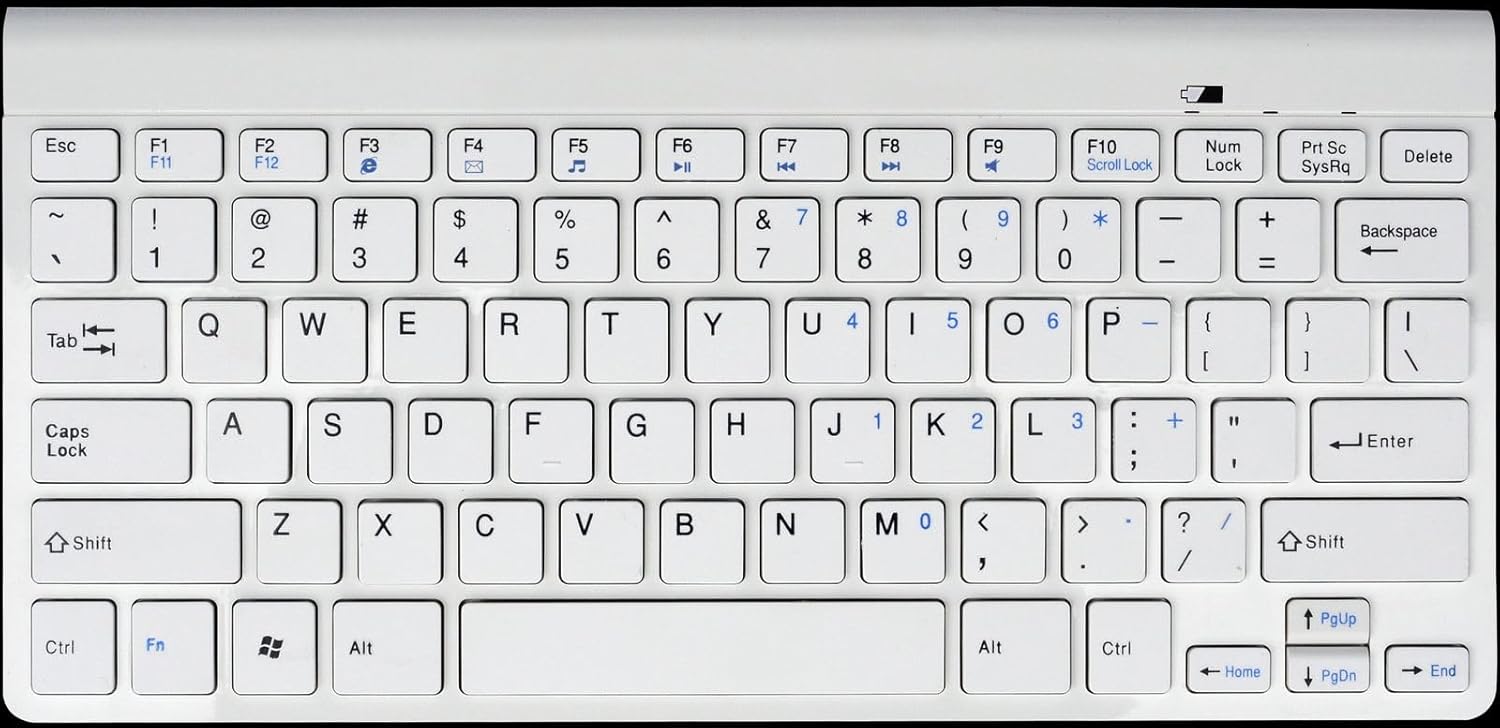
รูปที่ 1: Gembird KB-BT-001-W-DE Slimline Bluetooth Keyboard. This image displays the full keyboard, highlighting its compact design and German QWERTZ key layout, including function keys with multimedia shortcuts and the embedded numeric keypad on the right side.
7. การบำรุงรักษา
7.1. การทำความสะอาด
- ถอดปลั๊กคีย์บอร์ดออกจากแหล่งจ่ายไฟและปิดเครื่องก่อนทำความสะอาด
- ใช้ผ้านุ่มไม่เป็นขุยเช็ดเล็กน้อยampลงด้วยน้ำหรือน้ำยาทำความสะอาดอ่อนๆ
- หลีกเลี่ยงความชื้นที่มากเกินไปและอย่าฉีดน้ำยาทำความสะอาดลงบนแป้นพิมพ์โดยตรง
- สำหรับฝุ่นละอองและเศษต่างๆ ระหว่างคีย์ ให้ใช้ลมอัด
7.2. การดูแลแบตเตอรี่
- If the keyboard uses rechargeable batteries, charge it regularly using the provided USB cable.
- If it uses disposable batteries, replace them when the low battery indicator (if present) illuminates or performance degrades.
- ควรปิดแป้นพิมพ์เมื่อไม่ได้ใช้งานเป็นเวลานานเพื่อประหยัดแบตเตอรี่
8 การแก้ไขปัญหา
| ปัญหา | สาเหตุที่เป็นไปได้ | สารละลาย |
|---|---|---|
| แป้นพิมพ์ไม่เชื่อมต่อ/จับคู่ | Bluetooth is off on device; keyboard not in pairing mode; low battery; too far from device. | Ensure Bluetooth is enabled. Put keyboard in pairing mode. Charge/replace batteries. Move keyboard closer to device (within 10m). Try re-pairing. |
| ปุ่มไม่ตอบสนองหรือป้อนข้อมูลล่าช้า | Low battery; interference; out of range. | Charge/replace batteries. Move away from other wireless devices. Ensure keyboard is within range. |
| Incorrect characters typed (e.g., Y and Z swapped). | Device's keyboard layout is set to QWERTY instead of QWERTZ. | Change your device's keyboard input language/layout to German (QWERTZ). |
| ปุ่มมัลติมีเดียใช้งานไม่ได้ | Fn key not pressed; software incompatibility. | ตรวจสอบให้แน่ใจว่าคุณกำลังถือ Fn key while pressing the F-key. Update device drivers if applicable. |
9. ข้อมูลจำเพาะ
| คุณสมบัติ | รายละเอียด |
|---|---|
| ยี่ห้อ | นกเจมเบิร์ด |
| หมายเลขรุ่น | KB-BT-001-W-DE |
| เทคโนโลยีการเชื่อมต่อ | บลูทูธ v3.0 |
| อุปกรณ์ที่รองรับ | คอมพิวเตอร์ส่วนบุคคล, สมาร์ทโฟน, แท็บเล็ต |
| คำอธิบายแป้นพิมพ์ | มัลติมีเดีย |
| จำนวนคีย์ | 78 |
| เค้าโครงแป้นพิมพ์ | QWERTZ (German) |
| ส่วนประกอบที่รวมอยู่ | สาย USB |
| ระยะการทำงาน | สูงสุด 10 เมตร |
| ขนาด (โดยประมาณ) | 28.7 x 13.7 x 2 ซม. (11.3 x 5.4 x 0.8 นิ้ว) |
10. การรับประกันและการสนับสนุน
For warranty information and technical support, please refer to the documentation included with your purchase or visit the official Gembird webโดยทั่วไปแล้ว ข้อมูลติดต่อสำหรับขอรับบริการสนับสนุนจะระบุไว้ในบรรจุภัณฑ์ของผลิตภัณฑ์หรือบนเว็บไซต์ของผู้ผลิต webเว็บไซต์.
- ผู้ผลิต: นกเจมเบิร์ด
- สนับสนุน: Telephone support and email support are mentioned in the product features. Please check the included manual or Gembird's official webเว็บไซต์สำหรับข้อมูลการติดต่อปัจจุบัน


