
เซเจมคอม ซิกซ์ตี้
โทรศัพท์ไร้สายพร้อมเครื่องตอบรับอัตโนมัติ Sagemcom รุ่น Sixty
รุ่น: หกสิบ
แบรนด์: Sagemcom
สินค้าเกินview
โทรศัพท์ไร้สายและเครื่องตอบรับอัตโนมัติ Sagemcom Sixty ผสานเทคโนโลยีสมัยใหม่เข้ากับการออกแบบคลาสสิก รูปลักษณ์ที่เป็นเอกลักษณ์ พื้นผิวเรียบลื่น และฟังก์ชันหน้าจอสัมผัส ทำให้เป็นอุปกรณ์ที่โดดเด่นในทุกสภาพแวดล้อม ออกแบบมาเพื่อความสะดวกสบายของผู้ใช้ Sixty มีคุณสมบัติหลากหลาย เช่น โหมดแฮนด์ฟรี อายุการใช้งานแบตเตอรี่ที่ยาวนาน และอินเทอร์เฟซที่ใช้งานง่ายเพื่อการสื่อสารที่สะดวก
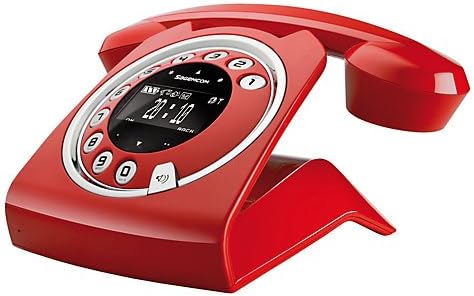
ภาพ: โทรศัพท์ไร้สายและเครื่องตอบรับอัตโนมัติ Sagemcom Sixty สีแดง (แสดงในภาพ)asinด้วยดีไซน์ย้อนยุคผสมผสานความทันสมัยที่เป็นเอกลักษณ์ พร้อมหน้าปัดทรงกลมและจอแสดงผลดิจิทัล

ภาพ: ด้านข้าง view ของโทรศัพท์ไร้สาย Sagemcom Sixty ซึ่งเน้นดีไซน์ที่ทันสมัยและใช้งานง่ายfile และการออกแบบเปลเด็ก
คู่มือการติดตั้ง
1. การแกะกล่อง
นำอุปกรณ์ทั้งหมดออกจากบรรจุภัณฑ์อย่างระมัดระวัง ตรวจสอบให้แน่ใจว่าคุณมีตัวเครื่องหลัก โทรศัพท์มือถือ อะแดปเตอร์แปลงไฟ และสายโทรศัพท์ครบถ้วน
2. การเชื่อมต่อหน่วยฐาน
- ต่ออะแดปเตอร์แปลงไฟเข้ากับพอร์ต 'DC IN' ที่ด้านหลังของตัวเครื่อง และเสียบปลายอีกด้านหนึ่งเข้ากับเต้ารับที่ผนัง
- ต่อปลายด้านหนึ่งของสายโทรศัพท์เข้ากับพอร์ต 'LINE' บนตัวเครื่องหลัก และต่อปลายอีกด้านหนึ่งเข้ากับเต้ารับโทรศัพท์ที่ผนัง
3. การติดตั้งและการชาร์จแบตเตอรี่
- เปิดช่องใส่แบตเตอรี่บนโทรศัพท์มือถือ
- ใส่แบตเตอรี่แบบชาร์จไฟได้ที่ให้มา โดยสังเกตขั้วที่ถูกต้อง (+ และ -)
- ปิดช่องใส่แบตเตอรี่
- วางโทรศัพท์ลงบนแท่นชาร์จ หน้าจอจะแสดงสถานะการชาร์จ ปล่อยให้โทรศัพท์ชาร์จอย่างน้อย 16 ชั่วโมงก่อนใช้งานครั้งแรก เพื่อให้แบตเตอรี่มีประสิทธิภาพสูงสุด
คำแนะนำการใช้งาน
การโทรออกและรับสาย
- ในการโทรออก: ยกหูโทรศัพท์หรือกด เรียก กดปุ่ม กดหมายเลขโดยใช้แป้นพิมพ์บนหน้าจอสัมผัส
- วิธีรับสาย: ยกหูโทรศัพท์หรือกด เรียก ปุ่มเมื่อโทรศัพท์ดัง
- วิธีวางสาย: วางหูฟังกลับบนฐานหรือกดปุ่ม วางสาย ปุ่ม.
การใช้หน้าจอสัมผัส
โทรศัพท์รุ่น Sixty มาพร้อมหน้าจอสัมผัสที่ตอบสนองไวสำหรับการนำทางและการป้อนข้อมูล แตะไอคอนหรือตัวเลขเพื่อเลือกฟังก์ชันหรือโทรออก ปัดนิ้วเพื่อเลื่อนดูรายการหรือเมนูต่างๆ
โหมดแฮนด์ฟรี
ระหว่างการโทร ให้กด ลำโพง กดปุ่มเพื่อเปิดใช้งานโหมดแฮนด์ฟรี กดอีกครั้งเพื่อกลับสู่โหมดหูฟัง
การจัดการสมุดโทรศัพท์
- การเพิ่มผู้ติดต่อ: ไปที่เมนูสมุดโทรศัพท์ เลือก 'เพิ่มรายชื่อใหม่' ป้อนชื่อและหมายเลขโทรศัพท์โดยใช้หน้าจอสัมผัส แล้วบันทึก สมุดโทรศัพท์สามารถจัดเก็บรายชื่อได้สูงสุด 150 รายชื่อ
- กำลังค้นหาข้อมูลติดต่อ: เข้าถึงสมุดโทรศัพท์และใช้ฟังก์ชันค้นหาหรือเลื่อนดูรายชื่อก็ได้
- การแก้ไข/ลบข้อมูลรายชื่อติดต่อ: เลือกรายชื่อที่ต้องการจากสมุดโทรศัพท์ แล้วเลือกตัวเลือก 'แก้ไข' หรือ 'ลบ'
ฟังก์ชันเครื่องตอบรับอัตโนมัติ
เครื่องตอบรับอัตโนมัติในตัวมีความสามารถในการบันทึกได้นาน 10 นาที
- การเปิดใช้งาน/ปิดใช้งาน: เข้าสู่เมนูเครื่องตอบรับอัตโนมัติเพื่อเปิดหรือปิดใช้งาน
- ข้อความที่กำลังเล่น: เลือก 'เล่นข้อความ' จากเมนูเครื่องตอบรับอัตโนมัติ
- การบันทึกข้อความขาออก: ทำตามคำแนะนำในเมนูเครื่องตอบรับอัตโนมัติเพื่อบันทึกข้อความตอบรับส่วนตัว
การซ่อมบำรุง
การทำความสะอาดโทรศัพท์ของคุณ
ในการทำความสะอาดโทรศัพท์ ให้เช็ดด้วยผ้าเนื้อนุ่มและแห้งamp ใช้ผ้าเช็ดทำความสะอาดเท่านั้น ห้ามใช้สารทำความสะอาดที่มีฤทธิ์กัดกร่อนหรือตัวทำละลาย เพราะอาจทำให้พื้นผิวเสียหายได้ ตรวจสอบให้แน่ใจว่าได้ถอดปลั๊กโทรศัพท์ออกจากแหล่งจ่ายไฟก่อนทำความสะอาด
การดูแลแบตเตอรี่
- ควรใช้แบตเตอรี่แบบชาร์จไฟได้ที่ให้มาเสมอ
- หากจะไม่ใช้โทรศัพท์เป็นเวลานาน ควรถอดแบตเตอรี่ออกเพื่อป้องกันการรั่วไหล
- ทิ้งแบตเตอรี่เก่าด้วยความรับผิดชอบตามข้อบังคับท้องถิ่น
การแก้ไขปัญหา
| ปัญหา | วิธีแก้ปัญหาที่เป็นไปได้ |
|---|---|
| ไม่มีเสียงสัญญาณโทรศัพท์ | ตรวจสอบว่าสายโทรศัพท์เชื่อมต่อกับฐานและช่องเสียบที่ผนังอย่างแน่นหนาหรือไม่ ตรวจสอบให้แน่ใจว่าเสียบอะแดปเตอร์ไฟฟ้าไว้แล้ว |
| โทรศัพท์ไม่ชาร์จ | ตรวจสอบให้แน่ใจว่าวางโทรศัพท์ลงบนฐานวางอย่างถูกต้อง เช็ดทำความสะอาดหน้าสัมผัสการชาร์จทั้งบนโทรศัพท์และฐานวางด้วยผ้าแห้ง ตรวจสอบว่าอะแดปเตอร์แปลงไฟใช้งานได้ |
| คุณภาพเสียงไม่ดี | ขยับเข้าใกล้ตัวเครื่องมากขึ้น ตรวจสอบว่ามีสัญญาณรบกวนจากอุปกรณ์อิเล็กทรอนิกส์อื่นๆ หรือไม่ ตรวจสอบให้แน่ใจว่าสายโทรศัพท์ไม่ได้รับความเสียหาย |
| การแสดงผลว่างเปล่า | ตรวจสอบว่าแบตเตอรี่โทรศัพท์มือถือชาร์จเต็มแล้วหรือไม่ หากไม่ ให้วางโทรศัพท์ลงบนแท่นชาร์จ และตรวจสอบให้แน่ใจว่าได้เสียบอะแดปเตอร์แปลงไฟเข้ากับแท่นชาร์จแล้ว |
| ไม่สามารถโทรออกหรือรับสายได้ | ตรวจสอบว่าสายโทรศัพท์ใช้งานได้หรือไม่ ตรวจสอบการเชื่อมต่อสายเคเบิลทั้งหมด รีสตาร์ทเครื่องหลักโดยถอดปลั๊กและเสียบปลั๊กอะแดปเตอร์แปลงไฟอีกครั้ง |
ข้อมูลจำเพาะทางเทคนิค
| คุณสมบัติ | ข้อมูลจำเพาะ |
|---|---|
| ยี่ห้อ | เซเจมคอม |
| แบบอย่าง | หกสิบ |
| สี | สีแดง |
| ประเภทโทรศัพท์ | ไร้สาย |
| เวลาสนทนาทางโทรศัพท์ | นานถึง 10 ชั่วโมง |
| เวลาสแตนด์บาย | นานถึง 120 ชั่วโมง |
| ความสามารถในการบันทึกเสียง (เครื่องตอบรับอัตโนมัติ) | 10 นาที |
| ความจุสมุดโทรศัพท์ | 150 ชื่อ |
| ASIN | B00DX64LPI |
| วันที่พร้อมใช้งานครั้งแรก | 15 เมษายน 2014 |
การรับประกันและการสนับสนุน
สำหรับข้อมูลการรับประกันและการบริการลูกค้า โปรดดูเอกสารที่แนบมากับสินค้าที่ซื้อ หรือเยี่ยมชมเว็บไซต์อย่างเป็นทางการของ Sagemcom webไซต์ เก็บหลักฐานการซื้อของคุณไว้เพื่อใช้ในกรณีเรียกร้องการรับประกัน
Ask a question about this manual
Ask about setup, troubleshooting, compatibility, parts, safety, or missing instructions. Manuals+ will review the question and use this page’s manual context to help answer it.