1. บทนำ
The Mastech MS8232B is a compact, auto-ranging digital multimeter designed for measuring AC/DC voltage, AC/DC current, resistance, frequency, capacitance, and duty cycle. It features a 3 3/4 digit LCD display with 3999 counts, overload protection, a flashlight function, low voltage display, and automatic power-off for energy conservation. This manual provides essential information for safe and effective operation of the device.
2. ข้อมูลด้านความปลอดภัย
To ensure safe operation and avoid damage to the meter, observe the following safety precautions:
- ควรตรวจสอบให้แน่ใจเสมอว่าสายทดสอบอยู่ในสภาพดีและเชื่อมต่ออย่างถูกต้องก่อนทำการวัดใดๆ
- ไม่ต้องสมัครวอลุ่มtagหรือกระแสไฟฟ้าที่เกินขีดจำกัดสูงสุดที่กำหนดไว้สำหรับแต่ละช่วง
- ใช้ความระมัดระวังอย่างยิ่งเมื่อทำงานกับ voltagสูงกว่า 60V DC หรือ 30V AC RMS เนื่องจากอาจเกิดอันตรายจากไฟฟ้าช็อตได้
- ก่อนเปลี่ยนฟังก์ชัน ให้ถอดสายวัดทดสอบออกจากวงจรที่ทดสอบ
- ห้ามใช้งานมิเตอร์หากพบว่าชำรุดเสียหาย หรือหากฝาครอบเปิดอยู่
- ควรเปลี่ยนแบตเตอรี่ทันทีเมื่อไฟแสดงสถานะแบตเตอรี่ต่ำปรากฏขึ้น เพื่อให้ได้ค่าการวัดที่แม่นยำ
- ปฏิบัติตามรหัสความปลอดภัยท้องถิ่นและระดับประเทศ
3. สินค้าหมดview
The Mastech MS8232B is a compact and versatile digital multimeter. Key features include a 4000-count display, non-contact voltage detection, and an integrated flashlight.

Figure 3.1: Mastech MS8232B Mini Digital Multimeter with test leads.
3.1 ส่วนประกอบ
- จอแสดงผล LCD: แสดงค่าการวัด หน่วย และตัวบ่งชี้ฟังก์ชัน
- สวิตช์โรตารี่: Used to select the desired measurement function.
- ปุ่ม FUNC: Toggles between different measurement modes within a single rotary switch position (e.g., AC/DC, Resistance/Continuity/Diode).
- ปุ่มไฟฉาย: เปิดใช้งานไฟฉายในตัว
- ปุ่ม Hz%: Toggles between frequency and duty cycle measurements.
- แจ็คอินพุต: For connecting test leads.
- แบบไม่สัมผัส Voltage (NCV) Sensor: ตรวจจับปริมาณ ACtagอีโดยไม่ต้องมีการสัมผัสโดยตรง

Figure 3.2: Close-up of the rotary switch and function buttons, including FUNC, Flashlight, and Hz%.

Figure 3.3: The multimeter's LCD display showing a measurement.
4. การตั้งค่า
4.1 การติดตั้งแบตเตอรี่
The MS8232B is powered by batteries. To install or replace batteries:
- ตรวจสอบให้แน่ใจว่ามัลติมิเตอร์ปิดอยู่
- ค้นหาฝาครอบช่องใส่แบตเตอรี่ที่ด้านหลังของเครื่อง
- Use a screwdriver to remove the screw(s) securing the cover.
- Carefully remove the old batteries (if any) and insert new ones, observing the correct polarity (+ and -).
- ปิดฝาช่องใส่แบตเตอรี่และขันสกรูให้แน่น
4.2 การเชื่อมต่อสายทดสอบ
Connect the red test lead to the 'VΩHz%CAP' input jack and the black test lead to the 'COM' input jack for most voltage, resistance, frequency, and capacitance measurements. For current measurements, refer to the specific current measurement section.
5. คู่มือการใช้งาน
Always ensure the correct function is selected and test leads are properly connected before making any measurement.
5.1 DC ฉบับที่tagการวัด e (DCV)
- Set the rotary switch to the 'VΩHz%' position.
- Press the 'FUNC' button until 'DC' is indicated on the display.
- ต่อสายทดสอบสีแดงเข้ากับขั้วบวกของวงจร และสายทดสอบสีดำเข้ากับขั้วลบ
- อ่านเล่มที่tagค่า e บนจอ LCD
5.2 AC โวลtagการวัดค่า e (ACV)
- Set the rotary switch to the 'VΩHz%' position.
- Press the 'FUNC' button until 'AC' is indicated on the display.
- เชื่อมต่อสายทดสอบเข้ากับขั้วไฟ ACtagแหล่งที่มา
- อ่านเล่มที่tagค่า e บนจอ LCD
5.3 DC Current (DCA) Measurement
- Set the rotary switch to the 'μA' or 'mA' position, depending on the expected current range.
- Press the 'FUNC' button until 'DC' is indicated on the display.
- Disconnect power to the circuit. Break the circuit and connect the multimeter in series. The red lead connects to the higher potential side, and the black lead to the lower potential side.
- จ่ายไฟให้กับวงจรแล้วอ่านค่ากระแสไฟฟ้า
5.4 AC Current (ACA) Measurement
- Set the rotary switch to the 'μA' or 'mA' position, depending on the expected current range.
- Press the 'FUNC' button until 'AC' is indicated on the display.
- Disconnect power to the circuit. Break the circuit and connect the multimeter in series.
- จ่ายไฟให้กับวงจรแล้วอ่านค่ากระแสไฟฟ้า
5.5 การวัดความต้านทาน
- ตั้งสวิตช์แบบหมุนไปที่ตำแหน่ง 'Ω'
- ตรวจสอบให้แน่ใจว่าวงจรที่กำลังทดสอบนั้นไม่มีกระแสไฟฟ้าไหลผ่าน
- ต่อสายวัดเข้ากับชิ้นส่วนเพื่อวัดค่าความต้านทาน
- อ่านค่าความต้านทานบนจอ LCD
5.6 การวัดความถี่ (เฮิร์ตซ์) และรอบการทำงาน (%)
- Set the rotary switch to the 'VΩHz%' position.
- Press the 'Hz%' button to cycle between Frequency and Duty Cycle modes.
- ต่อสายทดสอบเข้ากับแหล่งสัญญาณ
- อ่านค่าความถี่หรือรอบการทำงานจากหน้าจอ LCD
5.7 การวัดความจุ
- Set the rotary switch to the 'CAP' position.
- ตรวจสอบให้แน่ใจว่าตัวเก็บประจุถูกปล่อยประจุจนหมดก่อนที่จะเชื่อมต่อสายทดสอบ
- ต่อสายวัดทดสอบเข้ากับขั้วของตัวเก็บประจุ
- อ่านค่าความจุบนจอ LCD
5.8 ฟังก์ชันไฟฉาย
The multimeter includes a built-in flashlight for illuminating dark work areas.
- Press the flashlight button (labeled with a light bulb icon) to turn the flashlight ON.
- กดปุ่มอีกครั้งเพื่อปิดไฟฉาย

Figure 5.1: The integrated flashlight on the Mastech MS8232B.
5.9 ไม่สัมผัส Voltagการตรวจจับ e (NCV)
ฟังก์ชัน NCV ช่วยให้สามารถตรวจจับแรงดันไฟฟ้ากระแสสลับได้tagโดยไม่สัมผัสกับตัวนำโดยตรง
- Set the rotary switch to the 'NCV' position (often integrated with other functions or a dedicated position).
- Bring the top front part of the multimeter (where the NCV sensor is located) close to the conductor.
- มิเตอร์จะแสดงว่ามีแรงดันไฟฟ้ากระแสสลับอยู่หรือไม่tagผ่านทางเสียงบี๊บและ/หรือตัวบ่งชี้ภาพ
5.10 การปิดเครื่องอัตโนมัติ
The multimeter features an automatic power-off function to conserve battery life. If no operation is performed for approximately 15 minutes, the meter will automatically shut down. To reactivate, turn the rotary switch to OFF and then back to the desired function, or press any button.
6. การบำรุงรักษา
6.1 การทำความสะอาด
เช็ดเคสด้วยโฆษณาamp ผ้าและผงซักฟอกอ่อนๆ ห้ามใช้สารกัดกร่อนหรือตัวทำละลาย ควรทำความสะอาดขั้วอินพุตให้ปราศจากสิ่งสกปรกและความชื้น
6.2 การเปลี่ยนแบตเตอรี่
Refer to Section 4.1 for battery replacement instructions. Always use the specified battery type.
6.3 พื้นที่จัดเก็บ
If the meter is not to be used for an extended period, remove the batteries to prevent leakage and damage to the unit. Store the meter in a cool, dry place away from direct sunlight.
7 การแก้ไขปัญหา
| ปัญหา | สาเหตุที่เป็นไปได้ | สารละลาย |
|---|---|---|
| มิเตอร์ไม่เปิดใช้งาน | แบตเตอรี่หมดหรือติดตั้งไม่ถูกต้อง | ตรวจสอบขั้วแบตเตอรี่หรือเปลี่ยนแบตเตอรี่ |
| แสดง "OL" (โอเวอร์โหลด) | Input value exceeds selected range or meter's maximum capacity | Select a higher range (if available) or ensure the input is within the meter's specifications. |
| การอ่านที่ไม่ถูกต้อง | Low battery, incorrect function selected, or poor test lead connection | Replace batteries, verify function selection, ensure leads are securely connected. |
| ไม่พบการตรวจจับ NCV | ไม่มีฉบับ ACtage present, or sensor not close enough to source | ตรวจสอบปริมาณไฟฟ้ากระแสสลับtage presence with direct contact method if safe, move sensor closer. |
8. ข้อมูลจำเพาะ
The Mastech MS8232B offers the following technical specifications:
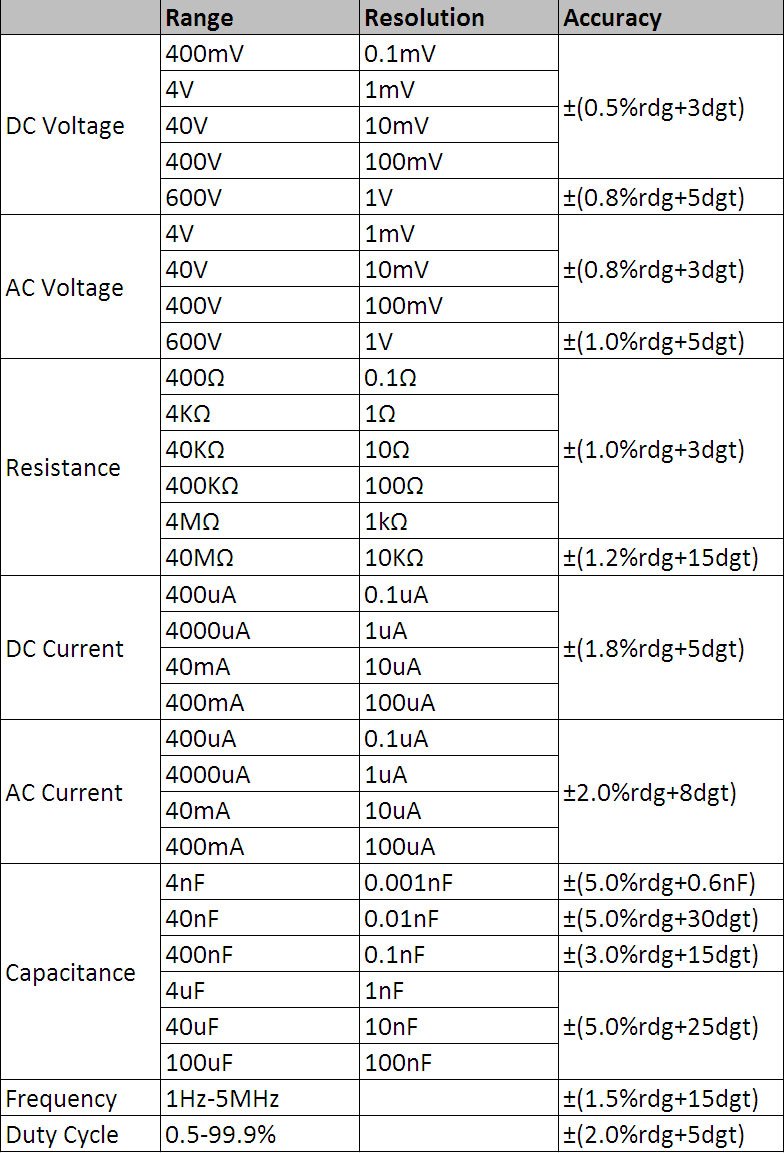
รูปที่ 8.1: ตารางข้อมูลจำเพาะทางเทคนิคโดยละเอียด
ข้อมูลจำเพาะทั่วไป:
- แสดง: 3 3/4 digits LCD, 3999 Counts
- ระบบป้องกันการโอเวอร์โหลด: การป้องกันอย่างเต็มรูปแบบ
- ปริมาณต่ำtagอี แสดงผล: ใช่
- ปิดเครื่องอัตโนมัติ: ใช่
- ฟังก์ชั่นไฟฉาย: ใช่
- แหล่งพลังงาน: ใช้พลังงานจากแบตเตอรี่
- มาตรฐานความปลอดภัย : UL 61010-1, IEC 61010-1
ช่วงการวัดและความแม่นยำ:
- DC ฉบับที่tagอี (ดีซีวี): 400mV / 4V / 40V / 400V / 600V (±0.5% + 3 digits)
- ฉบับ ACtagอี (ACV): 4V / 40V / 400V / 600V (±0.8% + 3 digits)
- กระแสไฟตรง (DCA): 400μA / 4000μA / 40mA / 400mA (±1.8% + 5 digits)
- กระแสไฟฟ้าสลับ (ACA): 400μA / 4000μA / 40mA / 400mA (±2.0% + 8 digits)
- ความต้านทาน: 400Ω / 4KΩ / 40KΩ / 400KΩ / 4MΩ / 40MΩ (±1.0% + 3 digits)
- ความถี่: 1Hz - 5MHz (±1.5% + 15 digits)
- ความจุ: 4nF / 40nF / 400nF / 4μF / 40μF / 100μF (±5.0% + 6 digits)
- รอบการทำงาน: 0.5% - 99.9% (±2.0% + 5 digits)
9. การรับประกันและการสนับสนุน
Specific warranty information for the Mastech MS8232B Mini Digital Multimeter is not provided in the product data. For warranty claims or technical support, please contact your retailer or the manufacturer directly. Retain your proof of purchase for any warranty-related inquiries.