1. บทนำ
The Kodak PIXPRO Astro Zoom AZ361 is a 16.1-megapixel digital camera featuring a powerful 36x optical zoom lens and a 24mm wide-angle capability. Designed for ease of use, this camera allows you to capture high-quality photos and 720p HD videos. Its features include optical image stabilization, various detection modes, and a 3-inch LCD screen for clear framing and review.
2. เนื้อหาบรรจุภัณฑ์
Before you begin, please ensure all items are present in your camera package:
- Kodak PIXPRO Astro Zoom AZ361 Camera Body
- LCD Screen (integrated)
- แบตเตอรี่ลิเธียมไอออน
- สาย USB (สำหรับชาร์จและถ่ายโอนข้อมูล)
- อะแดปเตอร์ AC
- สายคล้องคอ
- ฝาปิดเลนส์
3. กล้องโอเวอร์view
ทำความคุ้นเคยกับส่วนประกอบและปุ่มควบคุมของกล้อง
Front and Angled View

รูปที่ 3.1: มุมด้านหน้า view of the Kodak PIXPRO Astro Zoom AZ361, showing the lens, grip, and flash unit.
นี้ view highlights the camera's 36x optical zoom lens, the ergonomic grip, and the built-in flash unit. The lens cap should be removed before operation.
หลัง View
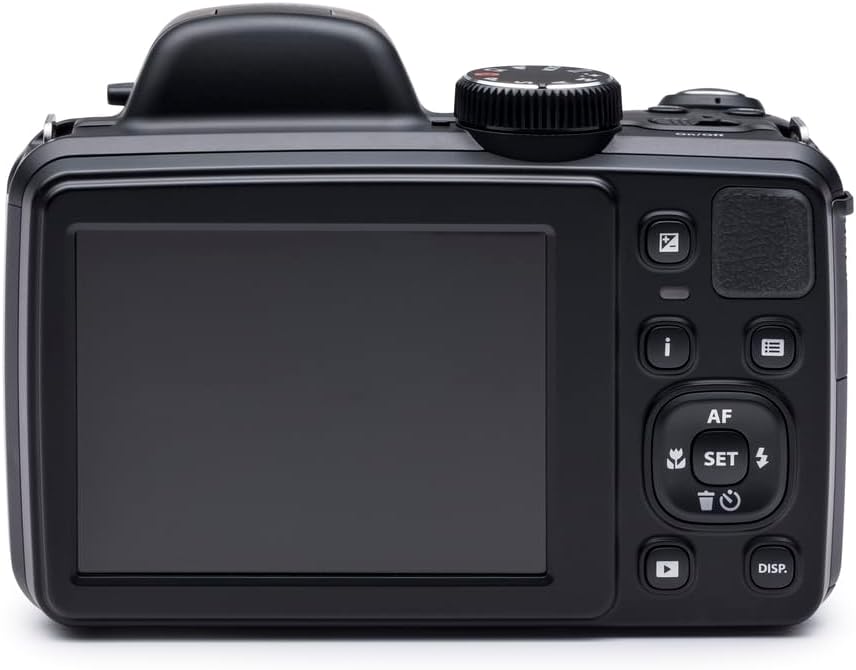
รูปที่ 3.2: ด้านหลัง view of the Kodak PIXPRO Astro Zoom AZ361, displaying the 3-inch LCD screen and various control buttons.
The rear of the camera features the 3-inch LCD screen for live view and playback. To the right of the screen are navigation buttons, menu access, playback, and dedicated video recording buttons.
สูงสุด View with Flash Up

รูปที่ 3.3: มุมด้านบน view of the Kodak PIXPRO Astro Zoom AZ361, showing the pop-up flash in its activated position.
This image shows the camera with its pop-up flash extended, ready for use in low-light conditions. The mode dial and shutter button are also visible on the top panel.
4. การตั้งค่า
4.1. การติดตั้งแบตเตอรี่
- เปิดฝาช่องใส่แบตเตอรี่ที่อยู่ด้านล่างของกล้อง
- Insert the supplied Lithium-Ion battery, ensuring the correct orientation as indicated inside the compartment.
- ปิดฝาช่องใส่แบตเตอรี่ให้แน่น
4.2. การชาร์จแบตเตอรี่
Connect the camera to the AC adapter using the USB cable. The charging indicator light will show the charging status. Ensure the battery is fully charged before first use.
4.3. การใส่การ์ดหน่วยความจำ
The camera supports SDXC memory cards. A maximum capacity of 64GB is recommended.
- เปิดฝาช่องใส่การ์ดหน่วยความจำ ซึ่งโดยปกติจะอยู่ใกล้กับช่องใส่แบตเตอรี่
- Insert the SDXC card with the metal contacts facing the correct direction until it clicks into place.
- ปิดฝาปิดช่องเสียบการ์ดหน่วยความจำ
4.4. เปิดเครื่องครั้งแรก
กดปุ่มเปิด/ปิดเพื่อเปิดกล้อง ทำตามคำแนะนำบนหน้าจอสำหรับการตั้งค่าเริ่มต้น เช่น การตั้งค่าวันที่และเวลา
5. การใช้งานกล้อง
5.1.การถ่ายภาพ
- เปิดกล้อง
- Select your desired shooting mode using the mode dial (e.g., Auto, Program, Scene modes).
- จัดองค์ประกอบภาพของคุณโดยใช้หน้าจอ LCD ขนาด 3 นิ้ว หรือเลนส์ออปติคอล viewตัวค้นหา
- Use the zoom lever to adjust the 36x optical zoom.
- Press the shutter button halfway down to focus. The camera will automatically detect faces, cats, or dogs if enabled.
- กดปุ่มชัตเตอร์จนสุดเพื่อถ่ายภาพ
5.2. บันทึกวิดีโอ
The camera can record HD 720p videos in MP4 format.
- In a shooting mode, press the dedicated video recording button.
- กดปุ่มอีกครั้งเพื่อหยุดการบันทึก
5.3.คุณสมบัติพิเศษ
- Face/Cat/Dog Detection: Automatically detects and optimizes focus and exposure for faces, cats, or dogs in your frame.
- Blink/Smile Detection: Helps capture the perfect moment by detecting blinks or smiles.
- Face Beautifier Mode: Reduces facial flaws and enhances skin tone in portraits.
- โหมดพาโนรามา: Create seamless 180-degree panoramic images by panning the camera.
- ระบบป้องกันภาพสั่นไหวแบบออปติคอล: Minimizes blur caused by camera shake, especially useful with the 36x zoom.
5.4. การเล่น
กดปุ่มเล่นเพื่อเริ่มเล่นใหม่view your photos and videos on the LCD screen. Use the navigation buttons to scroll through your media.
6. การบำรุงรักษา
6.1. การทำความสะอาดกล้อง
- ใช้ผ้านุ่มที่ไม่เป็นขุยในการทำความสะอาดตัวกล้อง
- สำหรับการทำความสะอาดเลนส์และหน้าจอ LCD ให้ใช้ผ้าทำความสะอาดเลนส์และน้ำยาทำความสะอาดเฉพาะ หลีกเลี่ยงสารเคมีรุนแรง
- ตรวจสอบให้แน่ใจว่ากล้องปิดอยู่ก่อนทำความสะอาด
6.2. การดูแลแบตเตอรี่
- เก็บแบตเตอรี่ไว้ในที่เย็นและแห้งเมื่อไม่ได้ใช้งาน
- หลีกเลี่ยงการปล่อยแบตเตอรี่จนหมดบ่อยครั้งเพื่อยืดอายุการใช้งาน
- ถอดแบตเตอรี่ออกหากจะไม่ได้ใช้งานกล้องเป็นเวลานาน
6.3. การจัดเก็บ
Store the camera in a dry, dust-free environment, away from extreme temperatures and direct sunlight. Use a camera bag for protection during transport.
7 การแก้ไขปัญหา
หากคุณพบปัญหาเกี่ยวกับกล้อง โปรดดูปัญหาทั่วไปและวิธีแก้ไขต่อไปนี้:
- กล้องไม่สามารถเปิดได้:
Ensure the battery is fully charged and correctly inserted. Try recharging the battery. - กล้องค้างหรือไม่ตอบสนอง:
Remove the battery, wait a few seconds, and then reinsert it to reset the camera. - Images are blurry or out of focus:
Ensure the lens is clean. Check that the camera is focusing correctly by pressing the shutter button halfway. Avoid shooting objects closer than 2 feet, as the camera may have difficulty focusing at very close ranges, especially with high zoom. Ensure optical image stabilization is active. - ข้อผิดพลาดการ์ดหน่วยความจำ:
Ensure the memory card is inserted correctly and is not full. Try formatting the card (this will erase all data). Use a compatible SDXC card (up to 64GB). - คุณภาพของภาพไม่ดี:
Check your shooting mode and lighting conditions. Ensure the lens is clean.
8. ข้อมูลจำเพาะ
| คุณสมบัติ | ข้อมูลจำเพาะ |
|---|---|
| ชื่อรุ่น | Astro Zoom AZ361 |
| ประเภทเซนเซอร์ | 16.1 MP CCD |
| ซูมออปติคอล | 36 เท่า |
| ซูมดิจิตอล | 4x |
| ประเภทเลนส์ | เลนส์มุมกว้าง (เทียบเท่า 24-864 มม.) |
| รูรับแสงสูงสุด | รูรับแสง f/2.9 - f/5.7 |
| ระบบป้องกันภาพสั่นไหว | ออปติคัล, ดิจิตอล |
| แสดง | จอ LCD ขนาด 3 นิ้ว (ความละเอียด 921600 พิกเซล) |
| Viewตัวค้นหา | ออฟติคอล |
| ความละเอียดวิดีโอ | HD 720p (MP4 format) |
| รองรับ File รูปแบบ | เจเพ็ก, ดิบ |
| ประเภทหน่วยความจำแฟลช | การ์ด SDXC (สูงสุด 64GB) |
| ประเภทแบตเตอรี่ | ลิเธียมไอออน |
| การเชื่อมต่อ | USB 2.0, Video Out |
| น้ำหนักสินค้า | 14.72 ออนซ์ |
| สี | สีดำ |
9. การรับประกันและการสนับสนุน
For warranty information and technical support, please refer to the official KODAK PIXPRO webหรือติดต่อฝ่ายบริการลูกค้า เก็บหลักฐานการซื้อไว้เพื่อใช้ในการเคลมประกัน


