1. บทนำ
This manual provides detailed instructions for the proper use and maintenance of your TFA 38.2028.02 Digital Timer and Stopwatch. This device is designed for precise timekeeping in various applications, featuring a reversible display, touch-sensitive buttons, and magnetic mounting options. Please read this manual thoroughly before operating the device.
2. คุณสมบัติของผลิตภัณฑ์
- Reversible Display: ช่วยให้ง่าย viewจากมุมที่แตกต่างกัน
- Touch-Sensitive Buttons: For intuitive operation.
- แสงไฟด้านหลัง: ให้ทัศนวิสัยที่ชัดเจนแม้ในสภาพแสงน้อย
- การติดตั้งแม่เหล็ก: Securely attaches to metallic surfaces.
- Wall or Tabletop Mounting: ตัวเลือกตำแหน่งที่หลากหลาย
- ช่วงจับเวลา: Counts up to 99 minutes and 59 seconds.
- การออกแบบที่กะทัดรัด: Dimensions of 76 x 25 x 76 mm.
3. เนื้อหาบรรจุภัณฑ์
- TFA 38.2028.02 Digital Timer and Stopwatch Unit
- คู่มือการใช้งาน (เอกสารนี้)
Note: 2 x 1.5V AAA batteries are required and not included in the package.
4. การตั้งค่า
4.1 การติดตั้งแบตเตอรี่
- ค้นหาฝาครอบช่องใส่แบตเตอรี่ที่ด้านหลังของเครื่อง
- เลื่อนหรือยกฝาขึ้นเบาๆ เพื่อเปิดช่อง
- Insert two (2) 1.5V AAA batteries, ensuring correct polarity (+/-) as indicated inside the compartment.
- ใส่ฝาครอบช่องใส่แบตเตอรี่กลับเข้าไป โดยให้แน่ใจว่าล็อคเข้าที่อย่างแน่นหนา
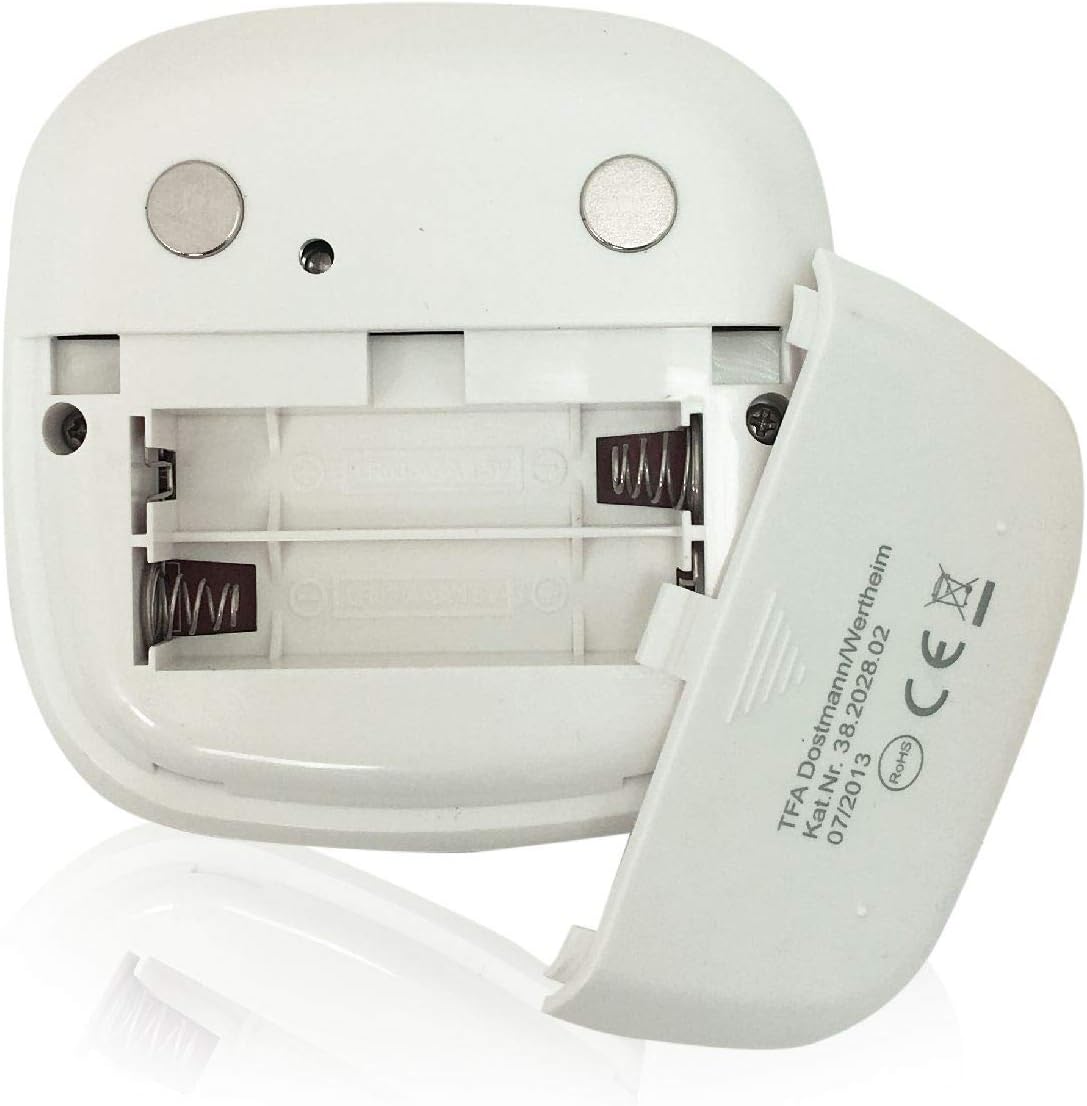
ภาพ: ด้านหลัง view of the timer with the battery compartment open, illustrating where to insert the two AAA batteries.
4.2 การเปิดเครื่องครั้งแรก
Once batteries are installed, the display will illuminate, and the device will be ready for use. The default display shows "00:00".
5. คู่มือการใช้งาน

ภาพ: ด้านหน้า view of the TFA 38.2028.02 timer, highlighting the digital display and the three touch-sensitive buttons: 'M' for minutes, 'S' for seconds, and 'S/S' for Start/Stop.
5.1 ฟังก์ชันปุ่ม
- M (Minutes): Press to increase minutes. Hold to rapidly increase minutes.
- S (Seconds): Press to increase seconds. Hold to rapidly increase seconds.
- S/S (Start/Stop): Press to start or stop the timer/stopwatch.
5.2 Setting the Timer (Countdown)
- Ensure the display shows "00:00". If not, press M และ S simultaneously to reset.
- กดปุ่ม M button to set the desired minutes (up to 99 minutes).
- กดปุ่ม S button to set the desired seconds (up to 59 seconds).
- เมื่อตั้งเวลาที่ต้องการแล้ว ให้กดปุ่ม ส/ส ปุ่มเพื่อเริ่มนับถอยหลัง
- หากต้องการหยุดการนับถอยหลัง ให้กดปุ่ม ส/ส อีกครั้ง. กด ส/ส เพื่อดำเนินการต่อ
- When the timer reaches "00:00", an alarm will sound. Press any button to stop the alarm.
5.3 Using the Stopwatch (Count-up)
- Ensure the display shows "00:00". If not, press M และ S simultaneously to reset.
- กดปุ่ม ส/ส button to start the count-up. The display will begin counting from "00:00".
- ในการหยุดนาฬิกาจับเวลาชั่วคราวให้กด ส/ส อีกครั้ง. กด ส/ส เพื่อดำเนินการต่อ
- To reset the stopwatch to "00:00", pause the stopwatch, then press M และ S พร้อมกัน
5.4 ฟังก์ชันไฟแบ็คไลท์
The display features a backlight for improved visibility. The backlight activates automatically when buttons are pressed and typically remains on for approximately 30-40 seconds before dimming to conserve battery life.
6. ตัวเลือกการติดตั้ง
The TFA 38.2028.02 timer offers flexible mounting solutions:
- การติดแม่เหล็ก: The back of the timer is equipped with magnets, allowing it to be securely attached to refrigerators, oven hoods, or any other metallic surface.
- ตำแหน่งบนโต๊ะ: The timer's design allows it to stand upright on a flat surface, such as a kitchen counter or desk.
- การติดตั้งบนผนัง: The unit can also be mounted on a wall using a small hook or screw (not included) through the designated hole on the back.

ภาพ: ด้านหลัง view of the timer, showing the integrated magnets for secure attachment to metallic surfaces and the model number.
7. การบำรุงรักษา
7.1 การทำความสะอาด
To clean the timer, wipe it with a soft, damp cloth. Do not use abrasive cleaners or immerse the device in water. Avoid getting moisture into the battery compartment or display area.
7.2 การเปลี่ยนแบตเตอรี่
When the display becomes dim or the device stops responding, it is time to replace the batteries. Follow the battery installation steps in Section 4.1. Always use fresh 1.5V AAA batteries and dispose of old batteries responsibly.
8 การแก้ไขปัญหา
| ปัญหา | สาเหตุที่เป็นไปได้ | สารละลาย |
|---|---|---|
| อุปกรณ์ไม่เปิดเครื่อง | แบตเตอรี่หมดหรือติดตั้งไม่ถูกต้อง | ตรวจสอบขั้วแบตเตอรี่หรือเปลี่ยนด้วยแบตเตอรี่ AAA ใหม่ |
| จอภาพมืดหรือกระพริบ | พลังงานแบตเตอรี่ต่ำ | เปลี่ยนแบตเตอรี่ |
| ปุ่มต่างๆ ไม่ตอบสนอง | แบตเตอรี่เหลือน้อยหรือเกิดข้อผิดพลาดชั่วคราวของซอฟต์แวร์ | Replace batteries. If problem persists, remove batteries for 1 minute and reinsert. |
| Timer alarm is too quiet. | ระดับเสียงเตือนถูกกำหนดไว้ตายตัวและไม่สามารถปรับเปลี่ยนได้ | Ensure the timer is placed in a location where the alarm can be heard. |
9. ข้อมูลจำเพาะ
| คุณสมบัติ | รายละเอียด |
|---|---|
| หมายเลขรุ่น | 38.2028.02 |
| ยี่ห้อ | TFA |
| ขนาด (กว้าง x ยาว x สูง) | 76 x 25 x 76 mm (approximately 2.5P x 7.6l x 7.6H cm) |
| น้ำหนัก | 92 กรัม |
| วัสดุ | Plastic with integrated magnets |
| แหล่งจ่ายไฟ | แบตเตอรี่ AAA ขนาด 2 x 1.5V (ไม่รวม) |
| ช่วงเวลาการจับเวลา | สูงสุด 99 นาที 59 วินาที |
| แสดง | Digital with backlight |
| ตัวเลือกการติดตั้ง | Magnetic, Tabletop, Wall-mountable |

Image: The timer held in a hand, visually demonstrating its compact size and indicating its dimensions (7.6 cm x 7.6 cm x 2.5 cm).
10. การรับประกันและการสนับสนุน
TFA products are manufactured with quality and precision. For specific warranty information, please refer to the documentation provided with your purchase or visit the official TFA website. For technical support or inquiries, please contact TFA customer service through their official channels.
เก็บคู่มือนี้ไว้เพื่อใช้อ้างอิงในอนาคต


