การแนะนำ
The JENSEN CD-490 is a portable stereo CD player equipped with an AM/FM stereo radio and an auxiliary line-in. It features a top-loading CD player with an LED track display, skip/search/repeat functions, and programmable memory. The unit includes a telescopic antenna for radio reception, a foldable carrying handle for portability, and a stereo headphone jack. An auxiliary input allows connection of external audio devices such as MP3 players.
ข้อมูลด้านความปลอดภัยที่สำคัญ
คำเตือน: ผลิตภัณฑ์นี้มีสารเคมีที่รัฐแคลิฟอร์เนียรู้จักว่าก่อให้เกิดมะเร็งและความพิการ แต่กำเนิดหรือเป็นอันตรายต่อระบบสืบพันธุ์อื่น ๆ
ควรปฏิบัติตามข้อควรระวังด้านความปลอดภัยขั้นพื้นฐานเสมอเมื่อใช้เครื่องใช้ไฟฟ้า เพื่อลดความเสี่ยงจากไฟไหม้ ไฟฟ้าช็อต และการบาดเจ็บ เก็บคู่มือนี้ไว้เพื่อใช้อ้างอิงในอนาคต
สิ่งที่รวมอยู่
- JENSEN CD-490 Portable Stereo CD Player with AM/FM Radio
- สายไฟ AC
- คู่มือของเจ้าของ
สินค้าเกินview
Familiarize yourself with the controls and features of your JENSEN CD-490 unit.
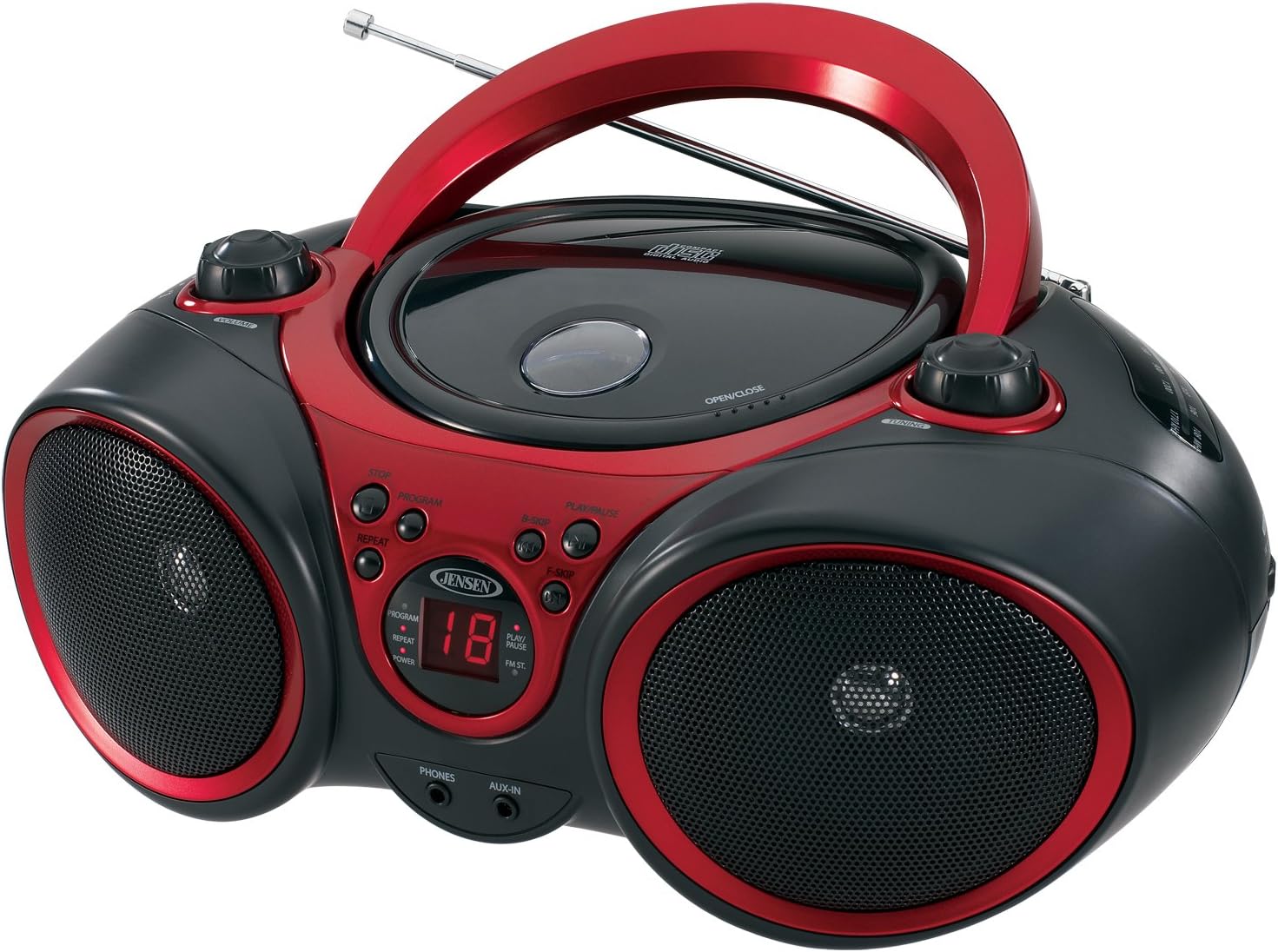
ภาพ: ด้านหน้า view of the JENSEN CD-490 unit, showing the CD compartment, speakers, control buttons, and display.
แผงควบคุมด้านหน้า:
- ปุ่มปรับระดับเสียง: ปรับระดับเอาต์พุตเสียง
- ปุ่มหยุด: หยุดเล่นซีดี
- ปุ่มโปรแกรม: ใช้สำหรับตั้งโปรแกรมแทร็กในแผ่นซีดี
- ปุ่ม REPEAT: ทำซ้ำเพลงปัจจุบันหรือเพลงทั้งหมด
- B-SKIP Button: Skips backward through CD tracks.
- ปุ่มเล่น/หยุดชั่วคราว: เริ่มหรือหยุดการเล่นซีดี
- F-SKIP Button: Skips forward through CD tracks.
- จอแสดงผล LED: Shows CD track number and function indicators (PROGRAM, REPEAT, POWER, PLAY/PAUSE, FM ST).
- แจ็คโทรศัพท์: สำหรับเชื่อมต่อหูฟังสเตอริโอ
- แจ็ค AUX-IN: สำหรับเชื่อมต่ออุปกรณ์เสียงภายนอก
แผงควบคุมด้านบน:
- ช่องใส่ซีดี: Top-loading area for compact discs.
- OPEN/CLOSE Latch: เปิดฝาช่องใส่ซีดี
- ปุ่มปรับจูน: Adjusts AM/FM radio frequency.
การควบคุมแผงด้านข้าง:
- FUNCTION Switch: Selects between RADIO, CD/AUX IN, and OFF modes.
- ตัวเลือกแบนด์ AM/FM: Selects between AM and FM radio bands.
คุณสมบัติแผงด้านหลัง:
- อินพุตไฟ AC: สำหรับเชื่อมต่อสายไฟ AC
- ช่องใส่แบตเตอรี่: Holds 8 'C' (UM-2) batteries for portable operation.
- เสาอากาศยืดไสลด์: เสาอากาศแบบยืดหดได้สำหรับรับสัญญาณวิทยุ FM
การตั้งค่า
การเปิดเครื่อง:
The CD-490 can be powered by either AC power or batteries.
ไฟฟ้ากระแสสลับ:
- Ensure the unit is in the OFF position using the FUNCTION switch.
- เสียบสายไฟ AC เข้ากับช่องเสียบไฟ AC ด้านหลังเครื่อง
- Plug the other end of the AC power cord into a standard AC 120V/60Hz wall outlet.
พลังงานแบตเตอรี่:
- Ensure the unit is in the OFF position.
- เปิดฝาปิดช่องใส่แบตเตอรี่ที่ด้านล่างของตัวเครื่อง
- Insert 8 'C' (UM-2) size batteries (not included), ensuring correct polarity (+/-).
- ปิดฝาช่องใส่แบตเตอรี่ให้แน่น
การตั้งค่าเสาอากาศ:
For optimal FM radio reception, fully extend the telescopic antenna. For AM reception, the unit has a built-in antenna, so no adjustment is typically needed.
Operating the CD Player
The CD-490 supports standard audio CDs and CD-R/RW discs.
- Set the FUNCTION switch to the 'CD/AUX IN' position.
- Press the 'OPEN/CLOSE' latch to open the CD compartment lid.
- Place an audio CD into the compartment with the label side facing up.
- Close the CD compartment lid firmly until it clicks. The LED display will show the total number of tracks on the CD.
- Press the 'PLAY/PAUSE' button to begin playback. The current track number will appear on the LED display.
- Adjust the 'VOLUME' knob to your desired listening level.
- To pause playback, press the 'PLAY/PAUSE' button. Press it again to resume.
- To skip to the next track, press the 'F-SKIP' button. To go back to the beginning of the current track or the previous track, press the 'B-SKIP' button.
- To stop playback, press the 'STOP' button.
ทำซ้ำฟังก์ชัน:
- During playback, press the 'REPEAT' button once to repeat the current track. The 'REPEAT' indicator will light up.
- Press the 'REPEAT' button a second time to repeat all tracks on the CD. The 'REPEAT' indicator will flash.
- Press the 'REPEAT' button a third time to cancel the repeat function.
โปรแกรมเล่น:
- In STOP mode, press the 'PROGRAM' button. The 'PROGRAM' indicator will light up and '00' will flash on the display.
- Use the 'F-SKIP' or 'B-SKIP' buttons to select your desired track.
- Press the 'PROGRAM' button again to confirm the track. The display will show the next program number.
- ทำซ้ำขั้นตอนที่ 2 และ 3 เพื่อตั้งโปรแกรมได้สูงสุด 20 แทร็ก
- After programming, press the 'PLAY/PAUSE' button to start programmed playback.
- To cancel programmed playback, press the 'STOP' button twice.
Operating the AM/FM Radio
- Set the FUNCTION switch to the 'RADIO' position.
- Select either 'AM' or 'FM' using the AM/FM band selector switch.
- Extend the telescopic antenna for FM reception. Adjust its position for best reception.
- Rotate the 'TUNING' knob to select your desired radio station.
- Adjust the 'VOLUME' knob to your desired listening level.
การใช้อินพุตเสริม
The AUX-IN jack allows you to connect an external audio device (e.g., MP3 player, smartphone) to play through the CD-490's speakers.
- Set the FUNCTION switch to the 'CD/AUX IN' position.
- Connect one end of a 3.5mm audio cable (not included) to the AUX-IN jack on the front of the CD-490.
- Connect the other end of the audio cable to the headphone jack or line-out jack of your external audio device.
- Turn on your external audio device and start playback.
- Adjust the volume on both your external device and the CD-490's 'VOLUME' knob for optimal sound.
การบำรุงรักษาและการดูแล
- ควรวางเครื่องให้ห่างจากแสงแดดโดยตรง แหล่งความร้อน และฝุ่นละอองหรือความชื้นมากเกินไป
- ทำความสะอาดตัวเครื่องด้วยผ้าแห้งเนื้อนุ่ม ห้ามใช้สารทำความสะอาดที่มีฤทธิ์กัดกร่อนหรือตัวทำละลาย
- หากต้องการทำความสะอาดเลนส์ซีดี ให้ใช้ผลิตภัณฑ์ทำความสะอาดเลนส์ซีดีที่มีจำหน่ายทั่วไป
- หากใช้แบตเตอรี่ ให้ถอดแบตเตอรี่ออกหากไม่ได้ใช้งานเป็นเวลานาน เพื่อป้องกันการรั่วไหล
การแก้ไขปัญหา
| ปัญหา | สาเหตุที่เป็นไปได้ | สารละลาย |
|---|---|---|
| ไม่มีไฟฟ้า | สายไฟ AC ไม่ได้เชื่อมต่อ; แบตเตอรี่หมดหรือใส่ไม่ถูกต้อง | ตรวจสอบการเชื่อมต่อสายไฟ AC เปลี่ยนแบตเตอรี่หรือตรวจสอบให้แน่ใจว่าขั้วถูกต้อง |
| CD does not play / 'NO DISC' error | CD inserted incorrectly; CD is dirty or scratched; Unit in wrong function mode. | Re-insert CD with label side up; Clean or replace CD; Set FUNCTION switch to 'CD/AUX IN'. |
| การรับสัญญาณวิทยุไม่ดี | เสาอากาศไม่ได้ยืด/ปรับ; สัญญาณอ่อน | Extend and adjust FM telescopic antenna; Reposition the unit for better signal. |
| ไม่มีเสียงจาก AUX-IN | Audio cable not connected; Volume too low on external device or unit. | Ensure audio cable is securely connected; Increase volume on both devices. |
ข้อมูลจำเพาะ
- แบบอย่าง: ซีดี-490
- แหล่งพลังงาน: AC 120V/60Hz or 8 x 'C' (UM-2) batteries (not included)
- กำลังขับ: 2x1.5วัตต์อาร์เอ็มเอส
- ความเข้ากันได้ของซีดี: ซีดี, ซีดี-อาร์/อาร์ดับบลิว
- วงวิทยุ: ระบบสเตอริโอ AM/FM
- การเชื่อมต่อ: Auxiliary Input Jack, Stereo Headphone Jack
- ขนาด (ยาว x กว้าง x สูง): 12.7 x 9.1 x 5.8 นิ้ว
- น้ำหนัก: 3.4 ปอนด์
- ผู้ผลิต: Spectra Merchandising International, Inc.
- มีจำหน่ายครั้งแรก: 14 พฤษภาคม 2003
การรับประกันและการสนับสนุน
Specific warranty information and customer support contact details are typically provided with your product packaging or on the manufacturer's official website. Please refer to those resources for the most accurate and up-to-date information.
วิดีโอสินค้า
ชมวิดีโอผลิตภัณฑ์อย่างเป็นทางการนี้เพื่อดูภาพรวมview of the JENSEN CD-490 Stereo.
วิดีโอ: จบแล้วview of the JENSEN CD-490 Portable Stereo CD Player, highlighting its features and design.


