1. สินค้าหมดview
The SALORA CR612 is a compact digital alarm clock radio designed for bedside use. It features a large LED display, dual alarm functionality, AM/FM radio tuning, and convenient snooze and sleep timer functions. This manual provides detailed instructions for its operation.

ภาพ: มุมเอียง view of the SALORA CR612 Digital Alarm Clock Radio, showing the green LED display and top control buttons.
การควบคุมและการแสดงผล
Familiarize yourself with the main controls and display elements:
- จอแสดงผล LED ขนาดใหญ่: แสดงเวลา สถานะการปลุก และความถี่วิทยุ
- ปุ่มเปิด/ปิด: เปิด/ปิดเครื่อง
- ปุ่มเลื่อนปลุก: ปิดเสียงเตือนชั่วคราว
- ปุ่มตั้งเวลา: ใช้เพื่อตั้งเวลาปัจจุบัน
- Alarm 1/Alarm 2 Buttons: Used to set and activate individual alarms.
- Tuning/Volume Knobs: Adjust radio frequency and sound volume.
- ปุ่มวง: สลับระหว่างคลื่นวิทยุ AM และ FM
- Memory/Preset Buttons: Save and recall radio stations.
2. การตั้งค่า
2.1 การเชื่อมต่อสายไฟ
The SALORA CR612 operates primarily on AC power with a battery backup feature to retain time and alarm settings during power outagใช่
- เชื่อมต่อไฟ AC: เสียบสายไฟ AC เข้ากับเต้ารับที่ผนังมาตรฐาน
- ติดตั้งระบบสำรองไฟแบตเตอรี่: Open the battery compartment located at the bottom or rear of the unit. Insert 2 x AAA batteries (not included) according to the polarity markings. These batteries are for backup only and will not power the display or radio functions continuously.

ภาพ: ด้านหลัง view of the SALORA CR612, highlighting the power cable connection and the battery compartment for backup.
2.2 การตั้งค่าเสาอากาศ
For optimal FM radio reception, extend the built-in wire antenna fully. For AM reception, the unit has a built-in ferrite bar antenna; try rotating the unit for better signal.
3. คู่มือการใช้งาน
3.1 การตั้งเวลา
- กดปุ่มค้างไว้ ตั้งเวลา ปุ่ม ตัวเลขชั่วโมงจะเริ่มกะพริบ
- ใช้ TUNING/VOLUME knob (or +/- buttons if present) to adjust the hour. Pay attention to AM/PM indicators if applicable.
- กดปุ่ม ตั้งเวลา กดปุ่มอีกครั้ง ตัวเลขนาทีจะกะพริบ
- ใช้ TUNING/VOLUME ปุ่มหมุนสำหรับปรับนาที
- กดปุ่ม ตั้งเวลา กดปุ่มอีกครั้งเพื่อยืนยันและออกจากโหมดตั้งเวลา
3.2 การตั้งค่านาฬิกาปลุก (นาฬิกาปลุกคู่)
The CR612 features two independent alarms (Alarm 1 and Alarm 2).
- วิธีตั้งนาฬิกาปลุก 1: กดปุ่มค้างไว้ นาฬิกาปลุก 1 กดปุ่ม ตัวเลขชั่วโมงของนาฬิกาปลุกจะกะพริบ
- ใช้ TUNING/VOLUME knob to set the desired alarm hour.
- กดปุ่ม นาฬิกาปลุก 1 กดปุ่มอีกครั้ง ตัวเลขนาทีของนาฬิกาปลุกจะกะพริบ
- ใช้ TUNING/VOLUME knob to set the desired alarm minutes.
- กดปุ่ม นาฬิกาปลุก 1 button again to select the alarm source (Buzzer or Radio). The corresponding indicator will light up.
- กดปุ่ม นาฬิกาปลุก 1 button once more to confirm and activate Alarm 1. An alarm indicator (e.g., a bell icon or 'A1') will appear on the display.
- ทำซ้ำขั้นตอนโดยใช้ นาฬิกาปลุก 2 ปุ่มตั้งปลุก 2.
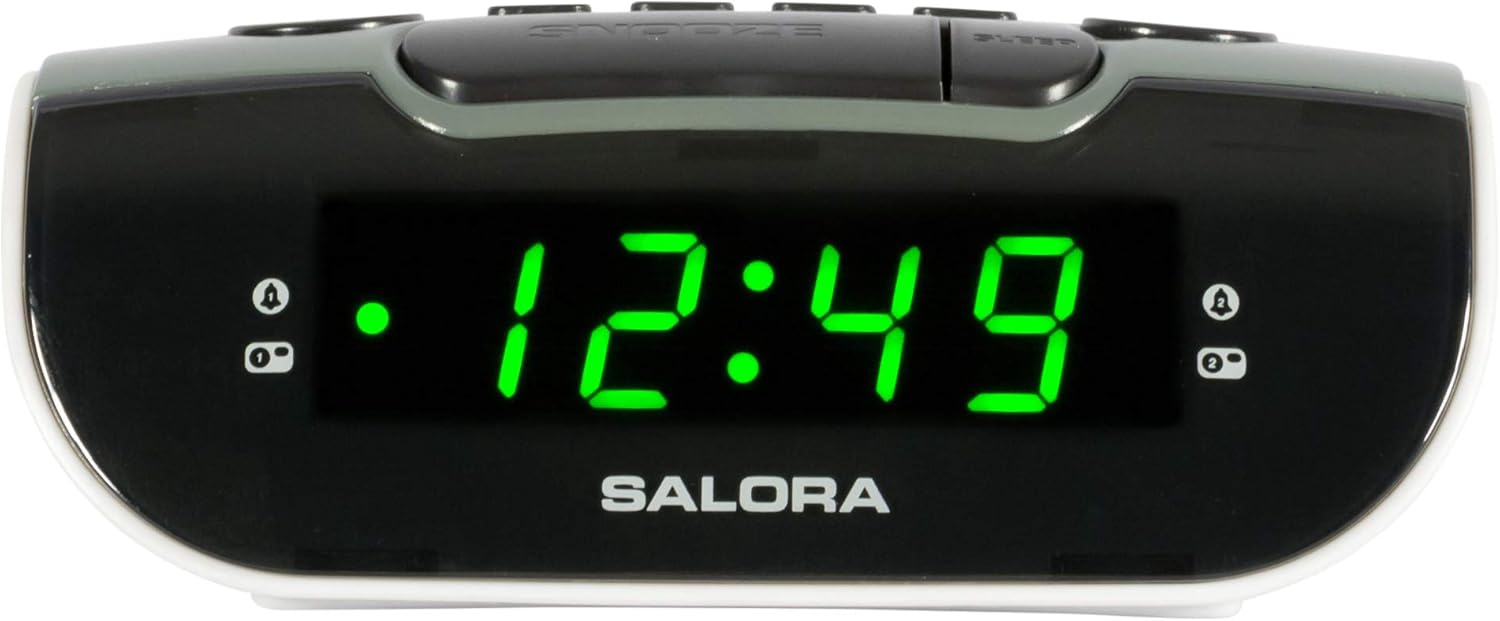
Image: Close-up of the SALORA CR612 display, showing the time '12:49' and active alarm indicators.
3.3 ฟังก์ชั่นเลื่อนซ้ำ
เมื่อสัญญาณเตือนดังขึ้น ให้กดปุ่ม เลื่อน button to temporarily silence it. The alarm will sound again after approximately 9 minutes. To cancel the snooze and turn off the alarm completely, press the พลัง ปุ่ม.
3.4 การใช้งานวิทยุ
- เปิดวิทยุ: กดปุ่ม พลัง ปุ่มเพื่อเปิดเครื่อง
- เลือกแบนด์: กดปุ่ม วงดนตรี ปุ่มสำหรับสลับระหว่างคลื่นความถี่ AM และ FM
- สถานีจูน: ใช้ การปรับแต่ง ปุ่มหมุนสำหรับปรับคลื่นวิทยุไปยังสถานีที่คุณต้องการด้วยตนเอง
- ปรับระดับเสียง: ใช้ ปริมาณ ปุ่มหมุนสำหรับปรับระดับเสียง
- บันทึกการตั้งค่าล่วงหน้า: หากต้องการบันทึกสถานี ให้เลือกสถานีนั้น แล้วกดปุ่มค้างไว้ หน่วยความจำ button until the display flashes. Use the พรีเซ็ต buttons (or tuning knob) to select a preset number, then press หน่วยความจำ เพื่อยืนยันอีกครั้ง
- เรียกคืนการตั้งค่าล่วงหน้า: กดปุ่มสั้นๆ พรีเซ็ต ปุ่มสำหรับสลับดูสถานีที่บันทึกไว้
3.5 ตัวตั้งเวลาปิดเครื่อง
ตัวตั้งเวลาปิดเครื่องอัตโนมัติช่วยให้วิทยุเล่นได้ตามระยะเวลาที่กำหนดก่อนที่จะปิดเครื่องโดยอัตโนมัติ
- ขณะที่วิทยุกำลังเล่นอยู่ ให้กดปุ่ม นอน กดปุ่มซ้ำๆ เพื่อสลับระหว่างเวลาพักเครื่องที่มีอยู่ (เช่น 10, 30, 60, 90 นาที หรือปิด)
- วิทยุจะปิดเองโดยอัตโนมัติหลังจากเวลาที่กำหนดไว้
4. การบำรุงรักษา
4.1 การทำความสะอาด
To clean the unit, wipe it with a soft, dry cloth. Do not use abrasive cleaners, waxes, or solvents as these can damage the finish. Ensure the unit is unplugged before cleaning.
4.2 การเปลี่ยนแบตเตอรี่
Replace the backup batteries (2 x AAA) annually or if the time and alarm settings are lost after a power interruption. Ensure correct polarity when inserting new batteries.
5 การแก้ไขปัญหา
- ไม่มีพลังงาน/ปิดจอแสดงผล:
- ตรวจสอบให้แน่ใจว่าเสียบสายไฟ AC เข้ากับเต้ารับไฟฟ้าอย่างแน่นหนา
- ตรวจสอบว่าได้กดปุ่มเปิด/ปิดหรือไม่
- สัญญาณเตือนไม่ส่งเสียง:
- Verify that the alarm is set and activated (check for the alarm indicator on the display).
- Ensure the alarm volume is not set to minimum if using radio alarm.
- Confirm the alarm time is correctly set (AM/PM).
- การรับสัญญาณวิทยุไม่ดี:
- ขยายสายอากาศ FM ให้สุด
- For AM, rotate the unit to find the best signal.
- ย้ายเครื่องให้ห่างจากอุปกรณ์อิเล็กทรอนิกส์อื่นๆ ที่อาจก่อให้เกิดสัญญาณรบกวน
- เวลา/การตั้งค่าจะหายไปหลังจากไฟดับtage:
- Check and replace the backup batteries if necessary.
- ตรวจสอบให้แน่ใจว่าใส่แบตเตอรี่ในขั้วที่ถูกต้อง
6. ข้อมูลจำเพาะ
| คุณสมบัติ | รายละเอียด |
|---|---|
| ยี่ห้อ | ซาโลรา |
| หมายเลขรุ่น | CR612 |
| ขนาดสินค้า | 11.5 x 13 x 4.8 ซม. |
| น้ำหนัก | 320 กรัม |
| แหล่งพลังงาน | AC Power (with 2x AAA battery backup) |
| ประเภทจอภาพ | ดิจิตอล LED |
| แบนด์วิทยุ | AM/FM PLL Tuner |
| คุณสมบัติพิเศษ | Dual Alarm, Snooze, Sleep Timer |
| ประเภทห้อง | ห้องนอน |
| สี | Grey (with black and white accents) |
7. การรับประกันและการสนับสนุน
7.1 ข้อมูลการรับประกัน
This product is covered by a standard manufacturer's warranty. For specific details regarding warranty duration and terms, please refer to the warranty card included with your purchase or contact your retailer. If you wish to return a product within 30 days of receipt because you have changed your mind, please consult the retailer's return policy. If you have received a defective or damaged product, please consult the retailer's help page on returns and refunds.
7.2 การสนับสนุนลูกค้า
For further assistance, technical support, or inquiries not covered in this manual, please contact SALORA customer service through their official website or the retailer where the product was purchased. Please have your model number (CR612) and purchase information ready when contacting support.


